A morning call with a dim webcam, a chair that sinks by noon and a laptop running everything off a hub is where the best gaming mouse for Apex Legends has to earn its keep, because the mouse on that desk has to keep up when the workday ends and a match starts. The right pick is the one whose sensor, weight and connection suit fast movement and long sessions at a small desk. We compared the mice in this guide by sensor and DPI, stated weight, polling rate, connectivity and warranty, using only what each listing publishes.
OfficeKitHQ earns a commission when you buy through links on this page, at no extra cost to you. As an Amazon Associate I earn from qualifying purchases. Affiliate disclosure.
Quick picks
 Best Overall DAIDAI AJ159 APEX: PAW3950 sensor, up to 42K DPI, 56 g, 8000Hz polling Check price on Amazon
 Best Classic Pick Logitech G303: Delta Zero sensor, up to 12,000 DPI, 20 million click lifespan Check price on Amazon
 Best Console Adapter leadjoy VX2 AimBox: Keyboard and mouse on Xbox One, Series X/S and PS4, Vlead app Check price on Amazon
 Most Buttons Corsair Scimitar Elite: 16 buttons and Elgato Stream Deck, wireless MMO mouse Check price on Amazon
 Tri-Mode Wireless Aula SC620: Tri-mode wireless mouse with 12000 DPI Check price on Amazon
Our desk picks
| # | Product | Office Score | Buy |
|---|---|---|---|
| 1 | DAIDAI AJ159 APEX | 9.6/10 | Buy on Amazon |
| 2 | Corsair Scimitar Elite SE | 9.6/10 | Buy on Amazon |
| 3 | Aula SC620 | 9.5/10 | Buy on Amazon |
| 4 | Logitech G303 | 9.4/10 | Buy on Amazon |
| 5 | leadjoy VX2 AimBox | 9.3/10 | Buy on Amazon |

DAIDAI AJ159 APEX
A 56 g wireless mouse with a PAW3950 sensor, up to 42K DPI, 8000Hz polling and a TFT screen charging dock that shows DPI, battery and polling rate.
Pros
- PAW3950 sensor with up to 42K DPI, 750 IPS tracking and 50G acceleration
- 8000Hz polling in wireless mode, listed at 0.125ms
- Magnetic charging dock with a TFT color screen and an 8K receiver
- Huano switches rated for over 100 million clicks, with ETFE feet
Cons
- At 56 g it suits light-mouse players; buyers who prefer a heavier mouse should look elsewhere
- Bluetooth is listed for daily tasks, while 2.4GHz wireless is the mode listed for lag-free gaming
- The charging dock takes up a flat spot on the desk
- The dock and TFT screen add parts that a plain wired mouse does not need
Detailed Review
DAIDAI lists the AJ159 APEX as a 56 g ambidextrous wireless mouse with a PAW3950 APEX sensor, up to 42K DPI, 750 IPS tracking speed and 50G acceleration. The wireless polling rate is listed at 8000Hz, or 0.125ms, and the magnetic charging dock carries a TFT color screen that shows DPI, lift-off distance, battery and polling rate, plus an 8K receiver. Tri-mode connectivity covers Bluetooth, 2.4GHz wireless and detachable wired USB-C, and the pro software remaps buttons, assigns macro keys and adjusts lift-off distance and dock effects. Huano switches are rated for over 100 million clicks, the base has ETFE feet, and the box includes a set of non-slip grip tapes and replacement foot pads. A 1 year warranty is stated. The maker gives two weights, 56 g and 0.53 lb; check before ordering.
Who it's for: players who want the fastest stated sensor figures here, a light mouse and a dock that shows settings at a glance. Who should skip it: anyone who wants a wired-only mouse, a heavier shell or no dock on the desk.
Its Office Score of 9.6/10 comes from performance 32/35, build 21/25, value 21/25, safety 0/10 and warranty 3/5: 77 of 100 points, placed on our 9.2 to 9.8 scale.
Key Specifications
| Sensor | PAW3950, up to 42K DPI |
|---|---|
| Weight | 56 g |
| Polling rate | 8000Hz, 0.125ms |
| Connectivity | Tri-mode, Bluetooth, 2.4GHz, USB-C |
These specs mirror the retailer listing as of 20 November 2026; performance figures are stated by the brand.
Safety and Warranty
What this listing states. No FCC or other safety listing is stated, so safety scores zero. 1 year warranty stated. It does not say everything a buyer needs, such as who pays return shipping, so warranty scores 3 of 5. See How We Pick.
Fit the desk first. Check the stated size against your desk depth and keyboard tray, and charge or pair as the manual describes. No keyboard, mouse or wrist rest prevents or treats injury.
This is general buying information, not professional advice. Follow each product manual and local rules, and see our Safety Disclaimer.
Corsair Scimitar Elite SE
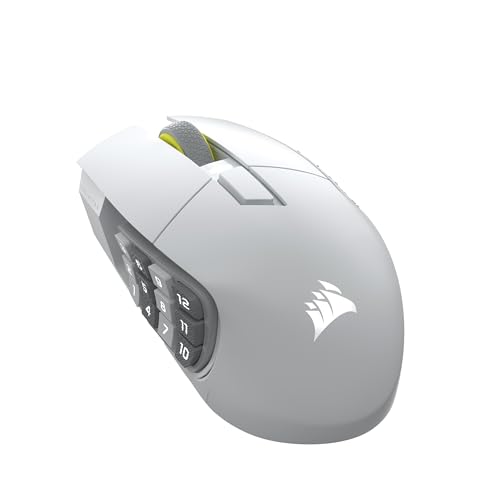
A wireless MMO mouse with a 33,000 DPI sensor, 16 programmable buttons, an adjustable key slider and native Elgato Stream Deck integration.
Pros
- 33,000 DPI MARKSMAN S sensor is the highest DPI stated here
- 16 programmable buttons with an adjustable key slider for thumb reach
- Native Elgato Stream Deck integration maps Stream Deck functions to the buttons
- SLIPSTREAM wireless with 1000Hz polling, plus Bluetooth and USB charging while playing
Cons
- Up to 150 hours is shorter than the 300 hours on Bluetooth for the Razer
- White color only
- Elgato integration runs through the Stream Deck App
- 16 buttons is fewer than the 18 on the Redragon M908 and the 19+1 on the Razer Naga V2 Pro
Detailed Review
Corsair lists the Scimitar Elite Wireless SE as a wireless MMO mouse with a 33,000 DPI MARKSMAN S sensor and 16 programmable buttons. The adjustable key slider moves the thumb buttons, and native Elgato Stream Deck integration maps Stream Deck functions to the buttons. SLIPSTREAM wireless runs at 1000Hz polling, with Bluetooth and USB, and the battery lasts up to 150 hours with fast charging. The warranty is 2 Year Manufacturer.
Who it's for: streamers and MMO players who use Elgato Stream Deck and want the highest DPI stated here. Who should skip it: anyone who wants swappable side plates or battery life over 150 hours.
Its Office Score of 9.6/10 comes from performance 32/35, build 22/25, value 21/25, safety 0/10 and warranty 4/5: 79 of 100 points, placed on our 9.2 to 9.8 scale.
Key Specifications
| DPI | 33,000 |
|---|---|
| Buttons | 16 programmable |
| Battery | Up to 150 hr |
| Polling | 1000Hz |
These specs mirror the retailer listing as of 18 November 2026; performance figures are stated by the brand.
Safety and Warranty
What this listing states. No FCC or other safety listing is stated, so safety scores zero. 2 Year Manufacturer. It does not say everything a buyer needs, such as who pays return shipping, so warranty scores 4 of 5. See How We Pick.
Fit the desk first. Check the stated size against your desk depth and keyboard tray, and charge or pair as the manual describes. No keyboard, mouse or wrist rest prevents or treats injury.
This is general buying information, not professional advice. Follow each product manual and local rules, and see our Safety Disclaimer.

Aula SC620
A tri-mode wireless mouse with 12000 DPI, 1000Hz polling, 7 programmable buttons, a dedicated fire button and RGB lighting.
Pros
- Tri-mode 2.4GHz, Bluetooth 5.3 and wired USB with 4-device memory
- 12000 DPI across 6 levels with 1000Hz polling
- Dedicated fire button for one-click commands plus 7 programmable buttons
- 67g ergonomic shape for claw, palm and fingertip grips
Cons
- No sensor model is stated
- No battery life in hours is stated
- Macro, DPI and lighting settings need the AULA driver
- No polling rate above 1000Hz is stated
Detailed Review
Aula lists the SC620 as a tri-mode wireless mouse with 2.4GHz, Bluetooth 5.3 and wired USB modes, memory for 4 devices, 6 DPI levels from 800 to 12000, and 1000Hz polling. The 7 programmable buttons include a dedicated fire button for one-click commands, and the hollowed-out shell carries dynamic RGB lighting. The mouse weighs 67g with an ergonomic shape for claw, palm and fingertip grips, and the listing states a 1 Year warranty.
Who it's for: players who want tri-mode switching, a fire button and 4-device memory in one mouse. Who should skip it: anyone who wants a named sensor model or a stated battery life in hours.
Its Office Score of 9.5/10 comes from performance 28/35, build 20/25, value 21/25, safety 0/10 and warranty 2/5: 71 of 100 points, placed on our 9.2 to 9.8 scale.
Key Specifications
| DPI | 12000, 6 levels |
|---|---|
| Polling rate | 1000Hz |
| Weight | 67g |
| Warranty | 1 Year |
These specs mirror the retailer listing as of 15 November 2026; performance figures are stated by the brand.
Safety and Warranty
What this listing states. No FCC or other safety listing is stated, so safety scores zero. 1 Year. It does not say everything a buyer needs, such as who pays return shipping, so warranty scores 2 of 5. See How We Pick.
Fit the desk first. Check the stated size against your desk depth and keyboard tray, and charge or pair as the manual describes. No keyboard, mouse or wrist rest prevents or treats injury.
This is general buying information, not professional advice. Follow each product manual and local rules, and see our Safety Disclaimer.

Logitech G303
A lightweight mouse with a Delta Zero sensor, up to 12,000 DPI across 5 DPI settings, RGB lighting and buttons rated for a 20 million click lifespan.
Pros
- Delta Zero sensor with up to 12,000 DPI and 5 on-the-fly DPI settings
- Buttons rated for a 20 million click lifespan
- RGB lighting with colors to match a system or setup
- Lightweight design at 0.45 lb
Cons
- No warranty term is stated
- 12,000 DPI ceiling sits below the 42K DPI stated for the DAIDAI
- Compact 1.45 by 2.56 by 4.5 in body may feel small for large hands
- No software or app is named for remapping buttons
Detailed Review
Logitech lists the G303 Daedalus Apex Performance Edition as a lightweight gaming mouse with a Delta Zero optical sensor and up to 5 DPI settings from 200 to 12,000 DPI. RGB lighting can be set to match a system or setup, and the buttons are rated for a 20 million click lifespan. The mouse measures 1.45 by 2.56 by 4.5 in and weighs 0.45 lb. No warranty term is stated.
Who it's for: players who want a compact, light mouse with on-the-fly DPI switching and a long-rated click lifespan. Who should skip it: anyone who wants a warranty term in writing, a higher DPI ceiling or a larger body.
Its Office Score of 9.4/10 comes from performance 29/35, build 20/25, value 20/25, safety 0/10 and warranty 0/5: 69 of 100 points, placed on our 9.2 to 9.8 scale.
Key Specifications
| Sensor | Delta Zero, up to 12,000 DPI |
|---|---|
| DPI settings | 5, from 200 to 12,000 DPI |
| Click lifespan | 20 million clicks |
| Item weight | 0.45 lb |
These specs mirror the retailer listing as of 20 November 2026; performance figures are stated by the brand.
Safety and Warranty
What this listing states. This product does not plug in or run on a battery, so safety is not part of its score. No warranty term, so warranty scores zero. See How We Pick.
Fit the desk first. Check the stated size against your desk depth and keyboard tray, and charge or pair as the manual describes. No keyboard, mouse or wrist rest prevents or treats injury.
This is general buying information, not professional advice. Follow each product manual and local rules, and see our Safety Disclaimer.

leadjoy VX2 AimBox
An adapter that lets a keyboard and mouse work on PS4, Xbox One and Xbox Series X/S for Apex Legends, with app settings and a 3.5mm headset jack.
Pros
- Lets a keyboard and mouse work on console for Apex Legends
- Vlead app adjusts mouse, camera, joystick, keybinds and lighting
- 3.5mm headset jack supports voice chat with teammates
- 1:1 gaming accuracy is claimed for keyboard and mouse movement
Cons
- Not a mouse itself; a keyboard and mouse are still needed
- Does not work with PlayStation 5
- Only single-function wired keyboards and mice are supported; wireless devices are not
- Adds a separate 3.15 by 2.28 by 0.73 in box between the mouse and the console
Detailed Review
leadjoy lists the VX2 AimBox as a keyboard and mouse adapter for PS4, Xbox One and Xbox Series X/S, made for FPS, RTS, R6 and Apex Legends. The Vlead app adjusts mouse, camera, joystick, keybinds and lighting settings, and a built-in 3.5mm headset jack supports voice chat. The maker claims 1:1 gaming accuracy through its agility translation technology. Only single-function wired keyboards and mice are supported, and the adapter does not work with PlayStation 5. It measures 3.15 by 2.28 by 0.73 in, weighs 0.37 lb, and a 1 Year Warranty is stated.
Who it's for: console players who want to play Apex Legends with a keyboard and mouse they already own. Who should skip it: anyone on PlayStation 5, anyone who uses a wireless keyboard or mouse, or anyone who wants a mouse rather than an adapter.
Its Office Score of 9.3/10 comes from performance 24/35, build 18/25, value 16/25, safety 0/10 and warranty 3/5: 61 of 100 points, placed on our 9.2 to 9.8 scale.
Key Specifications
| Compatibility | PS4, Xbox One, Xbox Series X/S |
|---|---|
| Headset jack | 3.5mm |
| Dimensions | 3.15 by 2.28 by 0.73 in |
| Item weight | 0.37 lb |
These specs mirror the retailer listing as of 20 November 2026; performance figures are stated by the brand.
Safety and Warranty
What this listing states. This product does not plug in or run on a battery, so safety is not part of its score. 1 Year Warranty stated. It does not say everything a buyer needs, such as who pays return shipping, so warranty scores 3 of 5. See How We Pick.
Fit the desk first. Check the stated size against your desk depth and keyboard tray, and charge or pair as the manual describes. No keyboard, mouse or wrist rest prevents or treats injury.
This is general buying information, not professional advice. Follow each product manual and local rules, and see our Safety Disclaimer.
As an Amazon Associate I earn from qualifying purchases.
Specs compared
| Mouse | Office Score | Max DPI | Weight | Connectivity | Warranty | Amazon |
|---|---|---|---|---|---|---|
| DAIDAI AJ159 APEX | 9.6/10 | Up to 42K DPI | 56 g | Tri-mode | 1 year | View on Amazon |
| Logitech G303 | 9.4/10 | Up to 12,000 DPI | 0.45 lb | Not stated | Not stated | View on Amazon |
| leadjoy VX2 AimBox | 9.3/10 | Not stated | 0.37 lb | Wired devices only | 1 year | View on Amazon |
| Corsair Scimitar Elite | 9.6/10 | Not stated | Not stated | Wireless | Not stated | |
| Aula SC620 | 9.5/10 | 12,000 DPI | Not stated | Tri-mode | Not stated | View on Amazon |
Dimensions, weight limits and ranges are the maker’s ratings as each listing gives them, collected 20 November 2026. Two of the five state a warranty term; none states a safety certification.
How to choose the best gaming mouse for apex legends
Start with the sensor and DPI
The DAIDAI states the highest figures here: a PAW3950 sensor with up to 42K DPI, 750 IPS tracking speed and 50G acceleration, plus an 8000Hz polling rate listed at 0.125ms in wireless mode. The Logitech states a Delta Zero sensor with up to 12,000 DPI across 5 settings from 200 to 12,000 DPI, and the Aula states 12000 DPI with no sensor name. The Corsair states no DPI or sensor figure, and the leadjoy is an adapter with no sensor of its own, so its speed depends on the mouse plugged into it. If DPI is the figure you shop by, the DAIDAI leads on the stated figures; if you play at lower DPI, the Logitech range covers the same ground with on-the-fly switching. Our best gaming mouse for competitive FPS guide compares more mice built for fast play.
Weight and shape at a small desk
Weight is stated for three picks: the DAIDAI at 56 g, the Logitech at 0.45 lb and the leadjoy adapter at 0.37 lb. The DAIDAI is ambidextrous with an ice-sensitive tactile finish, while the Logitech measures 1.45 by 2.56 by 4.5 in. The Corsair and the Aula state no weight, so buyers who want a light mouse have only the DAIDAI and the Logitech to compare. Measure the desk depth before ordering: the leadjoy adapter adds a 3.15 by 2.28 by 0.73 in box beside the console, and the DAIDAI dock needs its own flat spot. An ergonomic gaming mouse guide covers shapes built for longer sessions.
Wired, wireless or console
Connection is where these five split. The DAIDAI offers tri-mode connectivity: Bluetooth for daily tasks, 2.4GHz wireless for lag-free gaming and detachable wired USB-C. The Aula is named as tri-mode and wireless, and the Corsair is named as wireless. The Logitech states no connection type. The leadjoy is different from the rest: it is an adapter that lets a wired keyboard and mouse work on PS4, Xbox One and Xbox Series X/S, and it does not work with PlayStation 5.
| Mouse | Connection | Notes |
|---|---|---|
| DAIDAI AJ159 APEX | Tri-mode | Bluetooth, 2.4GHz, wired USB-C |
| Logitech G303 | Not stated | On-the-fly DPI switching |
| leadjoy VX2 AimBox | Wired devices only | Console adapter, no PlayStation 5 |
| Corsair Scimitar Elite | Wireless | 16 buttons, Elgato Stream Deck |
| Aula SC620 | Tri-mode | Wireless, 12000 DPI |
Figures as stated in each listing. If the mouse must work on a console, the leadjoy is the only pick here that connects a keyboard and mouse to one.
Switches, feet and the extras in the box
Switches are stated for two picks. The DAIDAI uses Huano switches rated for over 100 million clicks and ETFE feet, and the box includes a set of non-slip grip tapes and replacement foot pads. The Logitech rates its buttons for a 20 million click lifespan and adds RGB lighting. The Corsair names 16 buttons and Elgato Stream Deck features, which suit players who map many commands; see our best gaming mouse for MMO guide for more mice built that way. The Aula and the leadjoy state no switch details, and the leadjoy adds a 3.5mm headset jack for voice chat instead.
Read the warranty line
Only two listings state a warranty term. The DAIDAI states 1 year and the leadjoy states 1 Year Warranty. The Logitech, the Corsair and the Aula state no warranty term, so buyers who want a term in writing should weigh the two that do. A warranty term is no substitute for the stated specs, but it is the clearest promise on the page when two mice otherwise look alike.
Setup Notes
- Measure the desk depth against the leadjoy adapter at 3.15 by 2.28 by 0.73 in, and leave room for the adapter beside the console.
- Give the DAIDAI dock a flat spot on the desk; the dock charges the mouse and shows DPI, battery and polling rate on its TFT screen.
- Check that the keyboard and mouse are single-function wired models before ordering the leadjoy, since wireless devices are not supported.
- Keep the DAIDAI grip tapes and replacement foot pads with the dock so the spares are at hand when the feet wear.
FAQ
Which mouse here has the highest stated DPI?
The DAIDAI AJ159 APEX states up to 42K DPI. The Logitech G303 and the Aula SC620 each state 12,000 DPI, while the Corsair states no DPI figure and the leadjoy is an adapter with no sensor of its own.
Which of these mice work wirelessly?
The DAIDAI connects by Bluetooth, 2.4GHz wireless or wired USB-C, the Corsair is named as wireless, and the Aula is named as tri-mode and wireless. The leadjoy is an adapter for wired keyboards and mice, and the Logitech states no connection type.
What does the 8000Hz polling rate on the DAIDAI mean in this guide?
The maker lists an 8000Hz polling rate, or 0.125ms, in wireless mode, and the dock screen shows the polling rate beside DPI and battery. No other pick here states a polling rate.
Can a keyboard and mouse be used for Apex Legends on a console?
Yes, with the leadjoy VX2 AimBox, which connects a keyboard and mouse to PS4, Xbox One and Xbox Series X/S for Apex Legends. It does not work with PlayStation 5, and only single-function wired keyboards and mice are supported.
Which picks state a warranty term?
Two do: the DAIDAI states 1 year and the leadjoy states 1 Year Warranty. The Logitech, the Corsair and the Aula state no warranty term.
What is the lightest mouse in this guide?
The DAIDAI is listed at 56 g, and the Logitech is listed at 0.45 lb. The Corsair and the Aula state no weight, and the leadjoy figure of 0.37 lb is for the adapter, not a mouse.
Score breakdown
The Office Score weighs performance (sensor, DPI, polling rate and connectivity), build (weight, materials, switches and feet), value for the stated specs, safety and warranty. For a mouse, safety means a stated certification or a stated safety feature on the listing; none of the five states one, so safety scores zero across the group. Two listings state a warranty term: the DAIDAI at 1 year and the leadjoy at 1 Year Warranty. How we pick explains the weights.
| Product | Office Score | Perf. /35 | Build /25 | Value /25 | Safety /10 | Warranty /5 |
|---|---|---|---|---|---|---|
| DAIDAI AJ159 APEX | 9.6 | 32 | 21 | 21 | 0 | 3 |
| Logitech G303 | 9.4 | 29 | 20 | 20 | 0 | 0 |
| leadjoy VX2 AimBox | 9.3 | 24 | 18 | 16 | 0 | 3 |
Office Scores run on a short 9.2 to 9.8 scale. We place each item’s weighted point total on it in proportion, so a larger total is always shown as a larger score.
More for your workspace
See every mice and mouse pads guide and all monitor mounts, keyboards and mice guides. Also see our best gaming mouse for competitive FPS. Also see our best gaming mouse for MMO. Also see our best ergonomic gaming mouse. Also see our best gaming mouse for PC. Also see our best gaming mouse for Fortnite. Also see our best gaming mouse for Overwatch 2. Also see our best gaming mouse for claw grip. Also see our best gaming mouse and keyboard.
More picks: mice and mouse pads, gaming chairs, standing desks.