The best gaming mouse for mmo play keeps every ability, potion and macro under the thumb, so no raid night turns on hunting for a keybind on the keyboard. A desk crowded with a keyboard, a headset stand and a coffee mug leaves little room for a mouse that wanders, and a thumb panel in the wrong place turns a long session into a chore. This roundup compares a group of gaming mice by sensor resolution, programmable buttons, wireless range, battery life, polling rate and warranty term.
OfficeKitHQ earns a commission when you buy through links on this page, at no extra cost to you. As an Amazon Associate I earn from qualifying purchases. Affiliate disclosure.
Quick picks
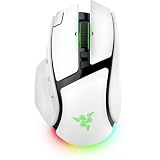 Best Overall Razer Basilisk V4 Pro: 50,000 DPI sensor, 8000Hz polling, 200 hr battery Check price on Amazon
 Best Thumb Panel Corsair Scimitar Elite: Sliding 12-button thumb panel, 16 buttons, 150 hr battery Check price on Amazon
 Best Wireless Range RED SAMURAI MMO Mouse: 33 ft wireless range, 71 hr battery, 16 programmable keys Check price on Amazon
 Best Wired Pick SOLAKAKA SM809: 24,000 DPI sensor, 16 buttons, 4 swappable side plates Check price on Amazon
 Best Charging Dock LTC MKM071: Tri-mode wireless with RGB charging dock, 600mAh battery Check price on Amazon
More picks to compare
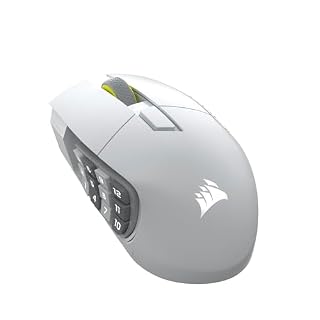 Corsair Scimitar Elite SEWhite wireless MMO mouse with 16 buttons and Elgato Stream Deck integration.Check on Amazon
 Redragon M801 WirelessWireless MMO mouse with 9 programmable buttons and up to 70 hours of battery.Check on Amazon
 Razer Basilisk V4 HyperSpeedWireless mouse with 12 controls and up to 225 hours on Bluetooth.Check on Amazon
 Strikonx SM809 ProTri-mode MMO mouse with 16 buttons and swappable magnetic side plates.Check on Amazon
 Mad Catz M.M.O.7+MMO mouse with 21 programmable inputs and adjustable thumb and palm rests.Check on Amazon
Specs compared
| Mouse | Office Score | DPI | Buttons | Battery | Polling rate | Warranty | Amazon |
|---|---|---|---|---|---|---|---|
| Razer Basilisk V4 Pro | 9.7/10 | 50,000 DPI | 14 controls | 200 hr | 8000Hz | 2 years | View on Amazon |
| Corsair Scimitar Elite | 9.6/10 | 26,000 DPI | 16 buttons | 150 hr | 2,000Hz | 2 years | View on Amazon |
| RED SAMURAI MMO Mouse | 9.5/10 | 16,000 DPI | 16 keys | 71 hr | Up to 1000Hz | 2 years | View on Amazon |
| SOLAKAKA SM809 | 9.5/10 | 24,000 DPI | 16 buttons | Wired, no battery | Not stated | Not stated | View on Amazon |
| LTC MKM071 | 9.4/10 | 12,000 DPI | 11 buttons | 600mAh battery | 1000Hz | Not stated | View on Amazon |
Dimensions, weight limits and ranges are the maker’s ratings as each listing gives them, collected 18 November 2026.
Our desk picks
| # | Product | Office Score | Buy |
|---|---|---|---|
| 1 | Razer Basilisk V4 Pro | 9.7/10 | Buy on Amazon |
| 2 | Corsair Scimitar Elite | 9.6/10 | Buy on Amazon |
| 3 | RED SAMURAI MMO Mouse | 9.5/10 | Buy on Amazon |
| 4 | SOLAKAKA SM809 | 9.5/10 | Buy on Amazon |
| 5 | LTC MKM071 | 9.4/10 | Buy on Amazon |

Razer Basilisk V4 Pro
A wireless mouse with the highest stated sensor resolution here: 50,000 DPI, 8000Hz polling and 200 hours of battery life at 1000Hz.
Pros
- 50,000 DPI sensor with 930 IPS tracking and 90G acceleration, the highest stated here
- 8000Hz polling in wired and wireless modes, with 200 hours of battery at 1000Hz
- Optical switches rated for over 100 million clicks with 12% lighter actuation
- Bluetooth 6.2 connects to up to 3 devices, plus HyperSpeed wireless and wired USB
Cons
- 14 customizable controls is fewer than the 16 buttons on three mice here
- 200-hour battery figure applies at 1000Hz, not at the 8000Hz polling rate
- Only a white finish is listed, with no black option stated
- No charging dock is stated, so the mouse charges over wired USB
Detailed Review
Razer lists the Basilisk V4 Pro with a Focus Pro 50K sensor at 50,000 DPI, 930 IPS and 90G acceleration, and 8000Hz polling in wired and HyperSpeed wireless modes. Battery life is up to 200 hours at 1000Hz, with 14 customizable controls including a multi-function trigger and 3 side buttons, and a HyperScroll Tilt Wheel Gen-2 with 24-step and 48-step tactile modes, free-spin scrolling and Smart-Reel auto switching. Optical Mouse Switches Gen-4 are rated for over 100 million clicks with 12% lighter actuation, and 7-zone Chroma RGB offers 16.8 million colors. Size is 5.01 by 2.99 in, weight 0.38 lb, warranty 2 Year Manufacturer.
Who it's for: the highest stated sensor resolution and polling rate here and switches rated for over 100 million clicks. Who should skip it: anyone who wants 16 thumb buttons or a charging dock.
Its Office Score of 9.7/10 comes from performance 34/35, build 24/25, value 21/25, safety 0/10 and warranty 3/5: 82 of 100 points, placed on our 9.2 to 9.8 scale.
Key Specifications
| DPI | 50,000 DPI |
|---|---|
| Battery | 200 hr at 1000Hz |
| Polling rate | 8000Hz |
| Item weight | 0.38 lb |
These specs mirror the retailer listing as of 18 November 2026; performance figures are stated by the brand.
Safety and Warranty
What this listing states. No FCC or other safety listing is stated, so safety scores zero. 2 Year Manufacturer. It does not say everything a buyer needs, such as who pays return shipping, so warranty scores 3 of 5. See How We Pick.
Fit the desk first. Check the stated size against your desk depth and keyboard tray, and charge or pair as the manual describes. No keyboard, mouse or wrist rest prevents or treats injury.
This is general buying information, not professional advice. Follow each product manual and local rules, and see our Safety Disclaimer.

Corsair Scimitar Elite
A wireless MMO mouse built around a sliding 12-button thumb panel, with 16 programmable buttons and up to 150 hours of battery life.
Pros
- 12-button Key Slider repositions the thumb panel for any size hand
- 26,000 DPI sensor with 650 IPS tracking and 50G acceleration
- 2,000Hz hyper-polling over SLIPSTREAM WIRELESS with a sub-1ms connection
- Up to 150 hours of battery with a recharge in 90 minutes or less
Cons
- 150-hour battery figure applies via Bluetooth with backlighting off
- 26,000 DPI sits below the Razer at 50,000 DPI
- No swappable side plates, unlike the SOLAKAKA
- No charging dock is stated in the listing
Detailed Review
Corsair lists the Scimitar Elite with 16 programmable buttons and a repositionable 12-button Key Slider that moves the side panel to fit the thumb, plus a contoured shape. The MARKSMAN optical sensor is rated at 26,000 DPI with 650 IPS tracking and 50G acceleration, and SLIPSTREAM WIRELESS offers a sub-1ms connection with 2,000Hz hyper-polling on PC or Mac, with Bluetooth or USB as alternatives. Battery life is up to 150 hours via Bluetooth with backlighting off, with a full recharge in 90 minutes or less. Size is 4.69 by 2.89 by 1.66 in, weight 0.25 lb, warranty 2 year manufacturer.
Who it's for: MMO play with many macros, a thumb panel that slides into place and long wireless battery life. Who should skip it: anyone who wants a wired mouse with no charging, or swappable side plates.
Its Office Score of 9.6/10 comes from performance 32/35, build 22/25, value 21/25, safety 0/10 and warranty 3/5: 78 of 100 points, placed on our 9.2 to 9.8 scale.
Key Specifications
| DPI | 26,000 DPI |
|---|---|
| Battery | 150 hr |
| Polling rate | 2,000Hz |
| Item weight | 0.25 lb |
These specs mirror the retailer listing as of 18 November 2026; performance figures are stated by the brand.
Safety and Warranty
What this listing states. No FCC or other safety listing is stated, so safety scores zero. 2 year manufacturer. It does not say everything a buyer needs, such as who pays return shipping, so warranty scores 3 of 5. See How We Pick.
Fit the desk first. Check the stated size against your desk depth and keyboard tray, and charge or pair as the manual describes. No keyboard, mouse or wrist rest prevents or treats injury.
This is general buying information, not professional advice. Follow each product manual and local rules, and see our Safety Disclaimer.

RED SAMURAI MMO Mouse
A wireless MMO mouse with a 12-button angled thumb keypad, 16 programmable keys and up to 33 ft of wireless range.
Pros
- 12-button angled thumb keypad plus a rapid-fire button, all macro-remappable
- 2.4GHz wireless reaches up to 33 ft, with USB-C wired play as backup
- 71 hours per charge with a refill in about 2 hours
- 5 profiles and 5 DPI levels, adjustable from 100 to 16000 DPI in 100 steps
Cons
- Heaviest mouse in this group
- Macro driver works on Windows only, though the mouse works on macOS
- 16,000 DPI sits below the Razer, Corsair and SOLAKAKA here
- Polling rate tops out at 1000Hz, below the Corsair at 2,000Hz and the Razer at 8000Hz
Detailed Review
RED SAMURAI lists this wireless MMO mouse with a 12-button angled thumb keypad, a rapid-fire button and 16 programmable keys, all macro-remappable across 5 profiles. The Pixart 3335 sensor offers 16,000 DPI with 5 DPI levels and 4 polling rates up to 1000Hz, plus 400 IPS and 40G acceleration, adjustable from 100 to 16000 DPI in 100 steps with the Windows software. Range is up to 33 ft on low-latency 2.4GHz, or USB-C wired play, and 71 hours per charge with a refill in about 2 hours. Four lighting modes and 16.8M RGB are stated, with on-screen battery level, and a 2-year warranty.
Who it's for: a full thumb keypad and long wireless range away from the desk. Who should skip it: anyone who needs macro software on macOS, or a lighter mouse from this group.
Its Office Score of 9.5/10 comes from performance 29/35, build 20/25, value 21/25, safety 0/10 and warranty 3/5: 73 of 100 points, placed on our 9.2 to 9.8 scale.
Key Specifications
| DPI | 16,000 DPI |
|---|---|
| Battery | 71 hr |
| Polling rate | Up to 1000Hz |
| Wireless range | 33 ft |
These specs mirror the retailer listing as of 18 November 2026; performance figures are stated by the brand.
Safety and Warranty
What this listing states. No FCC or other safety listing is stated, so safety scores zero. 2-Year Warranty. It does not say everything a buyer needs, such as who pays return shipping, so warranty scores 3 of 5. See How We Pick.
Fit the desk first. Check the stated size against your desk depth and keyboard tray, and charge or pair as the manual describes. No keyboard, mouse or wrist rest prevents or treats injury.
This is general buying information, not professional advice. Follow each product manual and local rules, and see our Safety Disclaimer.

SOLAKAKA SM809
A wired MMO mouse with a 24,000 DPI sensor, 16 programmable buttons and 4 magnetic side plates to swap.
Pros
- PAW3311 sensor offers up to 24000 DPI for fast, accurate control
- 4 magnetic side panels swap to change the layout
- Web-based driver customizes buttons and macros with no software download
- Wired connection needs no charging and no battery
Cons
- Wired only, with no wireless mode for play away from the desk
- No warranty term is stated
- Swappable side plates are small parts to keep track of between sessions
- Macros and lighting are set through a web driver rather than desktop software
Detailed Review
SOLAKAKA lists the SM809 as a wired MMO gaming mouse with a PAW3311 sensor at up to 24000 DPI and 16 programmable buttons, 4 magnetic side panels that swap to change the layout, RGB lighting, and a web-based driver for customization, button reset and macro file setup without software downloads. Its ergonomic shape suits extended sessions. Size is 4.9 by 2.8 in, weight 0.22 lb, and the warranty description gives no term.
Who it's for: a wired MMO mouse with swappable side plates and no software to install. Who should skip it: anyone who wants wireless play or a stated warranty term.
Its Office Score of 9.5/10 comes from performance 29/35, build 21/25, value 22/25, safety 0/10 and warranty 0/5: 72 of 100 points, placed on our 9.2 to 9.8 scale.
Key Specifications
| DPI | 24,000 DPI |
|---|---|
| Buttons | 16 programmable |
| Side plates | 4 magnetic, swappable |
| Item weight | 0.22 lb |
These specs mirror the retailer listing as of 18 November 2026; performance figures are stated by the brand.
Safety and Warranty
What this listing states. This product does not plug in or run on a battery, so safety is not part of its score. No warranty term, so warranty scores zero. See How We Pick.
Fit the desk first. Check the stated size against your desk depth and keyboard tray, and charge or pair as the manual describes. No keyboard, mouse or wrist rest prevents or treats injury.
This is general buying information, not professional advice. Follow each product manual and local rules, and see our Safety Disclaimer.

LTC MKM071
A tri-mode MMO mouse with 11 programmable buttons, a 12,000 DPI sensor and an RGB charging dock in the box.
Pros
- Tri-mode connection covers 2.4GHz wireless, Bluetooth and wired play
- RGB charging dock keeps the mouse powered with a drop-and-charge design
- 600mAh rechargeable battery supports long gaming sessions
- 5 custom profiles save different setups for games or work
Cons
- 12,000 DPI is the lowest sensor resolution here
- 11 programmable buttons is the fewest in this group
- No warranty term is stated
- The charging dock takes up desk space
Detailed Review
LTC lists the MKM071 as a wireless MMO gaming mouse with 11 programmable buttons including 7 side buttons, built for MMO and MOBA play with up to 5 custom profiles. The PAW3311 sensor offers 6 DPI levels up to 12000 DPI and a 1000Hz polling rate. Tri-mode connection covers 2.4GHz wireless, Bluetooth and wired play while charging, and the included RGB charging dock holds the 600mAh rechargeable battery with a drop-and-charge design. No warranty term is stated.
Who it's for: a charging dock on the desk, three ways to connect and a modest button count. Who should skip it: anyone who wants the highest sensor resolution here or a stated warranty term.
Its Office Score of 9.4/10 comes from performance 27/35, build 20/25, value 21/25, safety 0/10 and warranty 0/5: 68 of 100 points, placed on our 9.2 to 9.8 scale.
Key Specifications
| DPI | 12,000 DPI |
|---|---|
| Buttons | 11 programmable |
| Battery | 600mAh |
| Polling rate | 1000Hz |
These specs mirror the retailer listing as of 18 November 2026; performance figures are stated by the brand.
Safety and Warranty
What this listing states. No FCC or other safety listing is stated, so safety scores zero. No warranty term, so warranty scores zero. See How We Pick.
Fit the desk first. Check the stated size against your desk depth and keyboard tray, and charge or pair as the manual describes. No keyboard, mouse or wrist rest prevents or treats injury.
This is general buying information, not professional advice. Follow each product manual and local rules, and see our Safety Disclaimer.
As an Amazon Associate I earn from qualifying purchases.
How the picks were scored
The Office Score weighs performance, build, value for the stated specs, safety and warranty. For a mouse, safety means a stated safety certification or safety-relevant feature; none of the five states one, so safety scores zero across the group. Three mice state a 2-year warranty term: the Razer, the Corsair and the RED SAMURAI. How we pick explains the weights.
| Product | Office Score | Perf. /35 | Build /25 | Value /25 | Safety /10 | Warranty /5 |
|---|---|---|---|---|---|---|
| Razer Basilisk V4 Pro | 9.7 | 34 | 24 | 21 | 0 | 3 |
| Corsair Scimitar Elite | 9.6 | 32 | 22 | 21 | 0 | 3 |
| RED SAMURAI MMO Mouse | 9.5 | 29 | 20 | 21 | 0 | 3 |
| SOLAKAKA SM809 | 9.5 | 29 | 21 | 22 | 0 | 0 |
| LTC MKM071 | 9.4 | 27 | 20 | 21 | 0 | 0 |
Office Scores run on a short 9.2 to 9.8 scale. We place each item’s weighted point total on it in proportion, so a larger total is always shown as a larger score.
How to choose the best gaming mouse for mmo
Start with the thumb panel and button count
Button count runs from 11 on the LTC MKM071 to 16 on the Corsair Scimitar Elite, the SOLAKAKA SM809 and the RED SAMURAI, with the Razer Basilisk V4 Pro at 14 customizable controls. The Corsair puts its 12 buttons on a Key Slider that moves the panel to fit the thumb, the RED SAMURAI angles its 12 side buttons into a thumb keypad, and the SOLAKAKA swaps between 4 magnetic side plates. The LTC puts 7 of its 11 buttons on the side. Count the abilities and macros that need a home first.
Match sensor resolution and polling rate to the game
Sensor resolution runs from 12,000 DPI on the LTC to 50,000 DPI on the Razer. Polling rate runs from 1000Hz on the LTC and the RED SAMURAI to 8000Hz on the Razer. A higher polling rate means the mouse reports position more often, and a higher DPI ceiling leaves more room to tune sensitivity down to a comfortable level.
Wired, wireless or tri-mode
The Razer and Corsair run on HyperSpeed and SLIPSTREAM wireless with Bluetooth as a second option, and both also work wired over USB. The RED SAMURAI plays untethered up to 33 ft on 2.4GHz or plugs in over USB-C, and the LTC switches between 2.4GHz wireless, Bluetooth and wired play while charging. The SOLAKAKA is wired only. For more on the connection types, see gaming mouse types and types of wireless mouse. Pick wired when the cable can run clear, and wireless when it would snag.
Battery life and charging
Battery life runs from 71 hours per charge on the RED SAMURAI to 200 hours on the Razer at 1000Hz. The RED SAMURAI refills in about 2 hours, the Corsair in 90 minutes or less, and the LTC drops onto an RGB charging dock with a 600mAh battery inside. The SOLAKAKA draws power over its cable. For charging and battery care, see wireless mouse battery size.
Read the warranty line
Three mice state a 2-year warranty term: the Razer, the Corsair and the RED SAMURAI. The SOLAKAKA warranty description carries no unit, so it does not count as a stated term here, and the LTC states no warranty at all.
Setup Notes
- Measure the desk before ordering: the Corsair measures 4.69 by 2.89 in and the Razer 5.01 by 2.99 in.
- Plan charging: the Corsair recharges in 90 minutes or less, the RED SAMURAI refills in about 2 hours, and the LTC drops onto its RGB dock.
- Place the 2.4GHz receiver where it has a clear path: the RED SAMURAI lists up to 33 ft of wireless range.
- Check the macro software: the RED SAMURAI driver is Windows only, and the SOLAKAKA sets macros through a web driver with no download.
FAQ
How many programmable buttons does MMO play need?
The Corsair, SOLAKAKA and RED SAMURAI each list 16 programmable buttons or keys, the Razer 14 customizable controls, and the LTC lists 11 programmable buttons.
Which mouse here has the longest battery life?
The Razer Basilisk V4 Pro states up to 200 hours at 1000Hz, the Corsair up to 150 hours via Bluetooth with backlighting off, and the RED SAMURAI 71 hours per charge.
What does polling rate change on a gaming mouse?
Polling rate is how often the mouse reports its position. The Razer lists 8000Hz, the Corsair 2,000Hz, and the LTC and RED SAMURAI 1000Hz, while the SOLAKAKA states no polling rate.
Do these mice work with a Mac?
The Corsair lists SLIPSTREAM WIRELESS on PC or Mac; the RED SAMURAI lists Windows 10/11 and macOS support, with its macro driver on Windows only. The other three state no operating system.
Do any of these mice include a charging dock?
The LTC MKM071 includes an RGB charging dock with a drop-and-charge design for its 600mAh battery; the other four state no charging dock.
More for your workspace
See every mice and mouse pads guide and all monitor mounts, keyboards and mice guides, plus best gaming mouse for palm grip, best gaming mouse for wow, best gaming keyboard for world of warcraft, best gaming mouse for under 100, gaming mouse for beginners, gaming mouse size, best mouse pad for fps and best keyboard for competitive gaming.
More picks: gaming mouse for palm grip, mouse pad for fps, gaming keyboard for world of warcraft.