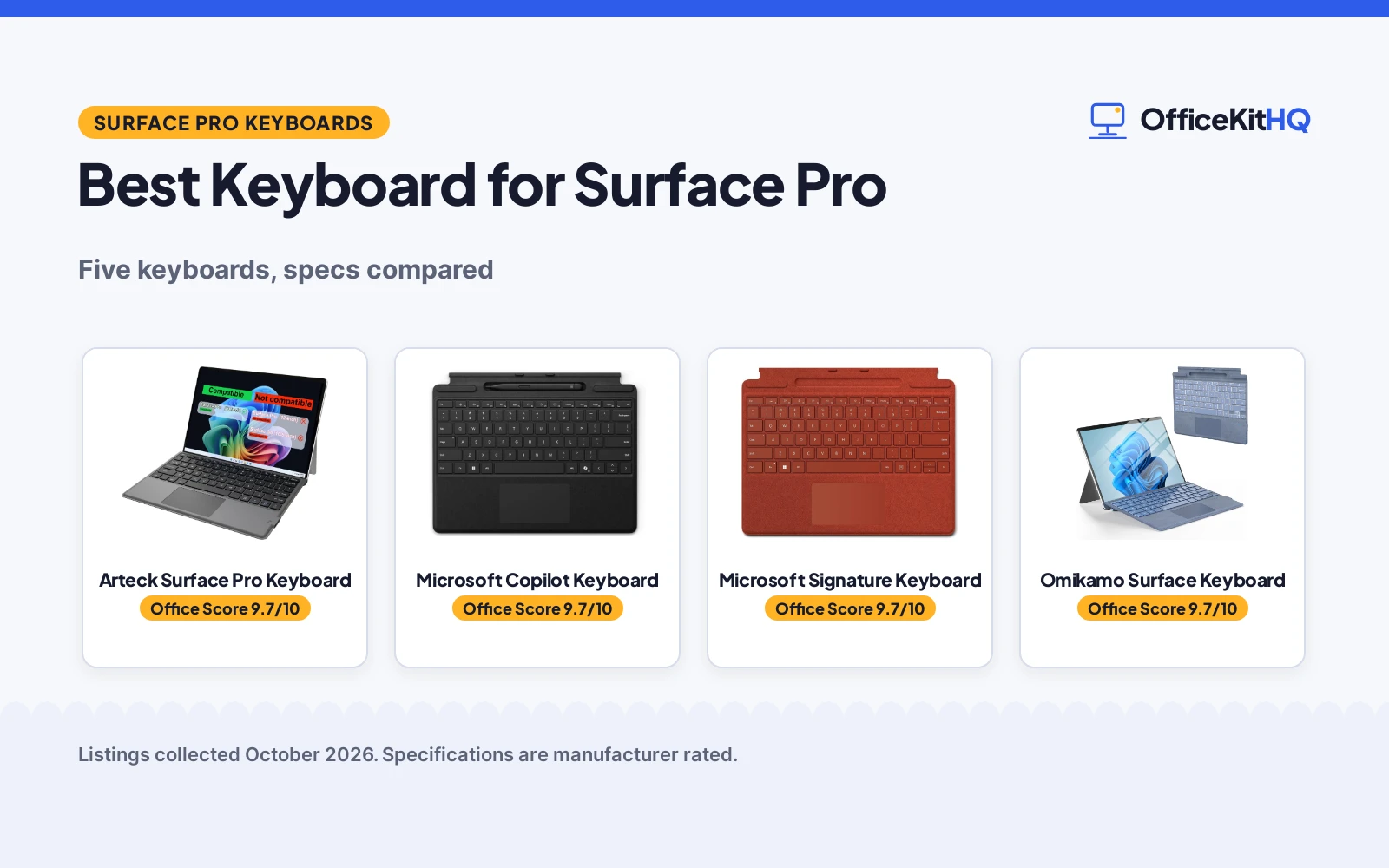
A home desk at the start of a workday usually means a tablet propped on its kickstand, a separate keyboard sliding around, and a cable hunt before the morning call. The best keyboard for surface pro is a keyboard that clicks into place, stays put at a workable angle, and turns that tablet into a laptop without another device on the desk. We compared Surface Pro keyboards by model fit, connection type, backlight, trackpad, stated size and warranty term, using only what each listing publishes.
OfficeKitHQ earns a commission when you buy through links on this page, at no extra cost to you. As an Amazon Associate I earn from qualifying purchases. Affiliate disclosure.
Quick picks
 Best Overall Arteck Surface Pro Keyboard: 50 hours of use after a 1 hour charge, per the listing Check price on Amazon
 Best for Copilot Microsoft Copilot Keyboard: Dedicated Copilot key, mic mute key and snipping key stated Check price on Amazon
 Best Alcantara Pick Microsoft Signature Keyboard: Alcantara finish with backlit keys and large trackpad Check price on Amazon
 Best Backlight Choice Omikamo Surface Keyboard: 7 color backlight with 3 brightness levels stated Check price on Amazon
 Best for Older Models WirelessFinest Pro Keyboard: Fits Surface Pro 3 through 7 Plus in 12.3 inch size Check price on Amazon
Our desk picks
| # | Product | Office Score | Buy |
|---|---|---|---|
| 1 | Arteck Surface Pro Keyboard | 9.7/10 | Buy on Amazon |
| 2 | Microsoft Copilot Keyboard | 9.7/10 | Buy on Amazon |
| 3 | Microsoft Signature Keyboard | 9.7/10 | Buy on Amazon |
| 4 | Omikamo Surface Keyboard | 9.7/10 | Buy on Amazon |
| 5 | WirelessFinest Pro Keyboard | 9.5/10 | Buy on Amazon |

Arteck Surface Pro Keyboard
A Bluetooth keyboard for Surface Pro 13-inch models with a large trackpad, media keys and a stated 50 hours of use after a 1 hour charge.
Pros
- Stated 50 hours of use after a 1 hour charge over USB-C
- Extra-large trackpad plus media hot keys for navigation and control
- Magnetic attach in the style of a laptop type cover, per the listing
- 24-month warranty stated, the longest term among the main picks
Cons
- Not for Surface Pro 12-inch or Surface Go 10.5-inch models, per the listing
- Plastic enclosure, not the Alcantara finish of the Microsoft picks
Detailed Review
Arteck lists this Bluetooth type cover for Surface Pro 13-inch models, with mechanical keys, an extra-large trackpad and media hot keys. It states a 1 hour charge, 50 hours of use, USB-C recharging and a 24-month warranty. The spec table contradicts itself on weight (12.17 oz in one field, 1 g in another), and its compatible list names Surface Pro 10, 8, 9 and X while the title points at newer 13-inch models, so follow the title and bullets for fit.
Who it's for: 13-inch Surface Pro owners wanting long stated battery life and a laptop style magnetic cover. Who should skip it: Surface Pro 12-inch, Surface Go 10.5-inch, or other models outside the stated list.
Its Office Score of 9.7/10 comes from performance 32/35, build 21/25, value 21/25, safety not scored (non-powered gear) and warranty 4/5: 78 of 90 points, placed on our 9.2 to 9.8 scale.
Key Specifications
| Connection | Bluetooth |
|---|---|
| Keys | 78 |
| Use | 50 hours |
| Warranty | 24-month warranty |
Figures as published on the retailer listing, collected 29 October 2026. Performance figures are manufacturer rated.
Safety and Warranty
What this listing states. This product does not plug in or run on a battery, so safety is not part of its score. 24-month warranty. It does not say everything a buyer needs, such as who pays return shipping, so warranty scores 4 of 5. See How We Pick.
Fit the desk first. Check the stated size against your desk depth and keyboard tray, and charge or pair as the manual describes. No keyboard, mouse or wrist rest prevents or treats injury.
This is general buying information, not professional advice. Follow each product manual and local rules, and see our Safety Disclaimer.

Microsoft Copilot Keyboard
A Microsoft keyboard with a Copilot key, backlit mechanical keys and a large trackpad, made for Surface Pro (11th Edition), Pro 9 and Pro 8.
Pros
- Dedicated Copilot key plus microphone mute and snipping keys
- Full mechanical keyset with backlit keys and a large trackpad
- Clicks into place and folds back for tablet use, per the listing
- Alcantara material with enhanced magnetic stability at almost any angle
Cons
- Spec table compatible list names only Surface Pro 8, narrower than the title
- USB power source, so it draws power through the Surface connection
- Listing does not state that a pen is included with the pen storage
Detailed Review
Microsoft lists this keyboard for Surface Pro (11th Edition), Pro 9 and Pro 8, with a full mechanical keyset, backlit keys, a large trackpad, a dedicated Copilot key, microphone mute and snipping keys. It states Alcantara material, enhanced magnetic stability, a fold-back tablet mode and a 1 year manufacturer warranty. The spec table contradicts itself, giving 78 buttons in one field and 104 keys in another, and its compatible list names only Surface Pro 8, so follow the title and bullets for fit; key count is best treated as unstated.
Who it's for: Surface Pro (11th Edition), Pro 9 or Pro 8 owners wanting the Copilot key and a first-party Alcantara cover. Who should skip it: anyone needing a single stated key count, or a model outside the title list.
Its Office Score of 9.7/10 comes from performance 32/35, build 22/25, value 20/25, safety not scored (non-powered gear) and warranty 3/5: 77 of 90 points, placed on our 9.2 to 9.8 scale.
Key Specifications
| Connection | Surface |
|---|---|
| Material | Alcantara |
| Backlight | Single Color |
| Warranty | 1 year manufacturer |
Figures as published on the retailer listing, collected 29 October 2026. Performance figures are manufacturer rated.
Safety and Warranty
What this listing states. This product does not plug in or run on a battery, so safety is not part of its score. 1 year manufacturer. It does not say everything a buyer needs, such as who pays return shipping, so warranty scores 3 of 5. See How We Pick.
Fit the desk first. Check the stated size against your desk depth and keyboard tray, and charge or pair as the manual describes. No keyboard, mouse or wrist rest prevents or treats injury.
This is general buying information, not professional advice. Follow each product manual and local rules, and see our Safety Disclaimer.

Microsoft Signature Keyboard
A Microsoft Signature Keyboard in Poppy Red with a full mechanical keyset, backlit keys and a large trackpad for Surface Pro 8 and Surface Pro X.
Pros
- Full mechanical keyset with backlit keys and a large trackpad
- Clicks into place and stays attached, with a fold-back tablet mode
- Colors stated include Poppy Red, Ice Blue, Platinum and Black
- Alcantara enclosure with a 1 year manufacturer warranty
Cons
- Made for Surface Pro 8 and Surface Pro X only, per the listing
- Surface Slim Pen 2 is sold separately, per the listing
- Battery life is not stated in the listing
- No pen charging detail is stated beyond carrying the pen with the keyboard
Detailed Review
Microsoft lists the Signature Keyboard as a full-size style keyboard for Surface Pro 8 and Surface Pro X, with a full mechanical keyset, backlit keys and a large trackpad, in an Alcantara enclosure. It states 78 keys, a 280 grams weight and dimensions of 289.1 x 226.1 x 4.89 mm, and it closes to protect the screen and conserve battery. The spec table gives the same dimensions in inches as 11.38 x 8.9 x 0.19 in, and no contradiction stands out between the title, bullets and spec table on fit or keys.
Who it's for: Surface Pro 8 or Surface Pro X owners wanting a first-party Alcantara keyboard in a choice of colors. Who should skip it: newer-model owners, or anyone needing a pen in the box.
Its Office Score of 9.7/10 comes from performance 30/35, build 22/25, value 20/25, safety not scored (non-powered gear) and warranty 3/5: 75 of 90 points, placed on our 9.2 to 9.8 scale.
Key Specifications
| Connection | Bluetooth |
|---|---|
| Keys | 78 |
| Weight | 280 grams |
| Warranty | 1 year manufacturer |
Figures as published on the retailer listing, collected 29 October 2026. Performance figures are manufacturer rated.
Safety and Warranty
What this listing states. This product does not plug in or run on a battery, so safety is not part of its score. 1 year manufacturer. It does not say everything a buyer needs, such as who pays return shipping, so warranty scores 3 of 5. See How We Pick.
Fit the desk first. Check the stated size against your desk depth and keyboard tray, and charge or pair as the manual describes. No keyboard, mouse or wrist rest prevents or treats injury.
This is general buying information, not professional advice. Follow each product manual and local rules, and see our Safety Disclaimer.

Omikamo Surface Keyboard
A wireless ultra-slim keyboard for Surface Pro 11, 10, 9, 8 and X with 7 color backlighting, a trackpad and USB-C recharging.
Pros
- Fits Surface Pro 11, 10, 9, 8 and X in 13 inch size, per the listing
- 7 color backlight with 3 brightness levels for dim rooms
- Bluetooth 5.3 with a stated 10 meter range and magnetic attach
- Multi-gesture trackpad supporting 4 finger operation and up to 12 gestures
Cons
- Pen holder supports placement only and does not support charging, per the listing
- Plastic enclosure, not Alcantara
- Pairing needs Fn+C held for 3 seconds, and touchpad setup needs a Surface setting change
Detailed Review
Omikamo lists this keyboard for 13 inch Surface Pro 11, Surface Pro 10, Surface Pro 9, Surface Pro 8 and Surface Pro X, with Bluetooth 5.3, a 10 meter range, 7 color backlighting at 3 brightness levels and a multi-gesture trackpad. It states independent shortcut keys, adjustable angle through magnetic attach and a 1 Year Manufacturer warranty. The spec table contradicts the title and bullets, naming AAUB P30 as the compatible tablet model, so follow the title and bullets for fit.
Who it's for: 13 inch Surface Pro owners from the stated list wanting color backlighting and gesture control. Who should skip it: anyone needing the pen holder to charge a pen, or a finish other than plastic.
Its Office Score of 9.7/10 comes from performance 30/35, build 20/25, value 21/25, safety not scored (non-powered gear) and warranty 3/5: 74 of 90 points, placed on our 9.2 to 9.8 scale.
Key Specifications
| Connection | Bluetooth 5.3 |
|---|---|
| Range | 10 meter |
| Backlight | 7 colors, 3 brightness levels |
| Warranty | 1 Year Manufacturer |
Figures as published on the retailer listing, collected 29 October 2026. Performance figures are manufacturer rated.
Safety and Warranty
What this listing states. This product does not plug in or run on a battery, so safety is not part of its score. 1 Year Manufacturer. It does not say everything a buyer needs, such as who pays return shipping, so warranty scores 3 of 5. See How We Pick.
Fit the desk first. Check the stated size against your desk depth and keyboard tray, and charge or pair as the manual describes. No keyboard, mouse or wrist rest prevents or treats injury.
This is general buying information, not professional advice. Follow each product manual and local rules, and see our Safety Disclaimer.

WirelessFinest Pro Keyboard
A Bluetooth keyboard for older Surface Pro 3 through 7 Plus models in 12.3 inch size, with 7-color LED backlight, a trackpad and USB-C charging.
Pros
- Made for Surface Pro 7 Plus, 7, 6, 5, 4 and 3 in 12.3 inch size
- 7-color LED backlight for dim rooms and night use
- Magnetic attach and detach for switching between tablet and laptop modes
- Responsive trackpad with scrolling and multi touch gesture, per the listing
Cons
- Battery charges only by USB-C cable, not magnetically from the tablet
- 90 day warranty term is the lowest stated among the main picks
- Listing warns buyers to check the model before purchase, as fit is narrow
- Brightness levels are not stated as a count in the listing
Detailed Review
WirelessFinest lists this keyboard for Surface Pro 7 Plus, 7, 6, 5, 4 and 3 in 12.3 inch size, with a responsive trackpad, magnetic attach and 7-color LED backlighting. Its internal battery charges externally by the included USB-C cable and does not charge magnetically from the tablet, and it states a 90 Days Warranty with 12 Months After Sale Support. No contradiction stands out between the title and bullets on fit, but the narrow model list is the point to check twice.
Who it's for: owners of older 12.3 inch Surface Pros wanting backlighting and a trackpad without a first-party cover. Who should skip it: newer-model owners, or anyone expecting tablet-connection charging.
Its Office Score of 9.5/10 comes from performance 28/35, build 19/25, value 19/25, safety not scored (non-powered gear) and warranty 2/5: 68 of 90 points, placed on our 9.2 to 9.8 scale.
Key Specifications
| Connection | Bluetooth |
|---|---|
| Size | 12.3 inch |
| Backlight | 7-color LED |
| Warranty | 90 Days Warranty |
Figures as published on the retailer listing, collected 29 October 2026. Performance figures are manufacturer rated.
Safety and Warranty
What this listing states. This product does not plug in or run on a battery, so safety is not part of its score. 90 Days Warranty. It does not say everything a buyer needs, such as who pays return shipping, so warranty scores 2 of 5. See How We Pick.
Fit the desk first. Check the stated size against your desk depth and keyboard tray, and charge or pair as the manual describes. No keyboard, mouse or wrist rest prevents or treats injury.
This is general buying information, not professional advice. Follow each product manual and local rules, and see our Safety Disclaimer.
As an Amazon Associate I earn from qualifying purchases.
More picks to compare
 Microsoft 12-inch KeyboardFor Surface Pro 12 inch use, with a 360 degree hinge and backlit keysCheck on Amazon
 Seteesamvo Surface KeyboardFor Surface Pro 11 through X, with 7 color backlight and pen slotCheck on Amazon
 Microsoft 13-inch KeyboardFor Surface Pro 13 inch use, with backlit keys and large glass touchpadCheck on Amazon
 Dexnor Case KeyboardFor Surface Pro 12th, 11, 10 and 9, with floating stand and pen holderCheck on Amazon
Specs compared
| Keyboard | Office Score | Connection | Keys | Backlight | Warranty | Amazon |
|---|---|---|---|---|---|---|
| Arteck Surface Pro Keyboard | 9.7/10 | Bluetooth | 78 | Not stated | 24 months | View on Amazon |
| Microsoft Copilot Keyboard | 9.7/10 | Surface | 78 and 104 stated | Single Color | 1 year manufacturer | View on Amazon |
| Microsoft Signature Keyboard | 9.7/10 | Bluetooth | 78 | Single Color | 1 year manufacturer | View on Amazon |
| Omikamo Surface Keyboard | 9.7/10 | Bluetooth | Not stated | 7 colors | 1 Year Manufacturer | View on Amazon |
| WirelessFinest Pro Keyboard | 9.5/10 | Bluetooth | Not stated | 7 colors | 90 days | View on Amazon |
Dimensions, weight limits and ranges are the maker’s ratings as each listing gives them, collected 29 October 2026.
How to choose the best keyboard for surface pro
Match the model before anything else
Model fit is the whole purchase. The Omikamo covers Surface Pro 11, 10, 9, 8 and X in 13 inch size; the Copilot keyboard is listed for Surface Pro (11th Edition), Pro 9 and Pro 8; the Signature Keyboard only for Surface Pro 8 and Surface Pro X. The Arteck is a 13-inch keyboard not for Surface Pro 12-inch or Surface Go 10.5-inch models, and the WirelessFinest is the older-model pick for Surface Pro 3 through 7 Plus in 12.3 inch size. Check the model name in the tablet settings against the title and bullets, not a single spec table field, since two listings have spec table fields that disagree with their titles. If the tablet is also the main work machine, a guide to keyboards for laptops is a useful second read, but it does not replace the model check.
Connection, charging and power
Three keyboards connect by Bluetooth, two use a closer Surface connection, and charging differs just as much. The Arteck charges over USB-C, with a stated 1 hour charge and 50 hours of use, and the Omikamo is also USB-C rechargeable. The WirelessFinest charges only through the included USB-C cable and does not charge magnetically from the tablet. The Copilot keyboard lists USB power as its source, while the Signature Keyboard lists battery power with no battery life stated.
| Keyboard | Connection | Charging | Trackpad |
|---|---|---|---|
| Arteck Surface Pro Keyboard | Bluetooth | USB-C | Extra-large trackpad |
| Microsoft Copilot Keyboard | Surface | USB power | Large trackpad |
| Microsoft Signature Keyboard | Bluetooth | Battery powered | Large trackpad |
| Omikamo Surface Keyboard | Bluetooth | USB-C rechargeable | Multi-gesture trackpad |
| WirelessFinest Pro Keyboard | Bluetooth | USB-C cable only | Responsive trackpad |
Backlight, trackpad and keys
Backlighting splits this group: the Omikamo and the WirelessFinest offer 7 color backlighting, the Omikamo adding 3 brightness levels, while both Microsoft keyboards state a single color backlight. The Arteck states no backlight. On keys, the Arteck and the Signature Keyboard state 78 keys with a mechanical keyset, and the Copilot keyboard states a full mechanical keyset with a Copilot key, microphone mute key and snipping key. The Omikamo trackpad supports 4 finger operation and up to 12 gestures; the Arteck pairs its keys with media hot keys and an extra-large trackpad.
Read the warranty line, not the headline
Warranty terms run from 90 days to 24 months. The Arteck states a 24-month warranty, the two Microsoft keyboards and the Omikamo each state a 1 year term, and the WirelessFinest states 90 days with 12 months of after sale support. Support is not a warranty term, and the WirelessFinest listing keeps the two separate. If the keyboard will travel daily, weigh the longer term next to magnetic attach and enclosure material: plastic on the Arteck, Omikamo and WirelessFinest, Alcantara on both Microsoft keyboards. For a home office setup, see our keyboards for home office guide.
Setup Notes
- Check the tablet model against the title and bullets before ordering; fit is model specific.
- Measure desk depth against the stated dimensions, leaving room for the kickstand angle.
- Plan charging: Bluetooth picks charge over USB-C, while the Surface connection pick draws USB power.
- Keep a pen in the stated pen storage or slot, noting where the listing states the slot does not charge the pen.
FAQ
Which keyboard fits a Surface Pro 11?
The Omikamo is listed for Surface Pro 11 among its 13 inch models, and the Copilot keyboard for Surface Pro (11th Edition). Check the exact model name before ordering.
Which pick gives the longest stated use on a charge?
The Arteck states 50 hours of use after a 1 hour charge; no other main pick states a use figure in hours.
Do any of these pen holders charge a pen?
No. The Omikamo pen holder supports placement only, not charging. The Copilot keyboard lists pen storage without stating a pen is included or charged.
Which keyboards have 7 color backlighting?
The Omikamo and the WirelessFinest, with the Omikamo adding 3 brightness levels.
Which pick is for older Surface Pro models?
The WirelessFinest, made for Surface Pro 7 Plus, 7, 6, 5, 4 and 3 in 12.3 inch size, charges only by USB-C cable.
Score breakdown
The Office Score weighs performance, build, value, safety and warranty. For a keyboard, safety means stated features that keep typing stable and the device attached, such as magnetic stability, a fold-back cover mode and a stable hinge, and none of the main picks states a certification, so safety scores zero here. Performance covers model fit, keyset, trackpad and backlight; build covers material and enclosure; value weighs those specs against the warranty term. All five main picks state a warranty term, from 90 days on the WirelessFinest to 24 months on the Arteck. How we pick explains the weights.
| Product | Office Score | Perf. /35 | Build /25 | Value /25 | Safety /10 | Warranty /5 |
|---|---|---|---|---|---|---|
| Arteck Surface Pro Keyboard | 9.7 | 32 | 21 | 21 | n/a | 4 |
| Microsoft Copilot Keyboard | 9.7 | 32 | 22 | 20 | n/a | 3 |
| Microsoft Signature Keyboard | 9.7 | 30 | 22 | 20 | n/a | 3 |
| Omikamo Surface Keyboard | 9.7 | 30 | 20 | 21 | n/a | 3 |
| WirelessFinest Pro Keyboard | 9.5 | 28 | 19 | 19 | n/a | 2 |
Office Scores run on a short 9.2 to 9.8 scale. We place each item’s weighted point total on it in proportion, so a larger total is always shown as a larger score. Safety is scored for powered desks, chairs and gadgets and for any listing that names safety features; if neither applies, the remaining 90 points decide.
More for your workspace
See every keyboards and keyboard trays guide and all monitor mounts, keyboards and mice guides. Also see our best keyboard for laptop. Also see our best keyboard for home office. Also see our best keyboard for engineers.
More picks: best keyboard for designers, best wireless keyboard for presentations, best ergonomic keyboard tray under desk.