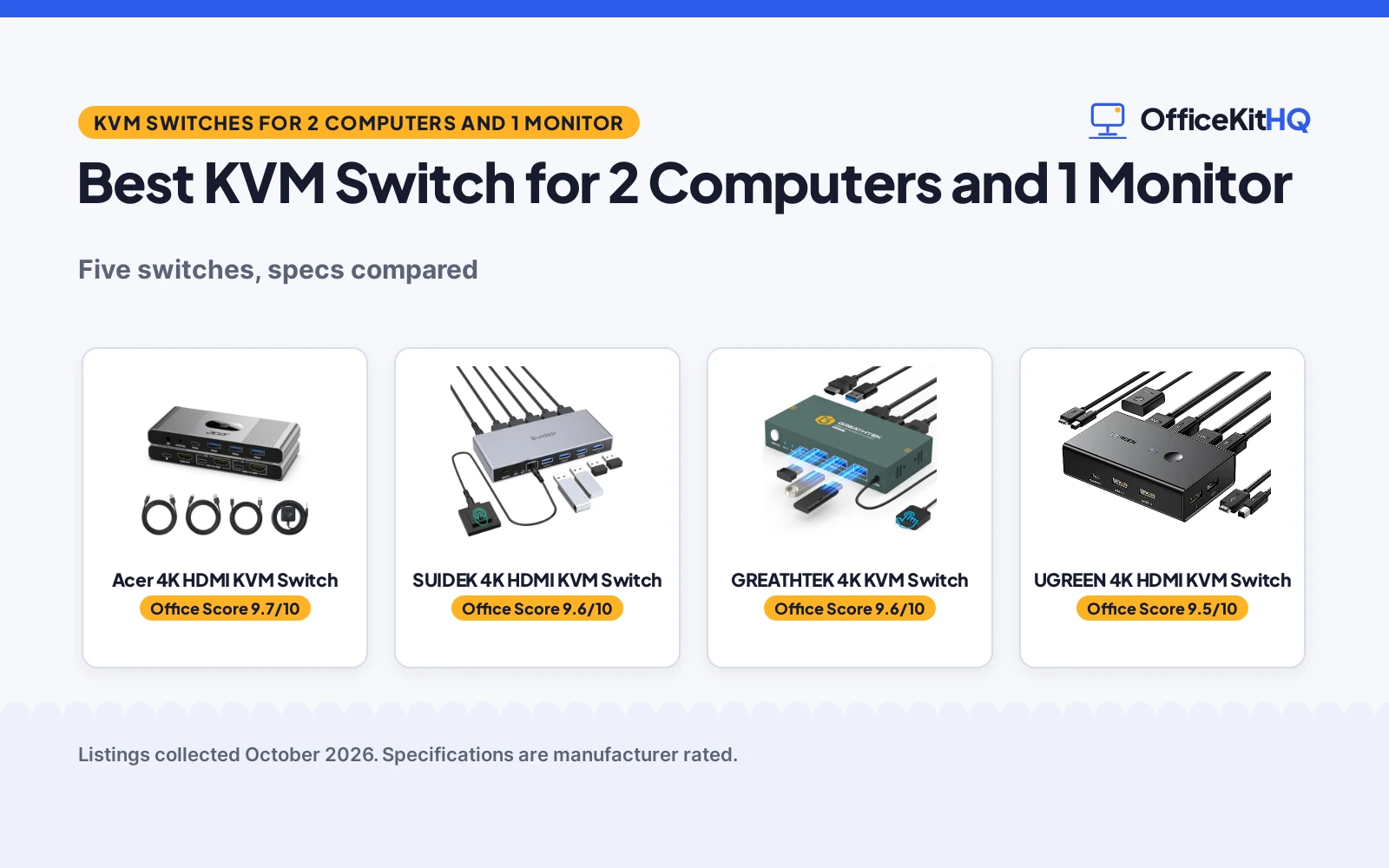
Morning starts at a desk crowded with cables, with a work laptop beside a home desktop and a shared set of keyboard, mouse and monitor. Swapping cables every time you switch machines eats the morning. The best kvm switch for 2 computers and 1 monitor ends that shuffle, letting each computer share the same screen and peripherals with a button press. This roundup compares HDMI switches on resolution, USB ports, switching ways and warranty terms, using only what each maker states.
OfficeKitHQ earns a commission when you buy through links on this page, at no extra cost to you. As an Amazon Associate I earn from qualifying purchases. Affiliate disclosure.
Quick picks
 Best Overall Acer 4K HDMI KVM Switch: 4 USB 3.0 ports at 5Gbps, audio out and a 1.5m wired remote Check price on Amazon
 Adapter Included SUIDEK 4K HDMI KVM Switch: 5V adapter in the box, 4 USB 3.0 ports and a 2 year warranty Check price on Amazon
 Best Warranty GREATHTEK 4K KVM Switch: lifetime warranty service, adaptive EDID and 3 USB 3.0 ports Check price on Amazon
 Best 4K Cables Included UGREEN 4K HDMI KVM Switch: 2 HDMI and 2 USB cables in the box with a 24 month warranty Check price on Amazon
 Highest Resolution UGREEN 8K HDMI KVM Switch: 8K@60Hz over HDMI 2.1 with 4 USB 3.0 ports at 5Gbps Check price on Amazon
Our desk picks
| # | Product | Office Score | Buy |
|---|---|---|---|
| 1 | Acer 4K HDMI KVM Switch | 9.7/10 | Buy on Amazon |
| 2 | SUIDEK 4K HDMI KVM Switch | 9.6/10 | Buy on Amazon |
| 3 | GREATHTEK 4K KVM Switch | 9.6/10 | Buy on Amazon |
| 4 | UGREEN 4K HDMI KVM Switch | 9.5/10 | Buy on Amazon |
| 5 | UGREEN 8K HDMI KVM Switch | 9.5/10 | Buy on Amazon |

Acer 4K HDMI KVM Switch
A 4K@60Hz HDMI switch with 4 USB 3.0 ports, a wired remote and audio out for sharing one monitor between two computers.
Pros
- 4 USB 3.0 ports with 5Gbps transfer, including 1 USB-C and 3 USB-A
- Aluminum shell stated for heat dissipation
- Wired remote with a 1.5m cable, plus a panel button
- Audio out stated, and 1080p at 144Hz for smoother motion
Cons
- 5V power adapter not included, needed for high-drain USB devices
- No hotkey switching and no EDID emulation
- Only one monitor output
- A USB-C to USB-A adapter is required if a laptop has only USB-C ports
Detailed Review
The maker lists a 4K@60Hz HDMI switch for one monitor and two computers, with HDMI 2.0, HDR and 4 USB 3.0 ports at 5Gbps, 1 USB-C and 3 USB-A, plus audio out and a wired remote with a 1.5m cable. The aluminum shell is stated for heat dissipation, and the switch is plug and play and driver-free for Windows, macOS and Linux. A 5V power adapter is not included, and the maker states to connect one when using high-drain USB devices. The warranty is stated as 1 year manufacturer.
Who it's for: home office workers sharing one monitor between a work laptop and a personal desktop who want fast USB 3.0 ports and a remote on the desk. Who should skip it: anyone who needs hotkey switching, EDID emulation or a second monitor output.
Its Office Score of 9.7/10 comes from performance 32/35, build 22/25, value 21/25, safety 4/10 and warranty 3/5: 82 of 100 points, placed on our 9.2 to 9.8 scale.
Key Specifications
| Resolution | 4K@60Hz, HDMI 2.0, HDR |
|---|---|
| USB ports | 4 USB 3.0 (1 USB-C, 3 USB-A), 5Gbps |
| Switching | Panel button or 1.5m wired remote |
| Warranty | 1 year manufacturer |
These specs mirror the retailer listing as of 19 November 2026; performance figures are stated by the brand.
Safety and Warranty
What this listing states. Aluminum shell stated for heat dissipation, so safety scores 4 of 10. 1 Year Manufacturer warranty stated. It does not say everything a buyer needs, such as who pays return shipping, so warranty scores 3 of 5. See How We Pick.
Follow the manual. Assemble and use the product as the maker describes, stay under any stated capacity, and read the manual before first use.
This is general buying information, not professional advice. Follow each product manual and local rules, and see our Safety Disclaimer.

SUIDEK 4K HDMI KVM Switch
A 4K@60Hz aluminum HDMI switch with 4 USB 3.0 ports, a desktop controller and a 5V power adapter in the box.
Pros
- 4 USB 3.0 ports at 5Gbps for keyboard, mouse, printer and drives
- DC 5V power adapter included in the box
- Aluminum build with a desktop controller and one-button switching
- 2 year manufacturer warranty stated
Cons
- HDMI cables not included and must be purchased separately
- No EDID support stated
- Switching is not supported in sleep mode
- Only one monitor output, HDMI only, with no DisplayPort or VGA
Detailed Review
The maker lists a 4K@60Hz aluminum HDMI switch for two computers sharing one monitor, keyboard, mouse and printer, with 4 USB 3.0 ports at 5Gbps and two switching methods, a button and a desktop controller. The box includes 2 USB A to A cables, a desktop controller and a DC 5V power adapter, and the maker states to keep the 5V adapter connected and not to use an adapter over 5V. HDMI cables are purchased separately, and the switch carries a 2 year manufacturer warranty.
Who it's for: desk workers who want the power adapter in the box and fast USB 3.0 sharing between two computers. Who should skip it: anyone who needs EDID support, switching from sleep mode or a second monitor output.
Its Office Score of 9.6/10 comes from performance 30/35, build 21/25, value 20/25, safety 3/10 and warranty 4/5: 78 of 100 points, placed on our 9.2 to 9.8 scale.
Key Specifications
| Resolution | 4K@60Hz |
|---|---|
| USB ports | 4 USB 3.0, 5Gbps |
| In the box | 2 USB cables, controller, 5V adapter |
| Warranty | 2 year manufacturer |
These specs mirror the retailer listing as of 19 November 2026; performance figures are stated by the brand.
Safety and Warranty
What this listing states. Maker states to keep the 5V power adapter connected and not to use an adapter over 5V, so safety scores 3 of 10. 2 Year Manufacturer warranty stated. It does not say everything a buyer needs, such as who pays return shipping, so warranty scores 4 of 5. See How We Pick.
Follow the manual. Assemble and use the product as the maker describes, stay under any stated capacity, and read the manual before first use.
This is general buying information, not professional advice. Follow each product manual and local rules, and see our Safety Disclaimer.
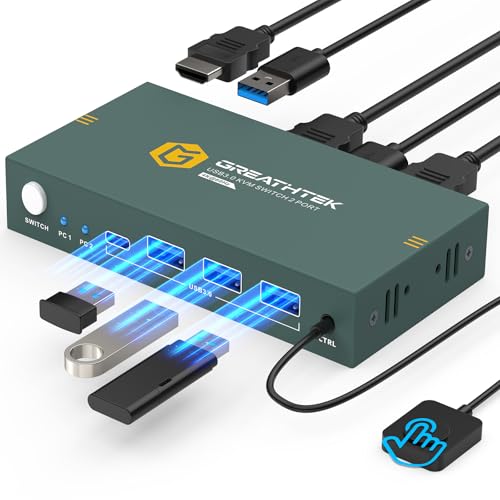
GREATHTEK 4K KVM Switch
A 4K@60Hz HDMI switch with 3 USB 3.0 ports, adaptive EDID and a wired remote, with a lifetime warranty service stated.
Pros
- Adaptive EDID for more stable image transmission
- 3 USB 3.0 ports for keyboard, mouse, printers and drives
- No power or driver software required, plug and play
- Lifetime warranty service stated
Cons
- HDMI cables not included, 3 are needed for 2 computers and 1 monitor
- No hotkey switching
- Only 3 USB ports, fewer than the 4 port switches here
- Only one monitor output
Detailed Review
The maker lists a 4K@60Hz HDMI switch for 2 computers sharing 1 monitor, with 3 USB 3.0 ports and two switching methods, a wired remote and a button. It supports resolutions up to 3840 by 2160 at 60Hz and is backward compatible with 3840 by 2160 at 30Hz and 1920 by 1080 at 60Hz, with HDMI 2.0 and HDCP 2.2. The box includes 2 USB 3.0 cables at 1.2m, a 3.5mm remote control cable at 1m and a wired remote, and the maker states a lifetime warranty service.
Who it's for: workers who want adaptive EDID and a lifetime warranty service on a 4K switch. Who should skip it: anyone who needs a fourth USB port, hotkey switching or HDMI cables in the box.
Its Office Score of 9.6/10 comes from performance 30/35, build 20/25, value 21/25, safety 0/10 and warranty 5/5: 76 of 100 points, placed on our 9.2 to 9.8 scale.
Key Specifications
| Resolution | 4K@60Hz (3840 x 2160) |
|---|---|
| USB ports | 3 USB 3.0 |
| Switching | Wired remote or button |
| Warranty | Lifetime warranty service |
These specs mirror the retailer listing as of 19 November 2026; performance figures are stated by the brand.
Safety and Warranty
What this listing states. No safety listing or safety feature is stated, so safety scores zero. Lifetime warranty service stated, so warranty scores 5 of 5. See How We Pick.
Follow the manual. Assemble and use the product as the maker describes, stay under any stated capacity, and read the manual before first use.
This is general buying information, not professional advice. Follow each product manual and local rules, and see our Safety Disclaimer.

UGREEN 4K HDMI KVM Switch
A 4K@60Hz HDMI switch with 4 USB ports, 2 HDMI and 2 USB cables and a desktop controller, backed by a 24 month warranty.
Pros
- 2 HDMI and 2 USB cables included, plus a desktop controller
- 4K@60Hz with HDMI 2.0, HDCP 2.2 and HDR
- Two switching ways, a button or the desktop controller
- 24 month warranty stated
Cons
- USB 2.0 ports, slower than the USB 3.0 switches here
- No EDID emulation and no hotkey switching
- Not for use with a docking station
- HDMI cable length must not exceed 5m for 4K@60Hz
Detailed Review
The maker lists a 4K@60Hz HDMI switch for 1 monitor and 2 computers, with 4 USB ports for a keyboard, mouse and printer, and support for 4K@30Hz and 2560 by 1440 at 120Hz. It supports HDMI 2.0, HDCP 2.2 and 1.4, USB 2.0, 3D and HDR, and switches by a button or the desktop controller. The box includes the switch, 2 USB A to B cables, 2 HDMI cables, a desktop controller and a user guide, and the warranty is stated as 24 months.
Who it's for: workers who want the cables in the box and a simple 4K switch for keyboard, mouse and printer sharing. Who should skip it: anyone who needs USB 3.0 speeds, EDID emulation or hotkey switching.
Its Office Score of 9.5/10 comes from performance 28/35, build 20/25, value 20/25, safety 0/10 and warranty 4/5: 72 of 100 points, placed on our 9.2 to 9.8 scale.
Key Specifications
| Resolution | 4K@60Hz, HDMI 2.0 |
|---|---|
| USB ports | 4 USB 2.0 |
| In the box | 2 HDMI and 2 USB cables, controller |
| Warranty | 24 months |
These specs mirror the retailer listing as of 19 November 2026; performance figures are stated by the brand.
Safety and Warranty
What this listing states. No safety listing or safety feature is stated, so safety scores zero. 24 Months warranty stated. It does not say everything a buyer needs, such as who pays return shipping, so warranty scores 4 of 5. See How We Pick.
Follow the manual. Assemble and use the product as the maker describes, stay under any stated capacity, and read the manual before first use.
This is general buying information, not professional advice. Follow each product manual and local rules, and see our Safety Disclaimer.

UGREEN 8K HDMI KVM Switch
An 8K@60Hz HDMI 2.1 switch with 4 USB 3.0 ports, 2 HDMI and 2 USB cables and a desktop controller.
Pros
- 8K@60Hz over HDMI 2.1, the highest resolution stated here
- 4 USB 3.0 ports at 5Gbps, with 3 USB-A and 1 USB-C
- 2 HDMI and 2 USB cables included, plus a desktop controller
- Backward compatible with 4K@60Hz, 4K@30Hz, 2560 by 1440 at 120Hz and 1920 by 1080 at 240Hz
Cons
- No warranty term is stated
- No hotkey switching and no EDID emulation
- USB-C power cable or power adapter not included
- HDMI cable input and output should be within 6.5 feet for 8K@60Hz
Detailed Review
The maker lists an 8K@60Hz HDMI 2.1 switch for 2 computers sharing 1 monitor, with 4 USB 3.0 ports at 5Gbps, 3 USB-A and 1 USB-C, and backward compatibility with 4K@60Hz, 4K@30Hz, 2560 by 1440 at 120Hz and 1920 by 1080 at 240Hz. The box includes the switch, 2 USB A to C cables, 2 HDMI cables, a desktop controller and a user guide. The switch states HDMI 2.0 and 1.4 and HDCP 2.3 and 1.4, and no warranty term is stated.
Who it's for: workers with an 8K monitor who want the highest resolution stated here and fast USB 3.0 sharing. Who should skip it: anyone who wants a warranty term in writing, hotkey switching or EDID emulation.
Its Office Score of 9.5/10 comes from performance 33/35, build 21/25, value 21/25, safety 0/10 and warranty 0/5: 75 of 100 points, placed on our 9.2 to 9.8 scale.
Key Specifications
| Resolution | 8K@60Hz, HDMI 2.1 |
|---|---|
| USB ports | 4 USB 3.0 (3 USB-A, 1 USB-C), 5Gbps |
| In the box | 2 HDMI and 2 USB cables, controller |
| Warranty | Not stated |
These specs mirror the retailer listing as of 19 November 2026; performance figures are stated by the brand.
Safety and Warranty
What this listing states. No safety listing or safety feature is stated, so safety scores zero. No warranty term, so warranty scores zero. See How We Pick.
Follow the manual. Assemble and use the product as the maker describes, stay under any stated capacity, and read the manual before first use.
This is general buying information, not professional advice. Follow each product manual and local rules, and see our Safety Disclaimer.
As an Amazon Associate I earn from qualifying purchases.
More picks to compare
 CMSTEDCD 8K DP KVM SwitchA DisplayPort switch with 8K video and 4 USB 3.0 ports for 2 computers.Check on Amazon
 UGREEN 4K Aluminum KVM SwitchA 4K aluminum switch with 4 USB 3.0 ports and a desktop controller.Check on Amazon
 Buerlaseul 4K HDMI KVM SwitchA 4K switch with 2 HDMI cables and 4 USB 3.0 ports.Check on Amazon
 J-Tech 8K DP KVM SwitchA DisplayPort switch with 8K video, 4 USB 3.0 ports and a wired remote.Check on Amazon
 DXchip 8K HDMI KVM SwitchAn 8K HDMI switch with 3 USB 3.0 ports and a 12 month warranty.Check on Amazon
Specs compared
| Switch | Office Score | Max resolution | USB ports | Switching | Warranty | Amazon |
|---|---|---|---|---|---|---|
| Acer 4K HDMI KVM Switch | 9.7/10 | 4K@60Hz | 4 USB 3.0 (1 USB-C, 3 USB-A) | Button or wired remote | 1 year | View on Amazon |
| SUIDEK 4K HDMI KVM Switch | 9.6/10 | 4K@60Hz | 4 USB 3.0 | Button or desktop controller | 2 years | View on Amazon |
| GREATHTEK 4K KVM Switch | 9.6/10 | 4K@60Hz | 3 USB 3.0 | Wired remote or button | Lifetime | View on Amazon |
| UGREEN 4K HDMI KVM Switch | 9.5/10 | 4K@60Hz | 4 USB 2.0 | Button or desktop controller | 24 months | View on Amazon |
| UGREEN 8K HDMI KVM Switch | 9.5/10 | 8K@60Hz | 4 USB 3.0 (3 USB-A, 1 USB-C) | Button or desktop controller | Not stated | View on Amazon |
We quote these figures from each listing as the brand rates them; captured 19 November 2026. Four of the five state a warranty term.
How to choose the best kvm switch for 2 computers and 1 monitor
Start with resolution and the cable in the box
Resolution runs from 4K@60Hz on four of the switches to 8K@60Hz on the UGREEN 8K switch, which uses HDMI 2.1. The Acer also states 1080p at 144Hz for smoother motion, and the GREATHTEK states backward compatibility with 3840 by 2160 at 30Hz and 1920 by 1080 at 60Hz. Cable length matters at those resolutions: the UGREEN 4K switch states that the HDMI cable must not exceed 5m for 4K@60Hz, and the UGREEN 8K switch states that HDMI cable input and output should be within 6.5 feet for 8K@60Hz. The best HDMI cable for laptop to monitor guide covers cables that meet those limits.
Count the USB ports and mind the version
Four switches here offer 4 USB ports and one offers 3, but the version matters more than the count. The Acer, SUIDEK and UGREEN 8K switches offer USB 3.0 at 5Gbps, while the UGREEN 4K switch offers USB 2.0, which the UGREEN 8K maker states at only 480Mbps. The Acer and UGREEN 8K switches each include 1 USB-C port alongside 3 USB-A ports, which helps when a laptop has only USB-C ports. Check the port mix against the keyboard, mouse, printer and drives you plan to share before choosing.
| Switch | Max resolution | USB ports | HDMI cables in box |
|---|---|---|---|
| Acer 4K HDMI KVM Switch | 4K@60Hz | 4 USB 3.0 | Not stated |
| SUIDEK 4K HDMI KVM Switch | 4K@60Hz | 4 USB 3.0 | No, purchased separately |
| GREATHTEK 4K KVM Switch | 4K@60Hz | 3 USB 3.0 | No, 3 needed |
| UGREEN 4K HDMI KVM Switch | 4K@60Hz | 4 USB 2.0 | Yes, 2 |
| UGREEN 8K HDMI KVM Switch | 8K@60Hz | 4 USB 3.0 | Yes, 2 |
Check the switching method and the fine print
Every switch here changes computers with a button, and most add a second way: a desktop controller on the UGREEN and SUIDEK switches, or a wired remote on the Acer and GREATHTEK switches. None of the five offers hotkey switching, and only the GREATHTEK offers adaptive EDID, which the maker states makes image transmission more stable. The fine print also differs: the SUIDEK states that switching is not supported in sleep mode, the UGREEN switches state that they are not for use with a docking station, and the Acer states that a 5V power adapter is needed for high-drain USB devices. The docking station types guide explains when a dock fits the desk instead.
Read the warranty line, not the headline
Warranty terms run from lifetime to none at all. GREATHTEK states a lifetime warranty service, SUIDEK states 2 years, the UGREEN 4K switch states 24 months, and Acer states 1 year. The UGREEN 8K switch states no warranty term, which is the main reason it ranks last here despite the highest resolution stated. A switch that shares a keyboard and mouse all day is worth a written term, so weigh the warranty next to the resolution before ordering.
Setup Notes
- Connect both USB cables to each computer before switching, or the keyboard and mouse will not work.
- Set both input computers to the same resolution as the monitor output.
- Keep the 5V power adapter connected on the SUIDEK, and use no adapter over 5V.
- Check the HDMI cable length: 5m for 4K@60Hz on the UGREEN 4K switch, and within 6.5 feet for 8K@60Hz on the UGREEN 8K switch.
- Do not press the button on the switch or the desktop controller while connecting devices and cables.
FAQ
Do I need a separate HDMI cable for each computer?
Yes. GREATHTEK states that 3 HDMI cables are needed to connect 2 computers and 1 monitor, and its box includes none. The UGREEN switches include 2 HDMI cables each, while SUIDEK states that HDMI cables are purchased separately.
Which switch here supports EDID?
Only the GREATHTEK, which states adaptive EDID. The UGREEN switches and the Acer state no EDID emulation, and SUIDEK states that EDID is not supported.
Can I switch with a keyboard hotkey?
No. The UGREEN switches, the Acer and the GREATHTEK all state that hotkey switching is not supported. Use the button, the desktop controller or the wired remote instead.
What resolution do these switches support?
The UGREEN 8K switch supports up to 8K@60Hz, and the other four support up to 4K@60Hz. The Acer also states 1080p at 144Hz.
Do any of these switches work with a docking station?
The UGREEN 4K and UGREEN 8K switches state that they are not supported for use with a docking station. The other three state nothing on docking stations, so check the maker notes before ordering.
Score breakdown
The Office Score weighs performance, build, value, safety and warranty. For a KVM switch, safety means stated heat dissipation and power-adapter limits; the Acer states an aluminum shell for heat dissipation and the SUIDEK states a 5V adapter limit, while the other three state neither. Four of the five state a warranty term: 24 months, 1 year, lifetime and 2 years. How we pick explains the weights.
| Product | Office Score | Perf. /35 | Build /25 | Value /25 | Safety /10 | Warranty /5 |
|---|---|---|---|---|---|---|
| Acer 4K HDMI KVM Switch | 9.7 | 32 | 22 | 21 | 4 | 3 |
| SUIDEK 4K HDMI KVM Switch | 9.6 | 30 | 21 | 20 | 3 | 4 |
| GREATHTEK 4K KVM Switch | 9.6 | 30 | 20 | 21 | 0 | 5 |
| UGREEN 4K HDMI KVM Switch | 9.5 | 28 | 20 | 20 | 0 | 4 |
| UGREEN 8K HDMI KVM Switch | 9.5 | 33 | 21 | 21 | 0 | 0 |
Score placement follows the weighted total: the lowest totals read 9.2, the highest 9.8, and everything between keeps its order.
More for your workspace
See every Docking Stations and USB Hubs guide and all Audio, Power and Connectivity guides.
More picks: best HDMI cable for laptop to monitor, docking station types, best USB hub for MacBook.