
The morning video call runs on the work laptop while the home PC idles beside it, and passing one keyboard and mouse between the two machines gets old fast. A best kvm switch under 100 removes that friction: one set of peripherals, one or two monitors, and a button press to move between computers. We compared five switches by how many computers and monitors each handles, stated resolution, USB 3.0 port count, switching method, stated certification marks and warranty terms, using only what each listing publishes.
OfficeKitHQ earns a commission when you buy through links on this page, at no extra cost to you. As an Amazon Associate I earn from qualifying purchases. Affiliate disclosure.
Quick picks
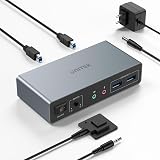 Best Overall Unitek V1311A: Dual-monitor HDMI and DisplayPort for 2 PCs at up to 4K@60Hz Check price on Amazon
 Best 2-PC Pick TIGKTING HKXY-US-SW200: 4K@60Hz HDMI, 4 USB 3.0 ports, wired controller, 2-year warranty Check price on Amazon
 Best for 3 PCs TJCXELE Kvm-3pc-60: Dual monitors across 3 computers with EDID simulation stated Check price on Amazon
 Best No-Power Pick Hearvo S7232H: No power supply needed; 3 USB-A plus 1 USB-C, 4K@60Hz Check price on Amazon
 USB-Only Extra BENFEI USB 3.0 Switch: USB 3.0 switch for 2 computers; no video switching stated Check price on Amazon
The picks
| # | Product | Office Score | Buy |
|---|---|---|---|
| 1 | Unitek V1311A | 9.6/10 | Buy on Amazon |
| 2 | TIGKTING HKXY-US-SW200 | 9.6/10 | Buy on Amazon |
| 3 | TJCXELE Kvm-3pc-60 | 9.5/10 | Buy on Amazon |
| 4 | Hearvo S7232H | 9.5/10 | Buy on Amazon |
| 5 | BENFEI USB | 9.4/10 | Buy on Amazon |
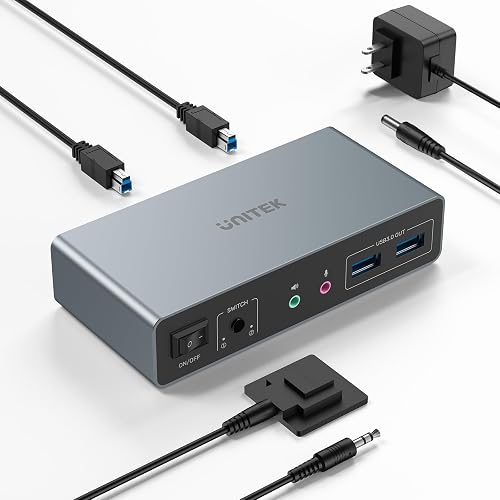
Unitek V1311A
The only dual-monitor switch here: one unit drives 2 monitors from 2 computers over HDMI and DisplayPort at up to 4K@60Hz, with a wired desktop controller and mic and headset jacks.
Pros
- Dual-monitor HDMI and DisplayPort switching for 2 computers, the only pick here with both video inputs
- 4K@60Hz with HDMI 2.0 and HDCP 2.2 stated, plus mic and headset jacks
- Wired desktop controller for switching from within reach, aluminum body
- 1-year warranty stated, with a DC 5V 2A adapter included
Cons
- Listing states it is not compatible with laptops
- Title says 3 USB ports while one bullet mentions four USB-A ports, so the USB count is unclear
- Dual video needs every cable connected, including the USB A-to-B cable, per the listing
- 5.15 x 2.44 x 1.2 in body is the largest of the 2-PC picks
Detailed Review
Unitek lists the V1311A as a dual-monitor KVM switch for 2 computers, with HDMI and DisplayPort video at up to 4K@60Hz, HDMI 2.0, HDCP 2.2, and USB 3.0 with data rates up to 5Gbps. The listing includes mic and headset jacks, a wired desktop controller that switches with one button press, and a DC 5V 2A power adapter. The body is aluminum at 5.15 x 2.44 x 1.2 in, the spec table lists UL as the specification met, and the listing states a 1-year warranty. One contradiction to note: the title says 3 USB ports while a bullet describes four USB-A ports, so we trust the title and bullets for the features but treat the USB count as unclear. The listing also states the unit is designed for desktop hosts only and is not compatible with laptops.
Who it's for: a home worker running 2 desktop PCs on a dual-monitor desk who wants wired remote switching within reach. Who should skip it: anyone switching a laptop, or anyone who needs a clearly stated USB port count.
Its Office Score of 9.6/10 comes from performance 30/35, build 21/25, value 20/25, safety 7/10 and warranty 3/5: 81 of 100 points, placed on our 9.2 to 9.8 scale.
Key Specifications
| Monitors | 2, HDMI + DisplayPort |
|---|---|
| Resolution | 4K@60Hz |
| USB | Up to 5Gbps, USB 3.0 |
| Warranty | 1 year |
Figures as published on the retailer listing, collected 22 October 2026. Performance figures are manufacturer rated.
Safety and Warranty
What this listing states. UL listed as Specification Met; IP40 protection code stated; aluminum body, so safety scores 7 of 10. 1-year warranty. It does not say everything a buyer needs, such as who pays return shipping, so warranty scores 3 of 5. See How We Pick.
Power and heat. Use the supplied adapter, treat power delivery wattage and display support as the maker's claims for your laptop model, and give the dock room to vent.
This is general buying information, not professional advice. Follow each product manual and local rules, and see our Safety Disclaimer.

TIGKTING HKXY-US-SW200
A 2-computer, 1-monitor HDMI switch at up to 4K@60Hz with 4 USB 3.0 ports, a wired desktop controller, LED port indicators and a 2-year stated warranty.
Pros
- 4K@60Hz HDMI for 2 computers sharing 1 monitor, with USB 3.0 up to 5Gbps
- 4 USB 3.0 ports, backward compatible with USB 2.0, 1.1 and 1.0 devices
- Wired desktop controller plus LED indicators showing the active port
- 2-year warranty stated in the spec table, with 24-month after-sales service in the bullets
Cons
- Single-monitor only, so no dual-display setup
- No keyboard hotkey switching; changes go through the button or controller
- 5.91 x 2.56 x 0.87 in body is the longest of the 1-monitor picks
- Listing states no lower resolution for older monitors
Detailed Review
TIGKTING lists the HKXY-US-SW200 as a 2-computer, 1-monitor HDMI KVM switch with up to 4K@60Hz output and 4 USB 3.0 ports at up to 5Gbps. The USB ports also accept USB 2.0, 1.1 and 1.0 devices, switching goes through one button press or the included wired desktop controller, and LED indicators show the active port. The metal body measures 5.91 x 2.56 x 0.87 in and weighs 0.22 kg, the package includes a 12V1A power adapter and 2 USB 3.0 cables, and the spec table lists CE with a 2-year warranty. No contradictions between the title, bullets and spec table.
Who it's for: someone sharing one monitor, keyboard and mouse between 2 PCs with the controller tucked out of the way. Who should skip it: anyone who wants dual monitors or keyboard hotkey switching.
Its Office Score of 9.6/10 comes from performance 29/35, build 20/25, value 20/25, safety 5/10 and warranty 3/5: 77 of 100 points, placed on our 9.2 to 9.8 scale.
Key Specifications
| Computers | 2 |
|---|---|
| Monitors | 1, HDMI |
| USB ports | 4, USB 3.0 |
| Item weight | 0.22 kg |
Figures as published on the retailer listing, collected 22 October 2026. Performance figures are manufacturer rated.
Safety and Warranty
What this listing states. CE listed as Specification Met; metal body, so safety scores 5 of 10. 2-year warranty. It does not say everything a buyer needs, such as who pays return shipping, so warranty scores 3 of 5. See How We Pick.
Power and heat. Use the supplied adapter, treat power delivery wattage and display support as the maker's claims for your laptop model, and give the dock room to vent.
This is general buying information, not professional advice. Follow each product manual and local rules, and see our Safety Disclaimer.

TJCXELE Kvm-3pc-60
The only pick here for 3 computers: a dual-monitor HDMI switch at up to 4K@60Hz with EDID simulation, 4 USB 3.0 ports and 24-month replacement stated.
Pros
- Controls 3 computers on 2 monitors, the most computers of any pick here
- EDID simulation keeps window order when switching back to a PC
- 4K@60Hz stated, with 4K@30Hz, 1440P@60Hz and 1080P@60Hz also listed
- 24-month replacement stated in the listing
Cons
- Title says a wired controller while a bullet says a wireless controller is included
- Spec table lists 15 watts while the bullets state a 12V 1A adapter
- Dual monitors need 2 HDMI ports per computer, which the listing says to check before buying
- Keyboard hotkey switching is not supported
Detailed Review
TJCXELE lists the Kvm-3pc-60 as a 3-computer, 2-monitor HDMI KVM switch with up to 4K@60Hz and stated support for 4K@30Hz, 1440P@60Hz and 1080P@60Hz. The 4 USB 3.0 ports run at up to 5Gbps, EDID simulation keeps windows in place when switching back to a PC, and the listing states a 24-month replacement. The aluminum body measures 6 x 6 x 1.5 in and the spec table lists CE. Two contradictions: the title includes a wired controller while a bullet says a wireless controller is included, and the spec table lists 15 watts while the bullets state a DC 12V 1A adapter. We trust the title and bullets over the spec table, so expect a 12V 1A adapter, and ask the seller which controller ships.
Who it's for: a home worker juggling 3 computers across 2 monitors who wants windows to stay put between switches. Who should skip it: anyone whose computers lack 2 HDMI ports each, or anyone who switches mainly with keyboard hotkeys.
Its Office Score of 9.5/10 comes from performance 29/35, build 19/25, value 19/25, safety 5/10 and warranty 3/5: 75 of 100 points, placed on our 9.2 to 9.8 scale.
Key Specifications
| Computers | 3 |
|---|---|
| Monitors | 2, HDMI |
| Resolution | 4K@60Hz |
| Adapter | DC 12V 1A |
Figures as published on the retailer listing, collected 22 October 2026. Performance figures are manufacturer rated.
Safety and Warranty
What this listing states. CE listed as Specification Met; aluminum body, so safety scores 5 of 10. 24-month replacement. It does not say everything a buyer needs, such as who pays return shipping, so warranty scores 3 of 5. See How We Pick.
Power and heat. Use the supplied adapter, treat power delivery wattage and display support as the maker's claims for your laptop model, and give the dock room to vent.
This is general buying information, not professional advice. Follow each product manual and local rules, and see our Safety Disclaimer.

Hearvo S7232H
A 2-computer, 1-monitor HDMI switch at up to 4K@60Hz with 3 USB-A and 1 USB-C ports, adaptive EDID, and no power supply needed.
Pros
- Runs without a power supply, per the listing
- 4 USB 3.0 ports at up to 5Gbps, including 1 USB-C for newer peripherals
- Adaptive EDID stated for stable image transmission when switching
- Package includes 2 USB cables, a wired desktop controller and 4 anti-slip rubber pads
Cons
- No warranty term is stated in the listing
- Single-monitor only, so no dual-display setup
- 5 x 2.4 x 0.8 in body leaves no room for extra ports beyond the four stated
- The lifetime Protection Plan card is not stated as a warranty term
Detailed Review
Hearvo lists the S7232H as a 2-computer, 1-monitor HDMI KVM switch with up to 4K@60Hz, plus 4K@30Hz, 2K, 3D and 1080P, and HDCP 2.2. The 4 USB 3.0 ports, 3 USB-A and 1 USB-C, run at up to 5Gbps, switching goes through the on-unit button or the wired remote, and adaptive EDID is stated. The listing needs no power supply and no driver software, the aluminum body measures 5 x 2.4 x 0.8 in, and the spec table lists FCC. No contradictions between the title, bullets and spec table. The package includes a lifetime Protection Plan card, but the listing states no warranty term, so warranty scores zero.
Who it's for: a 2-PC desk that wants a USB-C port on the switch and no extra power brick. Who should skip it: anyone who wants a warranty term in writing, or anyone who needs dual monitors.
Its Office Score of 9.5/10 comes from performance 28/35, build 20/25, value 20/25, safety 5/10 and warranty 0/5: 73 of 100 points, placed on our 9.2 to 9.8 scale.
Key Specifications
| Computers | 2 |
|---|---|
| Monitors | 1, HDMI |
| USB ports | 3 USB-A, 1 USB-C |
| Power | None needed |
Figures as published on the retailer listing, collected 22 October 2026. Performance figures are manufacturer rated.
Safety and Warranty
What this listing states. FCC listed as Specification Met; aluminum body, so safety scores 5 of 10. No warranty term, so warranty scores zero. See How We Pick.
Power and heat. Use the supplied adapter, treat power delivery wattage and display support as the maker's claims for your laptop model, and give the dock room to vent.
This is general buying information, not professional advice. Follow each product manual and local rules, and see our Safety Disclaimer.

BENFEI USB
A 2-in 4-out USB 3.0 KVM switch for 2 computers sharing 4 USB devices.
Pros
- 2 in 4 out
- USB 3.0
- Share 4 devices
- Easy switch
Cons
- USB only, no video
- No warranty stated
- Similar to UGREEN
- Limited features
Detailed Review
The BENFEI mirrors the UGREEN. The 2-in 4-out USB 3.0 switch supports 2 computers sharing 4 USB devices like keyboards and printers.
A solid USB switcher. The listing does not state video support.
Who it's for: simple USB sharing. Who should skip it: anyone needing HDMI.
Its Office Score of 9.4/10 comes from performance 28/35, build 20/25, value 20/25, safety 0/10 and warranty 0/5: 68 of 100 points, placed on our 9.2 to 9.8 scale.
Key Specifications
| Ports | 2 in 4 out |
|---|---|
| USB | USB 3.0 |
| Devices | Keyboards, printers |
| Computers | 2 |
Figures as published on the retailer listing, collected 22 October 2026. Performance figures are manufacturer rated.
Safety and Warranty
What this listing states. This product does not plug in or run on a battery, so safety is not part of its score. No warranty term, so warranty scores zero. See How We Pick.
Follow the manual. Assemble and use the product as the maker describes, stay under any stated capacity, and read the manual before first use.
This is general buying information, not professional advice. Follow each product manual and local rules, and see our Safety Disclaimer.
As an Amazon Associate I earn from qualifying purchases.
Compare the picks
| KVM Switch | Office Score | Monitors | Computers | Video | USB ports | Switching | Warranty | Amazon |
|---|---|---|---|---|---|---|---|---|
| Unitek V1311A | 9.6/10 | 2, HDMI + DisplayPort | 2 | Up to 4K@60Hz | 3 or 4, USB 3.0 (listing unclear) | One button or wired remote | 1 year | View on Amazon |
| TIGKTING HKXY-US-SW200 | 9.6/10 | 1, HDMI | 2 | Up to 4K@60Hz | 4, USB 3.0 | One button or wired controller | 2 year | View on Amazon |
| TJCXELE Kvm-3pc-60 | 9.5/10 | 2, HDMI | 3 | Up to 4K@60Hz | 4, USB 3.0 | Button or remote | 24-month replacement | View on Amazon |
| Hearvo S7232H | 9.5/10 | 1, HDMI | 2 | Up to 4K@60Hz | 4: 3 USB-A, 1 USB-C | Button or wired remote | Not stated | View on Amazon |
| BENFEI USB 3.0 Switch | 9.4/10 | Not stated | 2 | Not stated | Not stated | Not stated | Not stated |
Specifications are manufacturer rated as listed, collected 22 October 2026. Three of the five state a warranty term; four state a certification mark.
How we scored them
The Office Score weighs performance (monitor and computer count, stated resolution, USB 3.0 ports and switching method), build (body material and footprint), value for the stated specs, safety and warranty. For a KVM switch, safety means stated electrical certification marks such as UL, FCC or CE; four listings state one, the BENFEI states none. Three listings state a warranty term: Unitek at 1 year, TIGKTING at 2 years and TJCXELE at 24-month replacement. How we pick explains the weights.
| Product | Office Score | Perf. /35 | Build /25 | Value /25 | Safety /10 | Warranty /5 |
|---|---|---|---|---|---|---|
| Unitek V1311A | 9.6 | 30 | 21 | 20 | 7 | 3 |
| TIGKTING HKXY-US-SW200 | 9.6 | 29 | 20 | 20 | 5 | 3 |
| TJCXELE Kvm-3pc-60 | 9.5 | 29 | 19 | 19 | 5 | 3 |
| Hearvo S7232H | 9.5 | 28 | 20 | 20 | 5 | 0 |
Scores run from 9.2 to 9.8: each product’s point total is placed on that range, so more points always means a higher score.
How to choose the best kvm switch under 100
Count the computers first
Start with how many machines share the desk. Four picks handle 2 computers: the Unitek, TIGKTING, Hearvo and BENFEI. Only the TJCXELE handles 3, so it is the natural pick for a desk with a work PC, a home PC and a third machine. If your setup is exactly two computers, our best KVM switch for 2 computers guide compares more of that layout.
One monitor or two
The Unitek and the TJCXELE are the only picks here that drive 2 monitors. The Unitek mixes one HDMI and one DisplayPort input, while the TJCXELE uses 2 HDMI ports and states that each computer needs 2 HDMI ports, so check the back of your machines before you commit. The TIGKTING and Hearvo drive a single monitor each, and the BENFEI states no video switching at all. For more single-display options, see our best KVM switch with HDMI roundup.
USB ports and the USB-C question
Every KVM pick here lists USB 3.0 at up to 5Gbps, which covers a keyboard, mouse, printer and a drive. The TIGKTING and TJCXELE state 4 USB 3.0 ports each, and the Hearvo states 3 USB-A plus 1 USB-C, the only USB-C port in the group. The Unitek is the exception: its title says 3 USB ports while a bullet describes four USB-A ports, so its count is unclear. If the newer connector matters to your peripherals, our best KVM switch with USB C guide compares more picks with one.
| Switch | Computers | Monitors | USB ports | Power |
|---|---|---|---|---|
| Unitek V1311A | 2 | 2 | 3 or 4, unclear | DC 5V 2A adapter |
| TIGKTING HKXY-US-SW200 | 2 | 1 | 4 | 12V1A adapter |
| TJCXELE Kvm-3pc-60 | 3 | 2 | 4 | DC 12V 1A adapter |
| Hearvo S7232H | 2 | 1 | 4, incl. USB-C | None needed |
| BENFEI USB 3.0 Switch | 2 | Not stated | Not stated | Not stated |
Figures as stated in each listing. Power means the adapter or supply the listing names; the Hearvo states it needs none.
Switching method and small extras
All four KVM picks switch with a button on the unit, and the Unitek, TIGKTING and Hearvo each include a wired remote or controller so the box can hide behind the desk. The TIGKTING adds LED indicators that show the active port. Note the limits: the TJCXELE and TIGKTING state that keyboard hotkey switching is not supported. The Unitek is the only pick with mic and headset jacks, a useful extra for a desk where calls move between machines.
Read the warranty and certification lines
Warranty terms vary more than the specs. The TIGKTING states 2 years and the TJCXELE states 24-month replacement, the Unitek states 1 year, and the Hearvo and BENFEI state no warranty term. On certification marks, the Unitek lists UL, the Hearvo lists FCC, and the TJCXELE and TIGKTING list CE; the BENFEI states none. We report each mark as the maker’s claim, not as a verdict on safety.
Setup Notes
- Measure the desk footprint first: bodies run from 5 x 2.4 x 0.8 in on the Hearvo to 6 x 6 x 1.5 in on the TJCXELE, and the wired controllers need a spot within reach.
- Count the video outputs on each computer before buying: the TJCXELE needs 2 HDMI ports per computer for dual monitors, and the Unitek pairs one HDMI with one DisplayPort.
- Plan one outlet for the powered switches: the Unitek ships a DC 5V 2A adapter, the TIGKTING and TJCXELE list 12V adapters, while the Hearvo needs no power supply.
- Keep the included cables together: the Unitek, Hearvo and TIGKTING each include 2 USB cables, and the Unitek notes that dual video needs every cable connected.
Frequently Asked Questions
Can I use these switches with a laptop?
Only one listing rules laptops out: the Unitek states it is designed for desktop hosts only and is not compatible with laptops. The Hearvo names laptops among its input devices, and the TJCXELE spec table lists laptops as compatible. See our best KVM switch for laptop and desktop guide for more on mixed setups.
Do these switches need a power outlet?
The Hearvo states it needs no power supply. The Unitek ships a DC 5V 2A adapter, and the TIGKTING and TJCXELE list 12V adapters, so those three need an outlet near the desk.
Which picks support two monitors?
The Unitek, with HDMI and DisplayPort, and the TJCXELE, with 2 HDMI ports, each drive 2 monitors. The TIGKTING and Hearvo drive 1 monitor each, and the BENFEI states no video switching.
What does EDID do on a KVM switch?
The TJCXELE states EDID simulation keeps windows in their previous order when you switch back to a PC. The Hearvo states adaptive EDID for steady image transmission during switching. Both are the maker’s stated features.
Which pick has the longest stated warranty?
The TIGKTING and TJCXELE state the longest terms here: 2 years and 24-month replacement respectively. The Unitek states 1 year, and the Hearvo and BENFEI state no warranty term.
Related guides
See every docking stations and USB hubs guide and all audio, power and connectivity guides.
More picks: docking stations with KVM switch, KVM switches for laptop and desktop, KVM switches for 2 computers, KVM switches with HDMI.



