
Two computers, one desk, and a single monitor staring back at you. Swapping cables every time you change machines gets old fast, and a second keyboard and mouse eat the whole desk. A KVM switch solves it: one monitor, one keyboard and one mouse driving every computer you own. This roundup compares the best kvm switch vga options by stated ports, resolution, switching method, USB sharing and warranty. Prices shift daily, so this guide sticks to what each listing states.
OfficeKitHQ earns a commission when you buy through links on this page, at no extra cost to you. As an Amazon Associate I earn from qualifying purchases. Affiliate disclosure.
Quick picks
 Best Overall IOGEAR GCS22U KVM Switch: 2048 x 1536, remote button, cables included, 3-year warranty. Check price on Amazon
 Best with Audio IOGEAR GCS72U KVM Switch: Adds 2.1 stereo audio and mic to the 2048 x 1536 switch. Check price on Amazon
 Best 4-Port MT-VIKI 4-Port KVM Switch: Four computers, 3-port USB hub and 4 cables in the box. Check price on Amazon
 Best with Controller DGODRT 2-Port KVM Switch: Wired desktop controller and 1-year warranty. Check price on Amazon
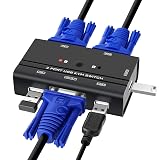 Best Compact TCRAYCH 2-Port KVM Switch: Panel button and LED in a 3.54 in wide box with 2 cables. Check price on Amazon
The picks
| # | Product | Office Score | Buy |
|---|---|---|---|
| 1 | IOGEAR GCS22U KVM Switch | 9.6/10 | Buy on Amazon |
| 2 | IOGEAR GCS72U KVM Switch | 9.5/10 | Buy on Amazon |
| 3 | MT-VIKI 4-Port KVM Switch | 9.5/10 | Buy on Amazon |
| 4 | DGODRT 2-Port KVM Switch | 9.4/10 | Buy on Amazon |
| 5 | TCRAYCH 2-Port KVM Switch | 9.4/10 | Buy on Amazon |

IOGEAR GCS22U KVM Switch
A cabled 2-port switch with a wired remote button, for a desk running two VGA computers off one monitor, keyboard and mouse.
Pros
- 2048 x 1536 maximum resolution, the highest stated here
- Wired remote switch button on a 6 ft cable for desk placement
- Cables included; no power adapter required
- 3-year warranty stated
Cons
- No audio or microphone support stated
- Only 2 ports; no 4-port option in this listing
- No USB hub for extra peripherals stated
- Attached cables need routing behind the desk
Detailed Review
IOGEAR lists the GCS22U as a 2-port USB VGA cabled KVM switch with 2048 x 1536 resolution, a wired remote switch button on a 6 ft cable, and included cables that need no power adapter. The listing states plug-n-play operation with PC, Mac and Sun systems and a 3-year warranty.
Who it's for: someone with two VGA computers who wants a one-button switch on the desk. Who should skip it: anyone who needs audio switching or more than 2 ports.
Its Office Score of 9.6/10 comes from performance 30/35, build 21/25, value 20/25, safety 0/10 and warranty 4/5: 75 of 100 points, placed on our 9.2 to 9.8 scale.
Key Specifications
| Ports | 2 |
|---|---|
| Max resolution | 2048 x 1536 |
| Switching | Wired remote button |
| Warranty | 3 years |
Figures as published on the retailer listing, collected 22 October 2026. Performance figures are manufacturer rated.
Safety and Warranty
What this listing states. This product does not plug in or run on a battery, so safety is not part of its score. 3-year warranty. It does not say everything a buyer needs, such as who pays return shipping, so warranty scores 4 of 5. See How We Pick.
Power and heat. Use the supplied adapter, treat power delivery wattage and display support as the maker's claims for your laptop model, and give the dock room to vent.
This is general buying information, not professional advice. Follow each product manual and local rules, and see our Safety Disclaimer.

IOGEAR GCS72U KVM Switch
The audio version of the 2-port switch, for two computers that also share speakers and a microphone.
Pros
- 2048 x 1536 maximum resolution with DDC2B
- 2.1 stereo audio and microphone support
- One-touch pushbutton switch for the desk; no power adapter required
- 3-year warranty plus free lifetime technical support stated
Cons
- Only 2 ports; no 4-port option in this listing
- No USB hub for extra peripherals stated
- No remote cable; switching is on the unit pushbutton
- 3 ft molded-in cables fix the layout
Detailed Review
IOGEAR lists the GCS72U as a 2-port USB VGA cabled KVM switch with 2048 x 1536 resolution, 2.1 stereo audio and microphone support, and a one-touch pushbutton switch. The 3 ft molded-in cables need no power adapter, and the listing states a 3-year warranty with free lifetime technical support.
Who it's for: someone who wants audio and mic switching alongside two VGA computers. Who should skip it: anyone who needs more than 2 ports or a USB hub.
Its Office Score of 9.5/10 comes from performance 30/35, build 21/25, value 19/25, safety 0/10 and warranty 4/5: 74 of 100 points, placed on our 9.2 to 9.8 scale.
Key Specifications
| Ports | 2 |
|---|---|
| Max resolution | 2048 x 1536 |
| Audio | 2.1 stereo + mic |
| Warranty | 3 years |
Figures as published on the retailer listing, collected 22 October 2026. Performance figures are manufacturer rated.
Safety and Warranty
What this listing states. This product does not plug in or run on a battery, so safety is not part of its score. 3-year warranty. It does not say everything a buyer needs, such as who pays return shipping, so warranty scores 4 of 5. See How We Pick.
Power and heat. Use the supplied adapter, treat power delivery wattage and display support as the maker's claims for your laptop model, and give the dock room to vent.
This is general buying information, not professional advice. Follow each product manual and local rules, and see our Safety Disclaimer.

MT-VIKI 4-Port KVM Switch
A 4-port switch with a USB hub, for four computers sharing one monitor, keyboard, mouse and printer.
Pros
- 4 ports with a 3-port USB 2.0 hub for printer or drive sharing
- 4 KVM cables included in the box
- Up to 1920 x 1440 resolution, per the bullets
- CE specification met, per the spec table
Cons
- Spec table lists HDMI input and 1080P, contradicting the VGA title and bullets
- No warranty term is stated
- Push-button switching on the unit; no remote stated
- No audio support stated
Detailed Review
MT-VIKI lists a 4-port VGA KVM switch with a 3-port USB 2.0 hub, 4 included KVM cables and support up to 1920 x 1440. The spec table contradicts the listing with an HDMI input and 1080P resolution; the title and bullets describe a VGA switch, which is the safer read.
Who it's for: someone running three or four computers who wants printer sharing too. Who should skip it: anyone who needs audio switching or a stated warranty.
Its Office Score of 9.5/10 comes from performance 32/35, build 20/25, value 21/25, safety 5/10 and warranty 0/5: 78 of 100 points, placed on our 9.2 to 9.8 scale.
Key Specifications
| Ports | 4 |
|---|---|
| USB hub | 3-port USB 2.0 |
| Cables included | 4 |
| Max resolution | 1920 x 1440 |
Figures as published on the retailer listing, collected 22 October 2026. Performance figures are manufacturer rated.
Safety and Warranty
What this listing states. CE specification met, per the spec table, so safety scores 5 of 10. No warranty term, so warranty scores zero. See How We Pick.
Power and heat. Use the supplied adapter, treat power delivery wattage and display support as the maker's claims for your laptop model, and give the dock room to vent.
This is general buying information, not professional advice. Follow each product manual and local rules, and see our Safety Disclaimer.

DGODRT 2-Port KVM Switch
A 2-port switch with a wired desktop controller, for switching two computers without leaving the chair.
Pros
- Wired desktop controller plus panel button for switching
- 3 USB ports for keyboard, mouse and a third device
- 2 KVM cables included; plug and play, no driver
- 1-year warranty stated
Cons
- 1920 x 1440 maximum resolution, below the IOGEAR picks
- Spec table lists model KS402V but part number KS202V
- No audio support stated
- Only 2 ports
Detailed Review
DGODRT lists a 2-port USB VGA KVM switch with a wired desktop controller, 3 USB ports and 1920 x 1440 resolution, with 2 KVM cables included and no driver required. The spec table lists model KS402V but part number KS202V; either way the listing states a 1-year warranty.
Who it's for: someone who wants a desktop controller for easy switching between two PCs. Who should skip it: anyone who needs 2048 x 1536 resolution or 4 ports.
Its Office Score of 9.4/10 comes from performance 28/35, build 19/25, value 20/25, safety 0/10 and warranty 2/5: 69 of 100 points, placed on our 9.2 to 9.8 scale.
Key Specifications
| Ports | 2 |
|---|---|
| Max resolution | 1920 x 1440 |
| Switching | Wired controller + panel button |
| Warranty | 1 year |
Figures as published on the retailer listing, collected 22 October 2026. Performance figures are manufacturer rated.
Safety and Warranty
What this listing states. This product does not plug in or run on a battery, so safety is not part of its score. 1-year warranty. It does not say everything a buyer needs, such as who pays return shipping, so warranty scores 2 of 5. See How We Pick.
Power and heat. Use the supplied adapter, treat power delivery wattage and display support as the maker's claims for your laptop model, and give the dock room to vent.
This is general buying information, not professional advice. Follow each product manual and local rules, and see our Safety Disclaimer.
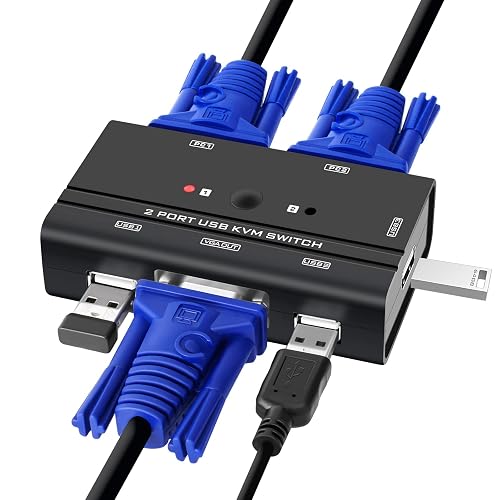
TCRAYCH 2-Port KVM Switch
A compact 2-port switch with an LED indicator, for two computers on a crowded desk.
Pros
- Panel button switching with an LED indicator
- 3 USB devices shared: keyboard, mouse, printer or scanner
- 2 KVM cables included; no software or power adapter needed
- 3.54 x 1.97 x 0.79 in, the smallest stated footprint here
Cons
- No warranty term is stated
- 1920 x 1440 maximum resolution, below the IOGEAR picks
- No audio support stated
- No remote controller stated; switching is on the panel
Detailed Review
TCRAYCH lists a 2-port VGA KVM switch with panel-button switching, an LED indicator and support for 3 USB devices, with 2 KVM cables included and 1920 x 1440 maximum resolution. The listing states plug and play with no software or external power adapter.
Who it's for: someone who wants the smallest box that switches two computers and three USB devices. Who should skip it: anyone who needs a warranty term or audio switching.
Its Office Score of 9.4/10 comes from performance 28/35, build 19/25, value 21/25, safety 0/10 and warranty 0/5: 68 of 100 points, placed on our 9.2 to 9.8 scale.
Key Specifications
| Ports | 2 |
|---|---|
| Max resolution | 1920 x 1440 |
| USB sharing | 3 devices |
| Dimensions | 3.54 x 1.97 x 0.79 in |
Figures as published on the retailer listing, collected 22 October 2026. Performance figures are manufacturer rated.
Safety and Warranty
What this listing states. This product does not plug in or run on a battery, so safety is not part of its score. No warranty term, so warranty scores zero. See How We Pick.
Power and heat. Use the supplied adapter, treat power delivery wattage and display support as the maker's claims for your laptop model, and give the dock room to vent.
This is general buying information, not professional advice. Follow each product manual and local rules, and see our Safety Disclaimer.
As an Amazon Associate I earn from qualifying purchases.
More picks to compare
 DGODRT 4-Port KVM SwitchFor four computers with 4 cables and a desktop controller.Check on Amazon
 StarTech SV231USB KVM SwitchFor a TAA-compliant 2-port switch with a 2-year warranty.Check on Amazon
 Arvitek 4-Port KVM SwitchFor 4 computers with button-only switching and 4 cables.Check on Amazon
 Arvitek 2-Port KVM SwitchFor two computers with simple button switching, no hotkeys.Check on Amazon
 CKLau 4-Port KVM SwitchFor 2048 x 1536 with audio and four switching modes.Check on Amazon
Compare the picks
| KVM switch | Office Score | Ports | Max resolution | USB hub | Audio | Warranty | Amazon |
|---|---|---|---|---|---|---|---|
| IOGEAR GCS22U KVM Switch | 9.6/10 | 2 | 2048 x 1536 | Not stated | Not stated | 3 years | View on Amazon |
| IOGEAR GCS72U KVM Switch | 9.5/10 | 2 | 2048 x 1536 | Not stated | 2.1 stereo + mic | 3 years | View on Amazon |
| MT-VIKI 4-Port KVM Switch | 9.5/10 | 4 | 1920 x 1440 | 3 USB 2.0 | Not stated | Not stated | View on Amazon |
| DGODRT 2-Port KVM Switch | 9.4/10 | 2 | 1920 x 1440 | 3 USB | Not stated | 1 year | View on Amazon |
| TCRAYCH 2-Port KVM Switch | 9.4/10 | 2 | 1920 x 1440 | 3 USB | Not stated | Not stated | View on Amazon |
Specifications are manufacturer rated as listed, collected 22 October 2026.
How we scored them
The Office Score weighs performance, build, value, safety and warranty. For KVM switches, safety means stated certifications and switching that cannot mix inputs; only one pick states a certification. Three of the five picks state a warranty term. How we pick explains the weights.
| Product | Office Score | Perf. /35 | Build /25 | Value /25 | Safety /10 | Warranty /5 |
|---|---|---|---|---|---|---|
| IOGEAR GCS22U KVM Switch | 9.6 | 30 | 21 | 20 | 0 | 4 |
| IOGEAR GCS72U KVM Switch | 9.5 | 30 | 21 | 19 | 0 | 4 |
| MT-VIKI 4-Port KVM Switch | 9.5 | 32 | 20 | 21 | 5 | 0 |
| DGODRT 2-Port KVM Switch | 9.4 | 28 | 19 | 20 | 0 | 2 |
| TCRAYCH 2-Port KVM Switch | 9.4 | 28 | 19 | 21 | 0 | 0 |
Scores run from 9.2 to 9.8: each product’s point total is placed on that range, so more points always means a higher score.
How to choose the best kvm switch vga
Count the computers first
Most desks need 2 ports, and four of the five picks here switch exactly two computers. The MT-VIKI is the exception with 4 ports plus a 3-port USB hub, so it suits a desk that may grow a third or fourth machine. If two is plenty, the 2-computer KVM switches roundup has more options. The 3-port USB hub on the MT-VIKI also shares a printer or drive across all four machines, which the 2-port picks cannot do.
Check the resolution against the monitor
Both IOGEAR picks list 2048 x 1536, the highest resolution stated here, while the other three list 1920 x 1440. Match the switch to the monitor: a 1920 x 1440 switch will not show more than its stated maximum. If the monitor takes HDMI instead, see the KVM switches with HDMI roundup. Compatibility runs downward too: the listings note backward compatibility with lower resolutions, so a higher-rated switch still drives a smaller monitor.
Pick the switching method
The GCS22U switches from a wired remote button on a 6 ft cable, the DGODRT from a wired desktop controller, and the GCS72U, MT-VIKI and TCRAYCH from buttons on the unit itself. A remote or controller keeps the switch box tucked away; a panel button keeps everything in one small box. None of the five list keyboard hotkey switching.
Audio is rare here
Only the IOGEAR GCS72U lists audio switching, with 2.1 stereo output and microphone support alongside its 2048 x 1536 video. The other four move video, keyboard and mouse only. If the desk shares speakers between machines, the GCS72U is the only pick here that carries sound.
Mind the cables and power
Every pick includes its KVM cables: molded-in 3 ft cables on the GCS72U, included sets on the rest, and 4 cables with the MT-VIKI. The GCS22U, GCS72U and TCRAYCH state that no power adapter is required, and the MT-VIKI draws power through its USB connector. Fewer wall warts means a cleaner desk. The listings that state a cable length keep it short: 3 ft molded-in on the GCS72U and a 6 ft remote cable on the GCS22U.
| If you need | Look for | Example pick |
|---|---|---|
| Highest resolution | 2048 x 1536 stated | IOGEAR GCS22U, GCS72U |
| Four computers | 4 ports and a USB hub | MT-VIKI |
| Switch from your chair | Wired remote or controller | IOGEAR GCS22U, DGODRT |
| Audio too | Stated audio and mic support | IOGEAR GCS72U |
Setup Notes
- Measure cable runs: the GCS72U includes 3 ft molded-in cables and the GCS22U a 6 ft remote cable, so plan the desk layout around the shortest run.
- Confirm VGA ports on every computer before ordering; each pick here is VGA in and VGA out.
- Plug the USB head in too: on combo cables the USB connector carries power and data.
- Place the switch where its button or remote is reachable; the TCRAYCH switches on its panel.
- Label each KVM cable at the computer end, so a re-plug after moving the desk goes to the right machine.
- Keep the remote or controller on the desk: the GCS22U remote rides a 6 ft cable and the DGODRT controller is wired, so both need a cable path back to the switch.
Frequently Asked Questions
What is a KVM switch?
A box that lets two or more computers share one monitor, keyboard and mouse. You press a button instead of swapping cables, so one desk setup drives every machine. Typical pairs are a work PC plus a personal PC, or a desktop plus a laptop.
How many computers can these switches handle?
The IOGEAR, DGODRT and TCRAYCH picks handle 2 computers each. The MT-VIKI handles 4 computers with its 3-port USB hub.
Do the cables come in the box?
Yes on all five. The GCS72U has 3 ft molded-in cables, the GCS22U lists included cables, the MT-VIKI includes 4 KVM cables, and the TCRAYCH and DGODRT each include 2 KVM cables.
Do these need a power adapter?
The GCS22U, GCS72U and TCRAYCH state that no power adapter is required. The MT-VIKI draws power through its USB connector, so plug the USB head in.
Which of these have a warranty?
Both IOGEAR picks state a 3-year warranty, and the DGODRT states a 1-year warranty. The MT-VIKI and TCRAYCH state no warranty term.
Related guides
See every docking stations and USB hubs guide and all connectivity guides.
More picks: KVM switches with HDMI, KVM switches with USB-C and KVM switches for laptop and desktop.



