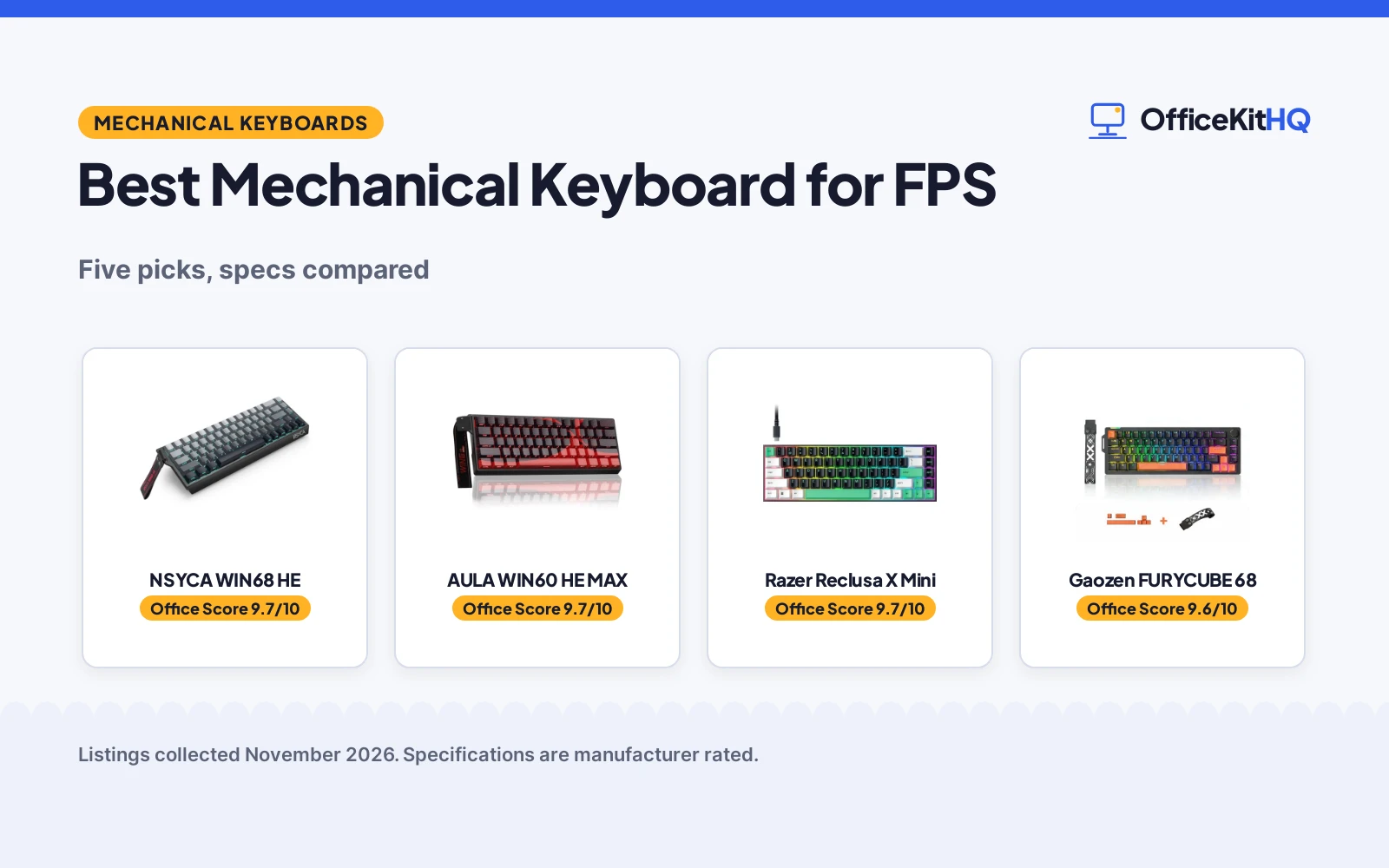
The best mechanical keyboard for fps is the board that keeps up when a round turns on a single peek: switches that reset fast, a layout that leaves room for the mouse, and a polling rate that keeps input delay out of the way. At a home desk wedged into a spare room corner, with a monitor, a mug and a tangle of cables sharing the surface, that is the difference between a clean strafe and a mistimed step. The keyboards below are compared by polling rate, rapid trigger actuation, switch type, layout and warranty term, using only what each maker publishes.
OfficeKitHQ earns a commission when you buy through links on this page, at no extra cost to you. As an Amazon Associate I earn from qualifying purchases. Affiliate disclosure.
Quick picks
 Best Overall NSYCA WIN68 HE: 8000 Hz, 0.01 to 4.0 mm actuation, DKS and SOCD Check price on Amazon
 Best Rapid Trigger AULA WIN60 HE MAX: 8000 Hz polling, 0.01 mm rapid trigger step, Hall effect Check price on Amazon
 Best 68% Layout Gaozen FURYCUBE 68: 68% gasket mount, volume knob, switches rated 50 million keystrokes Check price on Amazon
 Best Wireless Redragon K671KS: Tri-mode BT, 2.4G and USB-C, hot-swappable, 8 spare switches Check price on Amazon
 65% Compact Pick Razer Reclusa X Mini: 65% hot-swappable layout with Chroma RGB Check price on Amazon
Our desk picks
| # | Product | Office Score | Buy |
|---|---|---|---|
| 1 | NSYCA WIN68 HE | 9.7/10 | Buy on Amazon |
| 2 | AULA WIN60 HE MAX | 9.7/10 | Buy on Amazon |
| 3 | Razer Reclusa X Mini | 9.7/10 | Buy on Amazon |
| 4 | Gaozen FURYCUBE 68 | 9.6/10 | Buy on Amazon |
| 5 | Redragon K671KS | 9.5/10 | Buy on Amazon |

NSYCA WIN68 HE
A 60% Hall effect keyboard with 8000 Hz polling, actuation from 0.01 to 4.0 mm, DKS and SOCD, and a 1-year warranty.
Pros
- 8000 Hz polling with 0.1 ms latency stated
- Actuation adjusts from 0.01 to 4.0 mm with rapid trigger
- DKS and SOCD modes for advanced key control
- Gasket structure with foam and pre-lubed switches
Cons
- 60% layout leaves out the function row and number pad
- Wired only, with no wireless mode stated
- Hot-swap covers 3-pin magnetic switches only
- No volume knob or media control is stated
Detailed Review
NSYCA lists the WIN68 HE as a 60% Hall effect keyboard with adjustable actuation from 0.01 to 4.0 mm, rapid trigger, DKS and SOCD, and an 8000 Hz polling rate with 0.1 ms latency. The maker also states a 32K single-key scan rate and a 4K full-key scan rate, pre-lubed 3-pin hot-swappable switches, a gasket structure with foam layers, PBT shine-through keycaps, 14 RGB effects and 16.8 million colors, and a web-based driver with a 1-year limited warranty.
Who it's for: an FPS player who wants adjustable actuation, rapid trigger and DKS and SOCD on a compact board. Who should skip it: anyone who wants wireless, a number pad, or a volume knob.
Its Office Score of 9.7/10 comes from performance 32/35, build 21/25, value 21/25, safety not scored (non-powered gear) and warranty 3/5: 77 of 90 points, placed on our 9.2 to 9.8 scale.
Key Specifications
| Polling rate | 8000 Hz |
|---|---|
| Actuation | 0.01 to 4.0 mm |
| Layout | 60% with arrow keys |
| Warranty | 1 year |
These specs mirror the retailer listing as of 20 November 2026; performance figures are stated by the brand.
Safety and Warranty
What this listing states. This product does not plug in or run on a battery, so safety is not part of its score. 1-year limited warranty. It does not say everything a buyer needs, such as who pays return shipping, so warranty scores 3 of 5. See How We Pick.
Fit the desk first. Check the stated size against your desk depth and keyboard tray, and charge or pair as the manual describes. No keyboard, mouse or wrist rest prevents or treats injury.
This is general buying information, not professional advice. Follow each product manual and local rules, and see our Safety Disclaimer.
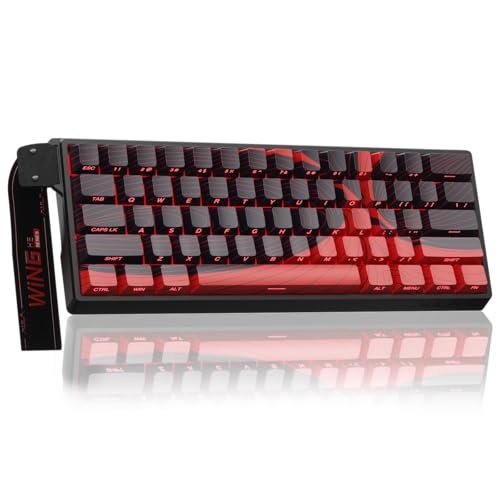
AULA WIN60 HE MAX
A 60% Hall effect keyboard built for FPS play with 8000 Hz polling, a 0.01 mm rapid trigger step and a 6-month warranty.
Pros
- 8000 Hz polling rate stated for fast response
- 0.01 mm rapid trigger step for quick key resets
- Hall effect magnetic switches with adjustable actuation
- Compact 60% layout at 11.0 by 5.0 in
Cons
- 6-month warranty is the shortest stated here
- 60% layout leaves out the number pad and function row
- No volume knob is stated
- No gasket mount or foam layers are stated
Detailed Review
AULA lists the WIN60 HE MAX as a 60% Hall effect keyboard with magnetic switches, adjustable actuation and a 0.01 mm rapid trigger step, built for FPS titles such as Valorant and CS2. The maker states an 8000 Hz polling rate, side printed PBT keycaps with 16.8 million RGB colors, a web-based driver for remapping and macros, and dimensions of 11.0 by 5.0 by 1.1 in with a 6-month warranty.
Who it's for: an FPS player who wants rapid trigger and 8000 Hz polling on a compact 60% board. Who should skip it: anyone who wants wireless, arrow keys, or a longer warranty term.
Its Office Score of 9.7/10 comes from performance 32/35, build 21/25, value 20/25, safety not scored (non-powered gear) and warranty 2/5: 75 of 90 points, placed on our 9.2 to 9.8 scale.
Key Specifications
| Polling rate | 8000 Hz |
|---|---|
| Rapid trigger step | 0.01 mm |
| Size | 11.0 by 5.0 by 1.1 in |
| Warranty | 6 months |
These specs mirror the retailer listing as of 20 November 2026; performance figures are stated by the brand.
Safety and Warranty
What this listing states. This product does not plug in or run on a battery, so safety is not part of its score. 6 Months. It does not say everything a buyer needs, such as who pays return shipping, so warranty scores 2 of 5. See How We Pick.
Fit the desk first. Check the stated size against your desk depth and keyboard tray, and charge or pair as the manual describes. No keyboard, mouse or wrist rest prevents or treats injury.
This is general buying information, not professional advice. Follow each product manual and local rules, and see our Safety Disclaimer.

Razer Reclusa X Mini
A 65% hot-swappable mechanical gaming keyboard with Razer Orange Tactile Gen-3 switches, Chroma RGB and a 1000Hz polling rate for competitive play.
Pros
- Hot-swappable PCB fits 3-pin and 5-pin switches
- Razer Orange Tactile Gen-3 switches with Snap Tap and Dual-Keypress Priority
- 1000Hz polling rate with N-key rollover and anti-ghosting
- 2 Year Manufacturer warranty stated
Cons
- No wireless connection is stated; detachable USB-C only
- ABS doubleshot keycaps, not PBT
- No wrist rest is stated
- No carrying case is stated
Detailed Review
Razer lists the Reclusa X Mini as a 65% hot-swappable mechanical gaming keyboard with a socketed PCB that fits 3-pin and 5-pin switches, Razer Orange Tactile Gen-3 switches, a PPS plate and dual-layer silicone dampening. Per-key Chroma RGB covers 16.8 million colors, with south-facing LEDs for aftermarket keycap sets. Snap Tap, Snap Flex and Dual-Keypress Priority are stated for competitive play, with a 1000Hz polling rate, N-key rollover and anti-ghosting over a detachable USB-C connection. The keyboard measures 12.24 x 4.02 x 1.47 inches at 1.56 pounds.
Who it's for: someone who swaps switches and wants tournament features in a compact 65% board. Who should skip it: anyone who wants wireless or a full-size layout with a number pad.
Its Office Score of 9.7/10 comes from performance 32/35, build 22/25, value 21/25, safety not scored (non-powered gear) and warranty 3/5: 78 of 90 points, placed on our 9.2 to 9.8 scale.
Key Specifications
| Layout | 65% |
|---|---|
| Switches | Orange Tactile Gen-3, hot-swappable |
| Polling | 1000Hz |
| Weight | 1.56 pounds |
Figures as published on the retailer listing, collected 12 November 2026. Performance figures are manufacturer rated.
Safety and Warranty
What this listing states. This product does not plug in or run on a battery, so safety is not part of its score. 2 Year Manufacturer. It does not say everything a buyer needs, such as who pays return shipping, so warranty scores 3 of 5. See How We Pick.
Fit the desk first. Check the stated size against your desk depth and keyboard tray, and charge or pair as the manual describes. No keyboard, mouse or wrist rest prevents or treats injury.
This is general buying information, not professional advice. Follow each product manual and local rules, and see our Safety Disclaimer.

Gaozen FURYCUBE 68
A 68% gasket-mount keyboard with pre-lubed linear switches, a volume knob, double-shot PBT keycaps and a 1-year warranty.
Pros
- 68% layout keeps arrow and navigation keys
- Pre-lubed linear switches rated for 50 million keystrokes
- Hot-swappable PCB supports 3-pin and 5-pin switches
- Volume knob and double-shot PBT keycaps
Cons
- No polling rate is stated
- No rapid trigger or Hall effect switches
- Wired only, with no wireless mode stated
- No actuation distance is stated
Detailed Review
Gaozen lists the FURYCUBE 68% as a gasket-mount keyboard with pre-lubed linear switches rated for 50 million keystrokes and a hot-swappable PCB that supports 3-pin and 5-pin switches. The maker states a volume knob, 16 lighting modes, double-shot PBT keycaps in an MDA profile, compatibility with Windows and macOS, and a 1-year warranty.
Who it's for: a player who wants a 68% layout with arrow keys, a volume knob and gasket mounting for FPS and everyday use. Who should skip it: anyone who wants a stated polling rate or rapid trigger.
Its Office Score of 9.6/10 comes from performance 27/35, build 20/25, value 21/25, safety not scored (non-powered gear) and warranty 3/5: 71 of 90 points, placed on our 9.2 to 9.8 scale.
Key Specifications
| Layout | 68% |
|---|---|
| Switches | Pre-lubed linear, 50 million keystrokes |
| Keycaps | Double-shot PBT, MDA profile |
| Warranty | 1 year |
These specs mirror the retailer listing as of 20 November 2026; performance figures are stated by the brand.
Safety and Warranty
What this listing states. This product does not plug in or run on a battery, so safety is not part of its score. 1-year warranty. It does not say everything a buyer needs, such as who pays return shipping, so warranty scores 3 of 5. See How We Pick.
Fit the desk first. Check the stated size against your desk depth and keyboard tray, and charge or pair as the manual describes. No keyboard, mouse or wrist rest prevents or treats injury.
This is general buying information, not professional advice. Follow each product manual and local rules, and see our Safety Disclaimer.

Redragon K671KS
A tri-mode mechanical keyboard with hot-swap switches, macro editing and 8 spare switches in the box.
Pros
- Hot-swap, 8 spare switches
- Macro editing, per-key RGB
- Tri-mode, up to 5 devices
- Metal panel, PBT keycaps
Cons
- Layout not stated in listing
- No warranty term is stated
- Red switches may feel light
- Software is vendor-locked
Detailed Review
Redragon lists the K671KS as a wireless mechanical gaming keyboard with tri-mode USB-C, Bluetooth and 2.4GHz connectivity for up to 5 devices, hot-swappable red linear switches and macro editing with key remapping. The listing states 16 preset backlights, double-injection PBT keycaps, a metal panel design, 8 spare switches and two red keycaps in the box, and switches rated for 500,000 keypresses. No warranty term is stated.
Who it's for: budget tinkerers who want hot-swap and spares included. Who should skip it: anyone who needs the exact layout stated before buying.
The macro support lets you remap key functions, set shortcuts or combine multiple functions into one key, per the listing, and RGB effects can be adjusted individually for each key.
Its Office Score of 9.5/10 comes from performance 30/35, build 24/25, value 21/25, safety 0/10 and warranty 0/5: 75 of 100 points, placed on our 9.2 to 9.8 scale.
Key Specifications
| Switches | Red linear, hot-swap |
|---|---|
| Connectivity | BT, 2.4GHz, USB-C |
| Keycaps | PBT double-injection |
| Spares | 8 switches, 2 keycaps |
| Warranty | Not stated |
Figures as published on the retailer listing, collected 17 October 2026. Performance figures are manufacturer rated.
Safety and Warranty
What this listing states. This product does not plug in or run on a battery, so safety is not part of its score. No warranty term, so warranty scores zero. See How We Pick.
Fit the desk first. Check the stated size against your desk depth and keyboard tray, and charge or pair as the manual describes. No keyboard, mouse or wrist rest prevents or treats injury.
This is general buying information, not professional advice. Follow each product manual and local rules, and see our Safety Disclaimer.
As an Amazon Associate I earn from qualifying purchases.
Specs compared
| Keyboard | Office Score | Polling rate | Switches | Layout | Warranty | Amazon |
|---|---|---|---|---|---|---|
| NSYCA WIN68 HE | 9.7/10 | 8000 Hz | Hall effect, 0.01 to 4.0 mm | 60% with arrow keys | 1 year | View on Amazon |
| AULA WIN60 HE MAX | 9.7/10 | 8000 Hz | Hall effect, 0.01 mm step | 60% | 6 months | View on Amazon |
| Gaozen FURYCUBE 68 | 9.6/10 | Not stated | Pre-lubed linear, 50 million keystrokes | 68% | 1 year | View on Amazon |
| Redragon K671KS | 9.5/10 | Not stated | Hot-swappable red | Not stated | Not stated | View on Amazon |
| Razer Reclusa X Mini | 9.7/10 | Not stated | Hot-swappable | 65% | Not stated | View on Amazon |
Dimensions, weight limits and ranges are the maker’s ratings as each listing gives them, collected 20 November 2026. Three of the five state a warranty term; none states a safety certification.
How to choose the best mechanical keyboard for fps
Start with polling rate and rapid trigger
Polling rate is the number to check first on an FPS board, because it sets how often the keyboard reports to the computer. The NSYCA WIN68 HE and the AULA WIN60 HE MAX both state 8000 Hz, and both pair it with rapid trigger: the NSYCA adjusts actuation from 0.01 to 4.0 mm, and the AULA states a 0.01 mm rapid trigger step. The Gaozen, the Redragon and the Razer state no polling rate, so there is nothing to compare on that figure. Rapid trigger resets a key as soon as it starts to rise instead of waiting for a set point, which suits the quick stops and repeated peeks of FPS play. If a board gives no polling rate, weigh the switch type and layout instead, and read the best gaming keyboard for FPS guide for the wider field.
Match the layout to your desk and mouse
Layout decides how much desk is left for the mouse. The AULA and the NSYCA are 60% boards, the Razer is 65%, and the Gaozen is 68% with arrow and navigation keys kept. A 60% board drops the number pad and the function row, which frees the most space for wide mouse sweeps; the Gaozen keeps arrows for players who use them between rounds. The AULA is the only one of the five with stated dimensions, at 11.0 by 5.0 by 1.1 in, so measure your desk against that footprint if space is tight. Pair the board with a wrist rest for keyboards if you want padding under your wrists during long sessions.
| Keyboard | Polling rate | Actuation | Layout |
|---|---|---|---|
| NSYCA WIN68 HE | 8000 Hz | 0.01 to 4.0 mm | 60% with arrow keys |
| AULA WIN60 HE MAX | 8000 Hz | 0.01 mm step | 60% |
| Gaozen FURYCUBE 68 | Not stated | Not stated | 68% |
| Redragon K671KS | Not stated | Not stated | Not stated |
| Razer Reclusa X Mini | Not stated | Not stated | 65% |
Figures as stated by each maker. Actuation is the distance a key travels before it registers; a shorter minimum suits rapid repeated presses.
Switches, hot-swap and keycaps
Switches decide feel, and hot-swap decides whether you can change them later. The NSYCA and the AULA use Hall effect magnetic switches, which allow adjustable actuation and rapid trigger. The Gaozen uses pre-lubed linear switches rated for 50 million keystrokes, and its hot-swappable PCB supports 3-pin and 5-pin switches. The Redragon uses hot-swappable red switches and includes 8 spare switches and 2 red keycaps, while the Razer states hot-swappable switches with no switch type given. For keycaps, the Gaozen lists double-shot PBT in an MDA profile, the NSYCA lists PBT shine-through keycaps, the Redragon lists double injection PBT keycaps, and the AULA lists side printed PBT keycaps.
Wired, wireless and the driver question
The Redragon is the only one of the five with a wireless mode. The NSYCA, the AULA and the Gaozen are wired boards, and the Redragon adds Bluetooth 3.0 and 5.0 and 2.4 GHz to its USB-C wired mode, pairing with up to 5 devices. The AULA and the NSYCA use a web-based driver for remapping, macros and lighting, with no software download stated. The Gaozen uses software for lighting effects, and the Razer states Chroma RGB with no driver detail given. Switches wear with use, and the guide to how long gaming keyboards last covers the signs to watch for.
Read the warranty line before you buy
Three of the five state a warranty term. The NSYCA and the Gaozen state 1 year, and the AULA states 6 months. The Redragon and the Razer state no warranty term. A warranty term is the only written promise in the group about support after the sale, so weigh the two without one against their other features.
Setup Notes
- Measure the desk against the AULA at 11.0 by 5.0 by 1.1 in; the other four state no dimensions, so leave spare room around them.
- Plan a USB-C port for the wired boards and the Redragon wired mode; the Redragon also pairs over Bluetooth and 2.4 GHz.
- Keep the mouse sweep clear: the 60% boards free the most desk space, and the 68% Gaozen keeps its arrow keys.
- Route cables before play, and keep the web driver pages for the AULA and the NSYCA at hand for remapping and macros.
FAQ
What polling rate do these FPS keyboards state?
The NSYCA WIN68 HE and the AULA WIN60 HE MAX both state 8000 Hz. The Gaozen, the Redragon and the Razer state no polling rate.
What is rapid trigger on a Hall effect keyboard?
Rapid trigger resets a key as soon as it starts to rise instead of waiting for a set point. The NSYCA adjusts actuation from 0.01 to 4.0 mm, and the AULA states a 0.01 mm rapid trigger step.
Which of these keyboards has a volume knob?
Only the Gaozen FURYCUBE 68, which lists an aluminum knob for volume control and mute.
Are the switches on these keyboards swappable?
The NSYCA supports 3-pin magnetic switches, the Gaozen supports 3-pin and 5-pin switches, and the AULA, the Redragon and the Razer state hot-swappable switches. The Redragon includes 8 spare switches.
Which keyboards here state a warranty term?
The NSYCA and the Gaozen state 1 year, and the AULA states 6 months. The Redragon and the Razer state no warranty term.
Score breakdown
The Office Score weighs performance (polling rate, rapid trigger, actuation range and switch features), build (mount, keycaps, frame and layout), value for the stated specs, safety and warranty. For a keyboard, safety means a stated safety certification or safety feature; none of the five states one, so safety scores zero across the group. Three state a warranty term: the NSYCA and the Gaozen at 1 year, and the AULA at 6 months. How we pick explains the weights.
| Product | Office Score | Perf. /35 | Build /25 | Value /25 | Safety /10 | Warranty /5 |
|---|---|---|---|---|---|---|
| NSYCA WIN68 HE | 9.7 | 32 | 21 | 21 | n/a | 3 |
| AULA WIN60 HE MAX | 9.7 | 32 | 21 | 20 | n/a | 2 |
| Gaozen FURYCUBE 68 | 9.6 | 27 | 20 | 21 | n/a | 3 |
Office Scores run on a short 9.2 to 9.8 scale. We place each item’s weighted point total on it in proportion, so a larger total is always shown as a larger score. When an item is unpowered and its listing names no safety feature, we drop safety and score it out of 90 points.
More for your workspace
See every keyboards guide and all computer peripherals guides. Also see our best gaming keyboard for CS2.
More picks: mice and mouse pads, desk mats and pads, webcams and ring lights.