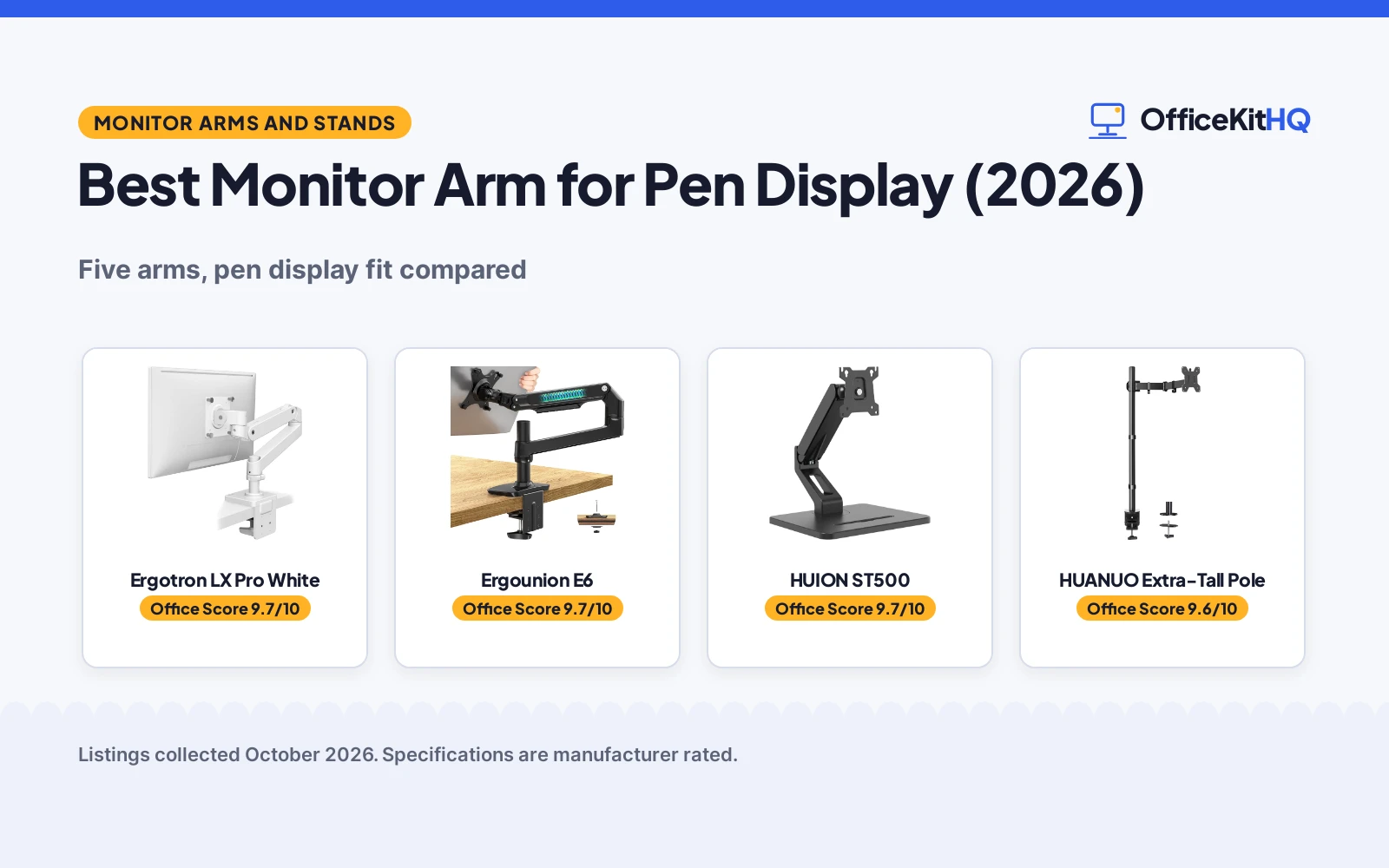
The best monitor arm for pen display work is the one that keeps the screen steady at the angle you draw from, because a wobbling panel or a slipping clamp ruins a long session faster than any spec sheet. A pen display usually lives at arm’s reach, so the mount has to hold its VESA pattern, its weight and its tilt without drifting. We compared five monitor arms from what each listing publishes, scoring screen size range, load capacity, movement, stated mounting and safety details, and warranty term.
OfficeKitHQ earns a commission when you buy through links on this page, at no extra cost to you. As an Amazon Associate I earn from qualifying purchases. Affiliate disclosure.
Quick picks
 Best Overall Ergotron LX Pro White: 34 in, 4 to 22 lb, 13 in lift, 10-year warranty stated Check price on Amazon
 Best for Large Screens Ergounion E6: 40 in, 25 lb, aluminum, C-clamp and grommet stated Check price on Amazon
 Best for Pen Displays HUION ST500: Pen series space, 17 to 32 in, 4.4 to 22 lb, freestanding base Check price on Amazon
 Tallest Pole HUANUO Extra-Tall Pole: 39 in extra-tall pole stated Check price on Amazon
 Simple Pick ErGear 19.8 lb Arm: 17 to 34 in, 19.8 lb capacity stated Check price on Amazon
The picks
| # | Product | Office Score | Buy |
|---|---|---|---|
| 1 | Ergotron LX Pro White | 9.7/10 | Buy on Amazon |
| 2 | Ergounion E6 | 9.7/10 | Buy on Amazon |
| 3 | HUION ST500 | 9.7/10 | Buy on Amazon |
| 4 | HUANUO 39 in Pole Arm | 9.6/10 | Buy on Amazon |
| 5 | ErGear EGDMA71B | 9.6/10 | Buy on Amazon |

Ergotron LX Pro White
Premium single monitor arm for screens up to 34 in and 4 to 22 lb, with 13 in of lift and a stated 10-year warranty.
Pros
- Stated 10-year warranty with expert technical support
- Raises screens up to 18.3 in above the worksurface with 13 in of lift
- Fits screens up to 34 in and 4 to 22 lb with VESA 75x75mm and 100x100mm
- Built-in cable management keeps the workspace tidy
Cons
- Grommet mount is a separate accessory, not included
- Single-arm listing: a dual-screen setup needs a second unit
- White is the only finish this listing states
- Tilt is limited to 85 degrees per the spec table
Detailed Review
The listing states broad compatibility: single screens up to 34 in, 4 to 22 lb and up to 3.6 in deep, with VESA 75x75mm and 100x100mm patterns. A two-piece desk clamp for desks 0.4 to 2.4 in thick is included, while the grommet mount is a separate accessory. The maker lists 18.3 in of raise above the worksurface with 13 in of lift, 360 degrees of rotation and 85 degrees of tilt, plus built-in cable management and a 10-year warranty.
Who it's for: someone mounting a 34 in ultrawide or a smaller panel they want to move often, who values a stated long warranty. Who should skip it: anyone who needs the grommet mount included, or a darker finish than white.
Its Office Score of 9.7/10 comes from performance 30/35, build 22/25, value 20/25, safety 9/10 and warranty 4/5: 85 of 100 points, placed on our 9.2 to 9.8 scale.
Key Specifications
| Screen size | Up to 34 in |
|---|---|
| Load capacity | 4 to 22 lb |
| Lift | 13 in |
| Tilt | 85 degrees |
Figures as published on the retailer listing, collected 18 October 2026. Performance figures are manufacturer rated.
Safety and Warranty
What this listing states. VESA 75x75mm and 100x100mm patterns and two-piece desk clamp stated, so safety scores 9 of 10. 10 Years. It does not say everything a buyer needs, such as who pays return shipping, so warranty scores 4 of 5. See How We Pick.
Match the mount. Check your screen's VESA pattern, size and weight against the stated range, and check that your desk thickness and edge suit a clamp or grommet mount before you drill or clamp.
This is general buying information, not professional advice. Follow each product manual and local rules, and see our Safety Disclaimer.

Ergounion E6
Aluminum single monitor arm for screens up to 40 in and 25 lb, with C-clamp and grommet mounting and a stated 10 Year Manufacturer warranty.
Pros
- Stated 10 Year Manufacturer warranty
- Holds up to 40 in and 25 lb, the largest screen size stated here
- Aluminum alloy build with built-in cable management stated
- Both C-clamp and grommet mounting are included
Cons
- The bullets list monitors up to 34 in while the title states 40 in
- No stated height or lift range
- Matte black is the only finish stated
- A 25 lb screen leaves no margin under the stated capacity
Detailed Review
The listing states a single arm holding screens up to 40 in and 7 to 25 lb, in aluminum with a matte black finish, VESA 100 x 100 mm and 75 x 75 mm, rotate, swivel, tilt and articulating movement, and both C-clamp and grommet bases. The one contradiction: the bullets fit monitors up to 34 in while the title and the spec table state 40 in, so we trust the title. The maker lists 10 Year Manufacturer warranty coverage.
Who it's for: anyone mounting a large 34 to 40 in panel who wants both clamp and grommet hardware in the box. Who should skip it: anyone who needs a stated height range, or a finish other than matte black.
Its Office Score of 9.7/10 comes from performance 29/35, build 21/25, value 21/25, safety 9/10 and warranty 4/5: 84 of 100 points, placed on our 9.2 to 9.8 scale.
Key Specifications
| Screen size | Up to 40 in |
|---|---|
| Load capacity | 7 to 25 lb |
| Mounting | C-clamp and grommet |
| Tilt | 90 degrees |
Figures as published on the retailer listing, collected 18 October 2026. Performance figures are manufacturer rated.
Safety and Warranty
What this listing states. VESA 100 x 100 mm and 75 x 75 mm bracket and C-clamp and grommet mounting stated, so safety scores 9 of 10. 10 Year Manufacturer. It does not say everything a buyer needs, such as who pays return shipping, so warranty scores 4 of 5. See How We Pick.
Match the mount. Check your screen's VESA pattern, size and weight against the stated range, and check that your desk thickness and edge suit a clamp or grommet mount before you drill or clamp.
This is general buying information, not professional advice. Follow each product manual and local rules, and see our Safety Disclaimer.

HUION ST500
Gas spring monitor arm for 17 to 32 in screens and 4.4 to 22 lb, with a freestanding base and a space sized for the HUION pen series.
Pros
- Space sized for the HUION pen series doubles as pen storage
- Gas spring full motion with height adjustment from 2.95 to 12.8 in
- Freestanding non-slip base, so no desk clamp is needed
- Stated 1 year warranty
Cons
- Freestanding base suits fewer desk setups than a clamp
- No cable management is stated
- 32 in is a smaller top end than the Ergounion's 40 in
- Black is the only finish stated
Detailed Review
The listing states a gas spring arm for 17 to 32 in screens weighing 4.4 to 22 lb, with VESA 75x75mm and 100x100mm holes, height adjustment from 2.95 to 12.8 in (75 to 325 mm), a VESA connector that flips 135 degrees vertically and rotates 360 degrees, and a freestanding non-slip base. The pen display hook: the maker states a space sized for the HUION pen series, so the arm stands in for a pen tray. The maker lists a 1 year warranty.
Who it's for: a pen display owner who wants the tablet reachable on the arm itself, on a desk where clamping is not an option. Who should skip it: anyone mounting above 32 in, or who prefers a clamped arm.
Its Office Score of 9.7/10 comes from performance 32/35, build 21/25, value 21/25, safety 8/10 and warranty 3/5: 85 of 100 points, placed on our 9.2 to 9.8 scale.
Key Specifications
| Screen size | 17 to 32 in |
|---|---|
| Load capacity | 4.4 to 22 lb |
| Height | 2.95 to 12.8 in |
| VESA | 75x75 and 100x100 |
Figures as published on the retailer listing, collected 18 October 2026. Performance figures are manufacturer rated.
Safety and Warranty
What this listing states. VESA 75x75mm and 100x100mm patterns and non-slip freestanding base stated, so safety scores 8 of 10. 1 year warranty. It does not say everything a buyer needs, such as who pays return shipping, so warranty scores 3 of 5. See How We Pick.
Match the mount. Check your screen's VESA pattern, size and weight against the stated range, and check that your desk thickness and edge suit a clamp or grommet mount before you drill or clamp.
This is general buying information, not professional advice. Follow each product manual and local rules, and see our Safety Disclaimer.

HUANUO 39 in Pole Arm
A HUANUO single arm with a 39 in extra-tall pole for 13 to 32 in screens at up to 22 lb.
Pros
- 39 in pole stated
- 13 to 32 in stated
- 22 lb stated
- C-clamp and grommet included stated
Cons
- No warranty term is stated
- Single screen only
- Alloy steel stated
- Clear color stated
Detailed Review
HUANUO lists the arm with a 39 in extra-tall pole for 13 to 32 in screens and up to 38 in ultrawides, holding up to 22 lb.
The C-clamp fits desks up to 3.93 in thick and the grommet up to 2.75 in per the listing.
Its Office Score of 9.6/10 comes from performance 34/35, build 21/25, value 20/25, safety 5/10 and warranty 0/5: 80 of 100 points, placed on our 9.2 to 9.8 scale.
Key Specifications
Figures as published on the retailer listing, collected 18 October 2026. Performance figures are manufacturer rated.
Safety and Warranty
What this listing states. VESA 75x75 and 100x100 stated, so safety scores 5 of 10. No warranty term, so warranty scores zero. See How We Pick.
Match the mount. Check your screen's VESA pattern, size and weight against the stated range, and check that your desk thickness and edge suit a clamp or grommet mount before you drill or clamp.
This is general buying information, not professional advice. Follow each product manual and local rules, and see our Safety Disclaimer.

ErGear EGDMA71B
An alloy steel single arm for 17 to 34 inch screens up to 19.8 lb, with 22.6 in height and 20.6 in extension.
Pros
- Height adjusts up to 22.6 in, the tallest here
- 20.6 in horizontal extension
- Pre-installed cable management clips, no tools needed
- Integrated C-clamp with anti-slip silicone padding
Cons
- 19.8 lb capacity is lower than the WALI and monTEK
- No grommet mount option is listed
- 2-year warranty is shorter than the 10-year WALI term
- Black is the only color listed
Detailed Review
ErGear lists an alloy steel single arm for 17 to 34 inch screens up to 19.8 lb, with VESA 75 and 100 mm patterns. The listing gives height adjustment up to 22.6 in, horizontal extension up to 20.6 in, tilt of +80 to -50 degrees, swivel of ±90 degrees and 360 degree rotation, with an integrated C-clamp and pre-installed cable clips. The spec table states a 2-year warranty.
Who it's for: someone who wants the tallest height adjustment and tool-free cable clips. Who should skip it: anyone with a monitor over 19.8 lb.
Its Office Score of 9.6/10 comes from performance 29/35, build 21/25, value 20/25, safety 5/10 and warranty 3/5: 78 of 100 points, placed on our 9.2 to 9.8 scale.
Key Specifications
| Screen | 17-34 in, up to 19.8 lb |
|---|---|
| Height | Up to 22.6 in |
| Extension | Up to 20.6 in |
| Warranty | 2-year |
Figures as published on the retailer listing, collected 17 October 2026. Performance figures are manufacturer rated.
Safety and Warranty
What this listing states. 19.8 lb load capacity and VESA 75/100mm stated, so safety scores 5 of 10. 2-year warranty. It does not say everything a buyer needs, such as who pays return shipping, so warranty scores 3 of 5. See How We Pick.
Match the mount. Check your screen's VESA pattern, size and weight against the stated range, and check that your desk thickness and edge suit a clamp or grommet mount before you drill or clamp.
This is general buying information, not professional advice. Follow each product manual and local rules, and see our Safety Disclaimer.
As an Amazon Associate I earn from qualifying purchases.
More picks to compare
 AX WABER Single Monitor ArmCheck on Amazon
 ARES WING Gas Spring Ultrawide MonitorCheck on Amazon
 ErgotronCheck on Amazon
 TVON Dual Monitor Stand & Monitor ArmCheck on Amazon
Compare the picks
| Monitor arm | Office Score | Screen size | Load capacity | Movement | Warranty | Amazon |
|---|---|---|---|---|---|---|
| Ergotron LX Pro White | 9.7/10 | Up to 34 in | 4 to 22 lb | 13 in lift, 85 degree tilt | 10-year warranty stated | View on Amazon |
| Ergounion E6 | 9.7/10 | Up to 40 in | 7 to 25 lb | Rotate, swivel, tilt, articulating | 10 Year Manufacturer stated | View on Amazon |
| HUION ST500 | 9.7/10 | 17 to 32 in | 4.4 to 22 lb | Gas spring, 135 degree flip, 360 rotation | 1 year warranty stated | View on Amazon |
| HUANUO Extra-Tall Pole | 9.6/10 | Not stated | Not stated | Not stated | Not stated | |
| ErGear 19.8 lb Arm | 9.6/10 | 17 to 34 in | 19.8 lb | Not stated | Not stated |
Specifications are manufacturer rated as listed, collected 18 October 2026. Three of the five state a warranty term; three state VESA patterns and mounting hardware details.
How we scored them
The Office Score weighs performance (screen size range, load capacity, lift and movement range), build (materials and stated mounting hardware), value for the stated specs, safety and warranty. For a monitor arm, safety means stated VESA patterns and secure mounting details; the Ergotron, Ergounion and HUION state them, the other two do not. Three listings state a warranty term: the Ergotron LX Pro and the Ergounion E6 state 10 years each, and the HUION ST500 states 1 year. How we pick explains the weights.
| Product | Office Score | Perf. /35 | Build /25 | Value /25 | Safety /10 | Warranty /5 |
|---|---|---|---|---|---|---|
| Ergotron LX Pro White | 9.7 | 30 | 22 | 20 | 9 | 4 |
| Ergounion E6 | 9.7 | 29 | 21 | 21 | 9 | 4 |
| HUION ST500 | 9.7 | 32 | 21 | 21 | 8 | 3 |
Scores run from 9.2 to 9.8: each product’s point total is placed on that range, so more points always means a higher score.
How to choose the best monitor arm for pen display
Match the VESA pattern before anything else
The pattern on the back of the pen display decides the shortlist. The Ergotron LX Pro White, the Ergounion E6 and the HUION ST500 each state VESA 75x75mm and 100x100mm holes, which covers most pen displays and drawing tablets that take a mount. The ErGear and HUANUO listings state no VESA pattern, so they are only worth considering if you confirm fit with the maker first. Browse the monitor arms and stands category to see how common those two patterns are across the category.
| Monitor arm | Screen size | Load capacity | Warranty |
|---|---|---|---|
| Ergotron LX Pro White | Up to 34 in | 4 to 22 lb | 10-year warranty stated |
| Ergounion E6 | Up to 40 in | 7 to 25 lb | 10 Year Manufacturer stated |
| HUION ST500 | 17 to 32 in | 4.4 to 22 lb | 1 year warranty stated |
| HUANUO Extra-Tall Pole | Not stated | Not stated | Not stated |
| ErGear 19.8 lb Arm | 17 to 34 in | 19.8 lb | Not stated |
Figures as stated in each listing. The Ergounion leads on stated screen size and capacity; the HUION is the only one with a pen-specific design detail.
Lift height matters more than tilt for drawing work
Tilt adjusts the viewing angle, but lift decides whether the screen sits high enough to look at without hunching over the desk. The Ergotron states 13 in of lift and raises the screen up to 18.3 in above the worksurface, the clearest height figure here. The HUION states height adjustment from 2.95 to 12.8 in, and the HUANUO states a 39 in extra-tall pole for setups that need serious elevation. If you pair the arm with a standing desk, the Ergotron’s 18.3 in top end gives the most room when the desk rises.
Clamp, grommet or freestanding
The mounting style has to suit the desk. The Ergounion states both a C-clamp and a grommet base in the box, the most flexible option here. The Ergotron includes a two-piece desk clamp for desks 0.4 to 2.4 in thick, with the grommet mount as a separate accessory. The HUION takes a different route: a freestanding non-slip base that needs no clamp at all, which suits glass or thin tops that cannot take a clamp. Whatever style you pick, check the edge on a computer desk for the thickness and any lip that could block the hardware.
More options worth a look
Four more listings from the data did not make the ranked products but are worth knowing. The AX WABER arm states 17 to 32 in screens, 4.4 to 20 lb, VESA 75x75mm and 100x100mm, a tilt range of -45 to +90 degrees, 360 degree rotation, 19.3 in of reach, a raise up to 17.3 in above the desktop, and a 90-day warranty. The ARES WING is the heavy-duty pick: 57 in ultrawide, 66 lb, VESA 75, 100 and 200 patterns, two built-in USB ports, a raise up to 22.5 in and 23 in of extension. The Ergotron LX Pro Tall Pole in black matches the white model at 34 in and 4 to 22 lb but raises the screen up to 25 in above the worksurface, and it states the same 10-year warranty. The TVON is a dual stand for 17 to 35 in screens at up to 22 lb per arm, with VESA 75x75mm and 100x100mm, C-clamp or grommet mounting for desks up to 3.1 in thick, and no warranty term stated.
Setup Notes
- Check the desk edge before ordering: the Ergotron clamp fits desks 0.4 to 2.4 in thick, while the HUION needs no clamp at all.
- Confirm the VESA pattern on the back of the pen display; the Ergotron, Ergounion and HUION all state 75x75mm and 100x100mm holes.
- Keep the screen inside the stated range: up to 40 in and 25 lb on the Ergounion, up to 34 in and 22 lb on the Ergotron.
- Plan the cable path: the Ergotron and Ergounion state built-in cable management, and the HUION lists none.
- Measure the lift: the Ergotron raises up to 18.3 in above the worksurface, the HUION adjusts from 2.95 to 12.8 in, and the HUANUO states a 39 in pole.
Frequently Asked Questions
Which monitor arm here is designed for a pen display?
The HUION ST500: the maker states a space sized for the HUION pen series, so the arm stands in for a pen tray. It fits 17 to 32 in screens weighing 4.4 to 22 lb with VESA 75x75mm and 100x100mm holes.
What is the largest screen size stated?
The Ergounion E6 states up to 40 in. The Ergotron LX Pro White and the ErGear both state up to 34 in, the HUION states up to 32 in, and the HUANUO states no screen size.
Which arms include both clamp and grommet mounting?
The Ergounion E6 states both a C-clamp and a grommet base. The Ergotron includes a desk clamp and lists the grommet mount as a separate accessory. The HUION uses a freestanding base instead of either.
Which listings state a 10-year warranty?
The Ergotron LX Pro White states a 10-year warranty and the Ergounion E6 states 10 Year Manufacturer coverage. The HUION ST500 states a 1 year warranty; the other two state no warranty term.
How far can these arms tilt?
The Ergounion states 90 degrees of tilt and the Ergotron states 85 degrees, both with full rotation. The HUION’s VESA connector flips 135 degrees vertically and rotates 360 degrees. The other two state no tilt figures.
Which arm gives the most height?
The HUANUO states a 39 in extra-tall pole. The Ergotron raises the screen up to 18.3 in above the worksurface with 13 in of lift, and the HUION adjusts from 2.95 to 12.8 in.
Related guides
See every monitor arm guide and all computer peripherals guides. Also see our best under desk mount. Also see our best monitor light bar for ultrawide. Also see our best desk lamp for photo editing.
More picks: computer desks, keyboards, mice and mouse pads.