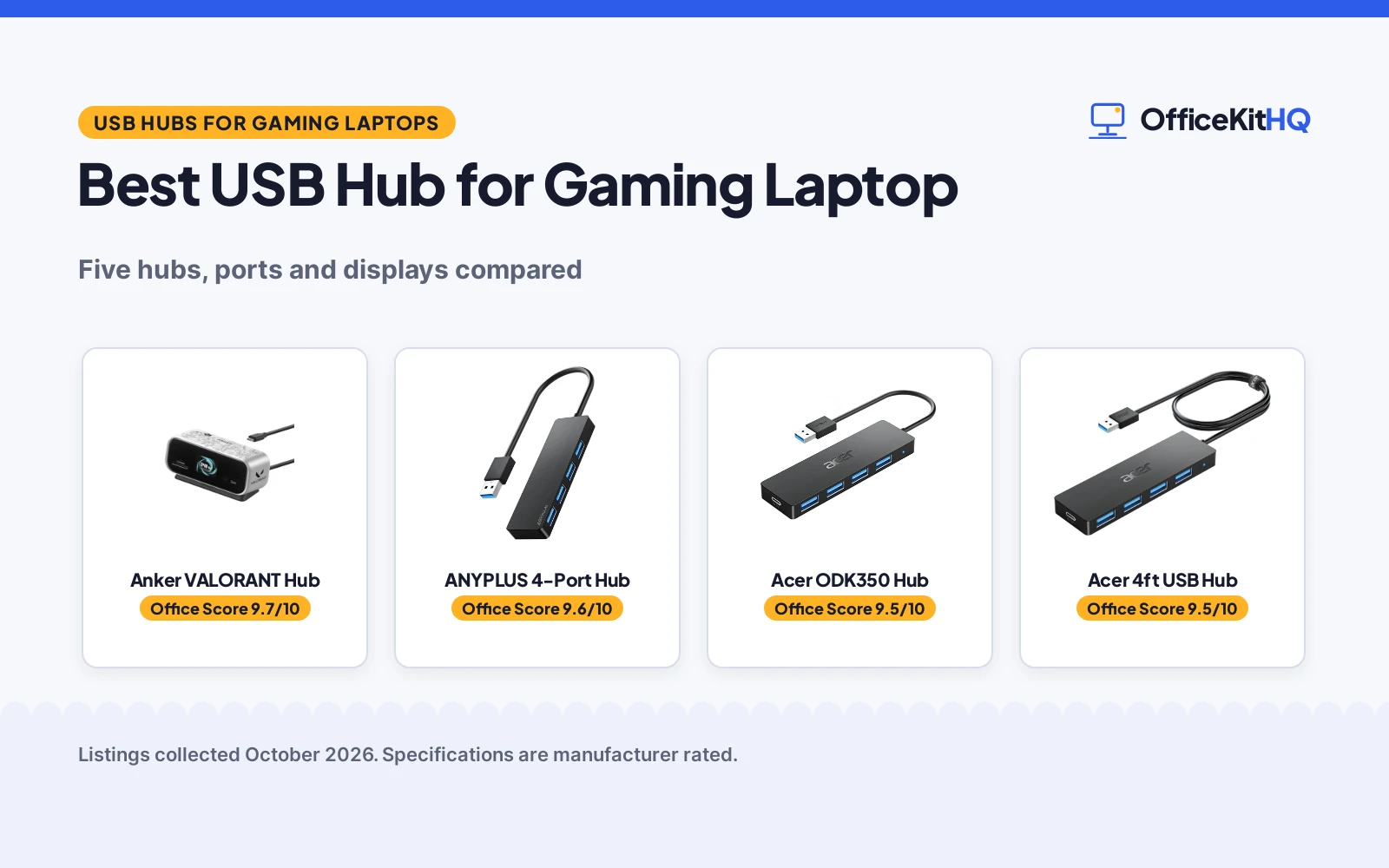
A gaming laptop on a kitchen table desk runs out of ports as soon as a keyboard, mouse and headset share the same small side panel, which is why the best usb hub for gaming laptop has to add ports without taking over the desk. We compared five USB hubs by port count, video output, data speed, cable length, host charging, Ethernet and stated warranty term, using only what each maker publishes. The highest scored pick adds display output and wired networking for a docked setup, while the rest add USB ports for peripherals and storage. Cable length and power for hard drives separate the simple hubs from each other more than port count does.
OfficeKitHQ earns a commission when you buy through links on this page, at no extra cost to you. As an Amazon Associate I earn from qualifying purchases. Affiliate disclosure.
Quick picks
 Best Overall Anker VALORANT Hub: Dual 2K at 240 Hz, Gigabit Ethernet, 10 Gbps ports stated Check price on Amazon
 Best for Hard Drives Acer ODK350 Hub: 4 USB 3.0 ports, 5V power port for hard drives stated Check price on Amazon
 Best Desktop Tower JoyReken FlyingVHUB: 2 ft cable, adhesive tape, 4 ports at up to 5 Gbps stated Check price on Amazon
 Long Cable Pick Acer 4ft USB Hub: 4 ports, 4 ft cable and Type-C power port in one hub Check price on Amazon
 Lightweight Pick ANYPLUS 4-Port Hub: 4 ports, 5 Gbps transfer, 45 g with 24 cm cable Check price on Amazon
Our desk picks
| # | Product | Office Score | Buy |
|---|---|---|---|
| 1 | Anker VALORANT Hub | 9.7/10 | Buy on Amazon |
| 2 | ANYPLUS 4-Port USB Hub | 9.6/10 | Buy on Amazon |
| 3 | Acer ODK350 Hub | 9.5/10 | Buy on Amazon |
| 4 | Acer 4-Port USB 3.0 Hub | 9.5/10 | Buy on Amazon |
| 5 | JoyReken FlyingVHUB | 9.4/10 | Buy on Amazon |

Anker VALORANT Hub
A 10-in-1 USB-C hub with HDMI and DisplayPort video, Gigabit Ethernet, card slots and host charging for a docked gaming laptop.
Pros
- Dual 2K at 240 Hz and single 4K at 144 Hz video stated
- Gigabit Ethernet port for wired networking stated
- 10 Gbps USB-C and USB-A ports plus 5 Gbps ports stated
- 100W max PD-IN for up to 80W host charging stated
Cons
- Charger not included, 65W or higher USB-C charger needed
- Not compatible with Linux per the maker
- On macOS both external monitors show identical content
- Dual 2K at 240 Hz needs a DP 2.1 host port with DSC
Detailed Review
Anker lists this hub as a 10-in-1 design with HDMI 2.1, DisplayPort 1.4, a 100W max PD-IN port for up to 80W host charging, 10 Gbps USB-C and USB-A ports, two 5 Gbps USB-A ports, Gigabit Ethernet and SD and microSD 3.0 slots. Video is rated at up to 4K at 144 Hz or dual 2K at 240 Hz with a suitable host port, with a display for port status, charging power, data speed and temperature, a 27.6-inch cable and 80% of ports facing the rear.
Who it's for: a gaming laptop desk that needs external monitors, wired Ethernet, card slots and host charging through one USB-C connection. Who should skip it: a laptop without Power Delivery and DisplayPort support on the USB-C port, or a setup that needs Linux support or separate content on two monitors on macOS.
Its Office Score of 9.7/10 comes from performance 33/35, build 21/25, value 20/25, safety 4/10 and warranty 4/5: 82 of 100 points, placed on our 9.2 to 9.8 scale.
Key Specifications
| Ports | 10-in-1 with HDMI, DisplayPort, Ethernet and card slots |
|---|---|
| Video | Single 4K at 144 Hz or dual 2K at 240 Hz stated |
| Data | 10 Gbps USB-C and USB-A, 5 Gbps USB-A stated |
| Cable | 27.6-inch built-in cable |
These specs mirror the retailer listing as of 21 November 2026; performance figures are stated by the brand.
Safety and Warranty
What this listing states. Built-in display shows device temperature and port status, so safety scores 4 of 10. 18-month warranty stated. It does not say everything a buyer needs, such as who pays return shipping, so warranty scores 4 of 5. See How We Pick.
Power and heat. Use the supplied adapter, treat power delivery wattage and display support as the maker's claims for your laptop model, and give the dock room to vent.
This is general buying information, not professional advice. Follow each product manual and local rules, and see our Safety Disclaimer.

ANYPLUS 4-Port USB Hub
A 4-port USB 3.0 hub with 5Gbps transfer, a 24 cm cable, a 3.54 by 0.39 by 1.42 in body at 45 g and a stated 900mA output limit.
Pros
- 4 USB 3.0 ports at 5Gbps, all usable at once per the listing
- 900mA maximum output is stated, so the limit is clear
- 3.54 by 0.39 by 1.42 in body at 45 g is stated
- Wide OS compatibility is stated: Windows, Mac OS X, Linux and Chrome OS
Cons
- Warranty description reads only "1", which names no term
- Not suitable for charging: 900mA maximum output is stated
- No safety certification is stated
- 0.39 in width is the slimmest stated, but the cable is only 24 cm
Detailed Review
ANYPLUS lists a 4-port USB 3.0 hub with 5Gbps transfer, plus stated 480Mbps for USB 2.0 and 12Mbps for USB 1.1, in a 3.54 by 0.39 by 1.42 in body at 45 g with a 24 cm cable. The listing states a 900mA maximum output and says the hub is not suitable for charging devices, for data transfer and peripherals only. The warranty description reads only "1", which names no term. No safety certification appears in the listing.
Who it's for: someone who wants a compact data-only hub with a clearly stated output limit. Who should skip it: anyone who wants a stated warranty term or charging support.
Its Office Score of 9.6/10 comes from performance 28/35, build 20/25, value 20/25, safety not scored (non-powered gear) and warranty 0/5: 68 of 90 points, placed on our 9.2 to 9.8 scale.
Key Specifications
| Ports | 4 x USB-A 3.0 |
|---|---|
| Speed | 5Gbps |
| Cable | 24 cm |
| Weight | 45 g |
Figures as published on the retailer listing, collected 21 October 2026. Performance figures are manufacturer rated.
Safety and Warranty
What this listing states. This product does not plug in or run on a battery, so safety is not part of its score. No warranty term, so warranty scores zero. See How We Pick.
Power and heat. Use the supplied adapter, treat power delivery wattage and display support as the maker's claims for your laptop model, and give the dock room to vent.
This is general buying information, not professional advice. Follow each product manual and local rules, and see our Safety Disclaimer.

Acer ODK350 Hub
A compact 4-port USB 3.0 hub at up to 5 Gbps with a 5V power port for hard drives and a short travel cable.
Pros
- Four USB 3.0 ports at up to 5 Gbps stated
- 5V USB-C power port for stable hard drive transfer stated
- Plug and play with no driver needed stated
- Works with Windows, macOS, ChromeOS and Linux stated
Cons
- No HDMI or DisplayPort video output for an external monitor
- No Ethernet port for wired networking at the desk
- 0.7 ft cable is short for routing to the back of a desk
- Type-C port cannot transfer data or charge devices
Detailed Review
Acer lists the ODK350 with four USB 3.0 ports at up to 5 Gbps, a GL3510 chip with thermal design, plug and play operation, an LED indicator and a 0.7 ft cable at 0.1 pounds. Hard drives need power through the 5V USB-C power port for stable transfer, and support covers Windows, macOS, ChromeOS and Linux.
Who it's for: a gaming laptop that needs four USB ports for peripherals and storage, with added power for a hard drive and a short cable for travel. Who should skip it: a desk that needs external monitor output, wired Ethernet or host charging for the laptop through the hub.
Its Office Score of 9.5/10 comes from performance 23/35, build 19/25, value 20/25, safety 5/10 and warranty 3/5: 70 of 100 points, placed on our 9.2 to 9.8 scale.
Key Specifications
| Ports | 4 x USB 3.0 |
|---|---|
| Data | Up to 5 Gbps |
| Cable | 0.7 ft |
| Power | 5V USB-C power port |
These specs mirror the retailer listing as of 21 November 2026; performance figures are stated by the brand.
Safety and Warranty
What this listing states. GL3510 chip with thermal design stated, so safety scores 5 of 10. 1 year manufacturer warranty stated. It does not say everything a buyer needs, such as who pays return shipping, so warranty scores 3 of 5. See How We Pick.
Power and heat. Use the supplied adapter, treat power delivery wattage and display support as the maker's claims for your laptop model, and give the dock room to vent.
This is general buying information, not professional advice. Follow each product manual and local rules, and see our Safety Disclaimer.

Acer 4-Port USB 3.0 Hub
A 4-port hub with a 4 ft cable and a USB-C 5V power input for steadier drive transfers.
Pros
- USB-C 5V power input steadies hard drive transfers
- GL3510 chip with thermal design stated
- LED indicator shows it is working
- 1 year manufacturer warranty stated
Cons
- Only 4 ports
- USB-C port cannot transfer data or charge other devices
- No per-port switches
- ABS housing rather than aluminum
Detailed Review
Acer lists a 4-port USB 3.0 hub with a 4 ft cable, 5Gbps data rate, a GL3510 chip and a USB-C port that takes 5V in to steady transfers to hard drives; the listing warns the USB-C port cannot transfer data or charge other devices. The housing is ABS, it weighs 68 g and the listing states a 1 year manufacturer warranty.
Who it's for: users who run external drives off a hub and want a powered 5V input for stable transfers. Who should skip it: anyone who needs more than four ports.
Its Office Score of 9.5/10 comes from performance 28/35, build 20/25, value 20/25, safety 0/10 and warranty 2/5: 70 of 100 points, placed on our 9.2 to 9.8 scale.
Key Specifications
| Cable | 4 ft |
|---|---|
| Ports | 4 USB-A + USB-C 5V power in |
| Data rate | 5Gbps |
| Warranty | 1 year |
Figures as published on the retailer listing, collected 18 October 2026. Performance figures are manufacturer rated.
Safety and Warranty
What this listing states. No UL, FCC or over-current protection statement is stated, so safety scores zero. 1 year manufacturer warranty stated. It does not say everything a buyer needs, such as who pays return shipping, so warranty scores 2 of 5. See How We Pick.
Power and heat. Use the supplied adapter, treat power delivery wattage and display support as the maker's claims for your laptop model, and give the dock room to vent.
This is general buying information, not professional advice. Follow each product manual and local rules, and see our Safety Disclaimer.
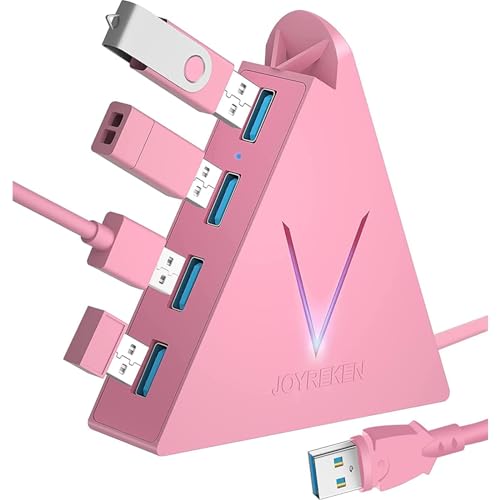
JoyReken FlyingVHUB
A vertical 4-port USB 3.0 tower hub at up to 5 Gbps with a 2 ft cable and adhesive tape for desktop placement.
Pros
- Four USB 3.0 ports at up to 5 Gbps stated
- 2 ft cable reaches a laptop set back on the desk
- Double-sided adhesive tape to hold the tower in place stated
- Works with Windows, Mac and Linux hosts stated
Cons
- Not designed to charge devices per the maker
- No HDMI or DisplayPort video output for an external monitor
- No Ethernet port for wired networking at the desk
- Tower size needs clear desk space beside the laptop
Detailed Review
JoyReken lists the FlyingVHUB with four USB 3.0 ports at up to 5 Gbps, a 2 ft cable, double-sided adhesive tape, a blue LED indicator and a light that cycles through 7 colors. Size is stated as 3.81 x 0.98 x 3.93 inches, with Windows, Mac and Linux support, and the hub is not designed to charge devices.
Who it's for: a gaming laptop desk that needs four reachable USB ports on a tower that stays in place with a longer cable. Who should skip it: a setup that needs device charging, external monitor output or wired Ethernet through the hub.
Its Office Score of 9.4/10 comes from performance 22/35, build 19/25, value 20/25, safety 0/10 and warranty 3/5: 64 of 100 points, placed on our 9.2 to 9.8 scale.
Key Specifications
| Ports | 4 x USB 3.0 |
|---|---|
| Data | Up to 5 Gbps |
| Cable | 2 ft |
| Size | 3.81 x 0.98 x 3.93 inches |
These specs mirror the retailer listing as of 21 November 2026; performance figures are stated by the brand.
Safety and Warranty
What this listing states. No UL, FCC or over-current protection statement is stated, so safety scores zero. 12-month warranty stated. It does not say everything a buyer needs, such as who pays return shipping, so warranty scores 3 of 5. See How We Pick.
Power and heat. Use the supplied adapter, treat power delivery wattage and display support as the maker's claims for your laptop model, and give the dock room to vent.
This is general buying information, not professional advice. Follow each product manual and local rules, and see our Safety Disclaimer.
As an Amazon Associate I earn from qualifying purchases.
Specs compared
| Hub | Office Score | Ports | Video output | Data speed | Cable | Warranty | Amazon |
|---|---|---|---|---|---|---|---|
| Anker VALORANT Hub | 9.7/10 | 10-in-1 | Dual 2K at 240 Hz | 10 Gbps and 5 Gbps | 27.6-inch | 18 months | View on Amazon |
| Acer ODK350 Hub | 9.5/10 | 4 x USB 3.0 | Not stated | Up to 5 Gbps | 0.7 ft | 1 year | View on Amazon |
| JoyReken FlyingVHUB | 9.4/10 | 4 x USB 3.0 | Not stated | Up to 5 Gbps | 2 ft | 12 months | View on Amazon |
| Acer 4ft USB Hub | 9.5/10 | 4 x USB 3.0 | Not stated | Not stated | 4 ft | Not stated | |
| ANYPLUS 4-Port Hub | 9.6/10 | 4 x USB 3.0 | Not stated | 5 Gbps | 24 cm | Not stated |
Dimensions, weight limits and ranges are the maker’s ratings as each listing gives them, collected 21 November 2026. Three of the five state a warranty term.
How to choose the best usb hub for gaming laptop
Start with display output and your laptop port
Display output is the widest gap in this group. The Anker VALORANT Hub is rated for a single monitor at up to 4K at 144 Hz or 2K at 240 Hz, or dual 2K at 240 Hz through HDMI and DisplayPort with a host port that supports DisplayPort 2.1 with DSC. The maker states Windows 10 and 11 and macOS support, mirrored content on macOS and no Linux support. The other four hubs state USB ports only, so a gaming laptop that needs an external monitor needs the Anker or a separate docking station with power delivery for video.
Host charging follows the same split. The Anker states a 100W max PD-IN port for up to 80W host charging, with a charger not included and a 65W or higher USB-C charger for optimal performance. The other four hubs do not state host charging, so the laptop charger stays plugged in separately with those picks.
Count USB ports and data speed for peripherals
The Anker states one 10 Gbps USB-C port, one 10 Gbps USB-A port and two 5 Gbps USB-A ports, plus card slots and Gigabit Ethernet. The Acer ODK350 Hub and JoyReken FlyingVHUB each state four USB 3.0 ports at up to 5 Gbps. The ANYPLUS 4-Port Hub states 5 Gbps transfer, while the Acer 4ft USB Hub states four USB 3.0 ports without a stated speed. Match the fastest device, such as a hard drive, to the fastest stated port. Readers comparing a USB hub for HP laptop face the same tradeoffs.
Power for storage matters as much as speed. The Acer ODK350 Hub states that hard drives need power through the 5V USB-C power port for stable transfer, and the JoyReken FlyingVHUB states that the hub is not designed to charge devices.
Plan cable length, power and desk placement
Cable length decides where the hub can sit: 0.7 ft on the Acer ODK350 Hub, 2 ft with adhesive tape on the JoyReken FlyingVHUB, 4 ft on the Acer 4ft USB Hub, 24 cm at 45 g on the ANYPLUS 4-Port Hub and 27.6-inch with 80% of ports facing the rear on the Anker VALORANT Hub. Measure from the laptop to the hub spot and leave slack for the laptop to move.
| Hub | Cable | Ports | Power note |
|---|---|---|---|
| Anker VALORANT Hub | 27.6-inch | 10-in-1 | 100W max PD-IN, up to 80W host charging |
| Acer ODK350 Hub | 0.7 ft | 4 x USB 3.0 | 5V USB-C power port for USB-A ports |
| JoyReken FlyingVHUB | 2 ft | 4 x USB 3.0 | Not designed to charge devices |
| Acer 4ft USB Hub | 4 ft | 4 x USB 3.0 | Type-C power port |
| ANYPLUS 4-Port Hub | 24 cm | 4 x USB 3.0 | Not stated |
Figures as stated by each maker. The JoyReken tower size is stated as 3.81 x 0.98 x 3.93 inches, so check desk depth before placing a vertical hub beside a monitor stand.
Check Ethernet, card slots and warranty term
Wired networking and card slots appear on the Anker only in this group, with a Gigabit Ethernet port, SD and microSD 3.0 card slots and a display that shows port status, charging power, data speed and device temperature. The other four hubs state no Ethernet port and no card slots. A USB-C hub for desktop guide covers the same choices for a fixed desk.
The Anker states an 18-month warranty, the Acer ODK350 Hub states a 1 year manufacturer warranty and the JoyReken FlyingVHUB states a 12-month warranty. The Acer 4ft USB Hub and ANYPLUS 4-Port Hub state no warranty term.
Setup Notes
- Measure from the laptop USB-C port to the hub spot and compare with the stated cable: 0.7 ft, 2 ft, 4 ft, 24 cm or 27.6-inch.
- Plan power before ordering: the Anker needs a 65W or higher USB-C charger that is not included, and the Acer ODK350 Hub needs 5V USB-C power for hard drives.
- Route cables to the rear where the maker states rear-facing ports, and hold a tower hub with the stated adhesive tape so plugs stay reachable.
- Check host support for video and charging: Power Delivery, DisplayPort 1.2, 1.4 or 2.1, and USB4 or Thunderbolt 3, 4 or 5 for the Anker.
FAQ
Can a simple USB hub drive an external monitor for a gaming laptop?
The Acer ODK350 Hub, JoyReken FlyingVHUB, Acer 4ft USB Hub and ANYPLUS 4-Port Hub state USB ports only, with no HDMI or DisplayPort output. The Anker VALORANT Hub states HDMI 2.1 and DisplayPort 1.4 output for a single monitor at up to 4K at 144 Hz or dual 2K at 240 Hz with a suitable host port.
Will these hubs charge a gaming laptop while peripherals stay connected?
The Anker VALORANT Hub states a 100W max PD-IN port for up to 80W host charging, with a charger not included. The other four hubs do not state host charging for the laptop, and the JoyReken FlyingVHUB states that the hub is not designed to charge devices.
Which hub suits a hard drive that needs stable power?
The Acer ODK350 Hub states a 5V USB-C power port to supply power to the USB-A ports for stable hard drive transfer at up to 5 Gbps. The Anker states 10 Gbps USB ports for storage, while the JoyReken states up to 5 Gbps without device charging.
Does cable length matter on a small desk?
Cable length decides hub placement: 0.7 ft on the Acer ODK350 Hub, 2 ft on the JoyReken FlyingVHUB, 4 ft on the Acer 4ft USB Hub, 24 cm on the ANYPLUS 4-Port Hub and 27.6-inch on the Anker VALORANT Hub. A longer cable lets the hub sit at the back of the desk while the laptop stays at the front.
What warranty terms are stated for these hubs?
The Anker VALORANT Hub states an 18-month warranty, the Acer ODK350 Hub states a 1 year manufacturer warranty and the JoyReken FlyingVHUB states a 12-month warranty. The Acer 4ft USB Hub and ANYPLUS 4-Port Hub state no warranty term.
Score breakdown
The Office Score weighs performance (port count, video output, data speed, Ethernet, card slots and host charging), build (cable length, housing and desk placement), value for the stated specs, safety and warranty. For a USB hub, safety means a stated thermal design or temperature monitoring feature from the maker; the Anker VALORANT Hub and the Acer ODK350 Hub state one, the other three do not. Three picks state a warranty term: the Anker VALORANT Hub at 18 months, the Acer ODK350 Hub at 1 year and the JoyReken FlyingVHUB at 12 months. How we pick explains the weights.
| Product | Office Score | Perf. /35 | Build /25 | Value /25 | Safety /10 | Warranty /5 |
|---|---|---|---|---|---|---|
| Anker VALORANT Hub | 9.7 | 33 | 21 | 20 | 4 | 4 |
| Acer ODK350 Hub | 9.5 | 23 | 19 | 20 | 5 | 3 |
| JoyReken FlyingVHUB | 9.4 | 22 | 19 | 20 | 0 | 3 |
Office Scores run on a short 9.2 to 9.8 scale. We place each item’s weighted point total on it in proportion, so a larger total is always shown as a larger score.
More for your workspace
See every Docking Stations and USB Hubs guide and all Audio, Power and Connectivity guides. Also see our USB-C hub with Ethernet port. Also see our docking station for MSI gaming laptop. Also see our USB hub for gaming PC.
More picks: headsets, computer speakers, surge protectors and cable management.