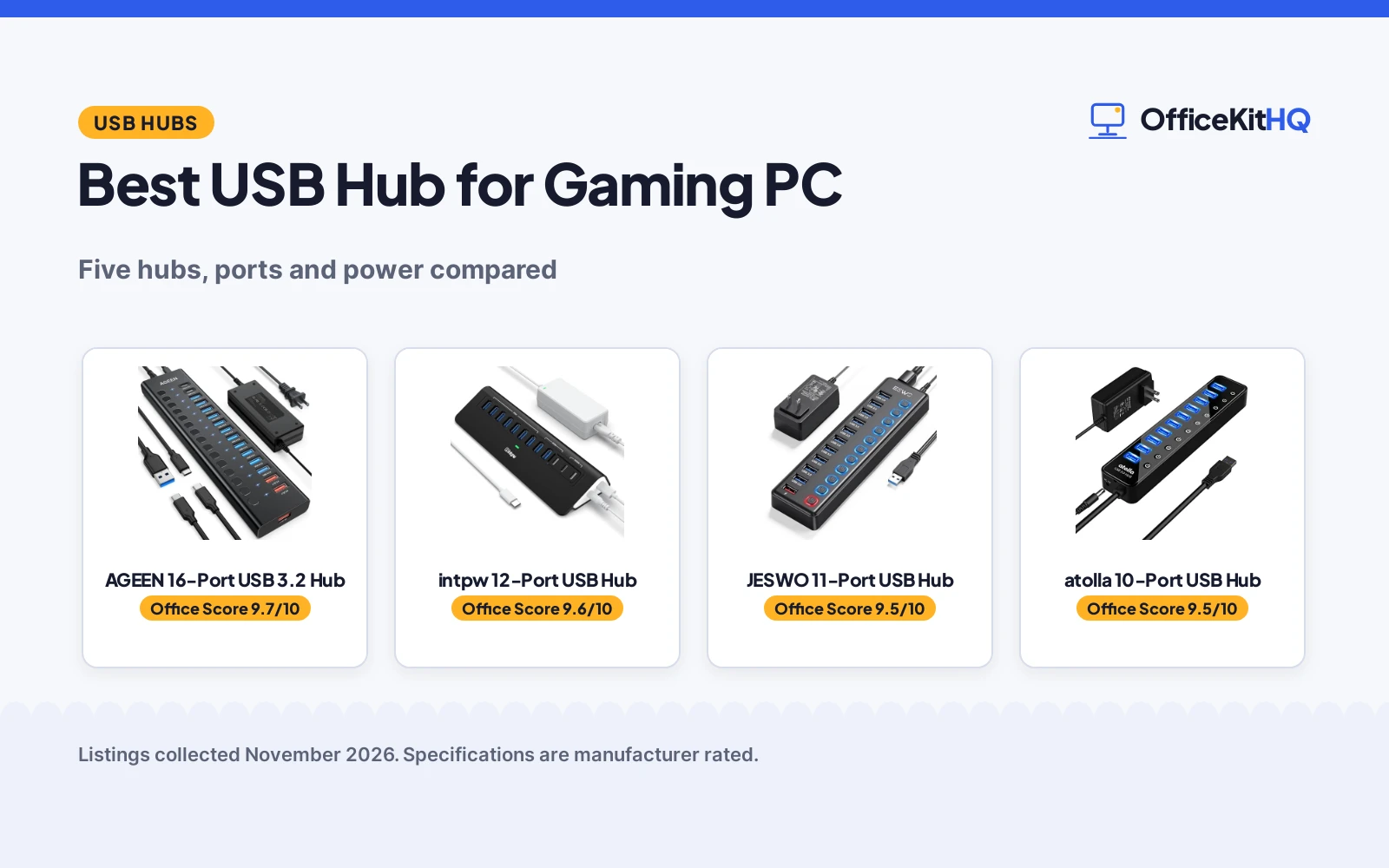
A gaming desk fills up fast, and the best usb hub for gaming pc options here turn one port into room for a keyboard, mouse, headset, controller and drives without swapping cables mid-session. We compared five powered and bus-powered hubs by stated port count, top speed, adapter wattage, charging ports and warranty. Every figure below comes from the Amazon listings, not from our own measurements.
OfficeKitHQ earns a commission when you buy through links on this page, at no extra cost to you. As an Amazon Associate I earn from qualifying purchases. Affiliate disclosure.
Quick picks
 Best Overall AGEEN 16-Port USB 3.2 Hub: 16 ports at up to 10Gbps with a 96W UL-certified power adapter Check price on Amazon
 Best Hybrid Mix intpw 12-Port USB Hub: 12 ports with 10Gbps and 5Gbps data plus 2 PD 45W charging ports Check price on Amazon
 Best With Switches JESWO 11-Port USB Hub: 11 ports with individual LED on/off switches and a 36W adapter Check price on Amazon
 Best Simple Expander atolla 10-Port USB Hub: 10 USB 3.0 ports with individual switches and a 30W adapter Check price on Amazon
 Best RGB Desk Hub JoyReken 7-Port RGB Hub: 7 USB 3.0 ports with RGB tree lighting and a 2ft cable Check price on Amazon
Our desk picks
| # | Product | Office Score | Buy |
|---|---|---|---|
| 1 | AGEEN 16-Port USB 3.2 Hub | 9.7/10 | Buy on Amazon |
| 2 | intpw 12-Port USB Hub | 9.6/10 | Buy on Amazon |
| 3 | JESWO 11-Port USB Hub | 9.5/10 | Buy on Amazon |
| 4 | atolla 10-Port USB Hub | 9.5/10 | Buy on Amazon |
| 5 | JoyReken 7-Port RGB Hub | 9.3/10 | Buy on Amazon |

AGEEN 16-Port USB 3.2 Hub
A 16-port USB 3.2 hub with 10Gbps data ports, 3 QC 24W charging ports and a 96W UL-certified adapter for a full gaming desk.
Pros
- 16 ports: 11 USB-A 3.2, 2 USB-C 3.2 and 3 charging ports
- USB 3.2 data ports rated at up to 10Gbps
- 96W power adapter, the highest wattage in this guide
- Two 3.3ft cables included, USB-A to USB-C and USB-C to USB-C
Cons
- 3 of the 16 ports are charging only, with no data transfer
- No individual port switches are stated
- Largest port count needs the most desk space for cables
- Power cord is 3.93ft, so the outlet must sit near the desk
Detailed Review
The maker lists 11 USB-A 3.2 ports and 2 USB-C 3.2 ports for data at up to 10Gbps, plus 3 QC 24W charging ports that do not support data transfer. The 96W (12V/8A) adapter is stated as UL-certified, and the box includes two 3.3ft cables and a 3.93ft power cord. The aluminum hub measures 5.0 by 3.5 by 1.2 inches and weighs 0.75 pounds.
Who it's for: gaming desks that plug in drives, keyboards, mice and printers at once and want 10Gbps data ports. Who should skip it: buyers who need every port to carry data, since 3 ports are charging only.
Its Office Score of 9.7/10 comes from performance 32/35, build 21/25, value 21/25, safety 7/10 and warranty 3/5: 84 of 100 points, placed on our 9.2 to 9.8 scale.
Key Specifications
| Ports | 16 (11 USB-A, 2 USB-C, 3 charging) |
|---|---|
| Top speed | 10Gbps |
| Power adapter | 96W (12V/8A), UL-certified |
| Warranty | 2 years |
These specs mirror the retailer listing as of 19 November 2026; performance figures are stated by the brand.
Safety and Warranty
What this listing states. 96W UL-certified AC/DC power adapter is stated, so safety scores 7 of 10. 2 year warranty. It does not say everything a buyer needs, such as who pays return shipping, so warranty scores 3 of 5. See How We Pick.
Power and heat. Use the supplied adapter, treat power delivery wattage and display support as the maker's claims for your laptop model, and give the dock room to vent.
This is general buying information, not professional advice. Follow each product manual and local rules, and see our Safety Disclaimer.

intpw 12-Port USB Hub
A hybrid 12-port hub mixing 10Gbps and 5Gbps data ports with 2 PD 45W charging ports and a 65W adapter in an aluminum housing.
Pros
- Hybrid mix: 1 USB-C and 2 USB-A ports at 10Gbps, 7 USB-A at 5Gbps
- 2 PD 45W charging ports for phones and tablets
- 65W power adapter with a built-in surge protector design
- 28-degree angled aluminum housing for easier plugging
Cons
- PD 45W charging ports do not support data transfer
- No video output function is supported
- Maker advises against using multiple SSD drives at the same time
- Not recommended for charging computers or other high-power devices
Detailed Review
The maker lists 1 USB-C 3.2 port and 2 USB-A 3.2 ports at 10Gbps, 7 USB-A 3.0 ports at 5Gbps and 2 USB-C PD 45W charging ports, for 12 ports in total. The 65W (20V/3.25A) adapter must be inserted to charge through the PD ports, and the hub does not support video output. The aluminum housing uses a 28-degree angled design, and the box includes a 3.3ft USB-C to USB-C cable.
Who it's for: gaming PC owners who want fast data ports plus dedicated PD charging for a phone or tablet. Who should skip it: buyers who need video output from the hub or plan to run several SSD drives at once.
Its Office Score of 9.6/10 comes from performance 30/35, build 21/25, value 20/25, safety 5/10 and warranty 2/5: 78 of 100 points, placed on our 9.2 to 9.8 scale.
Key Specifications
| Ports | 12 (3 at 10Gbps, 7 at 5Gbps, 2 PD) |
|---|---|
| Top speed | 10Gbps |
| Power adapter | 65W (20V/3.25A) |
| Warranty | 18 months |
These specs mirror the retailer listing as of 19 November 2026; performance figures are stated by the brand.
Safety and Warranty
What this listing states. Built-in surge protector design with overload, over-voltage, over-current, short circuit and overcharge protection is stated, so safety scores 5 of 10. 18 months. It does not say everything a buyer needs, such as who pays return shipping, so warranty scores 2 of 5. See How We Pick.
Power and heat. Use the supplied adapter, treat power delivery wattage and display support as the maker's claims for your laptop model, and give the dock room to vent.
This is general buying information, not professional advice. Follow each product manual and local rules, and see our Safety Disclaimer.

JESWO 11-Port USB Hub
An 11-port USB 3.0 hub with individual LED on/off switches, 1 charging port and a 36W adapter for peripherals you power down often.
Pros
- 10 USB 3.0 data ports rated at 5Gbps plus 1 charging port
- Individual on/off switches with LED indicators on each port
- Charging port rated up to 2.4A for phones and tablets
- 3 years warranty, the longest term in this guide
Cons
- Every data port tops out at 5Gbps, with no 10Gbps ports
- Power adapter is required for full functionality of all ports
- Only 1 of the 11 ports is a charging port
- 36W adapter is mid-range next to the 96W and 65W picks
Detailed Review
The maker lists 10 USB 3.0 data ports at 5Gbps and 1 smart charging port up to 2.4A, for 11 ports in total. Each port has an independent on/off switch with an LED indicator, and the 36W (12V/3A) adapter includes overheat safeguards. The box includes a 100cm USB cable and a 120cm power cord, and the adapter must stay connected for all ports to work.
Who it's for: gaming desks with many USB 3.0 peripherals that benefit from per-port switches. Who should skip it: buyers who need 10Gbps data ports or more than one charging port.
Its Office Score of 9.5/10 comes from performance 27/35, build 20/25, value 20/25, safety 5/10 and warranty 3/5: 75 of 100 points, placed on our 9.2 to 9.8 scale.
Key Specifications
| Ports | 11 (10 data, 1 charging) |
|---|---|
| Top speed | 5Gbps |
| Power adapter | 36W (12V/3A) |
| Warranty | 3 years |
These specs mirror the retailer listing as of 19 November 2026; performance figures are stated by the brand.
Safety and Warranty
What this listing states. 36W adapter with overheat safeguards is stated, so safety scores 5 of 10. 3 years. It does not say everything a buyer needs, such as who pays return shipping, so warranty scores 3 of 5. See How We Pick.
Power and heat. Use the supplied adapter, treat power delivery wattage and display support as the maker's claims for your laptop model, and give the dock room to vent.
This is general buying information, not professional advice. Follow each product manual and local rules, and see our Safety Disclaimer.
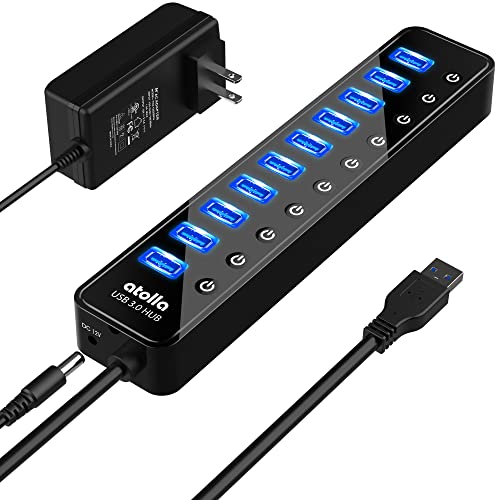
atolla 10-Port USB Hub
A 10-port USB 3.0 data hub with individual on/off switches and a 30W adapter for keyboards, mice, printers and drives.
Pros
- 10 USB 3.0 data ports rated at up to 5Gbps
- Individual switch and LED indicator for each port
- Over-voltage and over-current protection design is stated
- Slim 8.27 by 1.81 by 0.91 inch body for a desk edge
Cons
- Every data port tops out at 5Gbps, with no 10Gbps ports
- No charging ports are stated
- 30W adapter is the lowest wattage among the powered picks
- No USB-C data ports are stated
Detailed Review
The maker lists 10 USB 3.0 data ports at up to 5Gbps, each with an individual on/off switch and LED indicator. The 30W (12V/2.5A) adapter carries an over-voltage and over-current protection design, and the hub measures 8.27 by 1.81 by 0.91 inches. The maker gives two warranty terms, 18 months and 3 years; check before ordering.
Who it's for: gaming desks that need ten USB 3.0 data ports with per-port switches. Who should skip it: buyers who need USB-C data ports, charging ports or 10Gbps speeds.
Its Office Score of 9.5/10 comes from performance 27/35, build 19/25, value 19/25, safety 5/10 and warranty 2/5: 72 of 100 points, placed on our 9.2 to 9.8 scale.
Key Specifications
| Ports | 10 USB 3.0 data |
|---|---|
| Top speed | 5Gbps |
| Power adapter | 30W (12V/2.5A) |
| Warranty | 18 months |
These specs mirror the retailer listing as of 19 November 2026; performance figures are stated by the brand.
Safety and Warranty
What this listing states. Over-voltage and over-current protection design is stated, so safety scores 5 of 10. 18-Month Warranty. It does not say everything a buyer needs, such as who pays return shipping, so warranty scores 2 of 5. See How We Pick.
Power and heat. Use the supplied adapter, treat power delivery wattage and display support as the maker's claims for your laptop model, and give the dock room to vent.
This is general buying information, not professional advice. Follow each product manual and local rules, and see our Safety Disclaimer.

JoyReken 7-Port RGB Hub
A 7-port USB 3.0 hub with RGB tree lighting and a 2ft cable for gaming desks that want light with their extra ports.
Pros
- 7 USB 3.0 ports rated at up to 5Gbps
- RGB tree lighting cycles through seven colors, with an off button
- 2ft extension cable and cable tie included
- Side USB-C power port for power-hungry devices like external HDDs
Cons
- Designed strictly for data transfer, not charging
- Fewest ports in this guide at 7
- Every data port tops out at 5Gbps, with no 10Gbps ports
- 12-month warranty is the shortest term in this guide
Detailed Review
The maker lists 7 USB 3.0 ports at up to 5Gbps for data transfer, with support for USB 3.0, 2.0 and 1.1 devices across Windows, macOS and Linux. The RGB tree lighting cycles through seven colors and turns off with a button press, and a 2ft extension cable and cable tie are included. A side USB-C power port supports power-hungry devices such as external HDDs.
Who it's for: gaming desks that want RGB lighting with a simple 7-port data hub. Who should skip it: buyers who need charging ports, 10Gbps speeds or more than 7 ports.
Its Office Score of 9.3/10 comes from performance 23/35, build 18/25, value 18/25, safety 0/10 and warranty 1/5: 60 of 100 points, placed on our 9.2 to 9.8 scale.
Key Specifications
| Ports | 7 USB 3.0 data |
|---|---|
| Top speed | 5Gbps |
| Power adapter | Not stated |
| Warranty | 12 months |
These specs mirror the retailer listing as of 19 November 2026; performance figures are stated by the brand.
Safety and Warranty
What this listing states. No UL, FCC or over-current protection statement is stated, so safety scores zero. 12-month. It does not say everything a buyer needs, such as who pays return shipping, so warranty scores 1 of 5. See How We Pick.
Power and heat. Use the supplied adapter, treat power delivery wattage and display support as the maker's claims for your laptop model, and give the dock room to vent.
This is general buying information, not professional advice. Follow each product manual and local rules, and see our Safety Disclaimer.
As an Amazon Associate I earn from qualifying purchases.
Specs compared
| USB Hub | Office Score | Ports | Top Speed | Power Adapter | Charging Ports | Warranty | Amazon |
|---|---|---|---|---|---|---|---|
| AGEEN 16-Port USB 3.2 Hub | 9.7/10 | 16 | 10Gbps | 96W | 3 QC 24W | 2 years | View on Amazon |
| intpw 12-Port USB Hub | 9.6/10 | 12 | 10Gbps | 65W | 2 PD 45W | 18 months | View on Amazon |
| JESWO 11-Port USB Hub | 9.5/10 | 11 | 5Gbps | 36W | 1 up to 2.4A | 3 years | View on Amazon |
| atolla 10-Port USB Hub | 9.5/10 | 10 | 5Gbps | 30W | Not stated | 18 months | View on Amazon |
| JoyReken 7-Port RGB Hub | 9.3/10 | 7 | 5Gbps | Not stated | Data only | 12 months | View on Amazon |
Specs reflect manufacturer claims on each product listing (as of 19 November 2026).
How to choose the best usb hub for gaming pc
Count the ports you actually plug in
A gaming setup rarely stops at a keyboard and mouse. The AGEEN hub expands one port into 16, with 11 USB-A 3.2 ports, 2 USB-C 3.2 ports and 3 charging ports. The intpw hub gives 12 ports in a hybrid mix, the JESWO hub gives 11, the atolla hub gives 10 and the JoyReken hub gives 7. If your desk also runs a laptop, our USB hub for MacBook guide covers smaller travel hubs.
Top speed: 10Gbps or 5Gbps
Two picks state a 10Gbps top speed. The AGEEN hub rates its USB 3.2 ports at up to 10Gbps, and the intpw hub rates 3 of its ports at 10Gbps with 7 more at 5Gbps. The JESWO, atolla and JoyReken hubs rate every data port at up to 5Gbps. Drives and capture gear benefit from the higher figure, while keyboards and mice do not need it. Our docking station types guide explains how hub speeds differ from full docks.
Power adapter wattage and charging ports
Powered hubs carry their own adapter, and the stated wattage runs from 30W on the atolla hub to 96W on the AGEEN hub. Charging is separate from data on the bigger hubs: intpw states 2 PD 45W charging ports that do not support data transfer, and AGEEN states 3 QC 24W charging ports that are charging only. The JoyReken hub is data only, with a side USB-C power port for power-hungry devices. Handheld PC owners can compare our docking station for Steam Deck picks.
Switches, lights and cable length
Individual on/off switches appear on the JESWO and atolla hubs, each with an LED indicator per port. The JoyReken hub adds RGB tree lighting that cycles through seven colors and turns off with a button press. Cable lengths differ too: intpw and AGEEN include 3.3ft cables, JESWO includes a 100cm USB cable, and JoyReken includes a 2ft extension cable. Measure from your PC to the hub spot before you order.
Setup Notes
- Plug the power adapter in before connecting drives: the JESWO hub states the adapter is required for full functionality of all ports.
- Keep charging-only ports for phones: the intpw PD 45W ports and the AGEEN QC 24W ports do not carry data.
- Use the individual switches on the JESWO and atolla hubs to power down idle gear without unplugging cables.
- Route the 3.3ft cables on the intpw and AGEEN hubs along the desk edge so the hub sits within reach of your PC.
- Turn the JoyReken RGB lighting off with its button press when the desk doubles as a work setup.
FAQ
How many ports do these USB hubs offer?
The AGEEN hub offers 16 ports, the intpw hub 12, the JESWO hub 11, the atolla hub 10 and the JoyReken hub 7. Charging-only ports are counted in those totals on the AGEEN and intpw hubs.
Which of these hubs state a 10Gbps speed?
The AGEEN hub rates its USB 3.2 ports at up to 10Gbps. The intpw hub rates 3 ports at 10Gbps and 7 ports at 5Gbps, while the JESWO, atolla and JoyReken hubs rate their data ports at up to 5Gbps.
Do the charging ports on these hubs transfer data?
No. The intpw hub states its 2 PD 45W charging ports do not support data transfer, and the AGEEN hub states its 3 QC 24W ports are for charging only. Use the USB-A and USB-C data ports for drives and peripherals.
Do these USB hubs need a power adapter?
The AGEEN, intpw, JESWO and atolla hubs include a power adapter, rated 96W, 65W, 36W and 30W. The JESWO hub states the adapter is required for full functionality, and the JoyReken hub has a side USB-C power port for power-hungry devices.
How long is the warranty on these USB hubs?
The JESWO hub states 3 years, the AGEEN hub 2 years, and the intpw and atolla hubs 18 months. The JoyReken hub states a 12-month warranty.
Score breakdown
The Office Score weighs performance (stated port count, top speed and charging output), build, value, safety and warranty. For USB hubs, safety means a stated certification or protection feature on the hub or its power adapter, such as a UL-certified adapter or over-voltage protection. All five listings state a warranty term, from 12 months to 3 years. How we pick explains the weights.
| Product | Office Score | Perf. /35 | Build /25 | Value /25 | Safety /10 | Warranty /5 |
|---|---|---|---|---|---|---|
| AGEEN 16-Port USB 3.2 Hub | 9.7 | 32 | 21 | 21 | 7 | 3 |
| intpw 12-Port USB Hub | 9.6 | 30 | 21 | 20 | 5 | 2 |
| JESWO 11-Port USB Hub | 9.5 | 27 | 20 | 20 | 5 | 3 |
| atolla 10-Port USB Hub | 9.5 | 27 | 19 | 19 | 5 | 2 |
| JoyReken 7-Port RGB Hub | 9.3 | 23 | 18 | 18 | 0 | 1 |
The scale opens at 9.2 and closes at 9.8; between those marks, weighted points translate linearly into the score you see.
More for your workspace
See every docking stations and USB hubs guide and all audio, power and connectivity guides.
More picks: browse docking stations for Steam Deck, USB hubs for MacBook and docking station types.