The morning call starts with a webcam that will not sit straight and a drive with nowhere to plug in. The Mac mini hides its ports around the back, and every peripheral competes for the same few sockets. The best usb hub for mac mini m4 puts those ports within reach, adds storage and a display output, and leaves the desk clear. This roundup compares Mac mini hubs and docks by storage, video output, USB speed, card readers and warranty, using only what each listing publishes.
OfficeKitHQ earns a commission when you buy through links on this page, at no extra cost to you. As an Amazon Associate I earn from qualifying purchases. Affiliate disclosure.
Quick picks
 Best Overall ACASIS M001-New: 2-bay NVMe to 16TB, 4K60Hz HDMI, 4 x 10Gbps USB-A, 2-year warranty Check price on Amazon
 Best DisplayPort UGREEN 95103: 4K at 144Hz on M4, 240Hz on M4 Pro, 8TB NVMe, 2-year warranty Check price on Amazon
 Best HDMI 2.1 Acer ODK5R6: 4K at 144Hz HDMI 2.1, 8TB NVMe, 104MB/s card readers, 18-month warranty Check price on Amazon
 Best Compact Hub WAVLINK UH5020: 6 ports, 2 x 10Gbps USB-C, 180MB/s card reader, 2-year warranty Check price on Amazon
 Best Front Ports Keopien 6-in-2 Hub: Front-facing ports, 10Gbps USB-C, 3 x 5Gbps USB, 2-year warranty Check price on Amazon
Our desk picks
| # | Product | Office Score | Buy |
|---|---|---|---|
| 1 | ACASIS M001-New | 9.7/10 | Buy on Amazon |
| 2 | UGREEN 95103 | 9.7/10 | Buy on Amazon |
| 3 | Acer ODK5R6 | 9.6/10 | Buy on Amazon |
| 4 | Keopien 6-in-2 Hub | 9.5/10 | Buy on Amazon |
| 5 | WAVLINK UH5020 | 9.5/10 | Buy on Amazon |
ACASIS M001-New
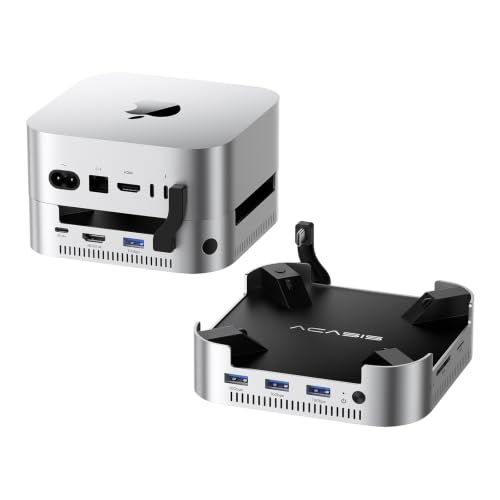
A two-bay NVMe dock with the largest stated storage in this group: up to 16TB, 4K60Hz HDMI, four 10Gbps USB-A ports and a 2-year warranty.
Pros
- Two NVMe bays expand storage to a stated 16TB in RAID 0 mode
- Four USB-A ports at 10Gbps plus SD/TF slots at up to 104MB/s
- Dual cooling fans hold a stated 60°C during long use
- Includes a 65W PD adapter, a 40Gbps cable, screwdrivers and a thermal pad
Cons
- HDMI is limited to 4K60Hz, below the 144Hz of the UGREEN and Acer
- The stated 1.0 lb weight is the heaviest in this group
- No SSD is included in the listed package
- The 5.0 by 5.0 in footprint takes more desk space than the slim WAVLINK and Keopien hubs
Detailed Review
ACASIS lists the M001-New as a Mac mini dock with a two-bay NVMe enclosure supporting up to 16TB at 917MB/s in RAID 0 mode or 8TB at 474MB/s in other modes, a 4K60Hz HDMI port, four 10Gbps USB-A ports, SD/TF 3.0 slots at up to 104MB/s and 30W PD. The aluminum dock has dual fans at about 52dB, side vents and a stated 60°C operating temperature, measures 5.0 by 5.0 by 1.33 in and weighs 1.0 lb, and ships with a 65W PD adapter, cables, screwdrivers and a thermal pad. The maker gives two USB-A counts, three and four; check before ordering.
Who it's for: someone who wants the most storage and four fast USB-A ports on one dock. Who should skip it: anyone who needs 144Hz video or the smallest footprint.
Its Office Score of 9.7/10 comes from performance 32/35, build 22/25, value 21/25, safety 7/10 and warranty 3/5: 85 of 100 points, placed on our 9.2 to 9.8 scale.
Key Specifications
| Storage | Up to 16TB, 2-bay NVMe |
|---|---|
| Video out | 4K60Hz HDMI |
| USB data | 4 x 10Gbps USB-A |
| Dimensions | 5.0 x 5.0 x 1.33 in |
These specs mirror the retailer listing as of 19 November 2026; performance figures are stated by the brand.
Safety and Warranty
What this listing states. Dual cooling fans hold a stated 60°C, and the included 65W PD adapter supplies stable self-power, so safety scores 7 of 10. 2-year warranty. It does not say everything a buyer needs, such as who pays return shipping, so warranty scores 3 of 5. See How We Pick.
Power and heat. Use the supplied adapter, treat power delivery wattage and display support as the maker's claims for your laptop model, and give the dock room to vent.
This is general buying information, not professional advice. Follow each product manual and local rules, and see our Safety Disclaimer.

UGREEN 95103
A Mac mini dock with an NVMe enclosure, DisplayPort video at 4K and 144Hz on the M4, 10Gbps USB-A and USB-C, and a 2-year warranty.
Pros
- DisplayPort reaches 4K at 144Hz on the M4 and 240Hz on the M4 Pro
- NVMe enclosure expands storage to a stated 8TB
- Power button lever switches the Mac mini on without lifting it
- Anti-slip silicone pads keep the dock steady and guard against scratches
Cons
- No HDMI port is listed, so a monitor needs DisplayPort
- One storage bay only, against the two bays on the ACASIS
- No read speed is stated for the SD/TF slots
- SSD is not included
Detailed Review
UGREEN lists the 95103 as a Mac mini dock with an M.2 NVMe enclosure for SSDs in 2230, 2242, 2260 and 2280 sizes up to 8TB, a DisplayPort at 4K and 144Hz on the M4 and 240Hz on the M4 Pro, 10Gbps USB-A and USB-C ports, SD/TF slots and an audio port. The dock matches the Mac mini curves, with a power button lever and anti-slip silicone pads. The SSD is not included. For an added display, the dock DisplayPort pairs with the Mac mini Thunderbolt port, and the listing states a 2-year warranty.
Who it's for: someone who wants the highest stated refresh rate and an NVMe bay. Who should skip it: anyone who needs an HDMI port or room for two SSDs.
Its Office Score of 9.7/10 comes from performance 30/35, build 21/25, value 21/25, safety 5/10 and warranty 3/5: 80 of 100 points, placed on our 9.2 to 9.8 scale.
Key Specifications
| Storage | Up to 8TB NVMe |
|---|---|
| Video out | 4K144Hz DisplayPort |
| USB data | 10Gbps USB-A/C |
| Card reader | SD/TF slots |
These specs mirror the retailer listing as of 19 November 2026; performance figures are stated by the brand.
Safety and Warranty
What this listing states. Anti-slip silicone pads hold the dock steady, and the power button lever switches the Mac mini on without lifting it, so safety scores 5 of 10. 2-year warranty. It does not say everything a buyer needs, such as who pays return shipping, so warranty scores 3 of 5. See How We Pick.
Power and heat. Use the supplied adapter, treat power delivery wattage and display support as the maker's claims for your laptop model, and give the dock room to vent.
This is general buying information, not professional advice. Follow each product manual and local rules, and see our Safety Disclaimer.

Acer ODK5R6
An aluminum Mac mini dock with an NVMe enclosure, 4K144Hz HDMI 2.1, 10Gbps USB ports, card readers at up to 104MB/s and an 18-month warranty.
Pros
- HDMI 2.1 outputs 4K at 144Hz with HDR support stated
- NVMe enclosure supports M.2 NVMe PCIe and NGFF SATA SSDs to a stated 8TB
- Aluminum stand doubles as a passive heatsink with raised airflow
- Box includes a USB-C cable, screwdriver, thumb screws, thermal pad and 5V/3A adapter
Cons
- 18-month warranty is shorter than the two-year terms on the other docks
- SSD is not included
- An added display relies on the Mac mini native HDMI port
- Card readers top out at 104MB/s, below the WAVLINK's 180MB/s
Detailed Review
Acer lists the ODK5R6 as a Mac mini dock hub for the M6, M5 Pro and M4 with an NVMe SSD enclosure for M.2 NVMe PCIe and NGFF SATA SSDs in 2230, 2242, 2260 and 2280 sizes up to 8TB, an HDMI 2.1 port at 4K144Hz with HDR support, 10Gbps USB-C and USB-A ports, SD/TF readers up to 104MB/s and a 3.5mm audio port. The aluminum alloy stand acts as a passive heatsink, the raised design improves airflow, and the power button stays easy to reach. The box holds the dock, a USB-C cable, a screwdriver, two thumb screws, a thermal pad and a 5V/3A power adapter, and the SSD is not included. The listing states an 18-month manufacturer warranty.
Who it's for: someone who wants HDMI 2.1 at 144Hz with a complete kit. Who should skip it: anyone who wants a two-year warranty or DisplayPort.
Its Office Score of 9.6/10 comes from performance 29/35, build 21/25, value 20/25, safety 5/10 and warranty 3/5: 78 of 100 points, placed on our 9.2 to 9.8 scale.
Key Specifications
| Storage | Up to 8TB NVMe |
|---|---|
| Video out | 4K144Hz HDMI 2.1 |
| USB data | 10Gbps USB-A/C |
| Card reader | SD/TF, 104MB/s |
These specs mirror the retailer listing as of 19 November 2026; performance figures are stated by the brand.
Safety and Warranty
What this listing states. Aluminum stand acts as a passive heatsink with raised airflow, and the included 5V/3A adapter gives stable power, so safety scores 5 of 10. 18-month manufacturer warranty. It does not say everything a buyer needs, such as who pays return shipping, so warranty scores 3 of 5. See How We Pick.
Power and heat. Use the supplied adapter, treat power delivery wattage and display support as the maker's claims for your laptop model, and give the dock room to vent.
This is general buying information, not professional advice. Follow each product manual and local rules, and see our Safety Disclaimer.

Keopien 6-in-2 Hub
A front-facing six-port dock with one 10Gbps USB-C port, three 5Gbps USB 3.0 ports and a dual SD/TF card reader.
Pros
- Front-facing ports let peripherals plug in without moving the Mac mini
- 10Gbps USB-C port speeds up large file copies
- Dual SD/TF card reader reads both cards at the same time
- Self-cooling design keeps speeds stable during long transfers
Cons
- Only one port runs at 10Gbps; the three USB 3.0 ports run at 5Gbps
- No SSD enclosure, so it adds no storage
- No video port is listed
- The 2.6 by 1.69 in body is wider than the WAVLINK hub
Detailed Review
Keopien lists the 6-in-2 dock as a Mac mini hub with one 10Gbps Type-C port, three 5Gbps USB 3.0 ports and a dual SD/TF card reader, with ports on the front side so peripherals plug in without moving the Mac mini. The self-cooling design guards against overheating during long transfers. The dock measures 2.6 by 1.69 by 0.67 in, and the listing states a 2-year product quality warranty, excluding accessories and battery wear.
Who it's for: someone who plugs gear in from the front and wants one fast USB-C port. Who should skip it: anyone who needs storage, video out, or 10Gbps on every port.
Its Office Score of 9.5/10 comes from performance 27/35, build 19/25, value 19/25, safety 3/10 and warranty 3/5: 71 of 100 points, placed on our 9.2 to 9.8 scale.
Key Specifications
| USB data | 1 x 10Gbps USB-C, 3 x 5Gbps USB 3.0 |
|---|---|
| Card reader | Dual SD/TF |
| Dimensions | 2.6 x 1.69 x 0.67 in |
| Item weight | 0.08 lb |
These specs mirror the retailer listing as of 19 November 2026; performance figures are stated by the brand.
Safety and Warranty
What this listing states. Self-cooling heat dissipation design keeps speeds stable during long data transfers, so safety scores 3 of 10. 2-year product quality warranty. It does not say everything a buyer needs, such as who pays return shipping, so warranty scores 3 of 5. See How We Pick.
Power and heat. Use the supplied adapter, treat power delivery wattage and display support as the maker's claims for your laptop model, and give the dock room to vent.
This is general buying information, not professional advice. Follow each product manual and local rules, and see our Safety Disclaimer.

WAVLINK UH5020
A compact six-port hub with two 10Gbps USB-C ports, two 10Gbps USB-A ports and a card reader stated at up to 180MB/s.
Pros
- Six ports with 10Gbps on every USB port, two USB-C and two USB-A
- Card reader reaches a stated 180MB/s, the highest here
- SD and TF cards read at the same time
- Plug-and-play with no drivers or extra software
Cons
- No SSD enclosure, so it adds no storage
- No video port is listed
- No 3.5mm audio port is listed
- Shaped for the Mac mini M4 and M4 Pro only
Detailed Review
WAVLINK lists the UH5020 as a six-port Mac mini M4 hub with two USB-C ports at 10Gbps, two USB-A ports at 10Gbps and SD and TF slots that read at the same time at up to 180MB/s. The hub is plug-and-play with no drivers, has an aluminum alloy housing at 28 g, and measures 2.0 by 0.7 by 1.7 in. The listing states a two-year warranty.
Who it's for: someone who wants six fast ports and the highest stated card reader in the smallest body. Who should skip it: anyone who needs storage or video out.
Its Office Score of 9.5/10 comes from performance 28/35, build 20/25, value 20/25, safety 4/10 and warranty 0/5: 72 of 100 points, placed on our 9.2 to 9.8 scale.
Key Specifications
| Ports | 6 ports |
|---|---|
| USB data | 2 x 10Gbps USB-C, 2 x 10Gbps USB-A |
| Card reader | SD/TF, up to 180MB/s |
| Dimensions | 2.0 x 0.7 x 1.7 in |
These specs mirror the retailer listing as of 19 November 2026; performance figures are stated by the brand.
Safety and Warranty
What this listing states. Aluminum alloy housing, and plug-and-play setup with no drivers or extra software, so safety scores 4 of 10. No warranty term, so warranty scores zero. See How We Pick.
Power and heat. Use the supplied adapter, treat power delivery wattage and display support as the maker's claims for your laptop model, and give the dock room to vent.
This is general buying information, not professional advice. Follow each product manual and local rules, and see our Safety Disclaimer.
As an Amazon Associate I earn from qualifying purchases.
More picks to compare
 PULWTOP 8-in-1 DockVertical dock with 4TB SSD slot, 10Gbps ports and audio for Mac mini M4.Check on Amazon
 BKELHS 7-Port USB-C HubSeven-port hub with 4K60Hz HDMI, 8TB SSD slot and 100W charging.Check on Amazon
Specs compared
| Hub | Office Score | Storage | Video out | USB data | Card reader | Warranty | Amazon |
|---|---|---|---|---|---|---|---|
| ACASIS M001-New | 9.7/10 | Up to 16TB, 2-bay NVMe | 4K60Hz HDMI | 4 x 10Gbps USB-A | SD/TF, 104MB/s | 2 years | View on Amazon |
| UGREEN 95103 | 9.7/10 | Up to 8TB NVMe | 4K144Hz DisplayPort | 10Gbps USB-A/C | SD/TF | 2 years | View on Amazon |
| Acer ODK5R6 | 9.6/10 | Up to 8TB NVMe | 4K144Hz HDMI 2.1 | 10Gbps USB-A/C | SD/TF, 104MB/s | 18 months | View on Amazon |
| WAVLINK UH5020 | 9.5/10 | No SSD enclosure | No video port | 2 x 10Gbps USB-C, 2 x 10Gbps USB-A | SD/TF, 180MB/s | 2 years | View on Amazon |
| Keopien 6-in-2 Hub | 9.5/10 | No SSD enclosure | No video port | 1 x 10Gbps USB-C, 3 x 5Gbps USB | Dual SD/TF | 2 years | View on Amazon |
All numbers are the manufacturer’s stated specs, not measured in an office, pulled on 19 November 2026.
How to choose the best usb hub for mac mini m4
Start with storage: enclosure or plain hub
Three of the five picks add storage. The ACASIS dock holds two NVMe SSDs with up to 16TB in RAID 0 mode at 917MB/s, or 8TB at 474MB/s in other modes. The UGREEN and Acer docks each hold one NVMe SSD up to 8TB, in sizes 2230, 2242, 2260 and 2280. The WAVLINK and Keopien hubs add ports only, with no SSD enclosure.
Match the video output to the monitor
Video output splits the group in two. The UGREEN dock drives a DisplayPort monitor at 4K and 144Hz on the M4 and 240Hz on the M4 Pro, while the Acer drives HDMI 2.1 at 4K and 144Hz with HDR support stated. The ACASIS dock drives HDMI at 4K and 60Hz for a single monitor. The WAVLINK and Keopien hubs list no video port, so a monitor still plugs into the Mac mini. For a desk built around a single cable to the screen, see our best usb hub for video.
Count the USB ports and their speeds
Port count and speed decide how many peripherals run at full pace. The ACASIS dock lists four USB-A ports at 10Gbps, the UGREEN and Acer docks list 10Gbps USB-A and USB-C ports, the WAVLINK hub lists two USB-C and two USB-A ports at 10Gbps, and the Keopien dock lists one 10Gbps USB-C port with three 5Gbps USB 3.0 ports. Card readers follow the same pattern: the WAVLINK reader is stated at up to 180MB/s, the Acer and ACASIS readers at up to 104MB/s, and the UGREEN and Keopien readers state no speed. Our usb hub types guide explains the port names in plain terms.
| Hub | USB data ports | Card reader |
|---|---|---|
| ACASIS M001-New | 4 x 10Gbps USB-A | SD/TF, 104MB/s |
| UGREEN 95103 | 10Gbps USB-A/C | SD/TF |
| Acer ODK5R6 | 10Gbps USB-A/C | SD/TF, 104MB/s |
| WAVLINK UH5020 | 2 x 10Gbps USB-C, 2 x 10Gbps USB-A | SD/TF, 180MB/s |
| Keopien 6-in-2 Hub | 1 x 10Gbps USB-C, 3 x 5Gbps USB | Dual SD/TF |
Figures as stated in each listing. A 10Gbps port suits large file copies, while a 5Gbps port suits keyboards and mice.
Power, cooling and the fine print
A dock that powers itself stays connected when the workload grows. The ACASIS dock ships with a 65W PD adapter and lists 30W PD, the Acer dock ships with a 5V/3A power adapter, and its listing advises plugging in the power supply before connecting peripherals. Cooling is stated on three picks: the ACASIS uses dual fans at about 52dB to hold 60°C, the Acer stand works as a passive heatsink, and the Keopien uses a self-cooling design. The UGREEN dock relies on anti-slip silicone pads, and the WAVLINK hub on its aluminum housing. For storage-first docks, see our best ssd docking station roundup.
Setup Notes
- Measure the footprint before ordering: the ACASIS is 5.0 by 5.0 in, the WAVLINK 2.0 by 1.7 in, and the Keopien 2.6 by 1.69 in.
- Plug in the Acer power adapter before connecting peripherals, as its listing advises.
- Leave space around the ACASIS side vents and the raised Acer stand so air can move.
- Fit the SSD with the included screwdriver and thermal pad, and never plug or unplug SSDs while the ACASIS dock is powered on.
FAQ
Can a Mac mini M4 hub add storage?
Yes, on three picks. The ACASIS dock holds two NVMe SSDs up to 16TB, and the UGREEN and Acer docks each hold one up to 8TB. Both listings state the SSD is not included.
Which hub gives the highest display refresh rate?
The UGREEN dock, at 4K and 240Hz on the M4 Pro and 144Hz on the M4 through DisplayPort. The Acer reaches 4K at 144Hz through HDMI 2.1, and the ACASIS 4K at 60Hz through HDMI.
Do these hubs work with the Mac mini M4 Pro?
The UGREEN, Acer, ACASIS and WAVLINK listings name the M4 Pro. All five name the Mac mini M4.
What card reader speeds do these hubs state?
The WAVLINK reader is stated at up to 180MB/s, and the Acer and ACASIS readers at up to 104MB/s. The UGREEN and Keopien listings state SD/TF slots with no speed.
Which picks include a power adapter?
The Acer dock includes a 5V/3A adapter, and the ACASIS dock a 65W PD adapter. The other three listings state no adapter.
Score breakdown
The Office Score weighs performance (storage, video output, USB and card reader speed), build (housing, cooling and footprint), value, safety and warranty. For a hub, safety means stated cooling, stable power and slip-resistant feet; the ACASIS, Acer and Keopien state cooling, and the UGREEN states anti-slip pads. All five state a warranty: the ACASIS, UGREEN, WAVLINK and Keopien at two years, the Acer at 18 months. How we pick explains the weights.
| Product | Office Score | Perf. /35 | Build /25 | Value /25 | Safety /10 | Warranty /5 |
|---|---|---|---|---|---|---|
| ACASIS M001-New | 9.7 | 32 | 22 | 21 | 7 | 3 |
| UGREEN 95103 | 9.7 | 30 | 21 | 21 | 5 | 3 |
| Acer ODK5R6 | 9.6 | 29 | 21 | 20 | 5 | 3 |
| Keopien 6-in-2 Hub | 9.5 | 27 | 19 | 19 | 3 | 3 |
| WAVLINK UH5020 | 9.5 | 28 | 20 | 20 | 4 | 0 |
We fit point totals onto a 9.2 low and 9.8 high in a straight line. One item can outscore another only by earning more points.
More for your workspace
See every docking stations and USB hubs guide and all audio, power and connectivity guides. See also our best usb hub for macbook, best usb hub for mac mini, best usb hub with power delivery, best usb hub for standing desk, best usb hub for printer, best usb c hub, best docking station for macbook pro dual monitor, best webcam for mac mini m4, best portable monitor for mac mini, docking station types, docking station setup, do i need a docking station, best usb hub for file transfer, best powered usb hub charger, best usb hub for webcams, best usb hub for cable management and best usb hub for audio.
More picks: computer speakers, surge protectors and cable management, monitor arms and stands.