When the desk does not fit the work, computer desk types are the place to start: straight, corner, standing, executive and compact shapes that fit different rooms and routines. A morning call with a dim webcam, a chair that sinks by noon, and a laptop running everything off a hub all point to the same problem, a surface that fights the work instead of holding it. The right type fits the room, the monitor and the way you work, and this guide walks through each type, then shows what to measure before you buy.
OfficeKitHQ earns a commission when you buy through links on this page, at no extra cost to you. As an Amazon Associate I earn from qualifying purchases. Affiliate disclosure.
The quick answer
For a wall in a spare room, a straight desk is the plain choice: a rectangular top, legs at the corners, and room for a monitor, a keyboard and a mug. For a corner, an L-shaped desk gives an extra surface that turns the corner into work space. For sit-stand work, a standing desk moves up and down. For a large room with files to store, an executive desk adds pedestals and drawers. For a small room, a compact or wall-mounted desk takes the least floor. Measure the wall, the chair space and the gear before you pick a type.
Computer desk types at a glance
| Type | Shape | Fits | Watch out for |
|---|---|---|---|
| Straight | Rectangular top on legs | A wall in a spare room | Depth for monitor and keyboard |
| Corner (L-shaped) | An L that fills a corner | A corner with room for an extra surface | The corner walls need measuring |
| Standing | Top that moves up and down | Sit-stand work | Height range stated by the maker |
| Executive | Wide top with pedestals | A large room with files to store | Size and weight: Sauder example 65.12 in wide, 168.0 lb |
| Compact / wall-mounted | Small top, sometimes folding | A small room or an apartment corner | Wall fixings and weight limits |
The table lines up the shapes; the sections below explain each type in turn.
Straight desks
A straight desk is a rectangular top on legs, set against a wall. It is the plain shape for a home office: the monitor sits at the back, the keyboard sits in front of it, and the rest of the top holds a mug, a notebook and a hub. Depth decides whether the setup fits: a shallow top pushes the monitor close and leaves no room for the keyboard, while a deep top holds the monitor at arm’s length with room to spare. Straight desks suit a spare room, an apartment corner and a kitchen table spot, and they move easily when the room changes. Check the width against the wall and the depth against the monitor stand before you buy.
Corner and L-shaped desks
A corner desk turns an unused corner into work space, with an L-shaped top that runs along each wall. The long side holds the monitor and keyboard, while the short side holds a printer, a notebook or an extra screen. The shape suits a room where a straight desk would waste the corner, and it gives an extra surface without taking the middle of the room. Measure each wall before you order, and leave room for the chair to pull out and turn. A corner desk is harder to move than a straight desk, so place it where it can stay.
Standing desks
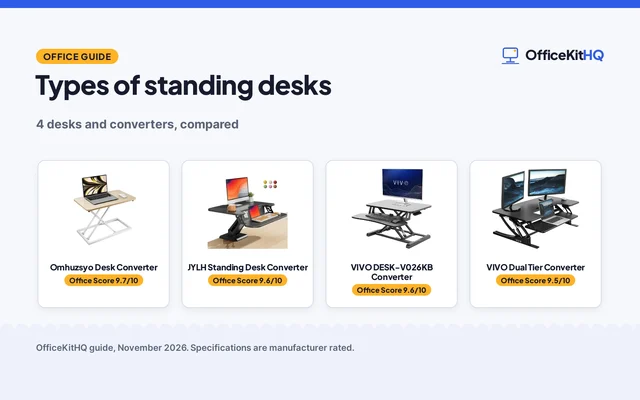
A standing desk moves up and down, so the same surface serves sitting and standing work. The top rises for standing calls and lowers for typing, and the change takes seconds. Look for the height range the maker states, and check it against your sitting and standing elbow height before you order. A standing desk needs power nearby for the motor, and cables need slack for the full travel of the top. The shape suits anyone who switches between sitting and standing through the day, and it fits the same wall spot as a straight desk. Pair it with a chair that adjusts to match, and a footrest for standing breaks.
Executive desks
An executive desk is a wide desk with pedestals and drawers, built for a large room and a full setup. The Sauder Edge Water (on Amazon) example shows the scale: Sauder lists it at 65.12 inches wide, 29.53 inches deep and 29.37 inches high, and 168.0 pounds, with a 5 year parts warranty. A large drawer with a flip-down panel holds the keyboard and mouse, and full extension slides run the file drawers. The shape suits a home office that doubles as a study or a gaming desk, with room for a laptop and a coffee mug on the top. Measure the room before you order, since a desk this wide needs a clear path through the door and space for the chair behind it.
Compact and wall-mounted desks
A compact desk is a small straight desk for a tight spot, and a wall-mounted desk folds down from the wall when work starts and folds away when it ends. These shapes suit an apartment corner, a hallway nook or a bedroom wall where a full desk would crowd the room. A compact desk still needs room for the chair to pull out, and a wall-mounted desk needs a solid wall and the maker’s installation manual close at hand. Check the folded size and the open size before you order, and keep the outlet within reach of the power strip.
How to choose between computer desk types
Start with the room, then the gear. Measure the wall where the desk will stand, the space for the chair to pull out, and the path the desk takes through the door. List what sits on the top: monitor, keyboard, laptop, mug, notebook and hub, and check that the depth holds the monitor at arm’s length with the keyboard in front of it. Match the type to the work: a straight desk for a wall, an L-shaped desk for a corner, a standing desk for sit-stand days, an executive desk for a large room with files, and a compact desk for a tight spot. A standing desk suits sit-stand work, a monitor arm frees top space on a shallow desk, and a chair that adjusts pairs with any type. Check the assembly notes and the warranty the maker states before you order.
FAQ
What is the most common computer desk type?
The straight desk, a rectangular top on legs set against a wall. It fits a spare room, an apartment corner and a kitchen table spot, and it moves easily when the room changes.
How do I measure for a corner desk?
Measure each wall the desk will run along, then leave room for the chair to pull out and turn. A corner desk is harder to move than a straight desk, so place it where it can stay.
Is a standing desk worth it for a home office?
It suits anyone who switches between sitting and standing through the day, since the same surface serves sitting and standing work. Check the height range the maker states against your sitting and standing elbow height before you order.
How big is an executive desk?
The Sauder Edge Water example measures 65.12 inches wide, 29.53 inches deep and 29.37 inches high, and weighs 168.0 pounds. Measure the room and the path through the door before you order.
Can a computer desk fit in a small room?
Yes, with a compact or wall-mounted desk. A compact desk takes a small straight top for a tight spot, and a wall-mounted desk folds away when work ends. Measure the spot and the chair space before you order.
More for your workspace
See the best standing desks for working from home, the best office chairs for working from home, the best keyboard trays and the best under-desk footrests.