
The best docking station for teachers is the hub that turns a laptop, a monitor for lesson slides, a webcam for video calls and a tangle of cables into a desk that connects with a cable. The docks here differ in how many monitors they drive, how much power they pass to the laptop and which ports they offer for cards, audio and wired internet. The sections below compare those points from the listings, so the choice follows the classroom setup rather than the box.
OfficeKitHQ earns a commission when you buy through links on this page, at no extra cost to you. As an Amazon Associate I earn from qualifying purchases. Affiliate disclosure.
Quick picks
 Best Overall Baseus 12-in-1 Dock: Triple 4K display with 2 HDMI and DisplayPort, 100W PD input Check price on Amazon
 Most Ports LIONWEI 14-in-1 Dock: 14 ports with 10Gbps USB 3.1 and triple display Check price on Amazon
 Best 8-Port Dock Selore 8-in-1 Dock: Triple 4K display for Windows with 85W charging output Check price on Amazon
 Best All-in-One ABIWAZY 14-in-1 Dock: 14 ports with VGA, card readers and audio Check price on Amazon
Our desk picks
| # | Product | Office Score | Buy |
|---|---|---|---|
| 1 | Baseus 12-in-1 Dock | 9.6/10 | Buy on Amazon |
| 2 | LIONWEI 14-in-1 Dock | 9.6/10 | Buy on Amazon |
| 3 | Selore 8-in-1 Dock | 9.6/10 | Buy on Amazon |
| 4 | ABIWAZY 14-in-1 Dock | 9.6/10 | Buy on Amazon |

Baseus 12-in-1 Dock
A 12-in-1 USB-C dock with triple 4K display, 100W PD input with 85W output and a stand design for heat dissipation.
Pros
- Triple 4K display with 2 HDMI and DisplayPort
- 100W PD input with 85W charging output
- Gigabit Ethernet with TF and SD card readers
- Stand design improves heat dissipation and keeps the workspace organized
Cons
- No dimensions stated in the listing
- Stand form factor, not a pocket-size dongle
- 85W charging output, below the 100W input
- No VGA output, with HDMI and DisplayPort only
Detailed Review
The Baseus dock lists 12-in-1 expansion with 3 USB-A 3.0 ports, 1 USB-C 3.0 port, Gigabit Ethernet, 4K HDMI, 4K DisplayPort, TF and SD card readers and an audio jack. The listing states triple 4K display on 3 monitors, 100W PD input with up to 85W output to the laptop, and a stand design that improves heat dissipation. The spec table states a 2 Years warranty, with no dimensions stated in the listing.
Who it is for: a teacher who wants triple 4K display with a stand that lifts the dock for airflow. Who should skip it: anyone who needs a VGA output or a pocket-size dongle.
Its Office Score of 9.6/10 comes from performance 32/35, build 21/25, value 21/25, safety 3/10 and warranty 3/5: 80 of 100 points, placed on our 9.2 to 9.8 scale.
Key Specifications
| Ports | 12-in-1 |
|---|---|
| Displays | Triple 4K |
| Power | 100W in, 85W out |
| Warranty | 2 Years |
Figures as published on the retailer listing, collected 29 October 2026. Performance figures are manufacturer rated.
Safety and Warranty
What this listing states. Stand design improves heat dissipation, so safety scores 3 of 10. 2 Years. It does not say everything a buyer needs, such as who pays return shipping, so warranty scores 3 of 5. See How We Pick.
Power and heat. Use the supplied adapter, treat power delivery wattage and display support as the maker's claims for your laptop model, and give the dock room to vent.
This is general buying information, not professional advice. Follow each product manual and local rules, and see our Safety Disclaimer.

LIONWEI 14-in-1 Dock
A 14-port USB-C dock with triple display, 10Gbps USB 3.1 ports and 100W PD input with 87W charging output.
Pros
- 14 ports with 2 HDMI, VGA and Ethernet
- 10Gbps USB 3.1 ports, faster than USB 3.0 ports
- Triple display for Windows with HDMI up to 3840 by 2160
- 100W PD input with 87W charging output
Cons
- Mac OS supports SST mirror mode only
- Wall charger not included
- Spec table warranty entry reads only 1, against 18 months in the bullets
- Requires 65W or more power for sufficient operation
Detailed Review
The LIONWEI dock lists 14 ports with 2 HDMI, VGA, USB-C and USB-A ports, a SD and TF card reader, Gigabit Ethernet and audio. The listing states triple display on Windows, 10Gbps USB 3.1 ports, 100W PD input with 87W charging output, and a wall charger that is not included. The bullets state an 18-month warranty while the spec table warranty entry reads only 1, so the bullets are trusted here.
Who it is for: a teacher who wants the most ports with fast data transfer and triple display on Windows. Who should skip it: anyone who needs extended display on macOS or a wall charger in the box.
Its Office Score of 9.6/10 comes from performance 32/35, build 20/25, value 20/25, safety 4/10 and warranty 3/5: 79 of 100 points, placed on our 9.2 to 9.8 scale.
Key Specifications
| Ports | 14 ports |
|---|---|
| Data | 10Gbps USB 3.1 |
| Power | 100W in, 87W out |
| Ethernet | 1000Mbps |
Figures as published on the retailer listing, collected 29 October 2026. Performance figures are manufacturer rated.
Safety and Warranty
What this listing states. Power output limited to 87W for safety, so safety scores 4 of 10. 18 months. It does not say everything a buyer needs, such as who pays return shipping, so warranty scores 3 of 5. See How We Pick.
Power and heat. Use the supplied adapter, treat power delivery wattage and display support as the maker's claims for your laptop model, and give the dock room to vent.
This is general buying information, not professional advice. Follow each product manual and local rules, and see our Safety Disclaimer.
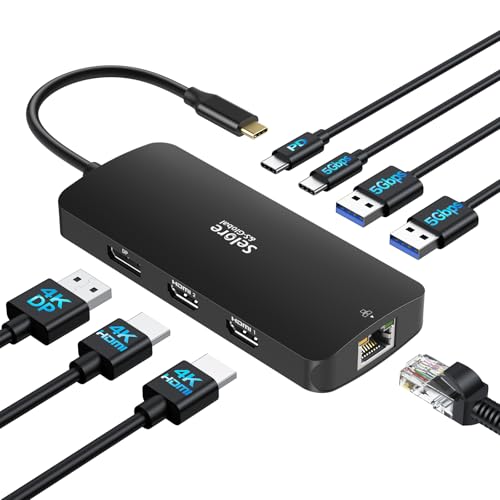
Selore 8-in-1 Dock
An 8-port USB-C dock with triple 4K display for Windows, 100W PD input with 85W output and Gigabit Ethernet.
Pros
- Triple 4K display with 2 HDMI and DisplayPort
- 100W PD input with 85W charging output
- Gigabit Ethernet at 1Gbps
- USB-C 3.0 and USB-A 3.0 ports at up to 5Gbps
Cons
- macOS supports mirror mode only, not extended display
- Power output limited to 85W for safety
- Compatible only with Thunderbolt, full-featured USB-C or USB4 ports
Detailed Review
The Selore dock lists 8 ports with 2 HDMI, a DisplayPort, USB-C 3.0 and USB-A 3.0 ports, Gigabit Ethernet and 100W PD input with 85W output limited for safety. The listing states triple 4K display for Windows and mirror mode only on macOS. The bullets state an 18 month warranty while the spec table states 2 YEAR, so the bullets are trusted here.
Who it is for: a Windows teacher who wants triple 4K display from a compact 8-port dock. Who should skip it: anyone who needs extended display on macOS or more than 8 ports.
Its Office Score of 9.6/10 comes from performance 30/35, build 20/25, value 20/25, safety 4/10 and warranty 3/5: 77 of 100 points, placed on our 9.2 to 9.8 scale.
Key Specifications
| Ports | 8 ports |
|---|---|
| Displays | Triple 4K, Windows; mirror on macOS |
| Power | 100W in, 85W out |
| Ethernet | 1Gbps |
Figures as published on the retailer listing, collected 29 October 2026. Performance figures are manufacturer rated.
Safety and Warranty
What this listing states. Power output limited to 85W for safety, so safety scores 4 of 10. 18 months. It does not say everything a buyer needs, such as who pays return shipping, so warranty scores 3 of 5. See How We Pick.
Power and heat. Use the supplied adapter, treat power delivery wattage and display support as the maker's claims for your laptop model, and give the dock room to vent.
This is general buying information, not professional advice. Follow each product manual and local rules, and see our Safety Disclaimer.

ABIWAZY 14-in-1 Dock
A 14-port USB-C dock with dual and triple display, VGA, card readers, audio and 100W PD input with 87W charging output.
Pros
- 14 ports including 2 HDMI, VGA and card readers
- Triple display for Windows with 4K HDMI output
- 100W PD input with 87W charging output
- Gigabit Ethernet and 3.5mm mic and audio port
Cons
- Mac OS supports mirror mode only
- Dual-display resolution falls to 4K at 30Hz and 1080P at 60Hz
- Only 1 HDD or SSD can connect at the same time
- USB speeds up to 5Gbps, below the 10Gbps ports on the LIONWEI
Detailed Review
The ABIWAZY dock lists 14 ports with 2 HDMI, VGA, USB 3.0 and USB 2.0 ports, a USB-C data port, Gigabit Ethernet, SD and Micro SD card readers and a 3.5mm mic and audio port. The listing states dual and triple display for Windows with mirror mode only on Mac OS, single HDMI 1 up to 4K at 60Hz, and 100W PD input with 87W charging output limited for safety. The spec table states a 1 Year Manufacturer warranty.
Who it is for: a teacher who wants the widest port mix, with VGA, card readers and audio in one dock. Who should skip it: anyone who needs extended display on macOS or 10Gbps data ports.
Its Office Score of 9.6/10 comes from performance 30/35, build 20/25, value 21/25, safety 4/10 and warranty 2/5: 77 of 100 points, placed on our 9.2 to 9.8 scale.
Key Specifications
| Ports | 14 ports |
|---|---|
| Displays | Triple display, Windows; mirror on Mac |
| Power | 100W in, 87W out |
| Size | 6.5 in by 3.54 in by 0.71 in |
Figures as published on the retailer listing, collected 29 October 2026. Performance figures are manufacturer rated.
Safety and Warranty
What this listing states. Charging limited to 87W for safety, so safety scores 4 of 10. 1 Year Manufacturer. It does not say everything a buyer needs, such as who pays return shipping, so warranty scores 2 of 5. See How We Pick.
Power and heat. Use the supplied adapter, treat power delivery wattage and display support as the maker's claims for your laptop model, and give the dock room to vent.
This is general buying information, not professional advice. Follow each product manual and local rules, and see our Safety Disclaimer.
As an Amazon Associate I earn from qualifying purchases.
More picks to compare
 Generic 7-in-1 DockSingle-cable dock with 4K HDMI, 90W power delivery and EthernetCheck on Amazon
 RoRoSkin 8-in-1 Dock StandDock and laptop stand in one, with 4K HDMI and 85W chargingCheck on Amazon
Specs compared
| Dock | Office Score | Ports | Displays | Power out | Warranty | Amazon |
|---|---|---|---|---|---|---|
| Baseus 12-in-1 Dock | 9.6/10 | 12-in-1 | Triple 4K | 85W | 2 Years | View on Amazon |
| LIONWEI 14-in-1 Dock | 9.6/10 | 14 ports | Triple display | 87W | 18 months | View on Amazon |
| Selore 8-in-1 Dock | 9.6/10 | 8 ports | Triple 4K, Windows | 85W | 18 months | View on Amazon |
| ABIWAZY 14-in-1 Dock | 9.6/10 | 14 ports | Triple display | 87W | 1 Year | View on Amazon |
All numbers are the manufacturer’s stated specs, not measured in an office, pulled on 29 October 2026.
How to choose the best docking station for teachers
Count the ports before the monitors
Port count decides what else can stay plugged in. The ABIWAZY and LIONWEI docks each list 14 ports, the Baseus lists 12-in-1 expansion and the Selore lists 8 ports. Beyond the video outputs, the ABIWAZY and LIONWEI docks list VGA, card readers and audio, the Baseus lists TF and SD card readers with an audio jack, and the Selore lists a USB-C 3.0 port with USB-A 3.0 ports. A teacher who runs a webcam, a headset and a card reader at once needs those ports in the dock, not in a second hub, and the best docking station for dual monitors and laptop comparison shows the same port-first check.
Displays: Windows extends, macOS mirrors
All four docks list triple display on Windows, but the macOS story differs, so check the operating system before buying. The Selore listing states triple 4K display for Windows and mirror mode only on macOS, with the second external monitor mirroring the first. The ABIWAZY listing states dual and triple display for Windows and mirror mode only on Mac OS, with HDMI 1 up to 4K at 60Hz on a single display and 4K at 30Hz with 1080P at 60Hz across two displays. The LIONWEI listing states three different monitors on Windows, with HDMI up to 3840 by 2160 at 60Hz and at 30Hz and VGA up to 1920 by 1080 at 60Hz, while Mac OS supports SST mode with the same content on all external monitors. The Baseus listing states triple 4K display with 2 HDMI and DisplayPort and lists MacBook compatibility, without stating mirror or extend behaviour on macOS.
Power in is not power out
Every dock here lists 100W PD input, but the charging output to the laptop is lower, and that output is the figure that matters at the desk. The Selore and Baseus docks deliver up to 85W output, while the ABIWAZY and LIONWEI docks deliver up to 87W output, with the Selore and LIONWEI outputs limited for safety. A laptop that ships with a larger adapter may charge more slowly on any of these docks, so match the output to the laptop’s needs before buying. The LIONWEI listing also states to connect 65W or more power to ensure sufficient power to work, and states the wall charger is not included.
Read the warranty line, not the headline
Two listings carry warranty contradictions between bullets and spec tables, and the bullets are trusted in both cases. The Selore bullets state an 18 month warranty while the spec table states 2 YEAR, so the warranty used here is 18 months. The LIONWEI bullets state an 18-month warranty while the spec table warranty entry reads only 1, so the warranty used here is 18 months. The ABIWAZY spec table states 1 Year Manufacturer and the Baseus spec table states 2 Years, with no bullet contradiction on either listing. A warranty term that covers the dock matters more than a vague support promise, so read the term as written.
Setup Notes
- Check the laptop port first: the Selore listing requires a Thunderbolt 3, 4 or 5 port, a full-featured USB-C port or a USB4 port.
- Plan power before the first call: the LIONWEI listing states the wall charger is not included and to connect 65W or more power.
- Only the ABIWAZY listing states overall size, at 6.5 in by 3.54 in by 0.71 in; the other listings state no dimensions.
- For a Mac, confirm mirror or extend behaviour from the listing, since three listings state mirror-only display on macOS.
FAQ
Do these docks work with macOS?
The Selore, ABIWAZY and LIONWEI listings state mirror-only display on macOS. The Baseus listing lists MacBook compatibility without stating mirror or extend behaviour, so check the listing before buying for a Mac.
How many monitors can these docks drive?
All four list triple display on Windows. The Selore and Baseus list triple 4K display, the LIONWEI lists three different monitors on Windows and the ABIWAZY lists dual and triple display for Windows.
Will the dock charge the laptop?
Yes, with limits. All four list 100W PD input, with charging output up to 85W on the Selore and Baseus and up to 87W on the ABIWAZY and LIONWEI.
Do I need a wall charger?
The LIONWEI listing states the wall charger is not included. The other listings do not state whether a charger is included.
Which dock has the most ports?
The ABIWAZY and LIONWEI docks each list 14 ports, ahead of the Baseus at 12-in-1 and the Selore at 8 ports.
Score breakdown
The Office Score weighs performance (ports, displays and charging), build, value for the stated specs, safety and warranty. For a docking station, safety means a power-output limit stated for safety or a design that improves heat dissipation; the Selore, ABIWAZY and LIONWEI listings state a safety-limited charging output, and the Baseus listing states a stand design that improves heat dissipation. All four listings state a warranty term: Baseus at 2 Years, Selore at 18 months, LIONWEI at 18 months and ABIWAZY at 1 Year Manufacturer. How we pick explains the weights.
| Product | Office Score | Perf. /35 | Build /25 | Value /25 | Safety /10 | Warranty /5 |
|---|---|---|---|---|---|---|
| Baseus 12-in-1 Dock | 9.6 | 32 | 21 | 21 | 3 | 3 |
| LIONWEI 14-in-1 Dock | 9.6 | 32 | 20 | 20 | 4 | 3 |
| Selore 8-in-1 Dock | 9.6 | 30 | 20 | 20 | 4 | 3 |
| ABIWAZY 14-in-1 Dock | 9.6 | 30 | 20 | 21 | 4 | 2 |
We fit point totals onto a 9.2 low and 9.8 high in a straight line. One item can outscore another only by earning more points.
More for your workspace
See every Docking Stations and USB Hubs guide and all Audio, Power and Connectivity guides.
More picks: docking station for home office, docking station for multiple monitors and webcam for ESL teachers.