
The cursor drifts across the screen while the wrist starts to complain, and the desk is too cluttered for big mouse sweeps. The best gaming mouse trackball stays put while the ball does the moving, and this guide compared five of them by connection type, DPI range, buttons and battery. Every pick below carries an Office Score.
OfficeKitHQ earns a commission when you buy through links on this page, at no extra cost to you. As an Amazon Associate I earn from qualifying purchases. Affiliate disclosure.
Quick picks
 Best Overall ELECOM DEFT PRO: Three connection types and 10 customizable buttons Check price on Amazon
 Best Thumb Control SABLUTE MAM1 Pro: 18-degree tilt, 800-4800 DPI and quiet clicks Check price on Amazon
 Runner-up ELECOM Huge Wireless: 52mm ball with ruby bearings, 325-day battery Check price on Amazon
 Best Vertical Nulea M506: 54-degree vertical design with 21-day battery Check price on Amazon
 Also Listed Nulea M501: Title-only listing with few stated details Check price on Amazon
The picks
| # | Product | Office Score | Buy |
|---|---|---|---|
| 1 | ELECOM DEFT PRO | 9.6/10 | Buy on Amazon |
| 2 | SABLUTE MAM1 Pro | 9.5/10 | Buy on Amazon |
| 3 | ELECOM Huge Wireless | 9.5/10 | Buy on Amazon |
| 4 | Nulea M506 | 9.5/10 | Buy on Amazon |
| 5 | Nulea M501 | 9.5/10 | Buy on Amazon |

ELECOM DEFT PRO
ELECOM DEFT PRO with three connection types, 8 buttons plus a tilting scrollwheel and 500 to 1500 DPI.
Pros
- Three connection types: Bluetooth, wireless USB and wired USB
- 8 buttons plus a tilting scrollwheel, 10 customizable in total
- DPI switches between 500, 1000 and 1500 for different screens
- 3 year manufacturer warranty stated on the listing
Cons
- 10-button customization needs the Mouse Assistant software
- Max 1500 DPI is below the SABLUTE's stated 4800
- No rechargeable battery; runs on one included AA
- Horizontal scroll is not compatible with Windows RT 8.1
Detailed Review
ELECOM lists the DEFT PRO as a finger-operated trackball that connects by Bluetooth, wireless USB or wired USB, switching with a single button. The DPI button changes between 500, 1000 and 1500, and 8 buttons plus a tilting scrollwheel give 10 customizable controls through the Mouse Assistant software. The unit measures 3.6 by 5.3 by 2.3 inches, weighs 5.7 oz without the battery, and one AA battery is included.
Who it's for: desk workers who switch between a laptop, a desktop and a tablet. Who should skip it: players who want DPI above 1500 or a rechargeable battery.
Its Office Score of 9.6/10 comes from performance 32/35, build 21/25, value 22/25, safety 0/10 and warranty 4/5: 79 of 100 points, placed on our 9.2 to 9.8 scale.
Key Specifications
| Connection | Wired, wireless, Bluetooth |
|---|---|
| DPI | 500/1000/1500 |
| Buttons | 8 + 2 tilt, 10 customizable |
| Size | 3.6 x 5.3 x 2.3 in |
Figures as published on the retailer listing, collected 23 October 2026. Performance figures are manufacturer rated.
Safety and Warranty
What this listing states. This product does not plug in or run on a battery, so safety is not part of its score. 3 year manufacturer. It does not say everything a buyer needs, such as who pays return shipping, so warranty scores 4 of 5. See How We Pick.
Fit the desk first. Check the stated size against your desk depth and keyboard tray, and charge or pair as the manual describes. No keyboard, mouse or wrist rest prevents or treats injury.
This is general buying information, not professional advice. Follow each product manual and local rules, and see our Safety Disclaimer.

SABLUTE MAM1 Pro
SABLUTE MAM1 Pro thumb trackball with 0 or 18 degree tilt, 800 to 4800 DPI and quiet clicks.
Pros
- Adjustable 0 or 18 degree tilt for a natural hand position
- 5 DPI levels from 800 to 4800, the widest range here
- Rechargeable battery with USB-C charging
- Quiet-touch buttons suit offices and shared workspaces
Cons
- Heaviest pick at 12.64 oz
- Driver for customization is not compatible with Mac OS
- No stated ball size or bearing details
- No stated battery life in days or hours
Detailed Review
SABLUTE lists the MAM1 Pro as a thumb-operated trackball with an adjustable 0 or 18 degree tilt. It connects up to 3 devices over Bluetooth and 2.4 GHz, switches with one button, and offers 5 DPI levels from 800 to 4800 with quiet-touch buttons. The built-in battery recharges over USB-C, a soft ambient backlight can be switched off, and the USB receiver stores in the base. The unit measures 5.36 by 3.94 inches, weighs 12.64 oz, and the range is stated as 33 feet.
Who it's for: shared-office workers who want quiet clicks and multi-device switching. Who should skip it: Mac users who need the customization driver, or anyone counting grams.
Its Office Score of 9.5/10 comes from performance 30/35, build 20/25, value 21/25, safety 0/10 and warranty 3/5: 74 of 100 points, placed on our 9.2 to 9.8 scale.
Key Specifications
| Tilt | 0 or 18 degrees |
|---|---|
| DPI | 800 to 4800, 5 levels |
| Battery | Rechargeable, USB-C |
| Weight | 12.64 oz |
Figures as published on the retailer listing, collected 23 October 2026. Performance figures are manufacturer rated.
Safety and Warranty
What this listing states. No FCC or other safety listing is stated, so safety scores zero. 2 Year warranty. It does not say everything a buyer needs, such as who pays return shipping, so warranty scores 3 of 5. See How We Pick.
Fit the desk first. Check the stated size against your desk depth and keyboard tray, and charge or pair as the manual describes. No keyboard, mouse or wrist rest prevents or treats injury.
This is general buying information, not professional advice. Follow each product manual and local rules, and see our Safety Disclaimer.

ELECOM Huge Wireless
ELECOM Huge wireless trackball with a 52 mm ball on ruby bearings and a 325-day stated battery life.
Pros
- 52 mm ball, the largest among ELECOM trackball products
- Ball rolls on three 2.5 mm artificial ruby bearings
- 325-day average battery life stated in the spec table
- Battery remaining light lamp on the unit
Cons
- Battery type is contradicted across the listing
- 9.2 oz without battery, heavy for a trackball
- Wireless range drops to 3 m on magnetic surfaces
- No Bluetooth or wired connection option on this model
Detailed Review
ELECOM lists the Huge as a finger-operated wireless trackball with a 52 mm ball, optical tracking and 8 buttons, measuring 4.5 by 7.2 by 2.3 inches. The DPI button switches between 500, 1000 and 1500, and the ball rides on three 2.5 mm artificial ruby bearings that pop out for cleaning through a hole in the bottom. One contradiction to flag: the bullets say one AA battery is included, the spec table says one AAA battery is required, and the included components list two AA batteries. This guide trusts the title and bullets, so one AA.
Who it's for: users who want the biggest ball and the longest stated battery life. Who should skip it: anyone who needs Bluetooth, a wired option or a lighter mouse.
Its Office Score of 9.5/10 comes from performance 30/35, build 21/25, value 21/25, safety 0/10 and warranty 3/5: 75 of 100 points, placed on our 9.2 to 9.8 scale.
Key Specifications
| Ball | 52 mm |
|---|---|
| Bearings | Three 2.5 mm ruby |
| DPI | 500/1000/1500 |
| Battery life | 325 days stated |
Figures as published on the retailer listing, collected 23 October 2026. Performance figures are manufacturer rated.
Safety and Warranty
What this listing states. No FCC or other safety listing is stated, so safety scores zero. 1 year manufacturer. It does not say everything a buyer needs, such as who pays return shipping, so warranty scores 3 of 5. See How We Pick.
Fit the desk first. Check the stated size against your desk depth and keyboard tray, and charge or pair as the manual describes. No keyboard, mouse or wrist rest prevents or treats injury.
This is general buying information, not professional advice. Follow each product manual and local rules, and see our Safety Disclaimer.
Nulea M506
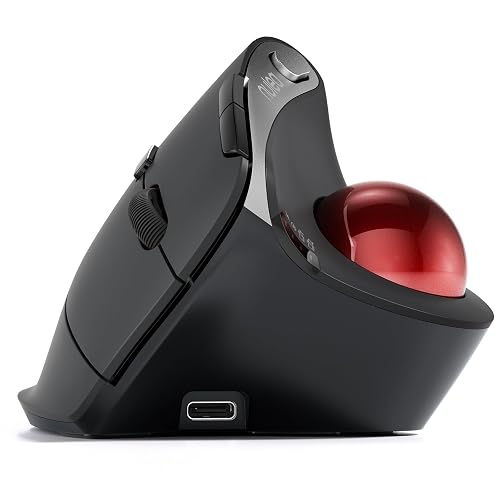
Nulea M506 vertical trackball with a 54 degree angle, up to 21 days of battery and 3-device connection.
Pros
- 54 degree vertical design for a natural wrist position
- Up to 21 days of battery per full charge
- Removable trackball for easy cleaning
- Two Bluetooth channels plus USB for 3 devices
Cons
- 6 buttons versus 8 or 10 on the other picks
- Fixed 54 degree angle with no tilt adjustment
- Max 1600 DPI is below the SABLUTE's stated 4800
- No stated dimensions in inches
Detailed Review
Nulea lists the M506 as a 54 degree vertical trackball with thumb control, aimed at office and design work. It pairs with up to 3 devices over two Bluetooth channels and one USB receiver, offers 4 adjustable DPI levels, and the built-in battery runs up to 21 days per charge. The trackball detaches for cleaning without tools, and the listing states a 12-month warranty. Item weight is listed as 151.5 g.
Who it's for: users who want a vertical grip with long battery life. Who should skip it: players who need more buttons or DPI above 1600.
Its Office Score of 9.5/10 comes from performance 29/35, build 20/25, value 21/25, safety 0/10 and warranty 3/5: 73 of 100 points, placed on our 9.2 to 9.8 scale.
Key Specifications
| Angle | 54 degrees vertical |
|---|---|
| Battery | 21 days per charge |
| DPI | 400/800/1200/1600 |
| Weight | 151.5 g |
Figures as published on the retailer listing, collected 23 October 2026. Performance figures are manufacturer rated.
Safety and Warranty
What this listing states. No FCC or other safety listing is stated, so safety scores zero. 12 months. It does not say everything a buyer needs, such as who pays return shipping, so warranty scores 3 of 5. See How We Pick.
Fit the desk first. Check the stated size against your desk depth and keyboard tray, and charge or pair as the manual describes. No keyboard, mouse or wrist rest prevents or treats injury.
This is general buying information, not professional advice. Follow each product manual and local rules, and see our Safety Disclaimer.

Nulea M501
A rechargeable thumb-control trackball with 4 DPI levels and 3-device switching at the lightest stated weight.
Pros
- Built-in rechargeable battery, no disposable batteries
- Connects up to 3 devices by Bluetooth or USB dongle
- 4 DPI levels for cursor control
- 12 months warranty stated in the spec table
Cons
- Buttons are not programmable
- No stated dpi numbers for the 4 DPI levels
- We do not repeat the listing's muscle stress claim
- Right-hand orientation only
Detailed Review
The Nulea M501 is the rechargeable trackball pick: a thumb-control ball with 4 DPI levels, 6 buttons and connections to up to 3 devices over Bluetooth or the 2.4G USB receiver stored at the bottom of the mouse. The built-in rechargeable battery charges with the included cable, and the listing warns against fast chargers, recommending a computer USB port or 5V charger. At 4.51 oz it is the lightest pick.
The buttons are not programmable, which limits it for CAD shortcuts, and the 4 DPI levels carry no stated dpi numbers. We do not repeat the listing's claim about reducing muscle stress, which is a health claim. The spec table states a 12 months warranty.
Its Office Score of 9.5/10 comes from performance 28/35, build 20/25, value 20/25, safety 0/10 and warranty 2/5: 70 of 100 points, placed on our 9.2 to 9.8 scale.
Key Specifications
| Sensor | 4 DPI levels, trackball |
|---|---|
| Buttons | 6, not programmable |
| Connectivity | Bluetooth, 2.4G, 3 devices |
| Warranty | 12 months |
Figures as published on the retailer listing, collected 20 October 2026. Performance figures are manufacturer rated.
Safety and Warranty
What this listing states. This product does not plug in or run on a battery, so safety is not part of its score. 12 months. It does not say everything a buyer needs, such as who pays return shipping, so warranty scores 2 of 5. See How We Pick.
Fit the desk first. Check the stated size against your desk depth and keyboard tray, and charge or pair as the manual describes. No keyboard, mouse or wrist rest prevents or treats injury.
This is general buying information, not professional advice. Follow each product manual and local rules, and see our Safety Disclaimer.
As an Amazon Associate I earn from qualifying purchases.
More picks to compare
 ELECOM Huge WiredWired Huge with the 52mm red ball for desk-bound setupsCheck on Amazon
Compare the picks
| Trackball | Office Score | Connection | DPI levels | Buttons | Warranty | Amazon |
|---|---|---|---|---|---|---|
| ELECOM DEFT PRO | 9.6/10 | Wired, wireless, Bluetooth | 500/1000/1500 | 10 customizable | 3 year manufacturer | View on Amazon |
| SABLUTE MAM1 Pro | 9.5/10 | Bluetooth + 2.4GHz, 3 devices | 800-4800 | 8 | 2 Year warranty | View on Amazon |
| ELECOM Huge Wireless | 9.5/10 | 2.4GHz wireless | 500/1000/1500 | 8 | 1 year manufacturer | View on Amazon |
| Nulea M506 | 9.5/10 | Bluetooth + USB, 3 devices | 400/800/1200/1600 | 6 | 12 months | View on Amazon |
| Nulea M501 | 9.5/10 | Wireless | Not stated | Not stated | Not stated | View on Amazon |
Specifications are manufacturer rated as listed, collected 23 October 2026.
How we scored them
The Office Score weighs performance, build, value, safety and warranty. For trackballs, safety means the stated ergonomic and maintenance features rather than a certification. Three of the five state a concrete warranty term. How we pick explains the weights.
| Product | Office Score | Perf. /35 | Build /25 | Value /25 | Safety /10 | Warranty /5 |
|---|---|---|---|---|---|---|
| ELECOM DEFT PRO | 9.6 | 32 | 21 | 22 | 0 | 4 |
| SABLUTE MAM1 Pro | 9.5 | 30 | 20 | 21 | 0 | 3 |
| ELECOM Huge Wireless | 9.5 | 30 | 21 | 21 | 0 | 3 |
| Nulea M506 | 9.5 | 29 | 20 | 21 | 0 | 3 |
Scores run from 9.2 to 9.8: each product’s point total is placed on that range, so more points always means a higher score.
How to choose the best gaming mouse trackball
Start with ball control: finger or thumb
The ELECOM pair are finger-operated: the Huge uses a 52 mm ball on three 2.5 mm ruby bearings, and the DEFT PRO uses a red ball on ruby bearings. The SABLUTE MAM1 Pro and the Nulea M506 are thumb-operated, so the mouse body never moves. See the best trackball mouse for work for more finger-operated options, and a large mouse pad gives the wired models a clean home.
Match the DPI range to your screens
| Trackball | Ball control | DPI range | Battery |
|---|---|---|---|
| ELECOM DEFT PRO | Finger | 500 to 1500 | 1 AA included |
| SABLUTE MAM1 Pro | Thumb | 800 to 4800 | Rechargeable, USB-C |
| ELECOM Huge Wireless | Finger | 500 to 1500 | 325 days stated |
| Nulea M506 | Thumb | 4 DPI levels | 21 days per charge |
| Nulea M501 | Not stated | Not stated | Not stated |
Both ELECOM models switch between 500, 1000 and 1500 DPI. The SABLUTE spans 800 to 4800 across 5 levels, the widest range here, and the Nulea M506 offers 4 adjustable DPI levels.
Count the connections
The DEFT PRO connects three ways: Bluetooth, wireless USB and wired USB, switching with one button. The SABLUTE pairs with up to 3 devices over Bluetooth and 2.4 GHz, and the Nulea M506 handles 2 Bluetooth channels plus a USB receiver. The Huge is 2.4 GHz wireless only, with a range of up to 3 m on magnetic surfaces and 10 m on non-magnetic surfaces.
Read the battery line, not the headline
The Huge spec table states a 325-day average battery life, and a battery remaining light is on the unit. The Nulea M506 states up to 21 days per charge from its built-in cell, and the SABLUTE recharges over USB-C with no stated days. The DEFT PRO runs on one AA battery, included. On the Huge, the battery type is contradicted: bullets say one AA is included, the spec table says one AAA is required, and the included components list two AA batteries; this guide trusts the title and bullets, so one AA.
Setup Notes
- Measure the desk space first: the Huge is 7.2 by 4.5 inches, the DEFT PRO 5.3 by 3.6 inches.
- The Huge needs a free USB port for its 2.4 GHz receiver; the DEFT PRO also connects by Bluetooth or wired USB.
- The SABLUTE charges over USB-C; the ELECOM pair run on AA batteries, so plan for spares.
- The SABLUTE driver is not compatible with Mac OS, per the listing.
- The M501 listing states no dimensions or weight, so plan for an unknown footprint.
Frequently Asked Questions
Which trackball has the longest stated battery life?
The ELECOM Huge lists a 325-day average battery life in its spec table. The Nulea M506 lists up to 21 days per charge, and the SABLUTE is rechargeable with no stated days.
Can a trackball mouse connect to multiple devices?
Yes. The ELECOM DEFT PRO connects three ways: Bluetooth, wireless USB and wired USB. The SABLUTE and the Nulea M506 each pair with up to 3 devices over Bluetooth and USB.
Do any of these have quiet clicks?
The SABLUTE MAM1 Pro lists quiet-touch buttons suited to offices or shared workspaces. The Nulea M506 instead lists a crisp, audible click.
Which trackball suits a small desk?
The thumb-operated SABLUTE and Nulea M506 stay put while the ball moves, which suits tight spaces. The ELECOM Huge is the largest here at 7.2 by 4.5 inches.
Does the ELECOM Huge use AA or AAA batteries?
The listing contradicts itself: the bullets say one AA battery is included, the spec table says one AAA is required, and the included components list two AA batteries. This guide trusts the title and bullets, so plan on one AA.
Related guides
See every mice and mouse pads guide and all monitor mounts, keyboards and mice guides. Also see our best trackball mouse for work. Also see our best large mouse pad.
More picks: gaming mouse and keyboard combos, wireless mouse for Blender, gaming mouse for office.


