The best laptop cooling pad for MacBook Pro is the one that moves air under the base, fits the size of your MacBook Pro, and sits steady on the desk while you work. A MacBook Pro on a home desk runs warm by mid-afternoon, the fans spin up during a video call, and the base feels hot against your wrists. We compared cooling pads and stands by fan size and speed, stated laptop fit, height settings, weight and warranty term, using only what each listing publishes.
OfficeKitHQ earns a commission when you buy through links on this page, at no extra cost to you. As an Amazon Associate I earn from qualifying purchases. Affiliate disclosure.
Quick picks
 Best Overall Metfut LZ-D21: Thermoelectric panel, two fans, 20 dB or less, 1-year warranty Check price on Amazon
 Best Turbo Fan llano V10: 4.72 in turbo fan up to 3500 RPM, fits 13 to 17.3 in Check price on Amazon
 Best Aluminum ICE COOREL: 160 mm fan, 7 height settings, about 1.35 lb Check price on Amazon
 Most Portable Hagibis JY-JD03MK: Magnetic pair about 1.76 oz, silicone pads, no fan Check price on Amazon
 Three-Fan Pick havit HV-F2056: 3 fans for 15.6 to 17 in laptops, per the title Check price on Amazon
Our desk picks
| # | Product | Office Score | Buy |
|---|---|---|---|
| 1 | Metfut LZ-D21 | 9.7/10 | Buy on Amazon |
| 2 | llano V10 | 9.6/10 | Buy on Amazon |
| 3 | ICE COOREL | 9.6/10 | Buy on Amazon |
| 4 | havit HV-F2056 | 9.5/10 | Buy on Amazon |
| 5 | Hagibis JY-JD03MK | 9.3/10 | Buy on Amazon |
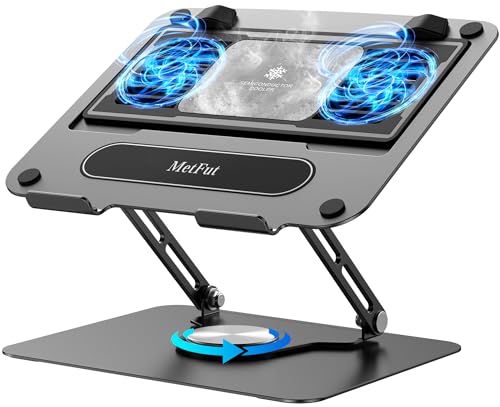
Metfut LZ-D21
A carbon steel cooling pad with a thermoelectric semiconductor panel and two fans, rated at 20 dB or less, for laptops up to 15.6 in and 20 lb.
Pros
- Thermoelectric semiconductor panel plus two fans, the only panel cooler here
- Noise rated at 20 dB or less
- Carbon steel frame supports laptops up to 20 lb
- 360-degree rotation base and detachable cooler for screen sharing
Cons
- Needs a 20W USB adapter for full 20W cooling, sold separately
- Heaviest pad here at 3.0 lb
- At 5W on a laptop USB port, cooling drops from the 20W maximum
- Mist can form on the cooling panel in high humidity or when idling, per the listing
Detailed Review
Metfut lists a thermoelectric cooling pad that uses a semiconductor panel and two fans, with four spring dampers that press the panel against the laptop base. The frame is carbon steel, supports laptops up to 15.6 inches and 20 lb, and weighs 3.0 lb. Noise is rated at 20 dB or less, and cooling runs at 20W with a compatible 20W USB adapter, sold separately, or 5W from a laptop USB port or 5W adapter. The base rotates 360 degrees, the cooler detaches for use as a plain stand, and the height and angle adjust. The listing states a 1-year quality warranty with life-long technical support. One thing to check: the title puts the fit at 10 to 16 inches while the bullets state support up to 15.6 inches; check before ordering a 16-inch MacBook Pro.
Who it's for: a MacBook Pro owner who wants the strongest stated cooling here and a pad that turns for screen sharing. Who should skip it: anyone with a 16-inch MacBook Pro who needs a stated fit above 15.6 inches, or anyone who does not want to buy a 20W adapter for full power.
Its Office Score of 9.7/10 comes from performance 32/35, build 22/25, value 21/25, safety 7/10 and warranty 4/5: 86 of 100 points, placed on our 9.2 to 9.8 scale.
Key Specifications
| Fan | 2 fans, semiconductor panel |
|---|---|
| Noise | 20 dB or less |
| Stated fit | Up to 15.6 in, 20 lb |
| Item weight | 3.0 lb |
These specs mirror the retailer listing as of 18 November 2026; performance figures are stated by the brand.
Safety and Warranty
What this listing states. Carbon steel frame with non-slip rubber pads and a stated 20 lb support limit, so safety scores 7 of 10. 1-year quality warranty. It does not say everything a buyer needs, such as who pays return shipping, so warranty scores 4 of 5. See How We Pick.
Match the mount. Check your screen's VESA pattern, size and weight against the stated range, and check that your desk thickness and edge suit a clamp or grommet mount before you drill or clamp.
This is general buying information, not professional advice. Follow each product manual and local rules, and see our Safety Disclaimer.

llano V10
A gaming cooling pad with a 4.72 in turbo fan rated up to 3500 RPM, 12 RGB lighting modes and a stated fit of 13 to 17.3 in.
Pros
- 4.72 inch turbo fan rated up to 3500 RPM, the highest stated fan speed here
- Stated fit of 13 to 17.3 inches covers a 16-inch MacBook Pro
- 12 RGB lighting modes with a memory function
- Removable dust filter and foam inserts for 13 to 14 inch laptops
Cons
- No item weight is stated
- No noise figure is stated
- Footprint of 14.8 by 11.4 inches needs a deep desk
- Foam inserts are needed for a snug fit on 13 to 14 inch laptops
Detailed Review
llano lists the V10 as a gaming cooling pad with a 4.72 inch turbo fan rated up to 3500 RPM and a maker claim of a drop of up to 38 degrees C (100 degrees F) within minutes. It fits laptops from 13 to 17.3 inches, with foam inserts for 13 to 14 inch models, and the stand has three levels, front anti-slip baffles and a removable dust filter. The pad has 12 RGB lighting modes across 5 hues with a memory function, physical buttons for fan and RGB control, and dual USB ports, one USB-A and one USB-C. The footprint is 14.8 by 11.4 by 2.5 inches, and the listing states a One Year Warranty. One thing to check: the title names four USB ports while the bullets describe two, one USB-A and one USB-C; check before ordering.
Who it's for: a MacBook Pro owner who wants the highest stated fan speed and a pad that fits a 16-inch model. Who should skip it: anyone who wants a stated noise figure or a stated item weight, or anyone who does not want RGB lighting on the desk.
Its Office Score of 9.6/10 comes from performance 30/35, build 21/25, value 20/25, safety 5/10 and warranty 0/5: 76 of 100 points, placed on our 9.2 to 9.8 scale.
Key Specifications
| Fan | 4.72 in, up to 3500 RPM |
|---|---|
| Stated fit | 13 to 17.3 in |
| RGB modes | 12 modes, 5 hues |
| Footprint | 14.8 by 11.4 by 2.5 in |
These specs mirror the retailer listing as of 18 November 2026; performance figures are stated by the brand.
Safety and Warranty
What this listing states. Front anti-slip baffles and a removable dust filter are stated, so safety scores 5 of 10. No warranty term, so warranty scores zero. See How We Pick.
Match the mount. Check your screen's VESA pattern, size and weight against the stated range, and check that your desk thickness and edge suit a clamp or grommet mount before you drill or clamp.
This is general buying information, not professional advice. Follow each product manual and local rules, and see our Safety Disclaimer.

ICE COOREL
An aluminum cooling pad with a 160 mm fan rated at 1000 to 1400 RPM, seven height settings and a stated weight of about 1.35 lb.
Pros
- Aluminum alloy surface draws heat away from the laptop, per the listing
- Seven height settings, the most stated here
- About 1.35 lb and slim enough to store in a laptop bag, per the listing
- Two USB 2.0 ports and one USB cable included
Cons
- No warranty term is stated
- Stated fit of 12 to 15.6 inches does not cover a 16-inch MacBook Pro
- Fan speed tops out at 1400 RPM, below the llano at 3500 RPM
- No noise figure is stated
Detailed Review
ICE COOREL lists an aluminum cooling pad with a mesh design and one 160 mm fan with adjustable speed from 1000 to 1400 RPM. The surface is aluminum alloy, the pad has seven height settings and two baffles to hold the laptop in place, and it weighs about 1.35 lb. It fits laptops from 12 to 15.6 inches, plugs into a laptop USB port, and has two USB 2.0 ports for data or other devices, with one USB cable included. No warranty term appears in the listing.
Who it's for: a MacBook Pro owner who wants a light aluminum pad with the most height settings here. Who should skip it: anyone with a 16-inch MacBook Pro, or anyone who wants a warranty term in writing.
Its Office Score of 9.6/10 comes from performance 28/35, build 21/25, value 21/25, safety 5/10 and warranty 0/5: 75 of 100 points, placed on our 9.2 to 9.8 scale.
Key Specifications
| Fan | 160 mm, 1000 to 1400 RPM |
|---|---|
| Stated fit | 12 to 15.6 in |
| Height settings | 7 |
| Item weight | About 1.35 lb |
These specs mirror the retailer listing as of 18 November 2026; performance figures are stated by the brand.
Safety and Warranty
What this listing states. Two baffles on the pad hold the laptop in place, so safety scores 5 of 10. No warranty term, so warranty scores zero. See How We Pick.
Match the mount. Check your screen's VESA pattern, size and weight against the stated range, and check that your desk thickness and edge suit a clamp or grommet mount before you drill or clamp.
This is general buying information, not professional advice. Follow each product manual and local rules, and see our Safety Disclaimer.

havit HV-F2056
A slim portable cooling pad with 3 quiet USB-powered fans, 2 height settings and an extra USB port, for 15.6 to 17 in laptops.
Pros
- Slim portable design at 14.96 by 11.02 by 1.18 in
- 3 quiet fans circulating air below the laptop
- Metal mesh surface for a stable carrying surface
- Extra USB port and power switch for other devices
Cons
- Only 2 height settings, the fewest here
- Warranty description of 1 states no warranty term
- Type C devices need an adapter, per the listing
- No fan size is stated
Detailed Review
havit lists the HV-F2056 cooling pad with 3 quiet USB-powered fans circulating air below the laptop, 2 height settings and an extra USB port with a power switch. Dimensions are 14.96 by 11.02 by 1.18 in and weight is 697.3 g. One note: the spec table lists an ABS enclosure while the bullets describe a metal mesh surface, so treat the mesh as the top surface rather than the whole enclosure. The warranty description of 1 states no warranty term, and Type C devices need an adapter per the listing.
Who it's for: someone who wants a slim portable pad for a 15.6 to 17 in laptop. Who should skip it: anyone who wants more height settings or a stated warranty term.
Its Office Score of 9.5/10 comes from performance 28/35, build 19/25, value 20/25, safety not scored (non-powered gear) and warranty 0/5: 67 of 90 points, placed on our 9.2 to 9.8 scale.
Key Specifications
| Laptop fit | 15.6 to 17 in |
|---|---|
| Fans | 3 |
| Height settings | 2 |
| Dimensions | 14.96 by 11.02 by 1.18 in |
Figures as published on the retailer listing, collected 24 October 2026. Performance figures are manufacturer rated.
Safety and Warranty
What this listing states. This product does not plug in or run on a battery, so safety is not part of its score. No warranty term, so warranty scores zero. See How We Pick.
Match the mount. Check your screen's VESA pattern, size and weight against the stated range, and check that your desk thickness and edge suit a clamp or grommet mount before you drill or clamp.
This is general buying information, not professional advice. Follow each product manual and local rules, and see our Safety Disclaimer.
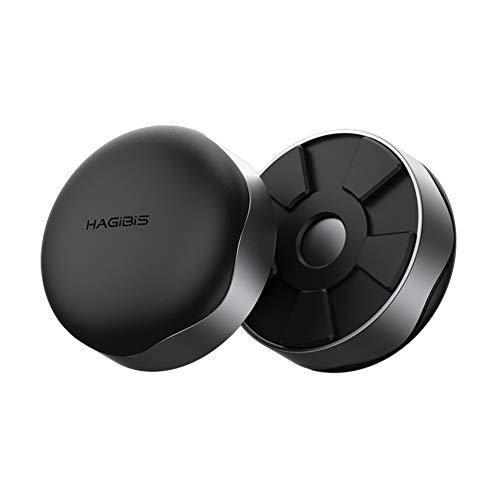
Hagibis JY-JD03MK
A pair of magnetic laptop feet that lift the laptop for airflow, with silicone pads on top and bottom and a stated weight of about 1.76 oz.
Pros
- About 1.76 oz for the pair, the lowest stated weight here
- Magnetic design attaches without tools
- Silicone pads on top and bottom hold the laptop in place and protect it from scratches
- Small enough to carry in a pocket or bag
Cons
- No fan, so cooling is passive airflow only
- No warranty term is stated
- No laptop size range is stated
- Two separate feet to place and keep track of
Detailed Review
Hagibis lists a pair of magnetic laptop feet that elevate the laptop so air can move under the base. Each foot uses an Nd-Fe-B magnet, with a silicone pad on top to protect the laptop and a silicone pad on the bottom to hold it in place. The two stands weigh about 1.76 oz together. There is no fan: cooling comes from the lift alone. No laptop size range or warranty term is stated.
Who it's for: a MacBook Pro owner who wants the smallest lift for airflow and carries it in a bag. Who should skip it: anyone who wants a fan, height settings or a stated laptop size range.
Its Office Score of 9.3/10 comes from performance 21/35, build 19/25, value 19/25, safety 4/10 and warranty 0/5: 63 of 100 points, placed on our 9.2 to 9.8 scale.
Key Specifications
| Weight | About 1.76 oz for the pair |
|---|---|
| Magnet | Nd-Fe-B |
| Pads | Silicone, top and bottom |
| Count | 2 stands |
These specs mirror the retailer listing as of 18 November 2026; performance figures are stated by the brand.
Safety and Warranty
What this listing states. Silicone pads on top and bottom hold the laptop in place, so safety scores 4 of 10. No warranty term, so warranty scores zero. See How We Pick.
Match the mount. Check your screen's VESA pattern, size and weight against the stated range, and check that your desk thickness and edge suit a clamp or grommet mount before you drill or clamp.
This is general buying information, not professional advice. Follow each product manual and local rules, and see our Safety Disclaimer.
As an Amazon Associate I earn from qualifying purchases.
Specs compared
| Cooling pad | Office Score | Stated fit | Fan | Height settings | Item weight | Warranty | Amazon |
|---|---|---|---|---|---|---|---|
| Metfut LZ-D21 | 9.7/10 | Up to 15.6 in | 2 fans, semiconductor panel | Adjustable height and angle | 3.0 lb | 1 year | View on Amazon |
| llano V10 | 9.6/10 | 13 to 17.3 in | 4.72 in fan, up to 3500 RPM | 3 levels | Not stated | 1 year | View on Amazon |
| ICE COOREL | 9.6/10 | 12 to 15.6 in | 160 mm fan, 1000 to 1400 RPM | 7 settings | About 1.35 lb | Not stated | View on Amazon |
| Hagibis JY-JD03MK | 9.3/10 | Not stated | No fan | None | About 1.76 oz | Not stated | View on Amazon |
| havit HV-F2056 | 9.5/10 | 15.6 to 17 in | 3 fans | Not stated | Not stated | Not stated | View on Amazon |
Dimensions, weight limits and ranges are the maker’s ratings as each listing gives them, collected 18 November 2026. Two of the five state a warranty term; two state a fan speed.
How to choose the best laptop cooling pad for macbook pro
Match the stated fit to your MacBook Pro
Check the stated fit against your MacBook Pro before anything else. Two pads state a clear fit for a 16-inch model: the llano V10 lists 13 to 17.3 inches and the havit HV-F2056 lists 15.6 to 17 inches. The Metfut lists support up to 15.6 inches in its bullets while its title says 10 to 16 inches, and the ICE COOREL lists 12 to 15.6 inches. The Hagibis feet state no laptop size range. Measure your MacBook Pro across the base and compare it with the stated fit, and see our laptop stand size guide for how to measure.
Fan size, speed and noise
The llano V10 has a 4.72 inch turbo fan rated up to 3500 RPM, the highest stated fan speed here. The ICE COOREL has one 160 mm fan with adjustable speed from 1000 to 1400 RPM. The Metfut takes a different route, with a semiconductor panel and two fans, and noise rated at 20 dB or less. The havit lists 3 fans with no stated speed, and the Hagibis has no fan at all. If fan noise matters at your desk, the Metfut is the only pick with a stated noise figure. Also see our best laptop cooling pad for Mac guide.
| Cooling pad | Fan | Stated fit | Item weight |
|---|---|---|---|
| Metfut LZ-D21 | 2 fans, semiconductor panel | Up to 15.6 in | 3.0 lb |
| llano V10 | 4.72 in, up to 3500 RPM | 13 to 17.3 in | Not stated |
| ICE COOREL | 160 mm, 1000 to 1400 RPM | 12 to 15.6 in | About 1.35 lb |
| Hagibis JY-JD03MK | No fan | Not stated | About 1.76 oz |
| havit HV-F2056 | 3 fans | 15.6 to 17 in | Not stated |
Figures as stated in each listing. A fan speed in RPM and a noise figure in dB are the two numbers that compare directly across pads; a fan count alone does not say how much air moves.
Height settings and desk fit
The ICE COOREL has seven height settings, the most stated here, and the llano V10 has a 3-level stand. The Metfut adjusts height and angle and rotates 360 degrees, which suits screen sharing during meetings. The Hagibis feet lift the laptop by a set amount with no settings. Check the stated footprint against your desk: the llano measures 14.8 by 11.4 inches. Also see our do I need a laptop cooling pad guide.
Power, ports and what comes in the box
The Metfut needs a compatible 20W USB adapter for its full 20W cooling, sold separately; plugged into a laptop USB port or a 5W adapter, it runs at 5W. The llano V10 has dual USB ports, one USB-A and one USB-C, for a mouse or keyboard. The ICE COOREL has two USB 2.0 ports and includes one USB cable. The Hagibis feet need no power at all, and the havit lists no ports. Count the ports on your MacBook Pro before you add a pad that takes one.
Setup Notes
- Measure your MacBook Pro across the base and match it to the stated fit: llano 13 to 17.3 inches, havit 15.6 to 17 inches, Metfut up to 15.6 inches, ICE COOREL 12 to 15.6 inches.
- Check the desk depth against the llano footprint of 14.8 by 11.4 inches.
- Plan power: the Metfut needs a 20W USB adapter for full 20W cooling, sold separately; on a laptop USB port it runs at 5W.
- The llano and ICE COOREL add USB ports for a mouse or keyboard, and the ICE COOREL includes one USB cable.
- The Hagibis feet are magnetic and pocket-sized; keep the pair together when you pack them away.
FAQ
Which cooling pad fits a 16-inch MacBook Pro?
The llano V10 states a fit of 13 to 17.3 inches and the havit HV-F2056 states 15.6 to 17 inches. The Metfut states support up to 15.6 inches in its bullets while its title says 10 to 16 inches, and the ICE COOREL states 12 to 15.6 inches. The Hagibis feet state no laptop size range.
Which cooling pad weighs the least?
The Hagibis pair weighs about 1.76 oz, the lowest stated weight here. The ICE COOREL weighs about 1.35 lb and the Metfut weighs 3.0 lb. The llano and havit state no item weight.
Do any of these cooling pads need a separate power adapter?
The Metfut needs a compatible 20W USB adapter for its full 20W cooling, sold separately. On a laptop USB port or a 5W adapter it runs at 5W. The llano and ICE COOREL plug into a laptop USB port.
How many fans do these cooling pads have?
The havit has 3 fans, the Metfut has two fans plus a semiconductor panel, the llano has one 4.72 inch turbo fan and the ICE COOREL has one 160 mm fan. The Hagibis has no fan; it lifts the laptop for airflow.
What warranty do these cooling pads state?
The Metfut states a 1-year quality warranty and the llano states a One Year Warranty. The ICE COOREL, Hagibis and havit state no warranty term.
Score breakdown
The Office Score weighs performance (fan size and speed, stated cooling, stated laptop fit and height settings), build (frame material, stated weight and extra features), value for the stated specs, safety and warranty. For a cooling pad, safety means a stated support limit, non-slip pads or baffles that hold the laptop in place, and a stable frame; the Metfut, llano, ICE COOREL and Hagibis state one, the havit does not. Two listings state a warranty term: Metfut at 1 year and llano at 1 year. How we pick explains the weights.
| Product | Office Score | Perf. /35 | Build /25 | Value /25 | Safety /10 | Warranty /5 |
|---|---|---|---|---|---|---|
| Metfut LZ-D21 | 9.7 | 32 | 22 | 21 | 7 | 4 |
| llano V10 | 9.6 | 30 | 21 | 20 | 5 | 0 |
| ICE COOREL | 9.6 | 28 | 21 | 21 | 5 | 0 |
| Hagibis JY-JD03MK | 9.3 | 21 | 19 | 19 | 4 | 0 |
Office Scores run on a short 9.2 to 9.8 scale. We place each item’s weighted point total on it in proportion, so a larger total is always shown as a larger score.
More for your workspace
See every computer peripherals guide. Also see our best laptop cooling pad for Mac. Also see our do I need a laptop cooling pad. Also see our laptop stand size.
More picks: stable laptop stand with dual rods, wireless mouse for MacBook Pro, USB hub for MacBook, mechanical keyboard for MacBook Pro.