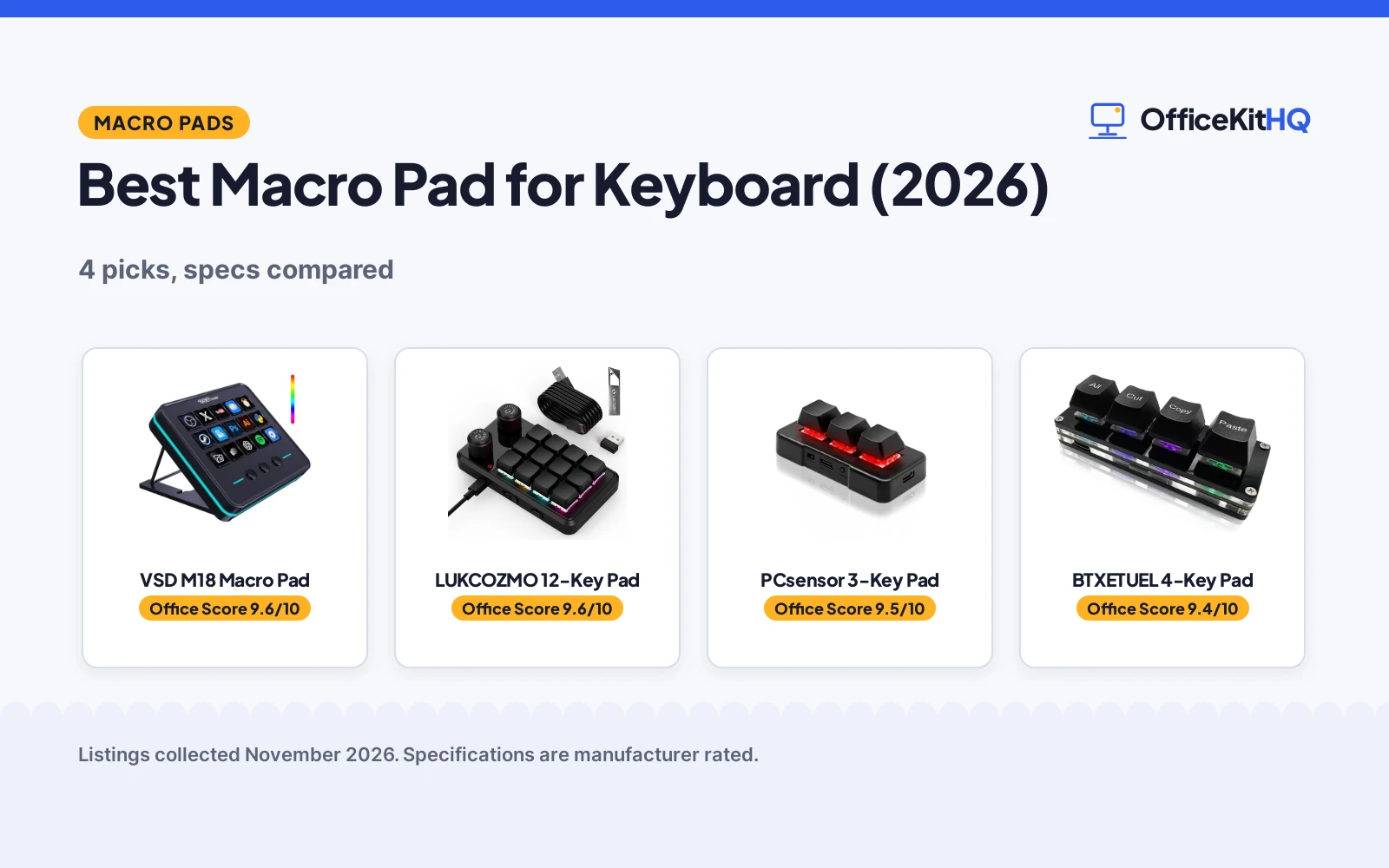
The best macro pad for keyboard shortcuts sits beside the keyboard and turns a repeated string of keys into a single tap: copy, paste, switch scenes, launch an app. A macro pad adds keys the keyboard does not have, each programmed for a single job, so the hands stay on the work instead of hunting through menus. The picks below cover pads with LCD keys, a wireless mini pad, a plug-and-play shortcut pad and a knob pad, with the specs each listing states.
OfficeKitHQ earns a commission when you buy through links on this page, at no extra cost to you. As an Amazon Associate I earn from qualifying purchases. Affiliate disclosure.
Quick picks
 Best Overall VSD M18 Macro Pad: 18 programmable keys with LCD visuals and an RGB ring for streaming and office work. Check price on Amazon
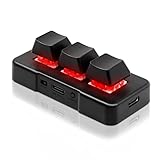 Best Wireless PCsensor 3-Key Pad: Wireless 3-key pad with mechanical switches and a 1 year warranty. Check price on Amazon
 Best Plug and Play BTXETUEL 4-Key Pad: Mini 4-key pad with cut, copy and paste shortcuts and no software needed. Check price on Amazon
Our desk picks
| # | Product | Office Score | Buy |
|---|---|---|---|
| 1 | VSD M18 Macro Pad | 9.6/10 | Buy on Amazon |
| 2 |  LUKCOZMO 12-Key | 9.6/10 | Buy on Amazon |
| 3 | PCsensor 3-Key Pad | 9.5/10 | Buy on Amazon |
| 4 | BTXETUEL 4-Key | 9.4/10 | Buy on Amazon |

VSD M18 Macro Pad
An 18-key programmable macro pad with 15 LCD visual keys, 3 physical buttons and an RGB light ring, for streaming, gaming and office work over USB-C.
Pros
- 18 programmable keys: 15 LCD visual keys and 3 physical buttons
- LCD keys accept JPG, PNG and GIF images and animations
- Single tap triggers macros, text, files, web pages and OBS scenes
- Works with OBS, Streamlabs, YouTube, Discord, Excel, Word and Photoshop
Cons
- No warranty term is stated
- No knob stated
- No safety listing stated
- Native Linux plug-and-play support is not available
Detailed Review
VSD's M18 deck holds 18 programmable keys: 15 LCD visual keys that accept JPG, PNG and GIF images and animations, plus 3 physical buttons. A single tap triggers pre-set macros, text, files, web pages, media playback or OBS scenes, and the Operation Follow function runs multi-step macros in custom order or at the same time. The outer RGB light ring cycles colors, and built-in plugins cover schedule reminders, clock, stopwatch, weather and calendar.
Who it's for: streamers and editors who want a visual key deck for OBS and office apps. Who should skip it: anyone who needs a knob, a stated warranty, or Linux plug-and-play.
Its Office Score of 9.6/10 comes from performance 33/35, build 22/25, value 21/25, safety 0/10 and warranty 0/5: 76 of 100 points, placed on our 9.2 to 9.8 scale.
Key Specifications
| Keys | 18 (15 LCD + 3 physical) |
|---|---|
| Connection | USB-C |
| Systems | Windows 11+, macOS 11.0+ |
| Size | 4.6 x 4.1 x 0.8 in |
Figures as published on the retailer listing, collected 10 November 2026. Performance figures are manufacturer rated.
Safety and Warranty
What this listing states. This product does not plug in or run on a battery, so safety is not part of its score. No warranty term, so warranty scores zero. See How We Pick.
Fit the desk first. Check the stated size against your desk depth and keyboard tray, and charge or pair as the manual describes. No keyboard, mouse or wrist rest prevents or treats injury.
This is general buying information, not professional advice. Follow each product manual and local rules, and see our Safety Disclaimer.

LUKCOZMO 12-Key
A macro pad with 12 keys, wireless and wired links, RGB backlighting and a Type-C 1m cable stated.
Pros
- Wireless receiver and Type-C cable allow switching between wireless and wired modes
- 12 keys support macros, with each button set to a different function mode stated
- RGB backlight can be adjusted for key press action display mode and on/off in configuration software
- Memory function means settings stay set after setup, with no need to set the pad again next time
Cons
- Title names an OSU knob while the bullets describe 2 programmable knobs, so the knob count is unclear
- Enclosure material is plastic, as stated
- Setup software must be copied and extracted before use, per the listing
- Battery powered design with 1 battery required is stated, so a battery plan deserves a check
Detailed Review
The listing states 12 keys, RGB backlighting, a wireless receiver and a Type-C 1m cable, with wireless and wired modes and a memory function. The title names an OSU knob, while the bullets describe 2 programmable knobs, so the knob count rests on the bullets for the wider count and the title for the OSU name, and the count stays unclear. After setting on Windows, the listing states the pad can be plug and play on Linux, Mac OS, Windows and Pi.
Who it's for: desk users who want a compact wireless pad with 12 keys and a memory function. Who should skip it: readers who need a clear knob count or an aluminum body, since this listing states plastic and an unclear knob count.
Its Office Score of 9.6/10 comes from performance 28/35, build 18/25, value 20/25, safety not scored (non-powered gear) and warranty 3/5: 69 of 90 points, placed on our 9.2 to 9.8 scale.
Key Specifications
| Keys | 12 |
|---|---|
| Knobs | 2 programmable knobs |
| Connectivity | USB-C and wireless |
| Dimensions | 5"L x 2.84"W x 1.46"H |
Figures as published on the retailer listing, collected 25 October 2026. Performance figures are manufacturer rated.
Safety and Warranty
What this listing states. This product does not plug in or run on a battery, so safety is not part of its score. 1 Year Manufacturer. It does not say everything a buyer needs, such as who pays return shipping, so warranty scores 3 of 5. See How We Pick.
Fit the desk first. Check the stated size against your desk depth and keyboard tray, and charge or pair as the manual describes. No keyboard, mouse or wrist rest prevents or treats injury.
This is general buying information, not professional advice. Follow each product manual and local rules, and see our Safety Disclaimer.

PCsensor 3-Key Pad
A wireless 3-key mini macro pad with mechanical switches and RGB LED, programmable for shortcuts, hotkeys and mouse actions, with a 1 year warranty.
Pros
- Wireless with a Type-C to USB braided cable for charging
- Mechanical switches rated up to 50 million strokes
- 1 year warranty stated
- 2 hours of charging holds up to 3 months of use
Cons
- Only 3 keys
- No knob stated
- No safety listing stated
- Set up on Windows or Mac OS first before other devices
Detailed Review
PCsensor's mini pad holds 3 programmable keys on mechanical switches rated up to 50 million strokes, with RGB LED lighting. It connects wirelessly and charges over a Type-C to USB nylon braided cable: 2 hours of charging holds up to 3 months of use, and the LED flashes for 3 seconds when the battery runs low.
Who it's for: a desk that needs a small wireless pad for shortcuts, page turns or image capture. Who should skip it: anyone who needs more than 3 keys or a knob.
Its Office Score of 9.5/10 comes from performance 27/35, build 20/25, value 21/25, safety 0/10 and warranty 2/5: 70 of 100 points, placed on our 9.2 to 9.8 scale.
Key Specifications
| Keys | 3 |
|---|---|
| Connection | Wireless, Type-C to USB cable |
| Switches | Mechanical, 50 million strokes |
| Battery | 2 hour charge, up to 3 months use |
Figures as published on the retailer listing, collected 10 November 2026. Performance figures are manufacturer rated.
Safety and Warranty
What this listing states. No FCC or other safety listing is stated, so safety scores zero. 1 Year warranty stated in the spec table. It does not say everything a buyer needs, such as who pays return shipping, so warranty scores 2 of 5. See How We Pick.
Fit the desk first. Check the stated size against your desk depth and keyboard tray, and charge or pair as the manual describes. No keyboard, mouse or wrist rest prevents or treats injury.
This is general buying information, not professional advice. Follow each product manual and local rules, and see our Safety Disclaimer.

BTXETUEL 4-Key
A 4-key plug-and-play macro pad with clicky switches and RGB for select-all, cut, copy and paste.
Pros
- Plug and play, no software needed
- Default copy-paste shortcuts
- Clicky switches, RGB
- 3.5-inch ultra-small size
Cons
- No warranty term is stated
- Only 4 keys
- No knob is listed
- Plastic enclosure
Detailed Review
BTXETUEL lists a 4-key macro pad at 3.5 by 1.1 by 1.1 inches with default functions of select all, cut, copy and paste, plug and play with no software needed. The listing describes clicky switches, RGB backlighting, programming through a website saved on the device, and a detachable USB-C cable. No warranty term is stated.
Who it's for: anyone who wants four one-press editing shortcuts in the smallest pad. Who should skip it: anyone who needs knobs or a stated warranty.
Its Office Score of 9.4/10 comes from performance 24/35, build 18/25, value 16/25, safety not scored (non-powered gear) and warranty 0/5: 58 of 90 points, placed on our 9.2 to 9.8 scale.
Key Specifications
| Keys | 4 |
|---|---|
| Switches | Clicky |
| Connection | USB-C |
| Warranty | Not stated |
Figures as published on the retailer listing, collected 17 October 2026. Performance figures are manufacturer rated.
Safety and Warranty
What this listing states. This product does not plug in or run on a battery, so safety is not part of its score. No warranty term, so warranty scores zero. See How We Pick.
Fit the desk first. Check the stated size against your desk depth and keyboard tray, and charge or pair as the manual describes. No keyboard, mouse or wrist rest prevents or treats injury.
This is general buying information, not professional advice. Follow each product manual and local rules, and see our Safety Disclaimer.
As an Amazon Associate I earn from qualifying purchases.
Specs compared
| Pad | Office Score | Keys | Knob | Connection | Display | Warranty | Amazon |
|---|---|---|---|---|---|---|---|
| VSD M18 Macro Pad | 9.6/10 | 18 | Not stated | USB-C | 15 LCD keys | Not stated | View on Amazon |
| PCsensor 3-Key Pad | 9.5/10 | 3 | Not stated | Wireless | Not stated | 1 Year | View on Amazon |
| BTXETUEL 4-Key Pad | 9.4/10 | 4 | Not stated | USB-C | Not stated | Not stated | |
| LUKCOZMO 12-Key Pad | 9.6/10 | 12 | Stated | Not stated | Not stated | Not stated |
All numbers are the manufacturer’s stated specs, not measured in an office, pulled on 10 November 2026. Only 1 of the 4 pads states a warranty term: the PCsensor at 1 year, and none states a safety listing.
How to choose the best macro pad for keyboard
Count the keys first
The VSD M18 holds 18 programmable keys, the LUKCOZMO 12, the BTXETUEL 4 and the PCsensor 3. Match the count to the shortcuts: a streamer who switches scenes, launches apps and controls media needs more keys than a desk that only needs cut, copy and paste.
Knob or no knob
Only the LUKCOZMO title states a knob. The other 3 listings state no knob, so check the listing if a knob matters. A knob pad suits a desk that wants one more control beside the keyboard, but this listing states no further specs.
Wireless or wired
The PCsensor pad is wireless and charges over a Type-C to USB cable, with 2 hours of charging for up to 3 months of use. The VSD M18 and BTXETUEL pads connect over USB-C, and the LUKCOZMO listing states no connection type. A wireless pad suits a desk that moves between rooms; a wired pad suits a desk that never moves.
Display keys
The VSD M18 has 15 LCD visual keys that accept JPG, PNG and GIF images and animations, so each key shows its function. The other 3 pads state no display, so their keys need labels or memory. A display pad suits streaming, where one tap switches scenes; see the best keyboard for streaming for the main keyboard.
Software and setup
The VSD M18 works with Windows 11 and newer and macOS 11.0 and newer, and the BTXETUEL pad programs through a website on MacOS, Linux and Windows with no software needed. The PCsensor pad sets up on Windows or Mac OS first, then works on other devices. The LUKCOZMO listing states no software. For the main keyboard, see the best mechanical keyboard.
Setup Notes
- Measure the desk space: the VSD M18 is 4.6 by 4.1 in, the PCsensor 3.0 by 1.5 in, and the BTXETUEL 3.5 by 1.1 in; the LUKCOZMO states no size.
- Plan the cable: the VSD M18 and BTXETUEL pads use USB-C, and the PCsensor charges over a Type-C to USB cable.
- Check the system first: the VSD M18 needs Windows 11 or newer or macOS 11.0 or newer, and the PCsensor sets up on Windows or Mac OS first.
- Place the pad beside the keyboard within cable reach of a free USB port.
FAQ
What is a macro pad for a keyboard?
A macro pad is a small extra keypad that sits beside a keyboard, with keys programmed for shortcuts, macros or app launches. The pads here hold 3, 4, 12 or 18 keys.
Do macro pads work with a normal keyboard?
Yes: the BTXETUEL listing states it connects beside a normal-size keyboard on the same computer and the pad and keyboard do not interfere with each other. The VSD M18 connects over USB-C and the PCsensor pad connects wirelessly.
Does a macro pad need software?
The BTXETUEL pad programs through a website with no software needed, and its programming is saved on the device. The VSD M18 works with OBS, Streamlabs and other software, and the PCsensor pad sets up on Windows or Mac OS first.
How many keys does a macro pad need?
It depends on the shortcuts: the VSD M18 holds 18 keys for streaming and office work, the LUKCOZMO 12, the BTXETUEL 4 for cut, copy and paste, and the PCsensor 3 for a few hotkeys.
Can I use a macro pad for streaming?
Yes: the VSD M18 triggers OBS scenes, media playback and app launches with a single tap, and its LCD keys show each function. The other pads state no streaming functions.
Score breakdown
The Office Score weighs performance (programmable keys, display, shortcuts and software), build (switches, materials and size), value, safety and warranty. For a macro pad, safety means a stated safety listing or certification; none of the 4 listings states one. Only 1 listing states a warranty term: the PCsensor at 1 year. How we pick explains the weights.
| Product | Office Score | Perf. /35 | Build /25 | Value /25 | Safety /10 | Warranty /5 |
|---|---|---|---|---|---|---|
| VSD M18 Macro Pad | 9.6 | 33 | 22 | 21 | 0 | 0 |
| PCsensor 3-Key Pad | 9.5 | 27 | 20 | 21 | 0 | 2 |
We fit point totals onto a 9.2 low and 9.8 high in a straight line. One item can outscore another only by earning more points.
More for your workspace
See every keyboards guide and all computer peripherals guides.
More picks: best mechanical keyboard, best keyboard for streaming, best keyboard for Linux and best mechanical keyboard kit.