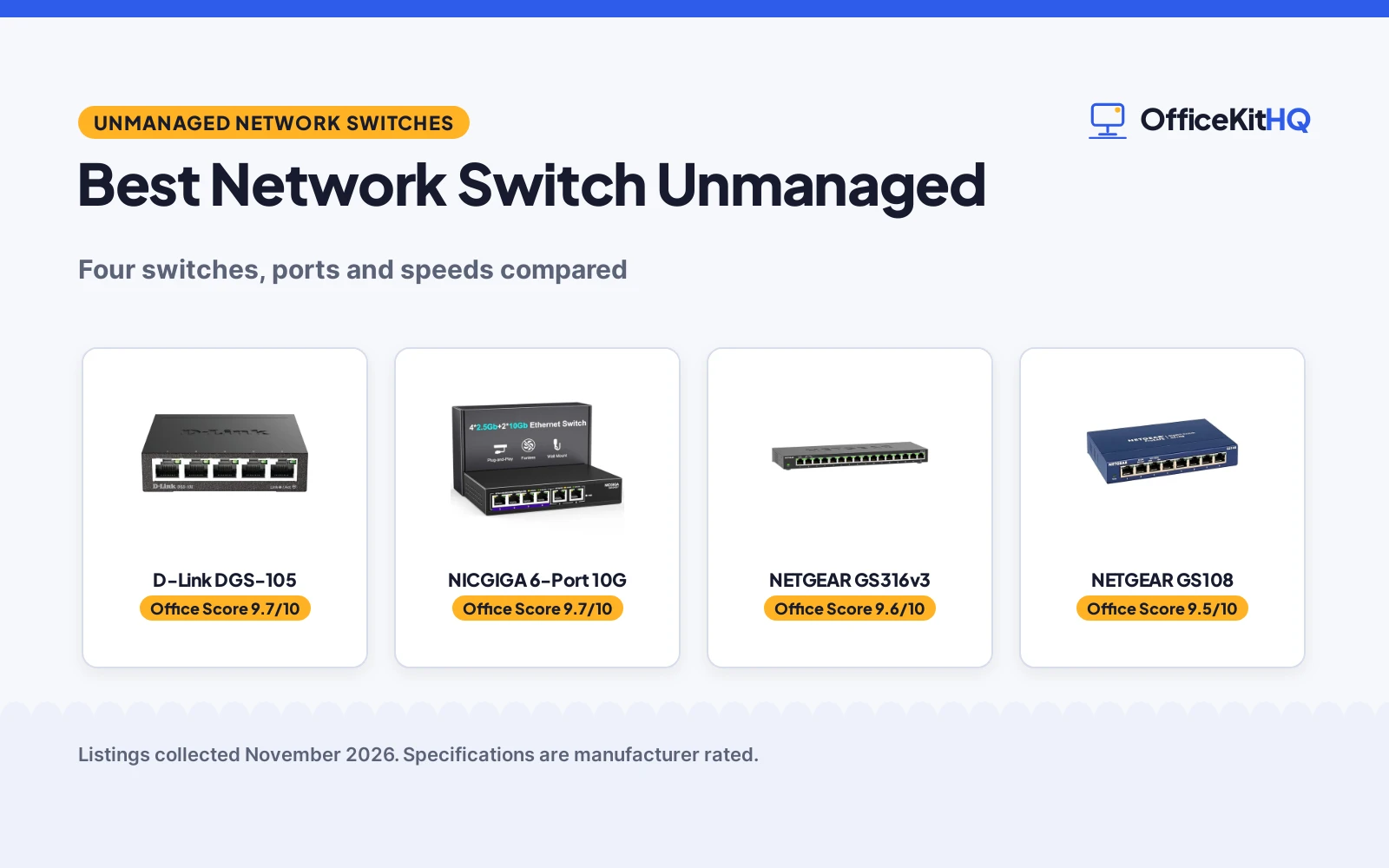
The best network switch unmanaged for a home office is the plug-and-play box that gives every wired device on the desk its own port, because a router with only a small set of Ethernet jacks runs out fast once a desktop, a printer and a console all need a cable. We compared unmanaged switches by port count, top speed, jumbo frame support, surge protection and warranty term, using only what each listing publishes. The picks below cover small desks and crowded ones, gigabit gear and faster wired gear, so pick the switch whose ports match the devices already on the desk.
OfficeKitHQ earns a commission when you buy through links on this page, at no extra cost to you. As an Amazon Associate I earn from qualifying purchases. Affiliate disclosure.
Quick picks
 Best Overall D-Link DGS-105: 5 gigabit ports, 10 Gbps engine, 802.1p QoS, limited lifetime cover Check price on Amazon
 Fastest Ports NICGIGA 6-Port 10G: 2 x 10Gb and 4 x 2.5Gb ports, 60Gbps switching capacity Check price on Amazon
 Most Ports NETGEAR GS316v3: 16 gigabit ports, 802.1p QoS, 9K jumbo frames, 3-year warranty Check price on Amazon
 Best 8-Port Pick NETGEAR GS108: 8 gigabit ports, fanless metal housing, limited lifetime warranty Check price on Amazon
Our desk picks
| # | Product | Office Score | Buy |
|---|---|---|---|
| 1 | D-Link DGS-105 | 9.7/10 | Buy on Amazon |
| 2 | NICGIGA 6-Port 10G | 9.7/10 | Buy on Amazon |
| 3 | NETGEAR GS316v3 | 9.6/10 | Buy on Amazon |
| 4 | NETGEAR GS108 | 9.5/10 | Buy on Amazon |

D-Link DGS-105
A 5-port gigabit switch with a 10 Gbps switching engine, 802.1p QoS, IGMP snooping and a limited lifetime cover.
Pros
- 10 Gbps non-blocking switching engine across 5 gigabit ports
- 802.1p QoS and IGMP snooping keep voice, video and gaming traffic smooth
- Built-in surge and ESD protection rated at ±4 kV
- Limited lifetime cover: repair or replacement for as long as the original purchaser owns the product
Cons
- 5 ports is the smallest port count in this group
- No 2.5Gb or 10Gb port for faster wired gear
- Power adapter included, so the switch needs its own outlet
- No stated USB port, PoE or Wi-Fi for extra gear
Detailed Review
D-Link lists the DGS-105 as a 5-port gigabit unmanaged switch with auto-negotiating ports, full and half duplex, and up to 2 Gbps per port, with 1 Gbps up and 1 Gbps down, on a 10 Gbps non-blocking switching engine. It handles Cat5e, Cat6 and Cat6A UTP to 100 m, with auto MDI/MDIX, LEDs for link and activity, and a power adapter included. The all-steel housing is fanless, with rubber feet and keyhole slots for desktop or wall placement. 802.1p traffic classes keep voice, video and gaming packets smooth, IGMP snooping serves 4K and 8K video to multiple devices, and IEEE 802.3az cuts power use up to 80% by throttling idle ports. Jumbo frame support is stated at 9 KB, and built-in surge and ESD protection is rated at ±4 kV.
Who it's for: a desk with 5 wired devices or fewer that needs QoS, IGMP snooping and surge protection in a small steel box. Who should skip it: anyone who needs more than 5 ports, or 2.5Gb or 10Gb ports for faster wired gear.
Its Office Score of 9.7/10 comes from performance 30/35, build 22/25, value 21/25, safety 8/10 and warranty 4/5: 85 of 100 points, placed on our 9.2 to 9.8 scale.
Key Specifications
| Ports | 5 x 1.0Gbps |
|---|---|
| Switching engine | 10 Gbps, non-blocking |
| Jumbo frames | 9 KB |
| Protection | ±4 kV surge and ESD |
These specs mirror the retailer listing as of 21 November 2026; performance figures are stated by the brand.
Safety and Warranty
What this listing states. Built-in surge and ESD protection rated at ±4 kV, so safety scores 8 of 10. Limited lifetime: D-Link will repair or replace defective hardware for as long as original purchaser owns the product or 5 years after discontinuation. It does not say everything a buyer needs, such as who pays return shipping, so warranty scores 4 of 5. See How We Pick.
Follow the manual. Assemble and use the product as the maker describes, stay under any stated capacity, and read the manual before first use.
This is general buying information, not professional advice. Follow each product manual and local rules, and see our Safety Disclaimer.

NICGIGA 6-Port 10G
A 6-port switch with 2 x 10Gb and 4 x 2.5Gb ports and a 60Gbps switching capacity for fast wired gear.
Pros
- 2 x 10Gb RJ45 ports plus 4 x 2.5Gb ports for 10G NAS, WiFi7 routers and 10G adapters
- 60Gbps switching capacity for large amounts of data traffic
- 6KV lightning protection in a metal case with a fanless silent design
- Plug and play with automatic MDI/MDIX and non-blocking data forwarding
Cons
- 1-year warranty is the shortest term in this group
- 6 ports is fewer than the 16-port and 8-port switches here
- No stated 802.1p QoS or jumbo frame support
- Desktop or wall mount only, with no stated rack mount option
Detailed Review
NICGIGA lists this switch as a 6-port 10G model with 4 x 2.5Gb Ethernet ports and 2 x 10Gb RJ45 ports. Ports 1 to 4 support 2.5G, 1G and 100Mbps, and ports 5 to 6 support 10G, 2.5G, 1G and 100Mbps, with automatic MDI/MDIX and non-blocking data forwarding. The maker states 2.5x faster network performance than traditional Gigabit switches, with a switching capacity of up to 60Gbps, for 10G NAS, WiFi7 routers, 10G adapters and 8K video. The metal case has 6KV lightning protection, a fanless silent design, cooling holes on 2 sides and a temperature range of -10 to 50°C, with LED indicator lights. Setup is plug and play with no software or configuration required, for desktop or wall mount. The warranty is 1 year, with lifetime technical support.
Who it's for: a desk with a 10G NAS, a WiFi7 router or a 10G adapter that needs ports above gigabit speed. Who should skip it: anyone whose devices are all gigabit, or who wants a warranty term longer than 1 year.
Its Office Score of 9.7/10 comes from performance 33/35, build 22/25, value 21/25, safety 8/10 and warranty 2/5: 86 of 100 points, placed on our 9.2 to 9.8 scale.
Key Specifications
| Ports | 4 x 2.5Gb + 2 x 10Gb |
|---|---|
| Switching capacity | 60Gbps |
| Protection | 6KV lightning protection |
| Warranty | 1 year |
These specs mirror the retailer listing as of 21 November 2026; performance figures are stated by the brand.
Safety and Warranty
What this listing states. 6KV lightning protection in a metal case, so safety scores 8 of 10. 1 Year Warranty, with lifetime technical support. It does not say everything a buyer needs, such as who pays return shipping, so warranty scores 2 of 5. See How We Pick.
Follow the manual. Assemble and use the product as the maker describes, stay under any stated capacity, and read the manual before first use.
This is general buying information, not professional advice. Follow each product manual and local rules, and see our Safety Disclaimer.

NETGEAR GS316v3
A 16-port gigabit switch with 802.1p QoS and 9K jumbo frame support for a desk with many wired devices.
Pros
- 16 x 1.0Gbps ports, the most in this group
- 802.1p QoS and 9K jumbo frame support
- Fanless silent metal housing for desktop or wall mount
- IEEE 802.3az Energy Efficient Ethernet reduces power consumption
Cons
- No 2.5Gb or 10Gb port for faster wired gear
- No stated surge or ESD protection
- Made for use in U.S. & CA only
- 3-year warranty is shorter than the limited lifetime terms in this group
Detailed Review
NETGEAR lists the GS316v3 as a 16-port gigabit unmanaged switch with 16 x 1.0Gbps Ethernet ports and auto-negotiating ports that work with Cat5e or Cat6 Ethernet cables. Setup is plug and play, with no software to install and no configuration required. The compact metal design supports desktop or wall-mount placement, and the fanless design runs silent while IEEE 802.3az Energy Efficient Ethernet reduces power consumption. 802.1p QoS and 9K jumbo frame support are stated. The switch measures 11.3 x 4.0 x 1.3 in, weighs 2.93 lb, and is made for use in U.S. & CA only. The warranty is a NETGEAR limited 3-year hardware warranty.
Who it's for: a desk with many wired devices that needs 16 gigabit ports in one fanless box. Who should skip it: anyone who needs 2.5Gb or 10Gb ports, surge protection, or a warranty term longer than 3 years.
Its Office Score of 9.6/10 comes from performance 32/35, build 22/25, value 22/25, safety 0/10 and warranty 3/5: 79 of 100 points, placed on our 9.2 to 9.8 scale.
Key Specifications
| Ports | 16 x 1.0Gbps |
|---|---|
| Jumbo frames | 9K |
| Housing | Metal, fanless |
| Dimensions | 11.3 x 4.0 x 1.3 in |
These specs mirror the retailer listing as of 21 November 2026; performance figures are stated by the brand.
Safety and Warranty
What this listing states. This product does not plug in or run on a battery, so safety is not part of its score. NETGEAR limited 3-year hardware warranty. It does not say everything a buyer needs, such as who pays return shipping, so warranty scores 3 of 5. See How We Pick.
Follow the manual. Assemble and use the product as the maker describes, stay under any stated capacity, and read the manual before first use.
This is general buying information, not professional advice. Follow each product manual and local rules, and see our Safety Disclaimer.

NETGEAR GS108
An 8-port gigabit switch with a fanless metal housing and a limited lifetime hardware warranty.
Pros
- 8 x 1.0Gbps auto-negotiating ports that work with Cat5e or Cat6 cables
- Fanless silent metal housing for desktop or wall mount
- IEEE 802.3az Energy Efficient Ethernet reduces power consumption
- Limited lifetime hardware warranty
Cons
- No stated 802.1p QoS or jumbo frame support
- No 2.5Gb or 10Gb port for faster wired gear
- No stated surge or ESD protection
- Made for use in U.S. & CA only
Detailed Review
NETGEAR lists the GS108 as an 8-port gigabit unmanaged switch with 8 x 1.0Gbps Ethernet ports and auto-negotiating ports that work with Cat5e or Cat6 Ethernet cables. Setup is plug and play, with no software to install and no configuration required. The compact metal design supports desktop or wall-mount placement, and the fanless design runs silent while IEEE 802.3az Energy Efficient Ethernet reduces power consumption. The switch is made for use in U.S. & CA only, and the warranty is a NETGEAR limited lifetime hardware warranty.
Who it's for: a desk with up to 8 wired devices that wants a quiet metal switch with a lifetime warranty term. Who should skip it: anyone who needs more than 8 ports, QoS, jumbo frames or faster ports.
Its Office Score of 9.5/10 comes from performance 29/35, build 21/25, value 20/25, safety 0/10 and warranty 4/5: 74 of 100 points, placed on our 9.2 to 9.8 scale.
Key Specifications
| Ports | 8 x 1.0Gbps |
|---|---|
| Housing | Metal, fanless |
| Cables | Cat5e or Cat6 |
| Warranty | Limited lifetime |
These specs mirror the retailer listing as of 21 November 2026; performance figures are stated by the brand.
Safety and Warranty
What this listing states. This product does not plug in or run on a battery, so safety is not part of its score. NETGEAR limited lifetime hardware warranty. It does not say everything a buyer needs, such as who pays return shipping, so warranty scores 4 of 5. See How We Pick.
Follow the manual. Assemble and use the product as the maker describes, stay under any stated capacity, and read the manual before first use.
This is general buying information, not professional advice. Follow each product manual and local rules, and see our Safety Disclaimer.
As an Amazon Associate I earn from qualifying purchases.
More picks to compare
 NETGEAR GS3088 gigabit ports in a fanless metal housing for a second desk or room.Check on Amazon
Specs compared
| Switch | Office Score | Ports | Top speed | Jumbo frames | Warranty | Amazon |
|---|---|---|---|---|---|---|
| D-Link DGS-105 | 9.7/10 | 5 x 1.0Gbps | 2 Gbps | 9 KB | Limited lifetime | View on Amazon |
| NICGIGA 6-Port 10G | 9.7/10 | 4 x 2.5Gb + 2 x 10Gb | 10Gb | Not stated | 1 year | View on Amazon |
| NETGEAR GS316v3 | 9.6/10 | 16 x 1.0Gbps | 1.0Gbps | 9K | 3 years | View on Amazon |
| NETGEAR GS108 | 9.5/10 | 8 x 1.0Gbps | 1.0Gbps | Not stated | Limited lifetime | View on Amazon |
Specs reflect manufacturer claims on each product listing (as of 21 November 2026). 2 of the 4 state a limited lifetime warranty term; 2 state surge or lightning protection.
How to choose the best network switch unmanaged
Count the wired devices before you count ports
Port count is the opening filter, and the range here runs from 5 ports on the D-Link DGS-105 to 16 ports on the NETGEAR GS316v3, with the NICGIGA at 6 ports and the NETGEAR GS108 at 8 ports. Count the desktop, the printer, the console, the NAS and any other wired device on the desk, then leave room for the next device that needs a cable. A switch with no spare port forces a shuffle every time something new arrives, so a little headroom is worth more than a perfect fit. If the desk serves a household that works from home, our best network switch for work from home picks cover the same choice in more depth.
Match top speed to the fastest device
Top speed decides whether the switch or the cable is the limit. The NICGIGA is the only switch here with ports above gigabit speed: 2 x 10Gb RJ45 ports and 4 x 2.5Gb ports, with a 60Gbps switching capacity and support for 10G NAS, WiFi7 routers, 10G adapters and 8K video. The D-Link DGS-105 states up to 2 Gbps per port, with 1 Gbps up and 1 Gbps down, on a 10 Gbps non-blocking switching engine. The 2 NETGEAR switches state 1.0Gbps per port, which suits a desk where every device is a gigabit device. Buy the faster ports only when a device on the desk can use them; otherwise a gigabit switch covers the desk.
| Switch | Ports | Top speed per port | Jumbo frames |
|---|---|---|---|
| D-Link DGS-105 | 5 | 2 Gbps | 9 KB |
| NICGIGA 6-Port 10G | 6 | 10Gb | Not stated |
| NETGEAR GS316v3 | 16 | 1.0Gbps | 9K |
| NETGEAR GS108 | 8 | 1.0Gbps | Not stated |
Figures as stated in each listing. Jumbo frame support is stated for the D-Link and the NETGEAR GS316v3 only.
Check the mount, the housing and the cables
All 4 switches here mount on a desktop or on a wall, and all 4 use a fanless metal housing, so the choice is about size and cables rather than noise. The NETGEAR GS316v3 measures 11.3 x 4.0 x 1.3 in and weighs 2.93 lb, which makes it the largest switch in this group, while the D-Link DGS-105 packs 5 ports into an all-steel housing. The NETGEAR switches work with Cat5e or Cat6 Ethernet cables, and the D-Link handles Cat5e, Cat6 and Cat6A UTP to 100 m. Measure the desk depth and the distance to the router before ordering cables, and keep the run tidy with a cable management setup once the switch is in place. Wall mounting suits a desk with no spare surface; see our best network switch wall mount picks for that setup.
Read the warranty and the protection line
Warranty terms split this group in 2: limited lifetime on the D-Link DGS-105 and the NETGEAR GS108, 3 years on the NETGEAR GS316v3 and 1 year on the NICGIGA, which also states lifetime technical support. Protection splits it the same way: the D-Link states built-in surge and ESD protection rated at ±4 kV, and the NICGIGA states 6KV lightning protection, while the 2 NETGEAR switches state no surge or lightning protection. A switch sits between the router and every wired device, so protection and a long warranty term matter more here than on a passive accessory. For the router side of the same desk, see our best surge protector for router picks.
FAQ
How do I use an unmanaged network switch?
Plug the switch into the router with an Ethernet cable, plug each wired device into a port on the switch, and the network is ready with no software to install and no configuration required. All 4 switches here are plug-and-play models, so there is nothing to set up beyond the cables.
How much power does a network switch use?
No wattage figure is stated for any of the 4 switches here. The D-Link states that its IEEE 802.3az feature cuts power use up to 80% by throttling idle ports and detecting cable length, and the NETGEAR switches state that IEEE 802.3az reduces power consumption. The NICGIGA states a fanless silent design for more power saving, without a figure.
How fast can a network switch go?
The fastest ports here are the 2 x 10Gb RJ45 ports on the NICGIGA, which also states a 60Gbps switching capacity and 4 x 2.5Gb ports. The D-Link states up to 2 Gbps per port on a 10 Gbps non-blocking switching engine, and the 2 NETGEAR switches state 1.0Gbps per port. The speed a desk sees is the slowest link in the chain, so match the switch to the fastest device on it.
What is stacking in a network switch?
Stacking links switches so they act as a group, and it is a feature of managed switches rather than the plug-and-play unmanaged models here. None of the 4 switches here states stacking support, so buy the port count you need in one switch rather than planning to link 2 switches later.
Do I need Cat6 cables for these switches?
Cat5e or Cat6 cables work with the NETGEAR switches, and the D-Link handles Cat5e, Cat6 and Cat6A UTP to 100 m. The NICGIGA states no cable type, so use the cable the connected device needs. Cat6A is the pick when the run is long, since the D-Link states it to 100 m.
Score breakdown
The Office Score weighs performance (port count, top speed, switching capacity and traffic features), build (housing, fanless design and mount options), value for the stated specs, safety and warranty. For a network switch, safety means stated surge, ESD or lightning protection on the listing; the D-Link and the NICGIGA state it, the 2 NETGEAR switches do not. All 4 listings state a warranty term: limited lifetime on the D-Link and the NETGEAR GS108, 3 years on the NETGEAR GS316v3 and 1 year on the NICGIGA. Performance carries the most weight in the Office Score, followed by build and value.
| Product | Office Score | Perf. /35 | Build /25 | Value /25 | Safety /10 | Warranty /5 |
|---|---|---|---|---|---|---|
| D-Link DGS-105 | 9.7 | 30 | 22 | 21 | 8 | 4 |
| NICGIGA 6-Port 10G | 9.7 | 33 | 22 | 21 | 8 | 2 |
| NETGEAR GS316v3 | 9.6 | 32 | 22 | 22 | 0 | 3 |
| NETGEAR GS108 | 9.5 | 29 | 21 | 20 | 0 | 4 |
The scale opens at 9.2 and closes at 9.8; between those marks, weighted points translate linearly into the score you see.
More for your workspace
See every storage and network guide and all office tech guides. Also see our best network switch for work from home. Also see our best NAS storage server. Also see our best network switch wall mount.
More picks: gigabit PoE network switches, network switch racks, and USB-C hubs with Ethernet.