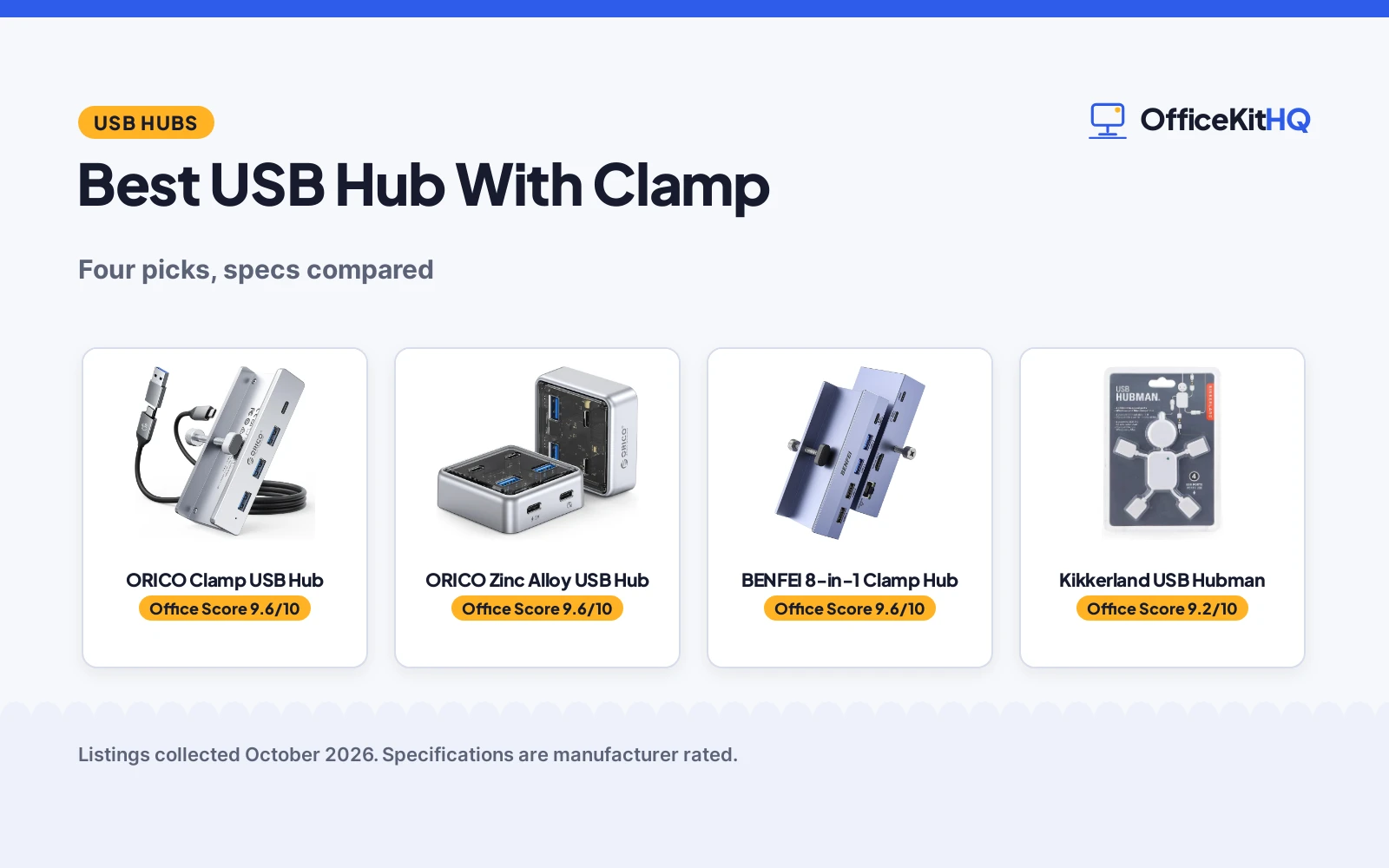
The best usb hub with clamp is the one that grips your desk or monitor edge and stays put when you pull a drive out mid-call, because a hub that skates across the desktop is barely better than none. A clamp keeps the ports exactly where your hand expects them, holds the cable weight off the host port, and turns one connection into room for everything you plug in daily. We compared four USB hubs by clamp range, port count, transfer speed, power handling, build and stated warranty, using only what each listing publishes.
OfficeKitHQ earns a commission when you buy through links on this page, at no extra cost to you. As an Amazon Associate I earn from qualifying purchases. Affiliate disclosure.
Quick picks
 Best Overall ORICO Clamp USB Hub: Aluminum clamp hub with an extra power port and a stated warranty Check price on Amazon
 Best Compact ORICO Zinc Alloy USB Hub: 10Gbps speeds in a palm-size zinc alloy body Check price on Amazon
 Most Ports BENFEI 8-in-1 Clamp Hub: Eight ports with 4K HDMI, Ethernet and 100W power delivery Check price on Amazon
 Novelty Pick Kikkerland USB Hubman: A playful figure-shaped hub for low-speed extras Check price on Amazon
The picks
| # | Product | Office Score | Buy |
|---|---|---|---|
| 1 | ORICO Clamp USB Hub | 9.6/10 | Buy on Amazon |
| 2 | ORICO Zinc Alloy USB Hub | 9.6/10 | Buy on Amazon |
| 3 | BENFEI 8-in-1 Clamp Hub | 9.6/10 | Buy on Amazon |
| 4 | Kikkerland USB Hubman | 9.2/10 | Buy on Amazon |

ORICO Clamp USB Hub
An aluminum USB 3.0 hub with a screw-adjust clamp for desk and monitor edges, three USB-A ports, one USB-C port and an extra power supply port.
Pros
- Clamp adjusts from 0.19 to 1.1 in (5-28mm) for desk and monitor edges
- Aluminum alloy body with silicone pads on the clamp contact points
- Extra power supply port for high-draw devices, no power adapter in the box
- 12-month warranty stated in the spec table
Cons
- 5Gbps ports only, with no 10Gbps option on this model
- Four ports total is the smallest count of the powered picks
- Extra power port needs a power adapter the box does not include
- 7.08 by 4.3 by 1.18 in footprint is the largest here
Detailed Review
ORICO lists this hub as a USB 3.0 clamp model that mounts to monitor or desk edges from 0.19 to 1.1 inches (5-28mm) with an adjustable screw, while silicone pads on the contact points keep the surface scratch-free. The hub spreads one host connection into three USB-A ports and one USB-C port at 5Gbps over a 3.3FT cable, with widened port spacing for chunky plugs, plus an extra power supply port for high-draw devices (the box includes no power adapter). The spec table lists an aluminum enclosure, a 7.08 by 4.3 by 1.18 in footprint, a 99 g item weight and a 12-month warranty; a 2-in-1 USB data cable (1M) is in the box.
Who it's for: a desk worker who wants a semi-permanent clamp mount with a scratch-safe grip and an extra power port for external drives. Who should skip it: anyone who needs 10Gbps transfers or more than four ports.
Its Office Score of 9.6/10 comes from performance 28/35, build 21/25, value 20/25, safety 7/10 and warranty 4/5: 80 of 100 points, placed on our 9.2 to 9.8 scale.
Key Specifications
| Clamp range | 0.19 to 1.1 inches (5-28mm) |
|---|---|
| Ports | 3 x USB-A (5Gbps), 1 x USB-C (5Gbps) |
| Body | Aluminum alloy, silicone pads |
| Warranty | 12 months |
Figures as published on the retailer listing, collected 24 October 2026. Performance figures are manufacturer rated.
Safety and Warranty
What this listing states. Power-management chip plus an extra supply port are stated; soft silicone pads on the clamp contact points guard desk and monitor edges, so safety scores 7 of 10. 12 months. It does not say everything a buyer needs, such as who pays return shipping, so warranty scores 4 of 5. See How We Pick.
Power and heat. Use the supplied adapter, treat power delivery wattage and display support as the maker's claims for your laptop model, and give the dock room to vent.
This is general buying information, not professional advice. Follow each product manual and local rules, and see our Safety Disclaimer.

ORICO Zinc Alloy USB Hub
A compact zinc alloy hub with two USB-A 3.2 and two USB-C 3.2 ports at up to 10Gbps, sized 2.24 by 2.24 by 0.81 inches.
Pros
- Up to 10Gbps across the four ports
- Zinc alloy body with anti-oxidation treatment
- Compact 2.24 by 2.24 by 0.81 in size suits travel
- 12-month warranty stated in the spec table
Cons
- No clamp is stated, so it sits on the desk rather than mounting to an edge
- Total bandwidth is shared across the four ports
- Listed cable is 1.64FT; longer reach needs the 3.28FT option
- No power supply port for high-draw devices
Detailed Review
ORICO lists this zinc alloy hub as a 10Gbps data extender with two USB-A 3.2 and two USB-C 3.2 ports, noting the total bandwidth is shared across the four interfaces. The body measures 2.24 by 2.24 by 0.81 inches and weighs 100 g, with a transparent PC section over the zinc alloy and a 10Gbps USB-C to USB-A/C cable in the box. The spec table states a 12-month warranty and broad compatibility with Windows 8 and 10 and Mac OS, with plug and play and no driver install. No clamp is stated for this model, and the listed cable is 1.64FT, with a 3.28FT option mentioned separately.
Who it's for: someone who wants the highest stated speeds here in a small, travel-friendly body. Who should skip it: anyone set on a clamp mount, which this model does not offer.
Its Office Score of 9.6/10 comes from performance 29/35, build 22/25, value 20/25, safety 0/10 and warranty 4/5: 75 of 100 points, placed on our 9.2 to 9.8 scale.
Key Specifications
| Ports | 2 x USB-A 3.2, 2 x USB-C 3.2 |
|---|---|
| Max speed | Up to 10Gbps, shared |
| Size | 2.24 x 2.24 x 0.81 inches |
| Warranty | 12 Month |
Figures as published on the retailer listing, collected 24 October 2026. Performance figures are manufacturer rated.
Safety and Warranty
What this listing states. This product does not plug in or run on a battery, so safety is not part of its score. 12 Month. It does not say everything a buyer needs, such as who pays return shipping, so warranty scores 4 of 5. See How We Pick.
Power and heat. Use the supplied adapter, treat power delivery wattage and display support as the maker's claims for your laptop model, and give the dock room to vent.
This is general buying information, not professional advice. Follow each product manual and local rules, and see our Safety Disclaimer.

BENFEI 8-in-1 Clamp Hub
An 8-in-1 USB-C hub with a monitor and desk clamp, 4K@60Hz HDMI, Gigabit Ethernet, 100W power delivery and 10Gbps data ports.
Pros
- Clamp fits edges from 0.19 to 1.41 in (5-36mm)
- HDMI mirrors or extends up to 4K@60Hz
- Gigabit Ethernet plus 10Gbps USB-A and USB-C 3.2 ports
- 100W input with 85W pass-through charging stated
Cons
- Plastic body rather than the metal bodies of the ORICO picks
- No warranty term is stated
- Type-C charging port carries no data or video
- Host port must support video output for HDMI to work
Detailed Review
BENFEI lists this as an 8-in-1 clampable hub: one host port expands into one USB-C 3.2 and two USB-A 3.2 ports at 10Gbps, two USB 2.0 ports, an HDMI port for mirror or extend up to 4K@60Hz, and a Gigabit Ethernet port, all through a single laptop connection. The clamp adjusts from 0.19 to 1.41 inches (5-36mm) for monitor or desk edges, with a rubber cover on the screw to protect the monitor finish. Charging is stated as 100W PD, with up to 85W pass-through to the laptop and 15W reserved for the hub's own interfaces; the Type-C charging port carries no data or video. The spec table lists a gray plastic body, 8 total USB ports and no warranty term. One nuance: the headline says 100W while the fine print limits pass-through to 85W, so plan on 85W reaching the laptop.
Who it's for: a laptop user who wants a clamp-mounted dock with video, wired networking and high-power charging in one unit. Who should skip it: anyone who needs a metal body or a written warranty term.
Its Office Score of 9.6/10 comes from performance 32/35, build 19/25, value 21/25, safety 6/10 and warranty 0/5: 78 of 100 points, placed on our 9.2 to 9.8 scale.
Key Specifications
| Clamp range | 0.19 to 1.41 inches (5-36mm) |
|---|---|
| Video | HDMI up to 4K@60Hz |
| Network | Gigabit Ethernet |
| Power | 100W PD, 85W pass-through |
Figures as published on the retailer listing, collected 24 October 2026. Performance figures are manufacturer rated.
Safety and Warranty
What this listing states. Rubber cover on the clamp screw protects the monitor finish; the stated power design reserves 15W for the hub's own interfaces, so safety scores 6 of 10. No warranty term, so warranty scores zero. See How We Pick.
Power and heat. Use the supplied adapter, treat power delivery wattage and display support as the maker's claims for your laptop model, and give the dock room to vent.
This is general buying information, not professional advice. Follow each product manual and local rules, and see our Safety Disclaimer.

Kikkerland USB Hubman
A novelty figure-shaped hub with four USB 2.0 hi-speed ports, flexible arms and legs, and a green power indicator LED.
Pros
- Playful figure shape with flexible arms and legs
- Four USB 2.0 hi-speed ports, one at the end of each limb
- Green power indicator LED in place of a heart
- Plug and play with no software needed
Cons
- USB 2.0 only, well below the 5Gbps and 10Gbps picks here
- No clamp is stated, so it cannot mount to a desk edge
- No warranty term is stated
- Compatible devices are listed as PC only
Detailed Review
Kikkerland lists the USB Hubman as a white figure-shaped hub with flexible arms and legs, one USB 2.0 hi-speed port at the end of each limb, for four ports total. A tiny green power indicator LED sits where the heart would be, and the listing states Windows and Mac compatibility with no software needed. The figure measures 4.5 by 5-inches and weighs 2.24 ounces, with a plastic enclosure and a 0.48 gigabits per second data rate. No clamp, no warranty term and no high-speed port are stated, so it fills a very different role from the clampable picks here.
Who it's for: someone who wants a conversation-piece hub for low-speed extras like a keyboard or mouse dongle. Who should skip it: anyone who needs a clamp mount, fast transfers or a warranty.
Its Office Score of 9.2/10 comes from performance 19/35, build 18/25, value 19/25, safety 0/10 and warranty 0/5: 56 of 100 points, placed on our 9.2 to 9.8 scale.
Key Specifications
| Ports | 4 x USB 2.0 hi-speed |
|---|---|
| Size | 4.5 by 5 inches |
| Weight | 2.24 ounces |
| Color | White |
Figures as published on the retailer listing, collected 24 October 2026. Performance figures are manufacturer rated.
Safety and Warranty
What this listing states. This product does not plug in or run on a battery, so safety is not part of its score. No warranty term, so warranty scores zero. See How We Pick.
Power and heat. Use the supplied adapter, treat power delivery wattage and display support as the maker's claims for your laptop model, and give the dock room to vent.
This is general buying information, not professional advice. Follow each product manual and local rules, and see our Safety Disclaimer.
As an Amazon Associate I earn from qualifying purchases.
More picks to compare
 ORICO Clamp USB Hub, BlackSame clampable design as the silver pick, finished in blackCheck on Amazon
 Qmrio Clamp USB Hub, BlackAnother aluminum clamp hub with an extra power portCheck on Amazon
 ABFCRTTW 7-Port Clamp HubSeven ports on a long 4FT cable for desktop towersCheck on Amazon
 EJAY Desk Mount USB HubExternal power plus a 4.92ft cable for busy desksCheck on Amazon
Compare the picks
| Hub | Office Score | Ports | Max Speed | Clamp Range | Warranty | Amazon |
|---|---|---|---|---|---|---|
| ORICO Clamp USB Hub | 9.6/10 | 4 (3 USB-A, 1 USB-C) | 5Gbps | 0.19 to 1.1 in (5-28mm) | 12 months | View on Amazon |
| ORICO Zinc Alloy USB Hub | 9.6/10 | 4 (2 USB-A, 2 USB-C) | 10Gbps | Not stated | 12 Month | View on Amazon |
| BENFEI 8-in-1 Clamp Hub | 9.6/10 | 8 total | 10Gbps | 0.19 to 1.41 in (5-36mm) | Not stated | View on Amazon |
| Kikkerland USB Hubman | 9.2/10 | 4 (USB 2.0) | USB 2.0 hi-speed | Not stated | Not stated | View on Amazon |
Specifications are manufacturer rated as listed, collected 24 October 2026.
How we scored them
The Office Score weighs performance (ports, transfer speed and clamp range), build (materials, body size and item weight), value for the stated specs, safety and warranty. For a hub, safety means stated power-protection features, a stable power design and clamp contact points that protect desk and monitor edges; the ORICO clamp hub and the BENFEI state such features, the other two do not. Two of the four picks state a warranty term. How we pick explains the weights.
| Product | Office Score | Perf. /35 | Build /25 | Value /25 | Safety /10 | Warranty /5 |
|---|---|---|---|---|---|---|
| ORICO Clamp USB Hub | 9.6 | 28 | 21 | 20 | 7 | 4 |
| ORICO Zinc Alloy USB Hub | 9.6 | 29 | 22 | 20 | 0 | 4 |
| BENFEI 8-in-1 Clamp Hub | 9.6 | 32 | 19 | 21 | 6 | 0 |
| Kikkerland USB Hubman | 9.2 | 19 | 18 | 19 | 0 | 0 |
Scores run from 9.2 to 9.8: each product’s point total is placed on that range, so more points always means a higher score.
How to choose the best usb hub with clamp
Measure the edge before you buy
Clamp range is the first figure to check. The ORICO clamp hub fits edges from 0.19 to 1.1 inches (5-28mm) and the BENFEI fits 0.19 to 1.41 inches (5-36mm), so both cover monitor bezels and typical desk tops. Silicone pads on the ORICO and a rubber cover on the BENFEI screw keep the contact points from scratching the finish. The ORICO zinc alloy hub and the Kikkerland Hubman state no clamp, so they sit on the desk instead; keep them clear of the clutter zone with a surge protector and cable management plan.
Count ports and match speeds
Port count runs from four to eight here. The BENFEI packs eight ports including 10Gbps USB-A and USB-C 3.2 connections, while both ORICO hubs offer four ports, at 5Gbps on the clamp model and 10Gbps on the zinc alloy model. The Kikkerland gives four USB 2.0 hi-speed ports for low-speed extras. If your daily load is external drives and media, lean toward the 10Gbps listings and read our best USB hub for external SSD guide before deciding.
| Hub | Clamp range | Ports | Max speed |
|---|---|---|---|
| ORICO Clamp USB Hub | 0.19 to 1.1 in (5-28mm) | 3 USB-A, 1 USB-C | 5Gbps |
| ORICO Zinc Alloy USB Hub | No clamp stated | 2 USB-A, 2 USB-C | 10Gbps |
| BENFEI 8-in-1 Clamp Hub | 0.19 to 1.41 in (5-36mm) | 8 total | 10Gbps |
| Kikkerland USB Hubman | No clamp stated | 4 USB 2.0 | USB 2.0 hi-speed |
Figures as stated in each listing.
Plan the power
Bus power is fine for keyboards and dongles, but spinning drives and several devices at once want more. The ORICO clamp hub and the Qmrio in the more picks add an extra power supply port, and the BENFEI passes up to 85W through from a 100W input. None of the extra power ports include an adapter in the box, so budget one separately. For drive-heavy desks, see our best powered USB hub for external hard drives for options that ship with the brick.
Read the warranty line, not the headline
Only two listings here state a warranty term: the ORICO clamp hub at 12 months and the zinc alloy ORICO at 12 Month. The BENFEI and Kikkerland listings state no warranty term, so you are relying on the store return window. A hub lives on the edge of the desk where cables get tugged, so a written term is worth weighing when the specs are otherwise close.
Frequently Asked Questions
What is a USB-C hub?
A USB-C hub expands one host port into several. The ORICO clamp hub turns one connection into three USB-A ports and one USB-C port at 5Gbps, while the BENFEI expands one port into eight connections including 10Gbps data ports, HDMI and Ethernet.
What does a powered USB hub do?
It adds a power input or supply port so high-draw devices like external hard drives stay connected. The ORICO clamp hub includes an extra power supply port, and the BENFEI reserves 15W of its 100W input for its own interfaces; neither includes the adapter in the box.
Will a clamp hub fit my monitor edge?
Check the stated range against your edge. The ORICO clamp hub fits edges from 0.19 to 1.1 inches (5-28mm) and the BENFEI fits 0.19 to 1.41 inches (5-36mm), with silicone pads or a rubber-covered screw to protect the finish. Measure the bezel or desk top before you buy.
Do these hubs need drivers or software?
No. The ORICO clamp hub and the zinc alloy hub list plug and play with no driver needed, and the Kikkerland states no software is needed. They work across the operating systems each listing names, such as Windows, Mac OS and Linux.
Is USB 2.0 enough for a desk hub?
For low-speed extras like a keyboard receiver or a mouse dongle, yes. For file transfers and drives, the 10Gbps listings move data far faster than the Kikkerland USB 2.0 hi-speed ports at 0.48 gigabits per second, so match the speed to the devices you plug in most.
Related guides
See every docking station and USB hub guide and all connectivity guides.
More picks: desktop USB hubs, powered hubs for hard drives, hubs for external SSDs, home office docks.