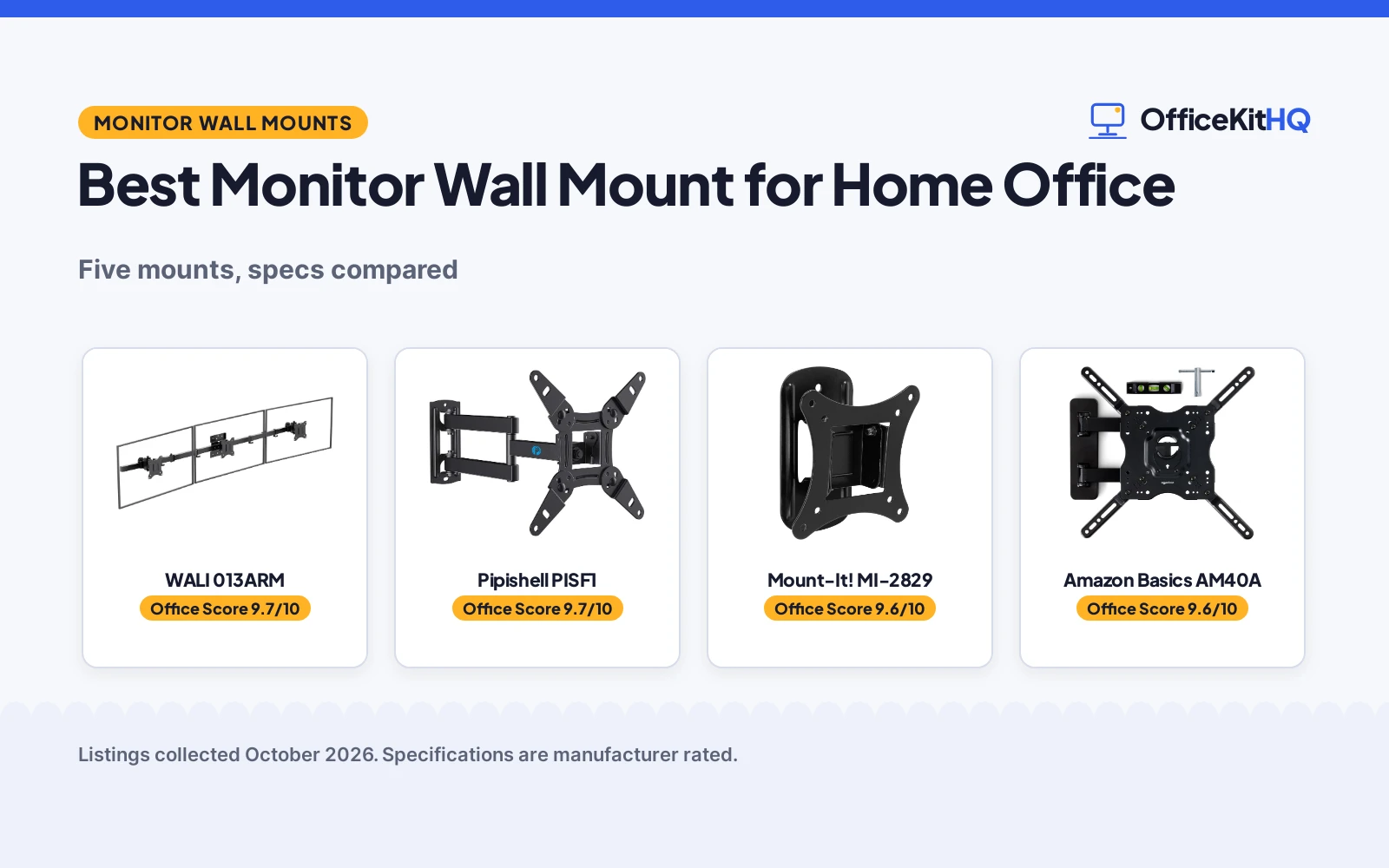
The best monitor wall mount for home office work puts your screen where your eyes already look. We compared wall mounts for home offices by stated screen size range, weight capacity, VESA pattern, motion range, wall type and warranty term, using only what each listing publishes.
OfficeKitHQ earns a commission when you buy through links on this page, at no extra cost to you. As an Amazon Associate I earn from qualifying purchases. Affiliate disclosure.
Quick picks
 Best Overall WALI 013ARM: 3-monitor mount, telescoping arms, 45-degree tilt, 10-year warranty stated Check price on Amazon
 Best Full Motion Pipishell PISF1: Tilt, 90-degree swivel, 360-degree rotation; retracts to 2.7 in, extends 14.59 in Check price on Amazon
 Best Warranty Mount-It! MI-2829: Lifetime manufacturer warranty stated, stainless steel, 44 lb capacity Check price on Amazon
 Best For Large Screens Amazon Basics AM40A: 26 to 55 in range, 80 lb stated capacity, 180-degree swivel Check price on Amazon
 Best Compact Reach XINLEI MA1330: Retracts to 1.96 in, extends 14.25 in, 180-degree swivel, 360-degree rotation Check price on Amazon
The picks
| # | Product | Office Score | Buy |
|---|---|---|---|
| 1 | WALI 013ARM | 9.7/10 | Buy on Amazon |
| 2 | Pipishell PISF1 | 9.7/10 | Buy on Amazon |
| 3 | Mount-It! MI-2829 | 9.6/10 | Buy on Amazon |
| 4 | Amazon Basics AM40A | 9.6/10 | Buy on Amazon |
| 5 | XINLEI MA1330 | 9.6/10 | Buy on Amazon |

WALI 013ARM
A triple monitor wall mount for 17 to 32 in screens up to 15.4 lb each, with tilt, swivel and 360-degree rotation, telescoping arms and a stated 10-year warranty.
Pros
- Holds 3 monitors of 17 to 32 in, up to 15.4 lb each
- Telescoping arms expand outward and slide together for added strength
- 45-degree maximum tilt with 360-degree rotation for portrait or landscape
- 10-year warranty stated in the spec table
Cons
- Listing recommends two people for installation
- 15.4 lb per-monitor limit is the lowest capacity here
- VESA limited to 75x75 and 100x100mm
- No extension or retraction distance is stated
Detailed Review
WALI lists the 013ARM as a triple monitor wall mount for 17 to 32 in screens up to 15.4 lb each, with 75x75 or 100x100mm holes. Telescoping arms expand straight outward for added strength, and each screen gets tilt, swivel and 360-degree rotation. It fits concrete, brick and wood stud walls, includes cable clips, and the spec table states a 10-year warranty.
Who it's for: a home worker running 3 screens who wants full motion on the wall. Who should skip it: anyone with one monitor or over 15.4 lb.
Its Office Score of 9.7/10 comes from performance 33/35, build 21/25, value 20/25, safety 7/10 and warranty 4/5: 85 of 100 points, placed on our 9.2 to 9.8 scale.
Key Specifications
| Screens | 17 to 32 in, 3 mounts |
|---|---|
| Capacity | 15.4 lb each |
| Motion | Tilt, swivel, 360 rotation |
| Warranty | 10 years |
Figures as published on the retailer listing, collected 22 October 2026. Performance figures are manufacturer rated.
Safety and Warranty
What this listing states. 15.4 lb per-monitor capacity and 75/100mm VESA patterns are stated, so safety scores 7 of 10. 10 Years Warranty. It does not say everything a buyer needs, such as who pays return shipping, so warranty scores 4 of 5. See How We Pick.
Match the mount. Check your screen's VESA pattern, size and weight against the stated range, and check that your desk thickness and edge suit a clamp or grommet mount before you drill or clamp.
This is general buying information, not professional advice. Follow each product manual and local rules, and see our Safety Disclaimer.

Pipishell PISF1
A full motion wall mount for 13 to 43 in screens up to 44 lb, with tilt, 90-degree swivel and 360-degree rotation, VESA from 75x75 to 200x200mm and a 5-year warranty statement.
Pros
- Covers 13 to 43 in screens, including the 34 and 35 in ultrawide sizes the listing names
- Tilts +9/-11 degrees, swivels 90 degrees and rotates 360 degrees
- Extends 14.59 in and retracts to 2.7 in
- VESA from 75x75 to 200x200mm stated in the bullets
Cons
- Spec table lists a 42 in maximum screen size against the title's 43 in
- 44 lb capacity is below the 80 lb Amazon Basics mount
- Single stud installation only, with no metal stud mentioned
- No cable management clips are mentioned
Detailed Review
Pipishell lists the PISF1 as a full motion wall mount for 13 to 43 in flat or curved screens up to 44 lb, with VESA from 75x75 to 200x200mm. It tilts +9/-11 degrees, swivels 90 degrees and rotates 360 degrees, extending 14.59 in and retracting to 2.7 in. It mounts to a single wood stud, concrete or brick with steel construction. One inconsistency: the spec table gives 42 in max while the title and bullets say 13 to 43 in; we trust the title and bullets. The spec table states a 5 year warranty.
Who it's for: a home worker with a 32 in or larger screen who wants full motion. Who should skip it: anyone over 44 lb.
Its Office Score of 9.7/10 comes from performance 32/35, build 21/25, value 21/25, safety 8/10 and warranty 3/5: 85 of 100 points, placed on our 9.2 to 9.8 scale.
Key Specifications
| Screen size | 13 to 43 in |
|---|---|
| Capacity | 44 lb |
| Motion | Tilt, 90-degree swivel, 360 rotation |
| Reach | 2.7 to 14.59 in |
Figures as published on the retailer listing, collected 22 October 2026. Performance figures are manufacturer rated.
Safety and Warranty
What this listing states. 44 lb capacity, VESA 75x75 to 200x200mm and steel construction are stated, so safety scores 8 of 10. 5 year manufacturer. It does not say everything a buyer needs, such as who pays return shipping, so warranty scores 3 of 5. See How We Pick.
Match the mount. Check your screen's VESA pattern, size and weight against the stated range, and check that your desk thickness and edge suit a clamp or grommet mount before you drill or clamp.
This is general buying information, not professional advice. Follow each product manual and local rules, and see our Safety Disclaimer.

Mount-It! MI-2829
A low-profile tilt and swivel wall mount for 19 to 32 in screens up to 44 lb, with a 2.6 in wall profile, stainless steel construction and a stated lifetime manufacturer warranty.
Pros
- Lifetime manufacturer warranty is stated
- 44 lb capacity on a 19 to 32 in mount matches mounts built for larger screens
- 2.6 in profile keeps the screen close to the wall
- Mounts to wood or metal stud, concrete, brick or block
Cons
- Spec table lists a 15-degree maximum tilt against the bullets' 12 degrees down
- Swivels only 30 degrees each way, for a 60-degree total range
- No extension arm or rotation is stated; tilt and swivel only
- Tools are not included; the listing calls for a drill, stud finder, level, tape and wrench
Detailed Review
Mount-It! lists the MI-2829 for 19 to 32 in screens up to 44 lb with VESA 75x75 or 100x100mm. It tilts down 12 degrees and swivels 30 degrees each way, with a 2.6 in profile off the wall. It mounts to a wood or metal stud, concrete, brick or block, but not drywall alone. The listing states stainless steel construction and a lifetime manufacturer warranty. One inconsistency: the spec table gives a 15-degree max tilt while the bullets say 12 degrees down; we trust the bullets.
Who it's for: a home worker with a 24 to 27 in monitor who wants the screen close to the wall. Who should skip it: anyone who wants a pull-out arm or portrait rotation.
Its Office Score of 9.6/10 comes from performance 27/35, build 20/25, value 21/25, safety 8/10 and warranty 5/5: 81 of 100 points, placed on our 9.2 to 9.8 scale.
Key Specifications
| Screen size | 19 to 32 in |
|---|---|
| Capacity | 44 lb |
| Motion | Tilt, 60-degree swivel |
| Profile | 2.6 in off the wall |
Figures as published on the retailer listing, collected 22 October 2026. Performance figures are manufacturer rated.
Safety and Warranty
What this listing states. 44 lb capacity, VESA 75x75/100x100mm and stainless steel construction are stated, so safety scores 8 of 10. lifetime manufacturer warranty, so warranty scores 5 of 5. See How We Pick.
Match the mount. Check your screen's VESA pattern, size and weight against the stated range, and check that your desk thickness and edge suit a clamp or grommet mount before you drill or clamp.
This is general buying information, not professional advice. Follow each product manual and local rules, and see our Safety Disclaimer.

Amazon Basics AM40A
A full motion articulating wall mount for 26 to 55 in screens up to 80 lb, with 180-degree swivel, tilt, a 2.6 to 16.3 in reach and an included mounting template and bubble level.
Pros
- 80 lb stated capacity is the highest here
- 180-degree swivel with tilt from +10 to -5 degrees
- 2.6 to 16.3 in articulating reach
- Mounting hardware, bubble level, mounting template and manual are included
Cons
- Spec table lists a 40 lb max load against the title's 80 lb
- Spec table lists 12 to 40 in compatible sizes against the title's 26 to 55 in
- Spec table calls the movement type Tilt while the title says full motion articulating
- No warranty term is stated
Detailed Review
Amazon Basics lists the AM40A as a full motion mount for 26 to 55 in screens up to 80 lb, with VESA from 3.9 by 3.9 in through 15.7 by 15.7 in. It tilts +10 to -5 degrees, swivels 180 degrees and articulates from 2.6 to 16.3 in off the wall, mounting to a single stud in concrete, brick or wood with hardware, a bubble level, template and manual. The spec table contradicts the title on load (40 vs 80 lb), sizes (12 to 40 vs 26 to 55 in) and movement type; we trust the title and bullets. No warranty term is stated.
Who it's for: a home worker mounting a large, heavy screen who wants the longest reach here. Who should skip it: anyone unsettled by the spec table contradictions.
Its Office Score of 9.6/10 comes from performance 29/35, build 21/25, value 20/25, safety 9/10 and warranty 0/5: 79 of 100 points, placed on our 9.2 to 9.8 scale.
Key Specifications
| Screen size | 26 to 55 in |
|---|---|
| Capacity | 80 lb |
| Motion | Tilt, 180-degree swivel |
| Reach | 2.6 to 16.3 in |
Figures as published on the retailer listing, collected 22 October 2026. Performance figures are manufacturer rated.
Safety and Warranty
What this listing states. 80 lb capacity and VESA up to 15.7 by 15.7 in are stated, so safety scores 9 of 10. No warranty term, so warranty scores zero. See How We Pick.
Match the mount. Check your screen's VESA pattern, size and weight against the stated range, and check that your desk thickness and edge suit a clamp or grommet mount before you drill or clamp.
This is general buying information, not professional advice. Follow each product manual and local rules, and see our Safety Disclaimer.

XINLEI MA1330
A full motion wall mount for 13 to 32 in screens up to 33 lb, with 180-degree swivel, ±15-degree tilt, 360-degree rotation and a 1.96 to 14.25 in reach.
Pros
- Retracts to 1.96 in and extends 14.25 in
- 180-degree swivel with 360-degree rotation
- 3-step installation stated to finish within 3 minutes
- Removable plate designed for single-person installation
Cons
- 33 lb capacity is the lowest single-screen capacity here
- No warranty term is stated
- Not for drywall, per the listing
- The 100x100mm plate can block cables; the listing says to check before purchase
Detailed Review
XINLEI lists the MA1330 as a full motion mount for 13 to 32 in screens up to 33 lb, with VESA 75x75 and 100x100mm. It swivels 180 degrees, tilts ±15 degrees and rotates 360 degrees, retracting to 1.96 in and extending 14.25 in. It fits a single stud in brick, concrete or wood, explicitly not drywall, with alloy steel construction and a removable plate. The 100x100mm plate can block cables on some screens. No warranty term is stated.
Who it's for: a home worker with a smaller screen who wants full motion in a compact arm. Who should skip it: anyone over 33 lb.
Its Office Score of 9.6/10 comes from performance 28/35, build 20/25, value 21/25, safety 7/10 and warranty 0/5: 76 of 100 points, placed on our 9.2 to 9.8 scale.
Key Specifications
| Screen size | 13 to 32 in |
|---|---|
| Capacity | 33 lb |
| Motion | Tilt, 180-degree swivel, 360 rotation |
| Reach | 1.96 to 14.25 in |
Figures as published on the retailer listing, collected 22 October 2026. Performance figures are manufacturer rated.
Safety and Warranty
What this listing states. 33 lb capacity, VESA 75x75/100x100mm and alloy steel construction are stated, so safety scores 7 of 10. No warranty term, so warranty scores zero. See How We Pick.
Match the mount. Check your screen's VESA pattern, size and weight against the stated range, and check that your desk thickness and edge suit a clamp or grommet mount before you drill or clamp.
This is general buying information, not professional advice. Follow each product manual and local rules, and see our Safety Disclaimer.
As an Amazon Associate I earn from qualifying purchases.
More picks to compare
 HUANUO Gaming Dual Monitor Wall MountCheck on Amazon
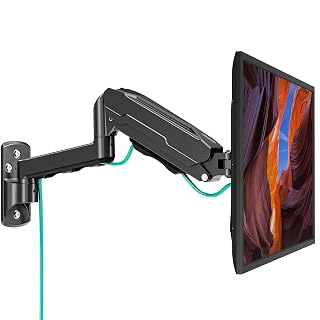 MOUNT PRO Single Monitor Wall MountCheck on Amazon
 MOUNT PRO Dual Monitor Wall MountCheck on Amazon
 VIVO Black 17-32 in Single Monitor WallCheck on Amazon
 ErGear Monitor Wall MountCheck on Amazon
Compare the picks
| Mount | Office Score | Screen size | Weight capacity | Motion | VESA | Warranty | Amazon |
|---|---|---|---|---|---|---|---|
| WALI 013ARM | 9.7/10 | 17 to 32 in each | 15.4 lb each | Tilt, swivel, 360 rotation | 75×75, 100x100mm | 10 years | View on Amazon |
| Pipishell PISF1 | 9.7/10 | 13 to 43 in | 44 lb | Tilt, 90-degree swivel, 360 rotation | 75×75 to 200x200mm | 5 years | View on Amazon |
| Mount-It! MI-2829 | 9.6/10 | 19 to 32 in | 44 lb | Tilt, 60-degree swivel | 75×75, 100x100mm | Lifetime | View on Amazon |
| Amazon Basics AM40A | 9.6/10 | 26 to 55 in | 80 lb | Tilt, 180-degree swivel | 3.9 to 15.7 in | Not stated | View on Amazon |
| XINLEI MA1330 | 9.6/10 | 13 to 32 in | 33 lb | Tilt, 180-degree swivel, 360 rotation | 75×75, 100x100mm | Not stated | View on Amazon |
Specifications are manufacturer rated as listed, collected 22 October 2026. Three of the five state a warranty term; all five state a weight capacity and a VESA pattern.
How we scored them
The Office Score weighs performance (screen size range, stated weight capacity, motion range and reach), build (stated materials, included hardware and cable management), value, safety and warranty. For a wall mount, safety means a stated weight capacity, VESA pattern, mounting surfaces and hardware; all five state a capacity and a VESA pattern. Three state a warranty: Mount-It! lifetime, WALI 10 years, Pipishell 5 years. How we pick explains the weights.
| Product | Office Score | Perf. /35 | Build /25 | Value /25 | Safety /10 | Warranty /5 |
|---|---|---|---|---|---|---|
| WALI 013ARM | 9.7 | 33 | 21 | 20 | 7 | 4 |
| Pipishell PISF1 | 9.7 | 32 | 21 | 21 | 8 | 3 |
| Mount-It! MI-2829 | 9.6 | 27 | 20 | 21 | 8 | 5 |
| Amazon Basics AM40A | 9.6 | 29 | 21 | 20 | 9 | 0 |
| XINLEI MA1330 | 9.6 | 28 | 20 | 21 | 7 | 0 |
Scores run from 9.2 to 9.8: each product’s point total is placed on that range, so more points always means a higher score.
How to choose the best monitor wall mount for home office
Match the mount to your screen and VESA pattern
Screen size ranges run from 13 in to 55 in. The XINLEI covers 13 to 32 in and the Mount-It! 19 to 32 in, the Pipishell 13 to 43 in, the Amazon Basics 26 to 55 in, and the WALI takes three screens of 17 to 32 in each. Check the VESA pattern on the back of your screen: every pick lists 75×75 and 100x100mm, the Pipishell adds up to 200x200mm, and the Amazon Basics lists 3.9 by 3.9 in through 15.7 by 15.7 in. For more single-screen options, see our best monitor wall mount roundup.
Weigh your screen against the stated capacity
Stated capacities run from 15.4 lb per screen on the WALI to 80 lb on the Amazon Basics, with the XINLEI at 33 lb and the Pipishell and Mount-It! at 44 lb. Treat each figure as the maker’s claim and leave a margin under the limit.
| Mount | Capacity | VESA | Warranty |
|---|---|---|---|
| WALI 013ARM | 15.4 lb each | 75×75, 100x100mm | 10 years |
| Pipishell PISF1 | 44 lb | 75×75 to 200x200mm | 5 years |
| Mount-It! MI-2829 | 44 lb | 75×75, 100x100mm | Lifetime |
| Amazon Basics AM40A | 80 lb | 3.9 to 15.7 in | Not stated |
| XINLEI MA1330 | 33 lb | 75×75, 100x100mm | Not stated |
Figures as stated in each listing. Capacity is the maker’s stated maximum; a margin under it keeps the arm from working at its limit.
Decide how much motion you need
Full motion means different things on each listing. The Pipishell tilts +9/-11 degrees, swivels 90 degrees and rotates 360 degrees; the XINLEI swivels 180 degrees, tilts ±15 degrees and rotates 360 degrees; the WALI states a 45-degree maximum tilt with 360-degree rotation; the Amazon Basics swivels 180 degrees and tilts +10 to -5 degrees; the Mount-It! tilts down 12 degrees and swivels 30 degrees each way. If you only need glare control, the Mount-It! at 2.6 in off the wall is enough; for pull-out reach compare 14.59 in (Pipishell), 14.25 in (XINLEI) and 16.3 in (Amazon Basics). For a three-screen wall, our triple monitor mount roundup compares more options.
Check the wall and plan the cables
Every pick here mounts to a wood stud, concrete or brick; the Mount-It! also lists metal stud and block, while the XINLEI and Mount-It! warn against drywall alone. The WALI includes cable clips. Measure before you drill: the Amazon Basics ships a mounting template and bubble level, while the Mount-It! expects a drill, stud finder, level, measuring tape and wrench. For cable chaos, a cable management guide pairs well with any mount.
Setup Notes
- Match the monitor’s VESA holes to the mount’s stated patterns: 75×75 and 100x100mm on every pick, up to 200x200mm on the Pipishell, 3.9 by 3.9 in through 15.7 by 15.7 in on the Amazon Basics.
- Confirm the wall before ordering: every pick lists a wood stud, concrete or brick, and none of the five is stated for drywall alone.
- Leave cable slack for the stated reach: 14.59 in (Pipishell), 14.25 in (XINLEI), 16.3 in (Amazon Basics); the WALI includes cable clips.
- The Mount-It! lists a drill, stud finder, level, measuring tape and wrench as needed tools, and the WALI recommends two people for positioning the mount.
Frequently Asked Questions
What VESA pattern does my monitor need?
Measure the four mounting holes on the back of the monitor before ordering. Every pick here lists 75×75 and 100x100mm, the Pipishell also lists up to 200x200mm, and the Amazon Basics lists 3.9 by 3.9 in through 15.7 by 15.7 in.
Can these mounts hold an ultrawide monitor?
The Pipishell names 34 and 35 in ultrawide monitors as compatible, and the WALI describes telescoping arms that expand to fit larger ultrawides. Check the screen’s weight against the stated capacity first.
Will these mounts work on drywall?
Not on drywall alone. The XINLEI says not to mount on drywall, and the Mount-It! is not for drywall alone without a stud or masonry behind it. All five list wood stud, concrete or brick.
Which mount states the longest warranty?
The Mount-It! states a lifetime warranty, the WALI 10 years and the Pipishell 5 years. The Amazon Basics and XINLEI state no warranty term.
Which mounts rotate a screen into portrait?
The Pipishell, WALI and XINLEI state 360-degree rotation for portrait or landscape. The Mount-It! and Amazon Basics describe tilt and swivel only.
Related guides
See every monitor arms and stands guide and all monitor mounts, keyboards and mice guides. Also see our best single arm monitor mount. Also see our best monitor arm for ultrawide. Also see our best standing desk with monitor mount. Also see our best monitor light bar for home office. Also see our best computer desk for two monitors. Also see our best small desk for dual monitors.
More picks: height adjustable monitor stands, monitor risers for laptops, desk lamps for dual monitors.