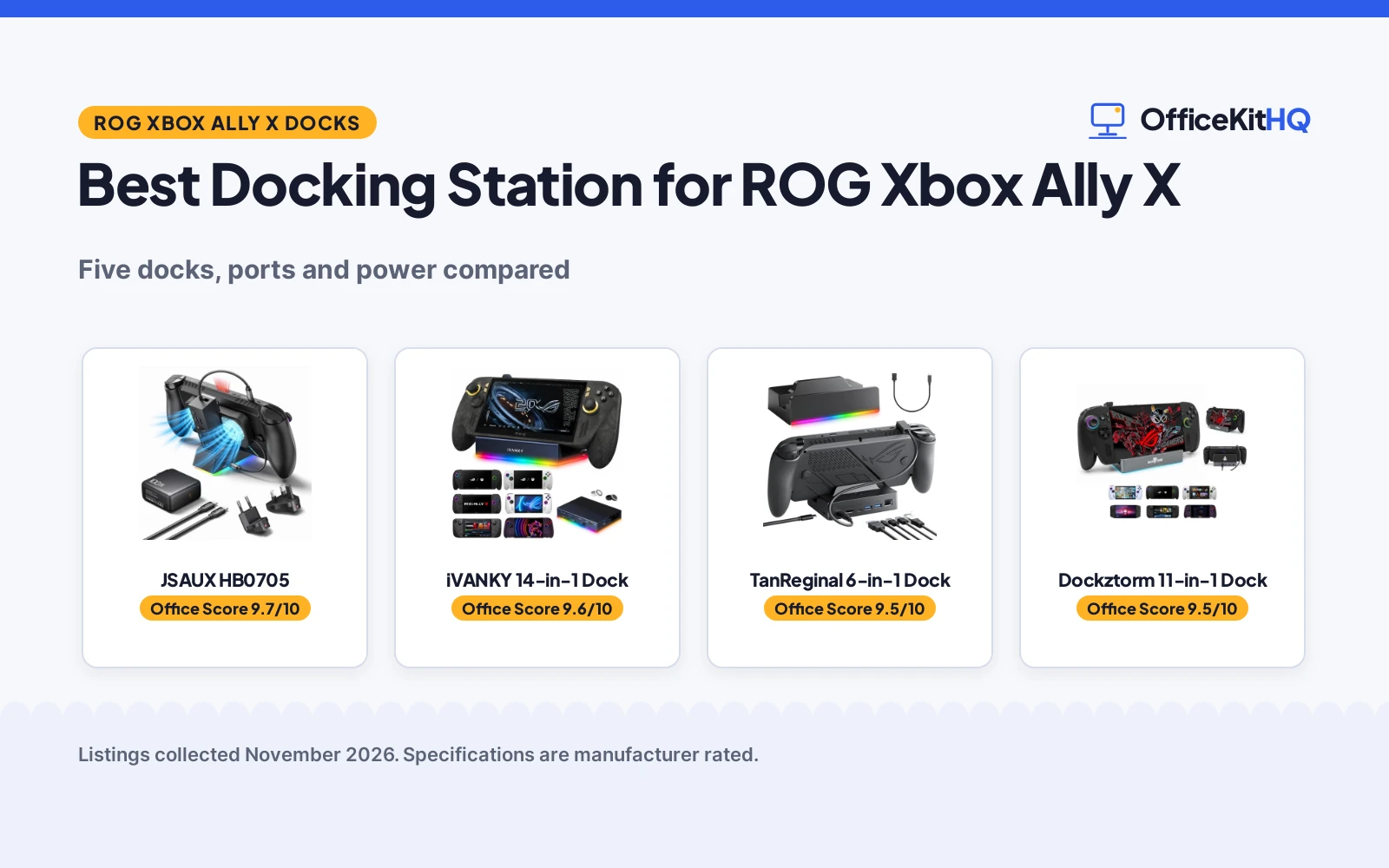
The best docking station for ROG Xbox Ally X turns the handheld into a desk setup without a tangle of adapters, because the dock decides what the handheld can drive. A handheld on a bare desk means a small screen, a crowded port and a charger that fights the cable. We compared docking stations for the ROG Xbox Ally X by port count, video output, charging power, RGB lighting, stand design and warranty term.
OfficeKitHQ earns a commission when you buy through links on this page, at no extra cost to you. As an Amazon Associate I earn from qualifying purchases. Affiliate disclosure.
Quick picks
 Best Overall JSAUX HB0705: 100W charger in the box, RGB cooling fan, 4K@120Hz video Check price on Amazon
 Most Ports iVANKY 14-in-1 Dock: 14-in-1 ports, 4K@120Hz, 24-month warranty, foldable stand Check price on Amazon
 Best Protection TanReginal 6-in-1 Dock: Overvoltage, overcurrent, short-circuit and overheat protection Check price on Amazon
 Highest Power Input Dockztorm 11-in-1 Dock: 140W PD input, 4K@120Hz, 10Gbps USB, SD and TF slots Check price on Amazon
 Highest Refresh SiWiQU 5-in-1 Dock: 4K@144Hz output, 35W Turbo Mode for ROG Xbox Ally X Check price on Amazon
Our desk picks
| # | Product | Office Score | Buy |
|---|---|---|---|
| 1 | JSAUX HB0705 | 9.7/10 | Buy on Amazon |
| 2 | iVANKY 14-in-1 Dock | 9.6/10 | Buy on Amazon |
| 3 | TanReginal 6-in-1 Dock | 9.5/10 | Buy on Amazon |
| 4 | Dockztorm 11-in-1 Dock | 9.5/10 | Buy on Amazon |
| 5 | SiWiQU 5-in-1 Dock | 9.5/10 | Buy on Amazon |

JSAUX HB0705
A 7-in-1 dock with a 100W charger in the box, a magnetic RGB cooling fan, 4K@120Hz video and 30W Turbo Mode support for the ROG Xbox Ally X.
Pros
- 100W PD charger included in the box, so no separate charger is needed
- Magnetic RGB cooling fan lines up with the ROG Ally (X) air intake
- 4K@120Hz or 1080p@240Hz video with VRR, ALLM, HDR and QFT stated
- 30W Turbo Mode support with the included charger
Cons
- Cooling may be reduced on non-ROG Ally models with different intake placements
- Only 7 ports, fewer than the 14-in-1 and 11-in-1 docks here
- No SD or TF card slot is stated
- 18-month warranty is shorter than the 24-month term on the iVANKY
Detailed Review
JSAUX lists the HB0705 as a 7-in-1 dock for the ROG Xbox Ally X, Steam Deck and Legion Go, with an included 100W PD charger, a magnetic RGB cooling fan and HDMI 2.1. The HDMI output runs 4K@120Hz or 1080p@240Hz, with VRR, ALLM, HDR and QFT stated, and the dock adds Gigabit Ethernet, USB-C PD charging, USB-C 3.0, dual USB-A 3.0 and an RGB-powered USB-C port. The fan lines up with the ROG Ally (X) air intake, and the maker states 30W Turbo Mode support with the included charger. The Steam Deck charges at up to 45W and the ROG Ally and Ally X at up to 65W, and the maker states an 18-month warranty.
Who it's for: someone who wants the charger in the box, a cooling fan aimed at the Ally intake and the highest stated video modes for a big screen. Who should skip it: anyone who needs more ports or card slots, or who plays on another handheld.
Its Office Score of 9.7/10 comes from performance 33/35, build 22/25, value 22/25, safety 0/10 and warranty 4/5: 81 of 100 points, placed on our 9.2 to 9.8 scale.
Key Specifications
| Ports | 7-in-1 |
|---|---|
| Video | 4K@120Hz, 1080p@240Hz |
| Turbo Mode | 30W Turbo Mode |
| Charger | 100W PD charger included |
These specs mirror the retailer listing as of 19 November 2026; performance figures are stated by the brand.
Safety and Warranty
What this listing states. No UL, FCC or over-current protection statement is stated, so safety scores zero. 18 Month Manufacturer. It does not say everything a buyer needs, such as who pays return shipping, so warranty scores 4 of 5. See How We Pick.
Power and heat. Use the supplied adapter, treat power delivery wattage and display support as the maker's claims for your laptop model, and give the dock room to vent.
This is general buying information, not professional advice. Follow each product manual and local rules, and see our Safety Disclaimer.

iVANKY 14-in-1 Dock
A 14-in-1 RGB dock with 4K@120Hz HDMI, 10Gbps USB-A ports, SD and TF slots, a foldable stand and a 24-month warranty.
Pros
- 14-in-1 port count is the widest stated here
- Two 10Gbps USB-A 3.2 ports plus two 5Gbps USB-A 3.0 ports
- SD and TF slots plus a 3.5mm audio jack
- 24-month warranty is the longest stated here
Cons
- No charger is included, so the 100W PD input needs a charger you already own
- Largest footprint stated here at 5.9 x 3.5 x 1.2 in
- Firmware update is recommended to avoid HDMI mirroring issues
- No cooling fan is stated, so airflow depends on the stand keeping vents clear
Detailed Review
iVANKY lists this dock as a 14-in-1 RGB station with a 4K@120Hz HDMI 2.1 port, a 1Gbps Ethernet port, two 10Gbps USB-A 3.2 ports, two 5Gbps USB-A 3.0 ports, a rapid-charging USB-C port, a 3.5mm audio jack and TF and SD slots, plus two joystick caps. The dual-foldable stand keeps the rear panel clear of the cooling vents, and the dock supports up to 100W power delivery. The maker gives two port counts, 14 and 12; check before ordering. The footprint is 5.9 x 3.5 x 1.2 in, and the maker states a 24-month warranty.
Who it's for: someone who wants the widest port set here, card slots and an audio jack, with the longest stated warranty. Who should skip it: anyone who wants a charger in the box or a cooling fan.
Its Office Score of 9.6/10 comes from performance 32/35, build 21/25, value 21/25, safety 0/10 and warranty 4/5: 78 of 100 points, placed on our 9.2 to 9.8 scale.
Key Specifications
| Ports | 14-in-1 |
|---|---|
| Video | 4K@120Hz |
| USB | Two 10Gbps USB-A 3.2, two 5Gbps USB-A 3.0 |
| Warranty | 24 months |
These specs mirror the retailer listing as of 19 November 2026; performance figures are stated by the brand.
Safety and Warranty
What this listing states. No UL, FCC or over-current protection statement is stated, so safety scores zero. 24-month Warranty. It does not say everything a buyer needs, such as who pays return shipping, so warranty scores 4 of 5. See How We Pick.
Power and heat. Use the supplied adapter, treat power delivery wattage and display support as the maker's claims for your laptop model, and give the dock room to vent.
This is general buying information, not professional advice. Follow each product manual and local rules, and see our Safety Disclaimer.
TanReginal 6-in-1 Dock
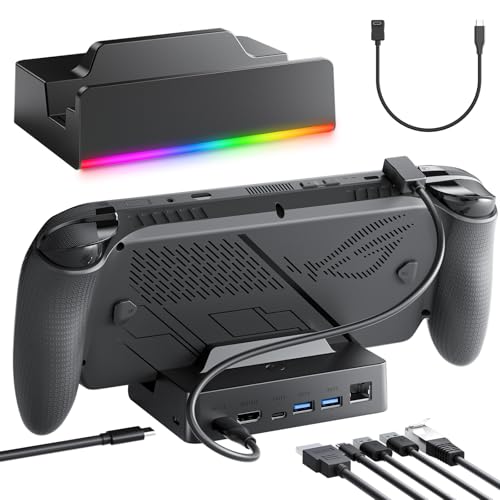
A 6-in-1 dock with 4K@120Hz HDMI, 100W PD charging, stated overvoltage, overcurrent, short-circuit and overheat protection and a foldable stand.
Pros
- Overvoltage, overcurrent, short-circuit and overheat protection are stated
- 10Gbps USB-C downlink plus dual USB-A 3.0 ports at 5Gbps
- RGB lighting with 7 modes, switched by short press
- Foldable stand with anti-slip pads holds the handheld at a viewing angle
Cons
- 6-in-1 port count is the second fewest stated here
- No SD or TF card slot is stated
- No charger is included in the box
- No 1080p high-refresh mode is stated, unlike the 1080p@240Hz on the JSAUX
Detailed Review
TanReginal lists this dock as a 6-in-1 station with a 4K@120Hz HDMI port, a Gigabit Ethernet port, a 10Gbps USB-C downlink, dual USB-A 3.0 ports at 5Gbps and a USB-C PD 100W charging input. The maker states built-in overvoltage, overcurrent, short-circuit and overheat protection and a foldable stand with anti-slip pads, and the dock is plug-and-play with no drivers needed. The maker gives two port counts, 6 and 14; check before ordering. The packaging and instructions give two refresh figures for 4K, 60fps and 120fps; the dock supports up to 120fps where the monitor supports it. The maker states a 1-year warranty.
Who it's for: someone who wants stated electrical protection, RGB lighting and a foldable stand. Who should skip it: anyone who needs card slots, an audio jack or a charger in the box.
Its Office Score of 9.5/10 comes from performance 27/35, build 19/25, value 19/25, safety 7/10 and warranty 3/5: 75 of 100 points, placed on our 9.2 to 9.8 scale.
Key Specifications
| Ports | 6-in-1 |
|---|---|
| Video | 4K@120Hz |
| Power | 100W PD |
| Protection | Overvoltage, overcurrent, short-circuit, overheat |
These specs mirror the retailer listing as of 19 November 2026; performance figures are stated by the brand.
Safety and Warranty
What this listing states. Built-in overvoltage, overcurrent, short-circuit, and overheat protection, so safety scores 7 of 10. 1-year warranty. It does not say everything a buyer needs, such as who pays return shipping, so warranty scores 3 of 5. See How We Pick.
Power and heat. Use the supplied adapter, treat power delivery wattage and display support as the maker's claims for your laptop model, and give the dock room to vent.
This is general buying information, not professional advice. Follow each product manual and local rules, and see our Safety Disclaimer.

Dockztorm 11-in-1 Dock
An 11-in-1 RGB dock with 4K@120Hz HDMI, a 140W PD input, 10Gbps USB, SD and TF slots and OpenRGB lighting control.
Pros
- 140W PD input is the highest charging input stated here
- 10Gbps USB and SD and TF slots in an 11-in-1 layout
- OpenRGB lighting control from the included TF card
- Lowest weight stated here at 0.4 lb, with a 5.7 x 3.6 x 1.2 in footprint
Cons
- No charger is included in the box, so the 140W input needs its own charger and cable
- RGB lighting turns on automatically when powered, and no off switch is stated
- No audio jack is stated
- 1-year warranty is shorter than the 24-month term on the iVANKY
Detailed Review
Dockztorm lists this dock as an 11-in-1 station with 10 physical ports plus RGB lighting: HDMI, RJ45, USB-C host, USB-C 10Gbps, USB-A ports, a PD input and SD and TF slots. The HDMI 2.1 output supports up to 4K@120Hz, and the 140W PD input supports pass-through charging while gaming, with actual charging power depending on the handheld, charger and USB-C cable. RGB lighting turns on automatically when powered, and the included TF card carries the OpenRGB installer for lighting control. The dock weighs 0.4 lb with a 5.7 x 3.6 x 1.2 in footprint, and the maker states a 1-year warranty.
Who it's for: someone who wants the highest stated power input, 10Gbps USB and card slots in a light dock. Who should skip it: anyone who wants a charger in the box or a cooling fan.
Its Office Score of 9.5/10 comes from performance 30/35, build 21/25, value 21/25, safety 0/10 and warranty 3/5: 75 of 100 points, placed on our 9.2 to 9.8 scale.
Key Specifications
| Ports | 11-in-1 |
|---|---|
| Video | 4K@120Hz |
| Power | 140W PD input |
| Weight | 0.4 lb |
These specs mirror the retailer listing as of 19 November 2026; performance figures are stated by the brand.
Safety and Warranty
What this listing states. No UL, FCC or over-current protection statement is stated, so safety scores zero. 1 Year. It does not say everything a buyer needs, such as who pays return shipping, so warranty scores 3 of 5. See How We Pick.
Power and heat. Use the supplied adapter, treat power delivery wattage and display support as the maker's claims for your laptop model, and give the dock room to vent.
This is general buying information, not professional advice. Follow each product manual and local rules, and see our Safety Disclaimer.

SiWiQU 5-in-1 Dock
A 5-in-1 dock with 4K@144Hz HDMI, 100W PD charging and 35W Turbo Mode, made only for the ROG Xbox Ally X.
Pros
- 4K@144Hz output is the highest refresh stated here
- 35W Turbo Mode for the ROG Xbox Ally X
- 100W PD charging while playing, with the ROG Xbox Ally charging at up to 65W
- Compact 5-in-1 layout with Gigabit Ethernet and 2 USB-A ports
Cons
- Made only for the ROG Xbox Ally X, with no stated support for the Steam Deck or Legion Go
- Fewest ports stated here at 5-in-1, with no card slots or audio jack
- No RGB lighting or stand is stated
- 1-year warranty is shorter than the 24-month term on the iVANKY
Detailed Review
SiWiQU lists this dock as a 5-in-1 station for the ROG Xbox Ally X with HDMI 2.1 at 4K@144Hz, Gigabit Ethernet, 2 USB-A 3.0 ports and a 100W PD charging port. The dock states 35W Turbo Mode for the ROG Xbox Ally X and charges while playing. It works only with the ROG Xbox Ally and ROG Xbox Ally X, not the ROG Ally or ROG Ally X. The maker states a 1-year warranty.
Who it's for: someone who plays only on the ROG Xbox Ally X and wants the highest stated refresh rate with Turbo Mode. Who should skip it: anyone with a Steam Deck, Legion Go or ROG Ally, or who needs more than 5 ports.
Its Office Score of 9.5/10 comes from performance 29/35, build 20/25, value 20/25, safety 0/10 and warranty 3/5: 72 of 100 points, placed on our 9.2 to 9.8 scale.
Key Specifications
| Ports | 5-in-1 |
|---|---|
| Video | 4K@144Hz |
| Power | 100W PD |
| Turbo Mode | 35W Turbo Mode |
These specs mirror the retailer listing as of 19 November 2026; performance figures are stated by the brand.
Safety and Warranty
What this listing states. No UL, FCC or over-current protection statement is stated, so safety scores zero. 1 Year Manufacturer. It does not say everything a buyer needs, such as who pays return shipping, so warranty scores 3 of 5. See How We Pick.
Power and heat. Use the supplied adapter, treat power delivery wattage and display support as the maker's claims for your laptop model, and give the dock room to vent.
This is general buying information, not professional advice. Follow each product manual and local rules, and see our Safety Disclaimer.
As an Amazon Associate I earn from qualifying purchases.
More picks to compare
 iVANKY 14-in-1 Dock with ChargerFor buyers who want the 100W charger included with the 14-in-1 dock.Check on Amazon
Specs compared
| Dock | Office Score | Ports | Video output | Power delivery | Warranty | Amazon |
|---|---|---|---|---|---|---|
| JSAUX HB0705 | 9.7/10 | 7-in-1 | 4K@120Hz, 1080p@240Hz | 100W charger included | 18 months | View on Amazon |
| iVANKY 14-in-1 Dock | 9.6/10 | 14-in-1 | 4K@120Hz | 100W PD | 24 months | View on Amazon |
| TanReginal 6-in-1 Dock | 9.5/10 | 6-in-1 | 4K@120Hz | 100W PD | 1 year | View on Amazon |
| Dockztorm 11-in-1 Dock | 9.5/10 | 11-in-1 | 4K@120Hz | 140W PD input | 1 year | View on Amazon |
| SiWiQU 5-in-1 Dock | 9.5/10 | 5-in-1 | 4K@144Hz | 100W PD | 1 year | View on Amazon |
Dimensions, weight limits and ranges are the maker’s ratings as each listing gives them, collected 19 November 2026. All five state a warranty term; one states electrical protection.
How to choose the best docking station for rog xbox ally x
Count the ports before the video specs
Port count runs from 5-in-1 on the SiWiQU to 14-in-1 on the iVANKY, with the JSAUX at 7-in-1, the Dockztorm at 11-in-1 and the TanReginal at 6-in-1. Count what you plug in every day first. The iVANKY is the only pick here with SD and TF slots and a 3.5mm audio jack, while the Dockztorm adds SD and TF slots without the audio jack. The iVANKY and TanReginal listings each give two port counts, so check before ordering. Our docking stations and USB hubs guides compare more port layouts.
Match the video output to your monitor
Four of the five docks state 4K@120Hz over HDMI 2.1, and the SiWiQU states 4K@144Hz, the highest refresh here. The JSAUX also states 1080p@240Hz, with VRR, ALLM, HDR and QFT. The TanReginal states up to 120fps at 4K where the monitor supports it. Match the stated output to the monitor on your desk.
| Dock | Ports | Video output | Power delivery |
|---|---|---|---|
| JSAUX HB0705 | 7-in-1 | 4K@120Hz | 100W charger included |
| iVANKY 14-in-1 Dock | 14-in-1 | 4K@120Hz | 100W PD |
| TanReginal 6-in-1 Dock | 6-in-1 | 4K@120Hz | 100W PD |
| Dockztorm 11-in-1 Dock | 11-in-1 | 4K@120Hz | 140W PD input |
| SiWiQU 5-in-1 Dock | 5-in-1 | 4K@144Hz | 100W PD |
Charging power and the charger in the box
Four docks state 100W power delivery, and the Dockztorm states a 140W PD input, the highest here. Only the JSAUX states a charger in the box, a 100W PD charger that the maker says the 30W Turbo Mode needs. The SiWiQU states 35W Turbo Mode for the ROG Xbox Ally X. Device limits still apply: the Steam Deck charges at up to 45W, the ROG Ally and Ally X at up to 65W, and the Legion Go at up to 65W on the JSAUX and up to 85W on the iVANKY. A dock without a charger in the box charges as fast as the charger and cable you already own allow. See our best docking station for Steam Deck picks for docks built around the Deck charging limits.
RGB lighting, stands and the desk
RGB lighting is stated on four of the five docks: 7 modes on the iVANKY and the TanReginal, 5 base modes plus a 7-color gradient fan on the JSAUX, and OpenRGB control from an included TF card on the Dockztorm. The SiWiQU states no RGB lighting. Two docks state a foldable stand, the iVANKY with a dual-foldable design and the TanReginal with anti-slip pads. Footprints are stated for two docks, the iVANKY at 5.9 x 3.5 x 1.2 in and the Dockztorm at 5.7 x 3.6 x 1.2 in and 0.4 lb, so measure the desk space before ordering. A docking station setup guide covers placement, cables and power.
Read the warranty line, not the headline
All five listings state a warranty term. The iVANKY states 24 months, the longest here, the JSAUX states 18 months, and the SiWiQU, Dockztorm and TanReginal each state 1 year. A longer term matters most on a dock that stays plugged in every day. Keep the warranty text with the dock.
Setup Notes
- Measure the desk space against the stated footprints: the iVANKY at 5.9 x 3.5 x 1.2 in and the Dockztorm at 5.7 x 3.6 x 1.2 in.
- Plan power first: the JSAUX includes a 100W PD charger, while the Dockztorm 140W PD input needs a charger and a USB-C cable.
- Keep the handheld vents clear: the iVANKY foldable stand keeps the rear panel clear of the vents, and the JSAUX magnetic fan lines up with the ROG Ally (X) air intake.
- Check the monitor HDMI input against the dock stated output: 4K@120Hz on four docks, 4K@144Hz on the SiWiQU.
FAQ
Will these docks work with a Steam Deck?
Four of the five state Steam Deck compatibility: the JSAUX, iVANKY, Dockztorm and TanReginal. The SiWiQU states compatibility only with the ROG Xbox Ally X.
Which dock has the highest stated video output?
The SiWiQU at 4K@144Hz. The other four state 4K@120Hz, and the JSAUX also states 1080p@240Hz.
Does any dock include a charger?
Only the JSAUX states a charger in the box, a 100W PD charger. The other four state power delivery without one.
What does Turbo Mode need on these docks?
The JSAUX states 30W Turbo Mode with its included 100W charger, which the maker says Turbo Mode needs. The SiWiQU states 35W Turbo Mode for the ROG Xbox Ally X.
Which dock states the longest warranty?
The iVANKY at 24 months. The JSAUX states 18 months, and the SiWiQU, Dockztorm and TanReginal each state 1 year.
Score breakdown
The Office Score weighs performance, build, value, safety and warranty. For a dock, safety means stated overvoltage, overcurrent, short-circuit or overheat protection, and only the TanReginal states it. All five listings state a warranty term, longest on the iVANKY at 24 months. How we pick explains the weights.
| Product | Office Score | Perf. /35 | Build /25 | Value /25 | Safety /10 | Warranty /5 |
|---|---|---|---|---|---|---|
| JSAUX HB0705 | 9.7 | 33 | 22 | 22 | 0 | 4 |
| iVANKY 14-in-1 Dock | 9.6 | 32 | 21 | 21 | 0 | 4 |
| TanReginal 6-in-1 Dock | 9.5 | 27 | 19 | 19 | 7 | 3 |
| Dockztorm 11-in-1 Dock | 9.5 | 30 | 21 | 21 | 0 | 3 |
| SiWiQU 5-in-1 Dock | 9.5 | 29 | 20 | 20 | 0 | 3 |
Office Scores run on a short 9.2 to 9.8 scale. We place each item’s weighted point total on it in proportion, so a larger total is always shown as a larger score.
More for your workspace
See every docking stations and USB hubs guide and all audio, power and connectivity guides, plus best docking station for Steam Deck, docking station setup and docking station types.
More picks: docking station for HP ZBook, USB hub for MacBook, standing desks.