The best portable monitor for ps5 is the screen that lets a console share a home desk with a laptop, a notebook and a morning video call, instead of claiming the living room television. A spare room desk has no spare display, and a console that needs an HDMI screen has nowhere to go. We compared portable monitors for PS5 by screen size, resolution, refresh rate, brightness, weight, ports and warranty term, using only what each listing publishes.
OfficeKitHQ earns a commission when you buy through links on this page, at no extra cost to you. As an Amazon Associate I earn from qualifying purchases. Affiliate disclosure.
Quick picks
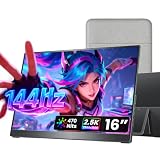 Best Overall cocopar Y16QLH: 144Hz 2.5K screen, 470 nits, metal chassis, VESA mount Check price on Amazon
 Highest Refresh Rate ARZOPA Z3FC: 180Hz 2.5K screen, 107% sRGB, 400 nits, kickstand Check price on Amazon
 Best 4K Display MNN 15.6 4K: 4K UHD 3840 x 2160, 100% Adobe RGB, smart cover stand Check price on Amazon
 Best Metal Stand ARZOPA Z1C: 16.1 in FHD IPS, 100% sRGB, metal stand, 1.71 lb Check price on Amazon
 Lowest Weight WCV WCV156P1: 1.37 lb, 15.6 in FHD IPS, Low Blue Light, two Type-C ports Check price on Amazon
Our desk picks
| # | Product | Office Score | Buy |
|---|---|---|---|
| 1 | cocopar Y16QLH | 9.6/10 | Buy on Amazon |
| 2 | ARZOPA Z3FC | 9.6/10 | Buy on Amazon |
| 3 | MNN 15.6 4K | 9.6/10 | Buy on Amazon |
| 4 | ARZOPA Z1C | 9.5/10 | Buy on Amazon |
| 5 | WCV WCV156P1 | 9.5/10 | Buy on Amazon |
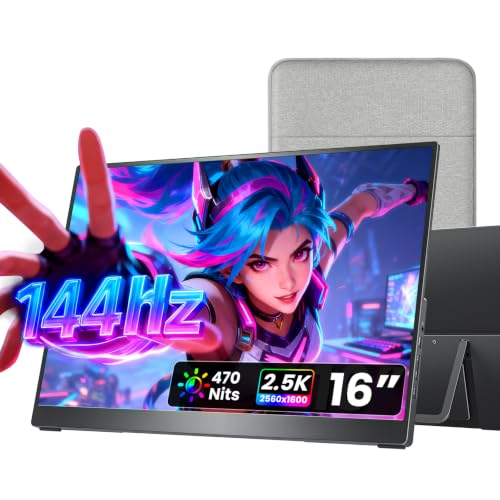
cocopar Y16QLH
A 16 inch 2.5K screen with a 144Hz refresh rate, 470 nits of brightness, a metal chassis, a VESA mount and a fabric sleeve.
Pros
- 144Hz refresh rate over USB-C, 120Hz over HDMI, for fast-paced games
- 470 nits brightness and 1200:1 contrast ratio, the highest brightness stated here
- Full metal chassis with a VESA mount and a kickstand that adjusts from 0 to 90 degrees
- Fabric sleeve included, and dual 1.5W speakers built in
Cons
- No Low Blue Light or flicker-free feature is stated
- Single-cable USB-C connection needs a port with Thunderbolt or DP Alt Mode
- 144Hz refresh rate is below the Z3FC at 180Hz
- 1.5 lb is heavier than the WCV at 1.37 lb
Detailed Review
cocopar lists the Y16QLH as a 16 inch portable monitor with a 2560 x 1600 resolution, a 16:10 aspect ratio, 110% sRGB, a 144Hz refresh rate over USB-C, 120Hz over HDMI, 470 nits of brightness and a 1200:1 contrast ratio, with HDR support. The full metal chassis carries a kickstand that adjusts from 0 to 90 degrees, dual VESA mounting holes and dual 1.5W speakers, and a fabric sleeve is included. It weighs 1.5 lb and measures 14.4 by 8.8 inches and 0.2 inches at its slimmest point. The maker states a 2 year warranty.
Who it's for: a gamer who wants a fast, bright screen with a metal build and a VESA mount for a desk setup. Who should skip it: anyone who needs a stated eye-care feature or a single-cable connection without a Thunderbolt or DP Alt Mode port.
Its Office Score of 9.6/10 comes from performance 34/35, build 22/25, value 21/25, safety 0/10 and warranty 3/5: 80 of 100 points, placed on our 9.2 to 9.8 scale.
Key Specifications
| Screen | 16 in, 2.5K |
|---|---|
| Resolution | 2560 x 1600 |
| Refresh rate | 144Hz |
| Brightness | 470 nits |
These specs mirror the retailer listing as of 18 November 2026; performance figures are stated by the brand.
Safety and Warranty
What this listing states. This product does not plug in or run on a battery, so safety is not part of its score. 2 year warranty. It does not say everything a buyer needs, such as who pays return shipping, so warranty scores 3 of 5. See How We Pick.
Follow the manual. Assemble and use the product as the maker describes, stay under any stated capacity, and read the manual before first use.
This is general buying information, not professional advice. Follow each product manual and local rules, and see our Safety Disclaimer.

ARZOPA Z3FC
A 16.1 inch 2.5K screen with a 180Hz refresh rate, 107% sRGB coverage, 400 nits of brightness and a built-in kickstand.
Pros
- 180Hz refresh rate, the highest stated here
- 2.5K resolution at 2560 x 1440 with 107% sRGB and 400 nits brightness
- Two USB-C ports plus a Mini HDMI port, with plug-and-play connection
- Built-in kickstand adjusts the tilt angle, and the screen switches between horizontal and vertical modes
Cons
- No VESA mount is stated
- No Low Blue Light or flicker-free feature is stated
- No speakers are stated
- No fabric sleeve or cover is stated
Detailed Review
ARZOPA lists the Z3FC as a 16.1 inch portable monitor with a 2560 x 1440 resolution, 107% sRGB, a 180Hz refresh rate, 400 nits of brightness, a 1000:1 contrast ratio and HDR support. Two USB-C ports and a Mini HDMI port connect a laptop, Mac, Xbox or PS5 with no setup, and the built-in kickstand adjusts the tilt angle. The screen switches between horizontal and vertical modes. The maker states a 2-Year Warranty.
Who it's for: a gamer who wants the highest refresh rate here for fast-paced games on a second screen. Who should skip it: anyone who wants built-in speakers, a VESA mount or a stated brightness above 400 nits.
Its Office Score of 9.6/10 comes from performance 33/35, build 22/25, value 21/25, safety 0/10 and warranty 3/5: 79 of 100 points, placed on our 9.2 to 9.8 scale.
Key Specifications
| Screen | 16.1 in, 2.5K |
|---|---|
| Resolution | 2560 x 1440 |
| Refresh rate | 180Hz |
| Brightness | 400 nits |
These specs mirror the retailer listing as of 18 November 2026; performance figures are stated by the brand.
Safety and Warranty
What this listing states. This product does not plug in or run on a battery, so safety is not part of its score. 2-Year Warranty. It does not say everything a buyer needs, such as who pays return shipping, so warranty scores 3 of 5. See How We Pick.
Follow the manual. Assemble and use the product as the maker describes, stay under any stated capacity, and read the manual before first use.
This is general buying information, not professional advice. Follow each product manual and local rules, and see our Safety Disclaimer.

MNN 15.6 4K
A 15.6 inch 4K UHD IPS screen with 100% Adobe RGB, HDR and a smart cover that folds into a stand.
Pros
- 4K UHD resolution at 3840 x 2160, the sharpest stated here
- 100% Adobe RGB coverage for color work
- Smart cover protects the screen and folds into a stand
- USB-C and HDMI ports, with speakers built in
Cons
- 60Hz refresh rate is the slowest stated here
- No brightness figure in nits is stated
- 1.8 lb is the heaviest stated weight here
- No VESA mount is stated
Detailed Review
MNN lists the 15.6 inch portable monitor with a 4K UHD IPS panel at 3840 x 2160, 100% Adobe RGB, HDR and a 60Hz refresh rate, with USB-C and HDMI ports and built-in speakers. The smart cover protects the screen and folds into a stand. It weighs 1.8 lb and measures 0.3 by 14.48 by 8.85 inches. The maker states a 2 Year warranty.
Who it's for: someone who wants the sharpest picture here for slower games and media on a PS5. Who should skip it: anyone who plays fast-paced games that benefit from a refresh rate above 60Hz.
Its Office Score of 9.6/10 comes from performance 32/35, build 21/25, value 21/25, safety 0/10 and warranty 3/5: 77 of 100 points, placed on our 9.2 to 9.8 scale.
Key Specifications
| Screen | 15.6 in, 4K IPS |
|---|---|
| Resolution | 3840 x 2160 |
| Refresh rate | 60Hz |
| Item weight | 1.8 lb |
These specs mirror the retailer listing as of 18 November 2026; performance figures are stated by the brand.
Safety and Warranty
What this listing states. This product does not plug in or run on a battery, so safety is not part of its score. 2 Year. It does not say everything a buyer needs, such as who pays return shipping, so warranty scores 3 of 5. See How We Pick.
Follow the manual. Assemble and use the product as the maker describes, stay under any stated capacity, and read the manual before first use.
This is general buying information, not professional advice. Follow each product manual and local rules, and see our Safety Disclaimer.

ARZOPA Z1C
A 16.1 inch FHD IPS screen with 100% sRGB, a metal stand and a slim 0.35 inch profile.
Pros
- 100% sRGB IPS panel with 178 degree viewing angles
- Metal stand switches between landscape and portrait modes
- 1.71 lb with a 0.35 inch slim profile for travel
- USB-C and Mini HDMI ports with plug-and-play connection
Cons
- 1080p resolution sits below the 2.5K and 4K screens here
- No refresh rate figure is stated
- No brightness figure in nits is stated
- No speakers are stated
Detailed Review
ARZOPA lists the Z1C as a 16.1 inch portable monitor with a 1080p IPS panel, 100% sRGB, 178 degree viewing angles and a 1000:1 contrast ratio. The metal stand switches between landscape and portrait modes, and USB-C and Mini HDMI ports connect laptops, gaming consoles and phones with plug-and-play. It weighs 1.71 lb with a 0.35 inch slim profile. The maker states a 2-Year Warranty.
Who it's for: someone who wants a large, slim second screen for work and play at a desk or on the move. Who should skip it: anyone who wants a resolution above 1080p or a stated refresh rate figure.
Its Office Score of 9.5/10 comes from performance 29/35, build 21/25, value 21/25, safety 0/10 and warranty 3/5: 74 of 100 points, placed on our 9.2 to 9.8 scale.
Key Specifications
| Screen | 16.1 in, FHD IPS |
|---|---|
| Resolution | 1080p |
| Item weight | 1.71 lb |
| Stand | Metal, landscape and portrait |
These specs mirror the retailer listing as of 18 November 2026; performance figures are stated by the brand.
Safety and Warranty
What this listing states. This product does not plug in or run on a battery, so safety is not part of its score. 2-Year Warranty. It does not say everything a buyer needs, such as who pays return shipping, so warranty scores 3 of 5. See How We Pick.
Follow the manual. Assemble and use the product as the maker describes, stay under any stated capacity, and read the manual before first use.
This is general buying information, not professional advice. Follow each product manual and local rules, and see our Safety Disclaimer.

WCV WCV156P1
A 15.6 inch FHD IPS screen with HDR, Low Blue Light, two Type-C ports and a Mini HDMI port, and the lowest-weight pick here at 1.37 lb.
Pros
- Lowest stated weight here at 1.37 lb, with a 0.04 inch thin profile
- Low Blue Light is stated, the only such feature here
- Two Type-C ports plus a Mini HDMI port, with plug-and-play connection
- Built-in speakers, with copy, extension and second screen modes
Cons
- 1080p resolution sits below the 2.5K and 4K screens here
- No refresh rate figure is stated
- No brightness figure in nits is stated
- No warranty term is stated
Detailed Review
WCV lists the WCV156P1 as a 15.6 inch portable monitor with a 1920 x 1080 IPS screen, HDR and Low Blue Light, with two Type-C ports and a Mini HDMI port. It weighs 1.37 lb and is 0.04 inch thin, with two built-in speakers and copy, extension and second screen modes. No warranty term is stated, so warranty scores zero.
Who it's for: a traveler who wants the lowest-weight screen here with a stated Low Blue Light feature. Who should skip it: anyone who wants a resolution above 1080p, a stated refresh rate or a warranty term in writing.
Its Office Score of 9.5/10 comes from performance 28/35, build 20/25, value 21/25, safety 5/10 and warranty 0/5: 74 of 100 points, placed on our 9.2 to 9.8 scale.
Key Specifications
| Screen | 15.6 in, FHD IPS |
|---|---|
| Resolution | 1920 x 1080 |
| Item weight | 1.37 lb |
| Ports | 2 Type-C, Mini HDMI |
These specs mirror the retailer listing as of 18 November 2026; performance figures are stated by the brand.
Safety and Warranty
What this listing states. Low Blue Light is stated, so safety scores 5 of 10. No warranty term, so warranty scores zero. See How We Pick.
Follow the manual. Assemble and use the product as the maker describes, stay under any stated capacity, and read the manual before first use.
This is general buying information, not professional advice. Follow each product manual and local rules, and see our Safety Disclaimer.
As an Amazon Associate I earn from qualifying purchases.
More picks to compare
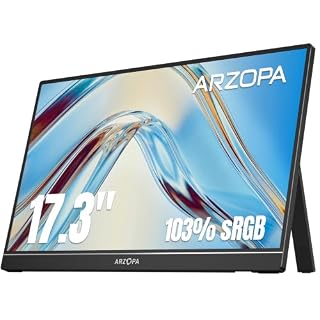 ARZOPA A1M 17.3Large 17.3 inch screen with a built-in kickstand and PS5 support.Check on Amazon
 MSI Pro MP165 E6Tripod mount and VESA support suit a permanent desk setup, with built-in speakers.Check on Amazon
 kksmart 16 2.5K144Hz 2.5K screen with a kickstand and VESA mount for laptop and PS5 use.Check on Amazon
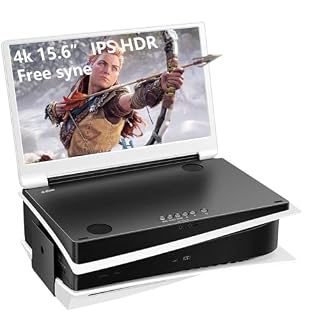 G-STORY GS156PU4K screen made for PS5 with dual HDMI ports and built-in speakers.Check on Amazon
 ARMORR GAMERSBOXRugged hard-shell case with a wheeled trolley for gaming on the move.Check on Amazon
Specs compared
| Monitor | Office Score | Screen | Resolution | Refresh rate | Ports | Warranty | Amazon |
|---|---|---|---|---|---|---|---|
| cocopar Y16QLH | 9.6/10 | 16 in 2.5K | 2560 x 1600 | 144Hz | 2 USB-C, HDMI | 2 year warranty | View on Amazon |
| ARZOPA Z3FC | 9.6/10 | 16.1 in 2.5K | 2560 x 1440 | 180Hz | 2 USB-C, Mini HDMI | 2-Year Warranty | View on Amazon |
| MNN 15.6 4K | 9.6/10 | 15.6 in 4K IPS | 3840 x 2160 | 60Hz | USB-C, HDMI | 2 Year | View on Amazon |
| ARZOPA Z1C | 9.5/10 | 16.1 in FHD IPS | 1080p | Not stated | USB-C, Mini HDMI | 2-Year Warranty | View on Amazon |
| WCV WCV156P1 | 9.5/10 | 15.6 in FHD IPS | 1920 x 1080 | Not stated | 2 Type-C, Mini HDMI | Not stated | View on Amazon |
We quote these figures from each listing as the brand rates them; captured 18 November 2026. All but one state a warranty term; one states Low Blue Light.
How to choose the best portable monitor for ps5
Match the resolution and refresh rate to the game
Resolution and refresh rate pull in opposite directions here. The MNN is the only 4K screen among the picks, at 3840 x 2160, and it runs at 60Hz. The Z3FC runs at 180Hz on a 2560 x 1440 screen, and the cocopar runs at 144Hz over USB-C and 120Hz over HDMI on a 2560 x 1600 screen. For fast-paced games, the higher refresh rate figures matter more than the extra pixels; for slower games and media, the 4K panel shows more detail. See the best portable monitor for gaming guide for more screens built around refresh rate.
| Monitor | Screen | Resolution | Refresh rate | Weight |
|---|---|---|---|---|
| cocopar Y16QLH | 16 in 2.5K | 2560 x 1600 | 144Hz | 1.5 lb |
| ARZOPA Z3FC | 16.1 in 2.5K | 2560 x 1440 | 180Hz | Not stated |
| MNN 15.6 4K | 15.6 in 4K IPS | 3840 x 2160 | 60Hz | 1.8 lb |
| ARZOPA Z1C | 16.1 in FHD IPS | 1080p | Not stated | 1.71 lb |
| WCV WCV156P1 | 15.6 in FHD IPS | 1920 x 1080 | Not stated | 1.37 lb |
Figures as stated in each listing. Refresh rate is stated for three of the picks; the other two list no refresh rate figure. Weight is stated for all but the Z3FC.
Check the ports before you pack
Every pick here lists an HDMI port and names PS5 compatibility, so the console connection is the HDMI cable. The USB-C ports are a second route for laptops, and the cocopar and WCV listings note that a single USB-C cable carries video only when the port supports Thunderbolt or DP Alt Mode. The Z3FC and cocopar each list two USB-C ports, which leaves room for a power cable beside the video cable. A USB hub for MacBook helps when the laptop has a single port to spare.
Weigh the screen before you carry it
The lowest-weight pick here is the WCV at 1.37 lb, followed by the cocopar at 1.5 lb, the Z1C at 1.71 lb and the MNN at 1.8 lb. Thickness is thinnest on the WCV at 0.04 inch and the cocopar at 0.2 inch at its slimmest point, against 0.3 inch on the MNN and 0.35 inch on the Z1C. The cocopar packs a fabric sleeve, and the MNN folds its smart cover into a stand, so both travel without an extra case. If the screen rides in a laptop bag every day, the WCV and cocopar are the easy carries; if it stays on a desk, the extra weight of the MNN buys a 4K panel. See portable monitor setup for stands, cables and mounts.
Mount it or prop it up
All but the MNN use a built-in stand: the Z3FC, Z1C and WCV use kickstands, and the cocopar uses a metal kickstand that adjusts from 0 to 90 degrees, while the MNN folds its smart cover into a stand. The cocopar is the only pick here with VESA mounting holes, so it is the one that fits a monitor arm. A monitor arm or stand holds the screen at eye level on a desk that has no room for a base.
Read the warranty line, not the headline
The cocopar, Z3FC, Z1C and MNN each state a two-year term. The WCV states no clear warranty term, so it scores zero on warranty even though it leads on weight and Low Blue Light. A term that covers two years is worth more than a vague promise, so weigh it beside the screen specs when two picks look close.
Setup Notes
- Measure the desk depth against the screen size: the picks run 15.6 to 16.1 inches across, and the MNN measures 14.48 inches wide.
- Plan the cable run: every pick takes HDMI, and the USB-C single-cable connection needs a port that supports DP Alt Mode or Thunderbolt, as the cocopar and WCV listings state.
- Check the stand: the Z3FC, Z1C, cocopar and WCV use built-in kickstands, and the MNN folds its smart cover into a stand, so no extra case is needed for the desk.
- Allow room for the speakers: the cocopar lists dual 1.5W speakers and the MNN and WCV list built-in speakers, so the screen carries its own sound.
FAQ
Which portable monitor here has the highest refresh rate?
The ARZOPA Z3FC at 180Hz. The cocopar runs 144Hz over USB-C and 120Hz over HDMI, and the MNN runs 60Hz.
Which of these monitors is 4K?
Only the MNN, at 3840 x 2160. The Z3FC and cocopar are 2.5K screens, and the Z1C and WCV are 1080p screens.
Do these monitors connect to a PS5 over USB-C or HDMI?
Every pick here lists an HDMI port and names PS5 compatibility, so the console connection is the HDMI cable. The USB-C ports carry video only from devices with a compatible port.
Which pick weighs the least?
The WCV at 1.37 lb. The cocopar lists 1.5 lb, the Z1C lists 1.71 lb, and the MNN lists 1.8 lb.
Which picks state a warranty term?
The cocopar, Z3FC, Z1C and MNN each state a two-year term. The WCV states no clear warranty term.
Can the cocopar mount on a monitor arm?
Yes, the maker lists dual VESA mounting holes, and the kickstand adjusts from 0 to 90 degrees.
Score breakdown
The Office Score weighs performance (resolution, refresh rate, brightness, color coverage and ports), build (chassis, stand, weight and thickness), value for the stated specs, safety and warranty. For a portable monitor, safety means a stated Low Blue Light mode or flicker-free backlight; only the WCV states Low Blue Light, so the rest score zero there. All but one listing states a warranty term, and each of those terms runs two years. How we pick explains the weights.
| Product | Office Score | Perf. /35 | Build /25 | Value /25 | Safety /10 | Warranty /5 |
|---|---|---|---|---|---|---|
| cocopar Y16QLH | 9.6 | 34 | 22 | 21 | 0 | 3 |
| ARZOPA Z3FC | 9.6 | 33 | 22 | 21 | 0 | 3 |
| MNN 15.6 4K | 9.6 | 32 | 21 | 21 | 0 | 3 |
| ARZOPA Z1C | 9.5 | 29 | 21 | 21 | 0 | 3 |
| WCV WCV156P1 | 9.5 | 28 | 20 | 21 | 5 | 0 |
Score placement follows the weighted total: the lowest totals read 9.2, the highest 9.8, and everything between keeps its order.
More for your workspace
See every monitor mounts, keyboards and mice guide. Also see our best portable monitor for gaming. Also see our best portable monitor for mac. Also see our best portable monitor for laptop. Also see our best gaming headset for ps5. Also see our best desk for pc gaming. Also see our portable monitor setup.
More picks: monitor arms and stands, keyboards, mice and mouse pads.