
The best wireless mouse for Dell is the one that pairs with your laptop without a fuss, glides across the desk mat without catching, and keeps working through a long morning of clicks. A mouse that drops its connection mid-sentence or dies before lunch is a mouse that ends up in a drawer. We compared wireless mice by connection, battery life, buttons and sensor, using only what each maker publishes.
OfficeKitHQ earns a commission when you buy through links on this page, at no extra cost to you. As an Amazon Associate I earn from qualifying purchases. Affiliate disclosure.
Quick picks
 Best Overall Dell MS5120W: Dual-mode 2.4GHz and Bluetooth 5.0, up to 36 months on one battery Check price on Amazon
 Best Plug and Play Dell WM126: RF mouse with USB receiver, 3 buttons, scroll wheel, 12-month battery Check price on Amazon
 15-Month Battery HP X3000 G3: Wireless mouse rated for a 15-month battery Check price on Amazon
 Six Buttons Acer Wireless Mouse: Wireless mouse with 6 buttons and 1600 DPI Check price on Amazon
Our desk picks
| # | Product | Office Score | Buy |
|---|---|---|---|
| 1 | Dell MS5120W | 9.6/10 | Buy on Amazon |
| 2 | Dell WM126 | 9.5/10 | Buy on Amazon |
| 3 | HP X3000 G3 Wireless Mouse | 9.5/10 | Buy on Amazon |
| 4 | Acer Wireless Mouse | 9.3/10 | Buy on Amazon |
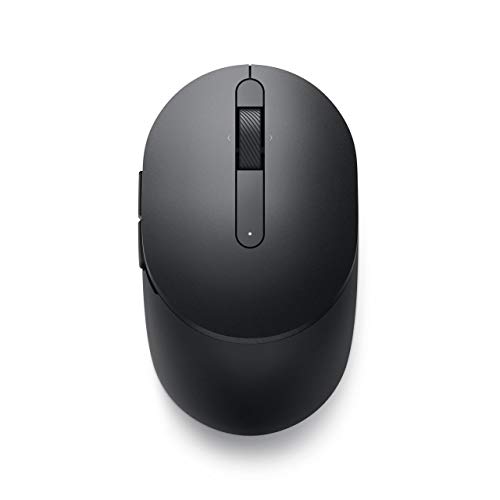
Dell MS5120W
The Dell MS5120W pairs 2.4GHz and Bluetooth 5.0 in a Titan Gray mouse rated for up to 36 months on a single battery.
Pros
- Dual-mode 2.4GHz and Bluetooth 5.0 for two ways to connect
- Up to 36 months on a single battery
- 3-year Advanced Exchange Service
- Shortcut buttons plus Dell Peripheral Manager software
Cons
- Swift Pair and Dell Pair need Windows 10 or 11
- Runs on a single battery, so a dead battery needs a spare
- Titan Gray is the only color
- Optical LED sensor suits everyday pointing rather than fine-detail work
Detailed Review
Dell lists the MS5120W as a dual-mode mouse with 2.4GHz and Bluetooth 5.0, Microsoft Swift Pair and Dell Pair, and an optical LED sensor. It works with Windows, Mac, Chrome, Linux and Android, runs up to 36 months on a single battery, and carries shortcut buttons with Dell Peripheral Manager software. The Titan Gray mouse measures 4.1 by 2.4 by 1.5 in and weighs 0.16 lb. Dell states 3 years Advanced Exchange Service, with a replacement shipped the next business day if the mouse is faulty. Swift Pair and Dell Pair work on Windows 10 and 11 only.
Who it's for: someone who wants one mouse for a Dell laptop and a desktop, with months of battery life and a 3-year service term. Who should skip it: anyone who needs Swift Pair on a system other than Windows 10 or 11.
Its Office Score of 9.6/10 comes from performance 30/35, build 21/25, value 21/25, safety 0/10 and warranty 4/5: 76 of 100 points, placed on our 9.2 to 9.8 scale.
Key Specifications
| Connection | 2.4GHz and Bluetooth 5.0 |
|---|---|
| Battery | Up to 36 months, single battery |
| Item weight | 0.16 lb |
| Warranty | 3 years Advanced Exchange Service |
These specs mirror the retailer listing as of 19 November 2026; performance figures are stated by the brand.
Safety and Warranty
What this listing states. No FCC or other safety listing is stated, so safety scores zero. 3 years Advanced Exchange Service. It does not say everything a buyer needs, such as who pays return shipping, so warranty scores 4 of 5. See How We Pick.
Fit the desk first. Check the stated size against your desk depth and keyboard tray, and charge or pair as the manual describes. No keyboard, mouse or wrist rest prevents or treats injury.
This is general buying information, not professional advice. Follow each product manual and local rules, and see our Safety Disclaimer.

Dell WM126
The Dell WM126 is a plug-and-play RF mouse with a USB receiver, a scroll wheel and a 12-month battery.
Pros
- Plug and play through a USB receiver with no pairing step
- One receiver connects up to six compatible devices
- Contoured design fits either hand
- 12-month battery life on one AA battery
Cons
- RF only, with no Bluetooth mode
- 1-year warranty is shorter than the 3-year term on the Dell MS5120W
- 0.3 lb item weight is heavier than the 0.16 lb Dell MS5120W
- 3 buttons and a scroll wheel cover the basics without extra controls
Detailed Review
Dell lists the WM126 as a black wireless optical mouse with an RF connection through a USB receiver, 3 buttons and a scroll wheel. The contoured design fits either hand, and one receiver connects up to six compatible devices. The USB receiver stores inside the mouse next to the battery compartment. The mouse runs on an AA battery rated for 12 months and works with Windows 10, Android and Chrome OS, and Dell states a 1 Year Warranty. The mouse weighs 0.3 lb with a 3.73 by 2.26 in footprint.
Who it's for: someone who wants a simple plug-and-play mouse for a Dell desk and likes a single receiver for compatible devices. Who should skip it: anyone who needs Bluetooth or a longer battery life than 12 months.
Its Office Score of 9.5/10 comes from performance 28/35, build 20/25, value 21/25, safety 0/10 and warranty 2/5: 71 of 100 points, placed on our 9.2 to 9.8 scale.
Key Specifications
| Connection | RF, USB receiver |
|---|---|
| Battery | 12 months, AA battery |
| Buttons | 3 buttons, scroll wheel |
| Item weight | 0.3 lb |
These specs mirror the retailer listing as of 19 November 2026; performance figures are stated by the brand.
Safety and Warranty
What this listing states. No FCC or other safety listing is stated, so safety scores zero. 1-Year Warranty. It does not say everything a buyer needs, such as who pays return shipping, so warranty scores 2 of 5. See How We Pick.
Fit the desk first. Check the stated size against your desk depth and keyboard tray, and charge or pair as the manual describes. No keyboard, mouse or wrist rest prevents or treats injury.
This is general buying information, not professional advice. Follow each product manual and local rules, and see our Safety Disclaimer.

HP X3000 G3 Wireless Mouse
An ambidextrous wireless mouse with a stated 15-month battery life and 1600 DPI.
Pros
- 15-month battery stated in the bullets
- Ambidextrous contoured shape with side grips
- 1600 DPI optical sensor
- USB nano receiver stores inside the mouse
Cons
- Only 3 buttons stated
- Stated warranty: "HP standard 1 year warranty"
- 1600 DPI maximum is mid-range here
Detailed Review
HP lists the X3000 G3 as a contoured wireless mouse with 3-button navigation, a 1600 DPI optical sensor and a 30 ft range. The bullets state up to 15 months of use on a 1 AA battery, while the spec table says 2 AA batteries are required; we trust the bullets on the term. The nano receiver stores inside the mouse. The listing states an "HP standard 1 year warranty".
Who it's for: travelers and either-hand users who want a compact mouse with a long battery term. Who should skip it: anyone who needs more buttons or higher DPI.
Its Office Score of 9.5/10 comes from performance 28/35, build 20/25, value 20/25, safety 0/10 and warranty 2/5: 70 of 100 points, placed on our 9.2 to 9.8 scale.
Key Specifications
| Battery | 15 months |
|---|---|
| DPI | 1600 max |
| Buttons | 3 |
| Hand | Ambidextrous |
Figures as published on the retailer listing, collected 17 October 2026. Performance figures are manufacturer rated.
Safety and Warranty
What this listing states. No FCC or other safety listing is stated, so safety scores zero. HP standard 1 year warranty. It does not say everything a buyer needs, such as who pays return shipping, so warranty scores 2 of 5. See How We Pick.
Fit the desk first. Check the stated size against your desk depth and keyboard tray, and charge or pair as the manual describes. No keyboard, mouse or wrist rest prevents or treats injury.
This is general buying information, not professional advice. Follow each product manual and local rules, and see our Safety Disclaimer.

Acer Wireless Mouse
A right-hand wireless mouse with 6 buttons and 1600 DPI; no battery life is stated.
Pros
- 6 buttons with forward and backward controls
- 1600 DPI with 3 adjustable levels
- 85 g stated weight
- 5.1 x 3.2 in, a mid size for medium to large hands
Cons
- No battery life is stated
- 2 AAA batteries are not included
- Side button does not work on Mac, per the listing
- Stated warranty: "1 Year Manufacturer"
Detailed Review
Acer lists a 2.4GHz wireless mouse with 3 adjustable DPI levels up to 1600, 6 buttons including forward and backward, and a 32 ft range, at 85 g and 5.1 x 3.2 in for medium to large hands. The listing notes the side button does not work on Mac and says to remove the film from the bottom before use. No battery life is stated; the listing states a "1 Year Manufacturer" warranty.
Who it's for: someone who wants 6 buttons and adjustable DPI at a mid size. Who should skip it: anyone who needs a stated battery life.
Its Office Score of 9.3/10 comes from performance 21/35, build 20/25, value 19/25, safety 0/10 and warranty 2/5: 62 of 100 points, placed on our 9.2 to 9.8 scale.
Key Specifications
| Battery | Not stated |
|---|---|
| DPI | 1600 max |
| Buttons | 6 |
| Hand | Right |
Figures as published on the retailer listing, collected 17 October 2026. Performance figures are manufacturer rated.
Safety and Warranty
What this listing states. No FCC or other safety listing is stated, so safety scores zero. 1 Year Manufacturer. It does not say everything a buyer needs, such as who pays return shipping, so warranty scores 2 of 5. See How We Pick.
Fit the desk first. Check the stated size against your desk depth and keyboard tray, and charge or pair as the manual describes. No keyboard, mouse or wrist rest prevents or treats injury.
This is general buying information, not professional advice. Follow each product manual and local rules, and see our Safety Disclaimer.
As an Amazon Associate I earn from qualifying purchases.
More picks to compare
 Dell MS5320WAnother Dell dual-mode mouse with up to 36 months batteryCheck on Amazon
 TECKNET Wireless MouseA 2.4G mouse with 2600 DPI, 5-level adjustment and 24 months battery lifeCheck on Amazon
 Afaartcci Wireless MouseA quiet rechargeable mouse with Bluetooth 5.2 and 7 LED lightsCheck on Amazon
Specs compared
| Mouse | Office Score | Connection | Battery | Buttons | DPI | Warranty | Amazon |
|---|---|---|---|---|---|---|---|
| Dell MS5120W | 9.6/10 | 2.4GHz, Bluetooth 5.0 | Up to 36 months | Shortcut buttons | Not stated | 3 years | View on Amazon |
| Dell WM126 | 9.5/10 | RF, USB receiver | 12 months | 3 buttons | Not stated | 1 year | View on Amazon |
| HP X3000 G3 | 9.5/10 | Wireless | 15 months | Not stated | Not stated | Not stated | |
| Acer Wireless Mouse | 9.3/10 | Wireless | Not stated | 6 buttons | 1600 DPI | Not stated | View on Amazon |
All numbers are the manufacturer’s stated specs, not measured in an office, pulled on 19 November 2026. Two mice state a warranty term; none state a certification.
How to choose the best wireless mouse for dell
Start with connection and your Dell
Connection is the first choice to make. The Dell MS5120W runs on 2.4GHz and Bluetooth 5.0, so it pairs with a laptop over Bluetooth and still has a 2.4GHz mode for a desktop. The Dell WM126 runs on RF through a USB receiver, which suits a desk where the receiver stays plugged in. Swift Pair and Dell Pair on the Dell MS5120W work on Windows 10 and 11 only, so check your system before counting on Swift Pair. The Dell MS5120W also works with Windows, Mac, Chrome, Linux and Android, so the same mouse can move between a Dell laptop and a Mac. If your Dell is a laptop, our best wireless mouse for Dell laptop guide compares laptop-first picks.
Match battery life to your work week
Battery life is the number that decides how often the mouse asks for attention. The Dell MS5120W runs up to 36 months on a single battery, the HP X3000 G3 states 15 months, and the Dell WM126 states 12 months on one AA battery. The Acer states no battery life, so buy it for the buttons and the DPI figure, not for a battery promise.
| Mouse | Battery life | Buttons | Item weight |
|---|---|---|---|
| Dell MS5120W | Up to 36 months | Shortcut buttons | 0.16 lb |
| Dell WM126 | 12 months | 3 buttons | 0.3 lb |
| HP X3000 G3 | 15 months | Not stated | Not stated |
| Acer Wireless Mouse | Not stated | 6 buttons | Not stated |
Figures as stated by each maker. Battery life is the maker’s figure for a single battery; a longer stated life means fewer battery swaps across the year.
Buttons, sensor and the shape of the mouse
Buttons decide how much you can do without reaching for the keyboard. The Acer lists 6 buttons and 1600 DPI, the Dell WM126 lists 3 buttons with a scroll wheel, and the Dell MS5120W lists shortcut buttons with an optical LED sensor. Shape matters as much as buttons: the Dell WM126 has a contoured design for either hand, and the Dell MS5120W measures 4.1 by 2.4 by 1.5 in in Titan Gray. The Dell WM126 includes a scroll wheel for moving through long pages, and its 3 clickable buttons cover left, right and middle clicks. A desk mat sized to your desk gives the sensor a steady surface to track on.
Read the warranty line, not the headline
Only two mice state a warranty term. The Dell MS5120W states 3 years Advanced Exchange Service and the Dell WM126 states a 1 Year Warranty, while the HP X3000 G3 and the Acer state no warranty term. A docking station for Dell gives the desk one hub for the receiver, the keyboard and the monitor, so the mouse stays with one setup. A term that covers the mouse for years is worth more than a vague promise, so read the warranty line before you buy.
Size, weight and the desk you have
Size and weight decide how the mouse feels after an hour. The Dell MS5120W measures 4.1 by 2.4 by 1.5 in and weighs 0.16 lb, while the Dell WM126 measures 3.73 by 2.26 in and weighs 0.3 lb. The HP X3000 G3 and the Acer state no size or weight, so judge them on the battery and the buttons instead. A lighter mouse moves with less effort across the desk, and a heavier one stays put when you lift your hand.
Setup Notes
- Measure your desk space first: the Dell MS5120W is 4.1 by 2.4 by 1.5 in, and the mouse needs room to travel beside the keyboard.
- Plan power before you buy: the Dell WM126 runs on one AA battery rated for 12 months, and the Dell MS5120W runs up to 36 months on a single battery.
- Plug the USB receiver into a port you can reach: the Dell WM126 connects through its receiver, while the Dell MS5120W can also pair over Bluetooth 5.0.
- No assembly step is needed for these mice: plug in the receiver or pair over Bluetooth and start working.
FAQ
Which wireless mouse lasts longest on a battery?
The Dell MS5120W, rated for up to 36 months on a single battery. The HP X3000 G3 states 15 months, the Dell WM126 states 12 months, and the Acer states no battery life.
Does the Dell MS5120W work with Bluetooth?
Yes. It pairs over Bluetooth 5.0 and also connects over 2.4GHz, and it works with Windows, Mac, Chrome, Linux and Android. Swift Pair and Dell Pair work on Windows 10 and 11 only.
Which of these mice works with either hand?
The Dell WM126. Its contoured design fits either hand, and it connects through a USB receiver with 3 buttons and a scroll wheel.
What warranty does the Dell MS5120W carry?
3 years Advanced Exchange Service, with a replacement shipped the next business day if the mouse is faulty. The Dell WM126 carries a 1 Year Warranty, and the HP X3000 G3 and the Acer state no warranty term.
Can one receiver run more than one device?
Yes. The Dell WM126 connects up to six compatible devices with a single receiver, and the receiver stores inside the mouse next to the battery compartment.
What DPI does the Acer mouse offer?
1600 DPI. It has 6 buttons, and it is the only pick here with a stated DPI figure.
Score breakdown
The Office Score weighs performance (connection, battery life, buttons and sensor), build (shape, size and item weight), value for the stated specs, safety and warranty. For a mouse, safety means a stated certification; none of the mice state one. Two mice state a warranty term: the Dell MS5120W at 3 years and the Dell WM126 at 1 year. How we pick explains the weights.
| Product | Office Score | Perf. /35 | Build /25 | Value /25 | Safety /10 | Warranty /5 |
|---|---|---|---|---|---|---|
| Dell MS5120W | 9.6 | 30 | 21 | 21 | 0 | 4 |
| Dell WM126 | 9.5 | 28 | 20 | 21 | 0 | 2 |
We fit point totals onto a 9.2 low and 9.8 high in a straight line. One item can outscore another only by earning more points.
More for your workspace
See every mice and mouse pads guide and all monitor mounts, keyboards and mice guides. Also see our best wireless mouse for Dell XPS 13. Also see our best wireless mouse for HP laptop. Also see our best wireless mouse for Lenovo laptop. Also see our best wireless mouse for MacBook Neo. Also see our best wireless mouse for iMac.
More related guides (11)
- best wireless mouse for laptop gaming
- best gaming mouse for shooters
- best gaming mouse with extra buttons
- best gaming mouse for fingertip grip
- best gaming mouse for drag clicking
- best mouse pad for R6
- best lap desk for keyboard and mouse
- best ergonomic keyboard for work
- best keyboard with light up keys
- best mechanical keyboard for Linux
- best docking station for Dell XPS 13
More picks: keyboards, monitor arms and stands, webcams and ring lights.