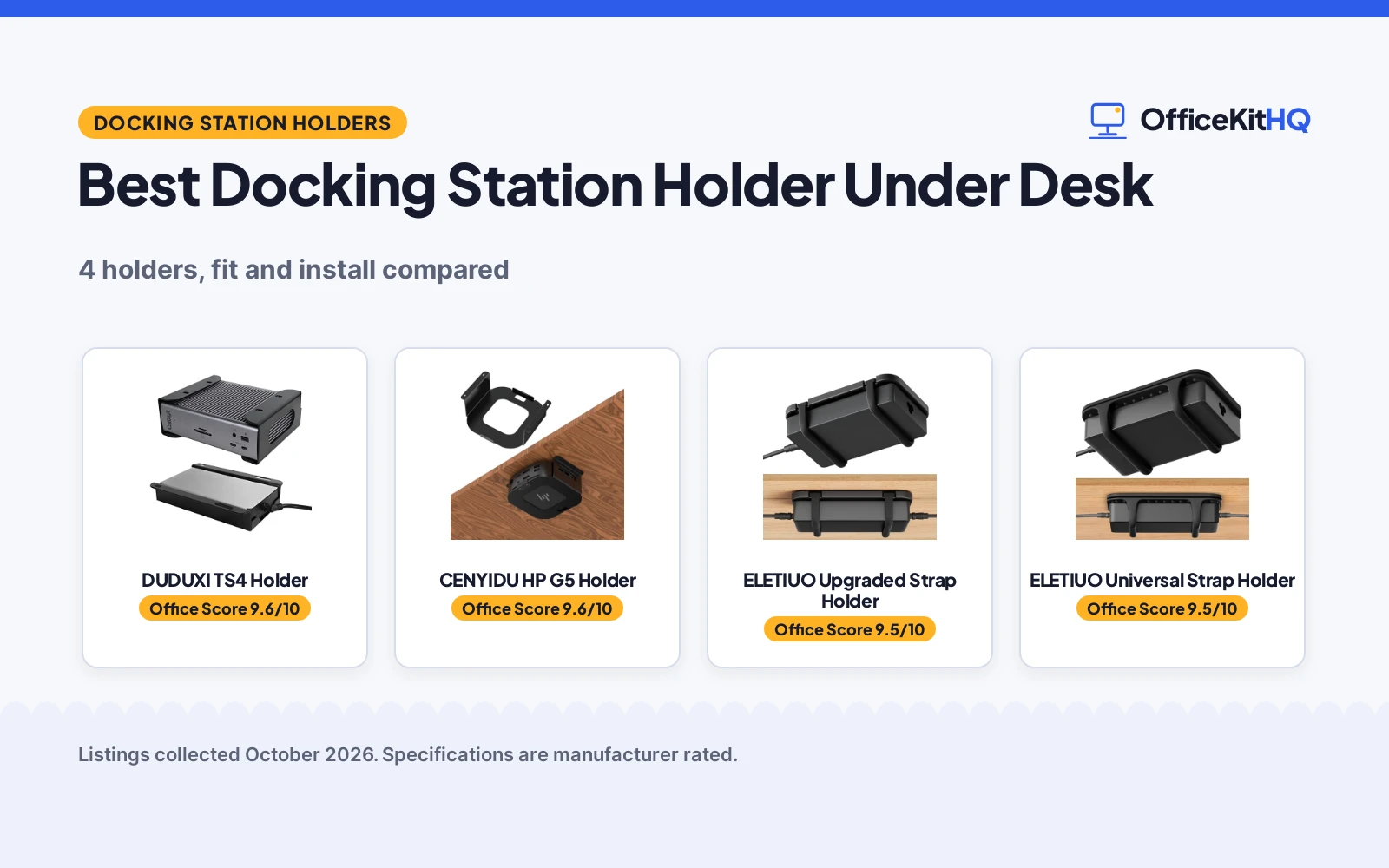
A best docking station holder under desk moves the dock and the power brick off the desktop and mounts them to the underside, where the ports stay within reach and the desktop stays clear. Without a holder, the dock slides away each time a cable gets plugged in or pulled out, and the brick beside it gathers cable slack across the work surface. This roundup compares custom-fit iron racks for named docks with universal silicone strap mounts for power bricks and small device boxes, using only what each listing states about fit, material, install method and airflow.
OfficeKitHQ earns a commission when you buy through links on this page, at no extra cost to you. As an Amazon Associate I earn from qualifying purchases. Affiliate disclosure.
Quick picks
 Best Overall DUDUXI TS4 Holder: Custom fit for TS4 and TS3 Plus, iron rack, 12 screws or tape Check price on Amazon
 Best Custom Fit CENYIDU HP G5 Holder: Snug fit for HP USB-C Dock G5, carbon steel, blocker plate Check price on Amazon
 Best Universal Fit ELETIUO Upgraded Strap Holder: Adjustable silicone straps hold most bricks, docks and small boxes Check price on Amazon
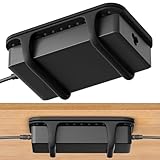 Best Adhesive Mount ELETIUO Universal Strap Holder: Adhesive strips only, no drilling, for most power bricks Check price on Amazon
Our desk picks
| # | Product | Office Score | Buy |
|---|---|---|---|
| 1 | DUDUXI TS4 Holder | 9.6/10 | Buy on Amazon |
| 2 | CENYIDU HP G5 Holder | 9.6/10 | Buy on Amazon |
| 3 | ELETIUO Upgraded Strap Holder | 9.5/10 | Buy on Amazon |
| 4 | ELETIUO Universal Strap Holder | 9.5/10 | Buy on Amazon |

DUDUXI TS4 Holder
An iron under desk rack made for the CalDigit TS4 and TS3 Plus, with an open design for airflow and a choice of 12 screws or double-sided tape.
Pros
- Made for the CalDigit TS4 and TS3 Plus, with room for the dock and power cable
- Open design keeps air moving around the dock and leaves ports within reach
- Thickened iron with a powder-coat finish, plus 4 black silicone blocks against scratches
- Installs with 12 screws or double-sided tape, so the tape route needs no drilling
Cons
- Fits only the TS4 and TS3 Plus, so it suits no other dock
- No warranty term is stated
- No dimensions are stated, so fit under a shallow desk apron cannot be checked
- Title says no drill, yet screws are the listed install method beside tape
Detailed Review
DUDUXI lists this holder as an under desk or wall mount for the CalDigit TS4 dock, made from thickened iron with a powder-coat finish and 4 black silicone blocks that keep the dock from scratching as it slides in and out. The dock sits in a horizontal position with the power cable beside it, and the open design leaves ports within reach while air moves freely around the unit. The listing states 12 screws are included, with double-sided mounting tape as the other install method, and notes that the mounted dock stays stable and in place even with small children or pets at home. The title says no drill, yet screws sit beside tape as an install method, so the no-drill claim holds only for the tape route.
Who it's for: a CalDigit TS4 or TS3 Plus owner who wants the dock off the desktop and held in an iron rack. Who should skip it: buyers with any other dock, or buyers who want stated dimensions before mounting.
Its Office Score of 9.6/10 comes from performance 30/35, build 21/25, value 21/25, safety 7/10 and warranty 0/5: 79 of 100 points, placed on our 9.2 to 9.8 scale.
Key Specifications
| Fit | CalDigit TS4 / TS3 Plus |
|---|---|
| Material | Iron, powder-coat finish |
| Install | 12 screws or double-sided tape |
| Silicone blocks | 4 black silicone blocks |
Figures as published on the retailer listing, collected 12 November 2026. Performance figures are manufacturer rated.
Safety and Warranty
What this listing states. Iron rack holds the dock and power cable in place under the desk, with 4 silicone blocks to stop scratches and sliding, so safety scores 7 of 10. No warranty term, so warranty scores zero. See How We Pick.
Power and heat. Use the supplied adapter, treat power delivery wattage and display support as the maker's claims for your laptop model, and give the dock room to vent.
This is general buying information, not professional advice. Follow each product manual and local rules, and see our Safety Disclaimer.

CENYIDU HP G5 Holder
A carbon steel under desk rack made for the HP USB-C Dock G5, with pre-drilled holes, included screws and a removable blocker plate.
Pros
- Precisely engineered for the HP USB-C Dock G5, with a stable and snug fit
- Carbon steel with a powder-coated finish, built to hold up under daily use
- Removable blocker plate holds the dock in place yet allows quick removal
- Open design promotes airflow around the dock and power supply
Cons
- Fits only the HP USB-C Dock G5, so it suits no other dock
- Adhesive strip installation is optional, and the strip is not included
- No warranty term is stated
- Title says all hardware is included, yet the adhesive strip is listed as not included
Detailed Review
CENYIDU lists this mount as a rack precisely engineered for the HP USB-C Dock G5, made from carbon steel with a powder-coated finish and sized at 5.79 by 4.9 by 1.85 in, with an item weight of 0.44 lb. Pre-drilled holes and included screws cover the screw install, and a removable blocker plate holds the dock in place while still allowing quick removal for moves between workstations or meetings. The listing also describes an adhesive strip install as a tool-free alternative, then states that the strip is not included, which sits against the title claim that all hardware is included. Mounting under the desk or on a shelf keeps the dock out of the way and helps keep it from tipping or damage caused by children or pets at home.
Who it's for: an HP USB-C Dock G5 owner who moves the dock between workstations and wants a snug steel rack. Who should skip it: buyers with any other dock, or buyers who want a tape or adhesive install with the strip in the box.
Its Office Score of 9.6/10 comes from performance 29/35, build 21/25, value 20/25, safety 7/10 and warranty 0/5: 77 of 100 points, placed on our 9.2 to 9.8 scale.
Key Specifications
| Fit | HP USB-C Dock G5 |
|---|---|
| Material | Carbon steel, powder-coated |
| Dimensions | 5.79 by 4.9 by 1.85 in |
| Item weight | 0.44 lb |
Figures as published on the retailer listing, collected 12 November 2026. Performance figures are manufacturer rated.
Safety and Warranty
What this listing states. Carbon steel mount with a removable blocker plate holds the HP USB-C Dock G5 in place and helps keep it from tipping, so safety scores 7 of 10. No warranty term, so warranty scores zero. See How We Pick.
Power and heat. Use the supplied adapter, treat power delivery wattage and display support as the maker's claims for your laptop model, and give the dock room to vent.
This is general buying information, not professional advice. Follow each product manual and local rules, and see our Safety Disclaimer.

ELETIUO Upgraded Strap Holder
A universal strap holder with adjustable silicone straps, a grooved plastic base and a choice of screws or adhesive strips.
Pros
- Adjustable silicone straps stretch to hold most power bricks, docks and small device boxes
- Grooved base with raised silicone dots lifts the brick for airflow
- Soft silicone straps and protective nubs guard the brick against scratches and bumps
- Screws and adhesive strips are both included, so the install method is a free choice
Cons
- No dimensions or item weight are stated, so fit for a large brick cannot be checked
- Plastic base, where the iron and steel racks state metal
- No warranty term is stated
- Listing promises no extra tools, yet screw mounting is offered beside adhesive strips
Detailed Review
ELETIUO lists this upgraded holder as a universal fit for most laptop power bricks, chargers, multi-outlet power strips, compact adapters, docking stations and small device boxes, held by stretchable, adjustable silicone straps. The plastic base carries precision grooves and raised silicone dots that lift the brick and let air move beneath it, while soft silicone straps and protective nubs guard against scratches, bumps and vibration. Screws and residue-free adhesive strips come in the box, with screw mounting for wood, plastic or metal surfaces and adhesive strips for a drill-free hold that leaves no residue. The listing says no extra tools are needed, which sits oddly beside a screw mounting option, and it states no dimensions or item weight, so the largest brick it holds cannot be checked from the listing.
Who it's for: a renter with a power brick or a small dock of uncertain size who wants straps that stretch to fit. Who should skip it: buyers who want stated dimensions, or buyers who want a rigid metal rack for a named dock.
Its Office Score of 9.5/10 comes from performance 28/35, build 20/25, value 20/25, safety 5/10 and warranty 0/5: 73 of 100 points, placed on our 9.2 to 9.8 scale.
Key Specifications
| Fit | Most power bricks, docks, small boxes |
|---|---|
| Material | Plastic base, silicone straps |
| Install | Screws or adhesive strips |
| Airflow | Grooves and raised silicone dots |
Figures as published on the retailer listing, collected 12 November 2026. Performance figures are manufacturer rated.
Safety and Warranty
What this listing states. Silicone straps and protective nubs hold the brick in place and guard against slips, bumps and vibration, so safety scores 5 of 10. No warranty term, so warranty scores zero. See How We Pick.
Power and heat. Use the supplied adapter, treat power delivery wattage and display support as the maker's claims for your laptop model, and give the dock room to vent.
This is general buying information, not professional advice. Follow each product manual and local rules, and see our Safety Disclaimer.

ELETIUO Universal Strap Holder
A low-profile silicone strap mount for most laptop power bricks, installed with adhesive strips and no drilling, screws or tools.
Pros
- Flexible silicone straps stretch to grip adapters of various sizes
- Adhesive strips give a drill-free install with no screws or tools
- Soft silicone cushions the adapter against scratches, drops and damage
- Low-profile design mounts under desks, on walls or behind furniture
Cons
- Adhesive only, with no screw option for a heavier brick
- No warranty term is stated
- Made to hold power bricks only, so a full docking station may not suit it
- No stated limit on the brick size the straps can hold
Detailed Review
ELETIUO lists this universal holder as a silicone strap mount for most laptop power bricks, with flexible straps that stretch to grip adapters of various sizes and keep cables neatly in place. Install uses strong adhesive strips only, with no drilling, screws or tools, and the mount fits under desks, behind furniture or on walls. Soft silicone cushions the adapter against scratches, drops and damage from bumps or vibration, and the low-profile design hides the brick and cords for a clean look. The spec table gives dimensions of 5.35 by 3.54 by 0.63 in, while the listing states no maximum brick size, so a large adapter may still need a check against those dimensions.
Who it's for: a buyer who wants a drill-free mount for a laptop power brick. Who should skip it: buyers who want a screw mount, or buyers who need a holder made for a full docking station.
Its Office Score of 9.5/10 comes from performance 27/35, build 19/25, value 20/25, safety 5/10 and warranty 0/5: 71 of 100 points, placed on our 9.2 to 9.8 scale.
Key Specifications
| Fit | Most laptop power bricks |
|---|---|
| Dimensions | 5.35 by 3.54 by 0.63 in |
| Install | Adhesive strips, no drilling |
| Material | Silicone straps |
Figures as published on the retailer listing, collected 12 November 2026. Performance figures are manufacturer rated.
Safety and Warranty
What this listing states. Flexible silicone straps grip the brick and keep it from slipping or falling, so safety scores 5 of 10. No warranty term, so warranty scores zero. See How We Pick.
Power and heat. Use the supplied adapter, treat power delivery wattage and display support as the maker's claims for your laptop model, and give the dock room to vent.
This is general buying information, not professional advice. Follow each product manual and local rules, and see our Safety Disclaimer.
As an Amazon Associate I earn from qualifying purchases.
Specs compared
| Holder | Office Score | Fit | Material | Install | Dimensions | Amazon |
|---|---|---|---|---|---|---|
| DUDUXI TS4 Holder | 9.6/10 | CalDigit TS4 / TS3 Plus | Iron, powder-coat | 12 screws or tape | Not stated | View on Amazon |
| CENYIDU HP G5 Holder | 9.6/10 | HP USB-C Dock G5 | Carbon steel, powder-coated | Screws, optional adhesive | 5.79 by 4.9 by 1.85 in | View on Amazon |
| ELETIUO Upgraded Strap Holder | 9.5/10 | Most bricks, docks, small boxes | Plastic base, silicone straps | Screws or adhesive strips | Not stated | View on Amazon |
| ELETIUO Universal Strap Holder | 9.5/10 | Most laptop power bricks | Silicone straps | Adhesive strips | 5.35 by 3.54 by 0.63 in | View on Amazon |
Specs reflect manufacturer claims on each product listing (as of 12 November 2026). No listing here states a warranty term.
How to choose the best docking station holder under desk
Match the holder to the dock
A custom-fit rack suits a buyer who owns the dock it was made for. The DUDUXI fits the CalDigit TS4 and TS3 Plus, and the CENYIDU fits the HP USB-C Dock G5, with each listing stating the fit outright. A universal strap mount suits a buyer whose brick or small dock has no custom rack, since the ELETIUO straps stretch to hold most power bricks, chargers and small device boxes. Check the fit line before anything else: a rack made for a named dock leaves no room for a different shape, and a strap mount leaves the exact fit to the stretch of the straps.
Iron and steel racks or silicone straps
The DUDUXI rack uses thickened iron with a powder-coat finish, and the CENYIDU rack uses carbon steel with a powder-coated finish, so each rigid rack holds its shape under the dock. The ELETIUO mounts use a plastic base with silicone straps on the upgraded holder and silicone straps alone on the universal holder, which grip by stretch rather than by a fixed shape. A rigid rack suits a dock that stays put, while straps suit a brick that moves between desks or comes down often. For the dock itself, a docking station guide covers the ports side of the desk, and a USB hub for video guide covers a lighter setup.
Install method: screws, tape or adhesive
Install splits the group cleanly. The DUDUXI gives a choice of 12 screws or double-sided tape, the CENYIDU ships with screws and pre-drilled holes while the adhesive strip stays optional and not included, the upgraded ELETIUO ships with screws and adhesive strips, and the universal ELETIUO uses adhesive strips alone with no drilling, screws or tools. A screw mount suits a desk that stays put, while adhesive suits a rented desk or a setup that may move. The table below lines up the install method and the hardware in the box for each holder.
| Holder | Install | Hardware in the box |
|---|---|---|
| DUDUXI TS4 Holder | 12 screws or double-sided tape | 12 screws |
| CENYIDU HP G5 Holder | Screws, optional adhesive strip | Screws; adhesive strip not included |
| ELETIUO Upgraded Strap Holder | Screws or adhesive strips | Screws and adhesive strips |
| ELETIUO Universal Strap Holder | Adhesive strips | Adhesive strips |
Figures as stated in each listing. The CENYIDU title says all hardware is included, yet the adhesive strip is listed as not included, so count the strip as an extra purchase for a tape install.
Airflow and access to ports
An open rack leaves the dock exposed to air and keeps every port within reach. The DUDUXI open design lets air flow freely around the dock, and the CENYIDU mount is designed with airflow in mind to help the dock stay cool. The ELETIUO upgraded holder lifts the brick on grooves and raised silicone dots so air moves beneath it, while the universal holder leaves the brick open to the air on straps alone. Whichever shape fits, leave the ports facing out and the power cable free to push into place, since a holder that blocks a port costs more desk time than it saves. For longer cable runs, a USB C to HDMI splitter guide covers the video side of the desk.
Setup Notes
- Measure the space under the desk before ordering: the CENYIDU states dimensions of 5.79 by 4.9 by 1.85 in, and the universal ELETIUO states 5.35 by 3.54 by 0.63 in, while the DUDUXI and the upgraded ELETIUO state no dimensions.
- Plan the power cable route with the dock in its horizontal position, so the cable reaches the outlet without pulling at the holder.
- Choose the install method with the desk surface in mind: screws suit wood, plastic or metal surfaces, while adhesive strips suit a surface that must stay free of holes.
- Leave the ports facing out and the dock free to slide in and out, so cables can be plugged in and pulled out without removing the mount.
FAQ
Will the DUDUXI holder fit a dock other than the TS4 or TS3 Plus?
No. The listing states the fit for the CalDigit TS4 and TS3 Plus only, so a buyer with a different dock needs a universal strap mount or a rack made for that dock.
Does the CENYIDU holder need screws?
Screws are the stated install method, with pre-drilled holes and screws included in the box. An adhesive strip install is listed as an option, but the strip is not included.
Can a silicone strap holder carry a docking station?
The upgraded ELETIUO listing states that its straps hold docking stations and small device boxes as well as power bricks. The universal ELETIUO listing states a fit for laptop power bricks only, so it suits a brick rather than a full dock.
Which holder suits a desk that must stay free of holes?
The DUDUXI offers double-sided tape beside screws, and the universal ELETIUO uses adhesive strips alone with no drilling. The upgraded ELETIUO also ships with adhesive strips, while the CENYIDU adhesive strip is optional and not included.
Do any of these holders state a warranty term?
No. None of the 4 listings states a warranty term, so warranty scores zero across the group.
Score breakdown
The Office Score weighs performance, build, value, safety and warranty. For a holder, performance means fit for the stated dock or brick and ease of reaching ports, build means the rack or strap material and finish, and safety means the mount holds the dock and power cable in place and keeps the dock from falling or tipping. No listing here states a warranty term, so warranty scores zero across the group, and the DUDUXI leads on a custom fit for a named dock with an iron rack. How we pick explains the weights.
| Product | Office Score | Perf. /35 | Build /25 | Value /25 | Safety /10 | Warranty /5 |
|---|---|---|---|---|---|---|
| DUDUXI TS4 Holder | 9.6 | 30 | 21 | 21 | 7 | 0 |
| CENYIDU HP G5 Holder | 9.6 | 29 | 21 | 20 | 7 | 0 |
| ELETIUO Upgraded Strap Holder | 9.5 | 28 | 20 | 20 | 5 | 0 |
| ELETIUO Universal Strap Holder | 9.5 | 27 | 19 | 20 | 5 | 0 |
The scale opens at 9.2 and closes at 9.8; between those marks, weighted points translate linearly into the score you see.
More for your workspace
See every docking stations and USB hubs guide.
More picks: docking station with 2 display ports, docking station with 3 HDMI ports, USB C hub for iPad.